
最大化及等比例测试演化Demo-Grid方法
Demo1-简单测试:
 <!doctype html>

 <html>

 <head>

 <meta charset="utf-8">

 <title>无标题文档</title>

 <style type="text/css">

 html,body{

     width:100%;

     height:100%;

     padding:0;

     margin:0;

 }

 .container {

     width:100%;

     height:100%;

     display: grid;

     grid-template-columns: 25%  25% 25% 25%;

     grid-template-rows: 25%  25% 25%;

     grid-template-areas:

        ". . . ."

        ". c c ."

        ". . . .";

 }

 .cs{

     grid-area: c;

     background-color: pink;

 }

 </style>

 </head>

 <body>

 <div class="container">

   <div class="cs">cs</div>

   </div>

 </body>

 </html>
Demo2-页面布局练习:
<!doctype html>

<html>

<head>

<meta charset="utf-8">

<title>无标题文档</title>

<style type="text/css">

html,body{

    width:100%;

    height:100%;

    padding:0;

    margin:0;

}

.container {

    width:100%;

    height:100%;

    display: grid;

    /*grid-gap: 5px;*/

    grid-template-columns: repeat(12, 1fr);

    grid-template-rows: 1fr 8fr 1fr;

    grid-template-areas: "h h h h h h h h h h h h"  "m m c c c c c c c c c c"  "f f f f f f f f f f f f";

}

.header {

    grid-area: h;

    background-color: #0F0;

}

.menu {

    grid-area: m;

    background-color: blue;

}

.content{

    grid-area: c;

    background-color: pink;

}

.footer {

    grid-area: f;

    background-color: #666;

}

</style>

</head>

<body>

<div class="container">

  <div class="header">HEADER</div>

  <div class="leftmenu">MENU</div>

  <div class="content">CONTENT</div>

  <div class="footer">FOOTER</div>

</div>

</body>

</html>
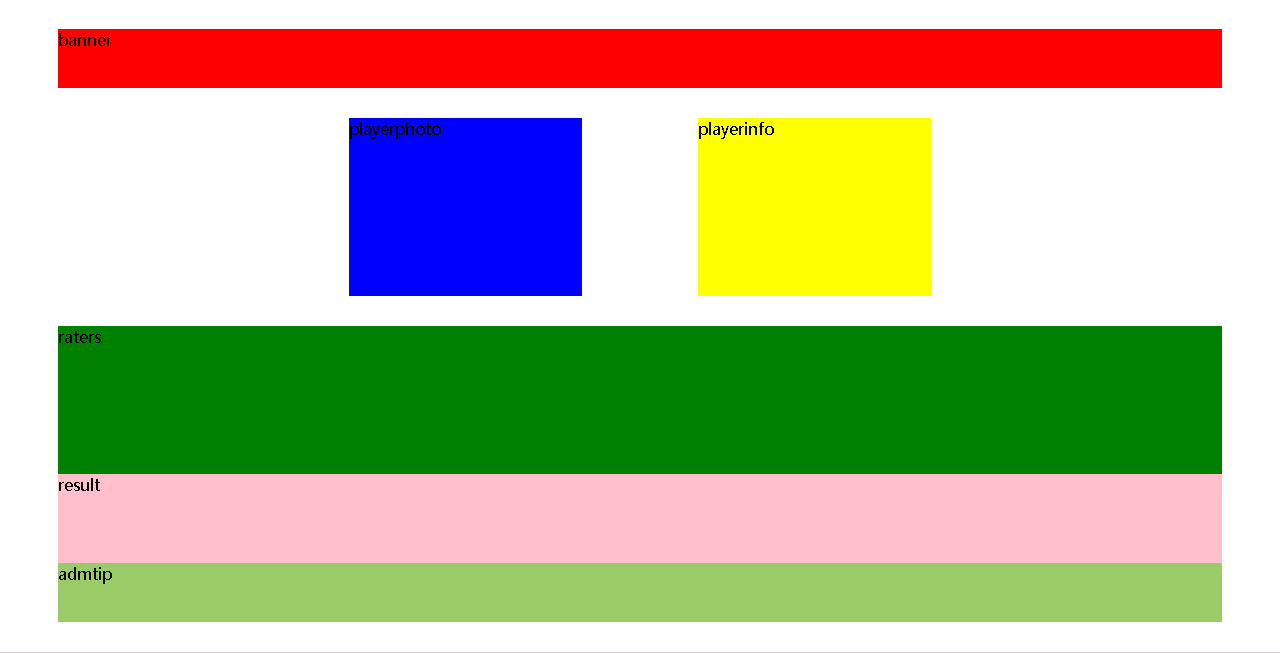
Demo3-选手分值信息展示布局:
<!doctype html>

<html>

<head>

<meta charset="utf-8">

<title>无标题文档</title>

<style type="text/css">

html, body {

    width: 100%;

    height: 100%;

    padding: 0;

    margin: 0;

}

.container {

    width: 100%;

    height: 100%;

    display: grid;

    /*grid-gap: 5px;*/

/*    grid-template-columns: 5% 5% 5% 5% 5% 5% 5% 5% 5% 5% 5% 5% 5% 5% 5% 5% 5% 5% 5% 5%;*/

    grid-template-columns:repeat(22,1fr);

    grid-template-rows: repeat(22,1fr);

    grid-template-areas:

    ". . . . . . . . . . . . . . . . . . . . . ."

    ". l   l   l   l   l   l   l   l   l   l   l   l   l   l   l   l   l   l  l  l ."

    ". l   l   l   l   l   l   l   l   l   l   l   l   l   l   l   l   l   l  l  l ."

    ". . . . . . . . . . . . . . . . . . . . . ."

   ". . . . . . xx xx xx xx . . yy yy yy yy . . . . . . "

   ". . . . . . xx xx xx xx . . yy yy yy yy . . . . . . "

   ". . . . . . xx xx xx xx . . yy yy yy yy . . . . . . "

   ". . . . . . xx xx xx xx . . yy yy yy yy . . . . . . "

   ". . . . . . xx xx xx xx . . yy yy yy yy . . . . . . "

   ". . . . . . xx xx xx xx . . yy yy yy yy . . . . . . "

    ". . . . . . . . . . . . . . . . . . . . . ."

    ". rs rs rs rs rs rs rs rs rs rs rs rs rs rs rs rs rs rs rs rs ."

    ". rs rs rs rs rs rs rs rs rs rs rs rs rs rs rs rs rs rs rs rs ."

    ". rs rs rs rs rs rs rs rs rs rs rs rs rs rs rs rs rs rs rs rs ."

    ". rs rs rs rs rs rs rs rs rs rs rs rs rs rs rs rs rs rs rs rs ."

    ". rs rs rs rs rs rs rs rs rs rs rs rs rs rs rs rs rs rs rs rs ."

    ". re re re re re re re re re re re re re re re re re re re re ."

    ". re re re re re re re re re re re re re re re re re re re re ."

    ". re re re re re re re re re re re re re re re re re re re re ."

    ". at at at at at at at at at at at at at at  at at at at at at ."

    ". at at at at at at at at at at at at at at  at at at at at at ."

    ". . . . . . . . . . . . . . . . . . . . . ." ;

}

.banner {

    grid-area: l;

    background-color: red;

}

.playerphoto {

    grid-area: xx;

    background-color: blue;

}

.playerinfo {

    grid-area: yy;

    background-color: yellow;

}

.raters {

    grid-area: rs;

    background-color: green;

}

.result {

    grid-area: re;

    background-color: pink;

}

.admtip {

    grid-area: at;

    background-color: #9C6;

}

</style>

</head>

<body>

<div class="container">

  <div class="banner">banner</div>

  <div class="playerphoto">playerphoto</div>

  <div class="playerinfo">playerinfo</div>

  <div class="raters">raters</div>

  <div class="result">result</div>

  <div class="admtip">admtip</div>

</div>

</body>

</html>
最大化及等比例测试演化Demo-Grid方法的更多相关文章
- 最大化等比例测试演化Demo-传统方法
demo-1: <!doctype html> <html> <head> <meta charset="utf-8"> <t ...
- Selenium关键字驱动测试框架Demo(Java版)
Selenium关键字驱动测试框架Demo(Java版)http://www.docin.com/p-803493675.html
- Spring Boot超简单的测试类demo
1 概述 Spring Boot结合Junit的简单测试类demo,流程是先引入依赖,接着编写测试类测试运行即可. 2 依赖 <dependency> <groupId>org ...
- appium+Python真机运行测试demo的方法
appium+Python真机运行测试demo的方法 一, 打开手机的USB调试模式 二, 连接手机到电脑 将手机用数据线连接到电脑,并授权USB调试模式.查看连接的效果,在cmd下运行命 ...
- 基于Python的XSS测试工具XSStrike使用方法
基于Python的XSS测试工具XSStrike使用方法 简介 XSStrike 是一款用于探测并利用XSS漏洞的脚本 XSStrike目前所提供的产品特性: 对参数进行模糊测试之后构建合适的payl ...
- Tkinter grid() 方法
Tkinter grid() 方法:这个的几何管理器组织在父部件的表状结构中的部件. 这的几何管理器组织表状结构中的小部件的父部件. 语法: widget.grid( grid_optio ...
- .NET中如何测试Private和Protected方法
TDD是1)写测试2)写通过这些测试的代码,3)然后重构的实践.在,NET社区中, 这个概念逐渐变得非常流行,这归功于它所增加的质量保证.此时,它很容易测试public方法,但是一个普遍的问题出现了, ...
- RegisterUserFunc为测试对象添加新方法或重写已有方法
QTP中为了提高扩展性,提供了一个为测试对象添加一个新的自定义方法,或者重写测试对象已有的方法的函数RegisterUserFunc,在此给大家分享一下. RegisterUserFunc:为测试对象 ...
- Java工作流引擎的测试容器-功能-使用方法-注意事项
工作流引擎的测试容器-功能-使用方法-注意事项 关键字 Ccbpm, ccflow,jflow,工作流引擎,工作流引擎测试容器,表单引擎 功能说明 工作流的测试容器是为了解决手工模拟人工登录模式下测试 ...
随机推荐
- TCP/UDP 网络工具
1. 统计连接状态 netstat -n | awk '/^tcp/ {++State[$NF]} END {for(s in State) print s, State[s]}' CLOSE_WAI ...
- 【软件安装与环境配置】ubuntu16.04+caffe+nvidia+CUDA+cuDNN安装配置
前言 博主想使用caffe框架进行深度学习相关网络的训练和测试,刚开始做,特此记录学习过程. 环境配置方面,博主以为最容易卡壳的是GPU的NVIDIA驱动的安装和CUDA的安装,前者尝试的都要吐了,可 ...
- 记录一次axios请求造成的数组初始化失败
axios请求是一个异步的请求,简单来讲就是在做其他事情的时候可以把这个先放一边等其他的事情做完后再来做这件事件. 我之前这样调用了一个方法: mounted() { this.first() thi ...
- PTA——字符串逆序
PTA 7-59 字符串逆序 #include<stdio.h> #include<string.h> #define N 81 int main() { int i; cha ...
- spring4注解配置datasource方式
package com.boot.config; import org.springframework.context.annotation.AnnotationConfigApplicationCo ...
- http和https区别及概念
HTTP:是互联网上的应用广泛的一种网络协议,是一个客户端和服务器端请求和应答的传输协议,它可以使浏览器更加高效,使网络传输减少. HTTPS:是以安全为目标的HTTP通道,简单讲是HTTP的安全版, ...
- android BluetoothAdapter蓝牙BLE扫描总结
1.android 4.3.1(Build.VERSION_CODES.JELLY_BEAN_MR2)增加的startLeScan(callback)方法,官方在5.0之后不建议使用,实测此方法,4. ...
- Python map,filter,reduce函数
# -*- coding:utf-8 -*- #定义一个自己的map函数list_list = [1,2,4,8,16] def my_map(func,iterable): my_list = [] ...
- Django学习笔记之视图高级-类视图
类视图 在写视图的时候,Django除了使用函数作为视图,也可以使用类作为视图.使用类视图可以使用类的一些特性,比如继承等. View django.views.generic.base.View是主 ...
- Vue Affix组件
在vue的项目中经常用到固钉,但是 element-ui 上并没有提供这样的组件可供使用,ant-design-vue 有提供,总不能为了这一个组件再去引入一个组件库吧 下面是一个封装好的 affix ...