
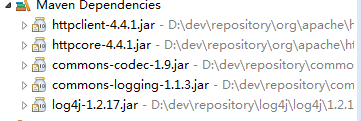
http和https工具类 (要注意httpclient版本号和log4j的版本号)
HTTPS 其实就是 HTTP + SSL/TLS 的合体,它其实还是 HTTP 协议,只是在外面加了一层,SSL 是一种加密安全协议
引入 SSL 的目的是为了解决 HTTP 协议在不可信网络中使用明文传输数据导致的安全性问题
SSL/TLS协议及其握手过程
在 SSL/TLS 握手的过程中,客户端和服务器彼此交换并验证证书,并协商出一个 “对话密钥” ,后续的所有通信都使用这个 “对话密钥” 进行加密,保证通信安全
1 打招呼
当用户通过浏览器访问 HTTPS 站点时,浏览器会向服务器打个招呼,服务器也会和浏览器打个招呼。所谓的打招呼,实际上是告诉彼此各自的 SSL/TLS 版本号以及各自支持的加密算法等,让彼此有一个初步了解
2 表明身份、验证身份
第二步是整个过程中最复杂的一步,也是 HTTPS 通信中的关键。为了保证通信的安全,首先要保证我正在通信的人确实就是那个我想与之通信的人,服务器会发送一个证书来表明自己的身份,浏览器根据证书里的信息进行核实。如果是双向认证的话,浏览器也会向服务器发送客户端证书
双方的身份都验证没问题之后,浏览器会和服务器协商出一个 “对话密钥”
3 通信
至此,握手就结束了。双方开始聊天,并通过 “对话密钥” 加密通信的数据。
1 工具类
package dd.com;

import java.io.IOException;

import java.security.cert.CertificateException;

import java.security.cert.X509Certificate;

import java.util.ArrayList;

import java.util.Iterator;

import java.util.List;

import java.util.Map;

import java.util.Map.Entry;

import javax.net.ssl.SSLContext;

import javax.net.ssl.TrustManager;

import javax.net.ssl.X509TrustManager;

import org.apache.http.HttpEntity;

import org.apache.http.HttpResponse;

import org.apache.http.NameValuePair;

import org.apache.http.client.HttpClient;

import org.apache.http.client.config.RequestConfig;

import org.apache.http.client.entity.UrlEncodedFormEntity;

import org.apache.http.client.methods.CloseableHttpResponse;

import org.apache.http.client.methods.HttpGet;

import org.apache.http.client.methods.HttpPost;

import org.apache.http.conn.ClientConnectionManager;

import org.apache.http.conn.scheme.Scheme;

import org.apache.http.conn.scheme.SchemeRegistry;

import org.apache.http.conn.ssl.SSLSocketFactory;

import org.apache.http.impl.client.CloseableHttpClient;

import org.apache.http.impl.client.DefaultHttpClient;

import org.apache.http.impl.client.HttpClients;

import org.apache.http.message.BasicNameValuePair;

import org.apache.http.util.EntityUtils;

public class HttpUtils {

    private static RequestConfig requestConfig = RequestConfig.custom().setSocketTimeout(15000).setConnectTimeout(15000)

            .setConnectionRequestTimeout(15000).build();

    public static String sendHttpGet(String url) {

        HttpGet httpGet = new HttpGet(url);

        CloseableHttpClient httpClient = null;

        CloseableHttpResponse response = null;

        HttpEntity entity = null;

        String responseContent = null;

        try {

            // 创建默认的httpClient实例.

            httpClient = HttpClients.createDefault();

            httpGet.setConfig(requestConfig);

            // 执行请求

            response = httpClient.execute(httpGet);

            entity = response.getEntity();

            responseContent = EntityUtils.toString(entity, "UTF-8");

        } catch (Exception e) {

            e.printStackTrace();

        } finally {

            try {

                // 关闭连接,释放资源

                if (response != null) {

                    response.close();

                }

                if (httpClient != null) {

                    httpClient.close();

                }

            } catch (IOException e) {

                e.printStackTrace();

            }

        }

        return responseContent;

    }

    /**

     * 发送 post请求

     *

     * @param httpUrl 地址

     * @param maps    参数

     */

    public static String sendHttpPost(String httpUrl, Map<String, String> maps) {

        HttpPost httpPost = new HttpPost(httpUrl);// 创建httpPost

        // 创建参数队列

        List<NameValuePair> nameValuePairs = new ArrayList<NameValuePair>();

        for (String key : maps.keySet()) {

            nameValuePairs.add(new BasicNameValuePair(key, maps.get(key)));

        }

        try {

            httpPost.setEntity(new UrlEncodedFormEntity(nameValuePairs, "UTF-8"));

        } catch (Exception e) {

            e.printStackTrace();

        }

        CloseableHttpClient httpClient = null;

        CloseableHttpResponse response = null;

        HttpEntity entity = null;

        String responseContent = null;

        try {

            // 创建默认的httpClient实例.

            httpClient = HttpClients.createDefault();

            httpPost.setConfig(requestConfig);

            // 执行请求

            response = httpClient.execute(httpPost);

            entity = response.getEntity();

            responseContent = EntityUtils.toString(entity, "UTF-8");

        } catch (Exception e) {

            e.printStackTrace();

        } finally {

            try {

                // 关闭连接,释放资源

                if (response != null) {

                    response.close();

                }

                if (httpClient != null) {

                    httpClient.close();

                }

            } catch (IOException e) {

                e.printStackTrace();

            }

        }

        return responseContent;

    }

    @SuppressWarnings("unchecked")

    public static String sendHttpsPost(String url, Map<String, String> map, String charset) {

        if (null == charset) {

            charset = "utf-8";

        }

        HttpClient httpClient = null;

        HttpPost httpPost = null;

        String result = null;

        try {

            httpClient = new SSLClient();

            httpPost = new HttpPost(url);

            // 设置参数

            List<NameValuePair> list = new ArrayList<NameValuePair>();

            Iterator iterator = map.entrySet().iterator();

            while (iterator.hasNext()) {

                Entry<String, String> elem = (Entry<String, String>) iterator.next();

                list.add(new BasicNameValuePair(elem.getKey(), elem.getValue()));

            }

            if (list.size() > 0) {

                UrlEncodedFormEntity entity = new UrlEncodedFormEntity(list, charset);

                httpPost.setEntity(entity);

            }

            HttpResponse response = httpClient.execute(httpPost);

            if (response != null) {

                HttpEntity resEntity = response.getEntity();

                if (resEntity != null) {

                    result = EntityUtils.toString(resEntity, charset);

                }

            }

        } catch (Exception ex) {

            ex.printStackTrace();

        }

        return result;

    }

    public static String sendHttpsGet(String url, String charset) {

        if (null == charset) {

            charset = "utf-8";

        }

        HttpClient httpClient = null;

        HttpGet httpGet = null;

        String result = null;

        try {

            httpClient = new SSLClient();

            httpGet = new HttpGet(url);

            HttpResponse response = httpClient.execute(httpGet);

            if (response != null) {

                HttpEntity resEntity = response.getEntity();

                if (resEntity != null) {

                    result = EntityUtils.toString(resEntity, charset);

                }

            }

        } catch (Exception e) {

            e.printStackTrace();

        }

        return result;

    }

    public static class SSLClient extends DefaultHttpClient {

        public SSLClient() throws Exception {

            super();

            SSLContext ctx = SSLContext.getInstance("TLS");

            X509TrustManager tm = new X509TrustManager() {

                @Override

                public void checkClientTrusted(X509Certificate[] chain, String authType) throws CertificateException {

                }

                @Override

                public void checkServerTrusted(X509Certificate[] chain, String authType) throws CertificateException {

                }

                @Override

                public X509Certificate[] getAcceptedIssuers() {

                    return null;

                }

            };

            ctx.init(null, new TrustManager[] { tm }, null);

            SSLSocketFactory ssf = new SSLSocketFactory(ctx, SSLSocketFactory.ALLOW_ALL_HOSTNAME_VERIFIER);

            ClientConnectionManager ccm = this.getConnectionManager();

            SchemeRegistry sr = ccm.getSchemeRegistry();

            sr.register(new Scheme("https", 443, ssf));

        }

    }

}
2 maven 依赖 和 jdk 编译版本

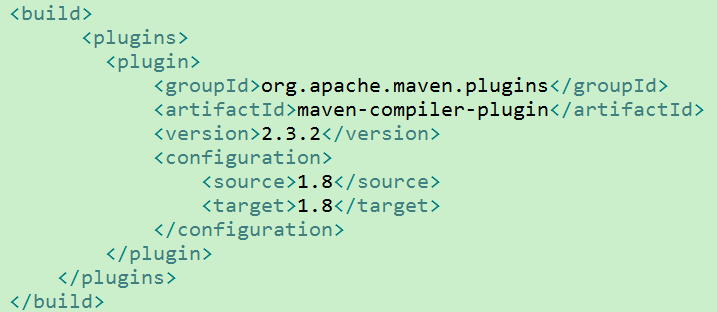
3 依赖的jar包
http和https工具类 (要注意httpclient版本号和log4j的版本号)的更多相关文章
- java Https工具类
import java.security.cert.CertificateException; import java.security.cert.X509Certificate; import ja ...
- java安全HTTPS工具类
import java.io.FileInputStream; import java.security.KeyStore; import java.security.SecureRandom; im ...
- https工具类
import org.apache.commons.lang.StringUtils; import javax.net.ssl.*; import java.io.*; import java.ne ...
- 使用单例模式实现自己的HttpClient工具类
引子 在Android开发中我们经常会用到网络连接功能与服务器进行数据的交互,为此Android的SDK提供了Apache的HttpClient 来方便我们使用各种Http服务.你可以把HttpCli ...
- HttpClinet工具类
一.URL调用 忽略https证书 1.调用 InputStream in = null; try { URL url = new URL( "url地址" ); IgnoreSS ...
- 项目ITP(四) javaweb http json 交互 in action (服务端 spring 手机端 提供各种工具类)勿喷!
前言 系列文章:[传送门] 洗了个澡,准备写篇博客.然后看书了.时间 3 7 分.我慢慢规律生活,向目标靠近. 很喜欢珍惜时间像叮当猫一样 正文 慢慢地,二维码实现签到将要落幕了.下篇文章出二维码实 ...
- 基于HttpClient 4.3的可訪问自签名HTTPS网站的新版工具类
本文出处:http://blog.csdn.net/chaijunkun/article/details/40145685,转载请注明.因为本人不定期会整理相关博文,会对相应内容作出完好.因此强烈建议 ...
- HttpClient发起Http/Https请求工具类
<dependency> <groupId>org.apache.httpcomponents</groupId> <artifactId>httpcl ...
- HttpClient 4.5.x 工具类设计与实现
最近,业务需要在java服务端发起http请求,需要实现"GET","POST","PUT"等基本方法.于是想以 "HttpCli ...
随机推荐
- python中的tcp
目录 TCP简介 TCP介绍 TCP特点 TCP与UDP的不同点 udp通信模型 TCP通信模型 tcp客户端 tcp服务器 tcp注意点 TCP简介 TCP介绍 TCP协议,传输控制协议(英语:Tr ...
- eclipse提交到git
前言 今天是我正式加入GitHub的第一天,作为世界上最大的同性交友社区,以push和pull出名的它,让我坠入其中并无法自拔,废话不多说,上教程: 步骤一 首先,你需要注册一个github账号,相信 ...
- NPOI 读取Excel文件
private void buttonExcel_Click(object sender, EventArgs e) { FileStream fs = null; List<ISheet> ...
- @meda媒体查询
定义和使用 使用 @media 查询,你可以针对不同的媒体类型定义不同的样式. @media 可以针对不同的屏幕尺寸设置不同的样式,特别是如果你需要设置设计响应式的页面,@media 是非常有用的. ...
- django(python manage.py imgrate)同步数据库出错后的解决办法
问题 很多情况下,因为app的models.py的文件内容有误,但是通过python manage.py check检查不出来时,当执行python manage.py migra ...
- 初见jQuery EasyUI
本文通过一个简单的小例子,简述jQuery EasyUI的使用方法,仅供学习分享使用,如有不足之处,还请指正. 什么是jQuery EasyUI ? 引用官网的一句话:jQuery EasyUI fr ...
- Android为TV端助力 浅谈Aidl 通讯机制
服务端: 首先是编写一个aidl文件,注意AIDL只支持方法,不能定义静态成员,并且方法也不能有类似public等的修饰符:AIDL运行方法有任何类型的参数和返回值,在java的类型中,以下的类型使用 ...
- 章节四、4-For循环
一.For循环格式 package introduction5; public class ForLoopDemo { public static void main(String[] args) { ...
- Spark DataFrame的groupBy vs groupByKey
在使用Spark SQL的过程中,经常会用到groupBy这个函数进行一些统计工作.但是会发现除了groupBy外,还有一个groupByKey(注意RDD也有一个groupByKey,而这里的gro ...
- C#方法重载(overload)方法重写(override)隐藏(new)
一.重载:同一个作用域内发生(比如一个类里面),定义一系列同名方法,但是方法的参数列表不同.这样才能通过传递不同的参数来决定到底调用哪一个. 值得注意的是,方法重载只有通过参数不同来判断调用哪个方法, ...