
[转] Node.js使用MongoDB3.4+Access control is not enabled for the database解决方案
今天使用MongoDB时遇到了一些问题
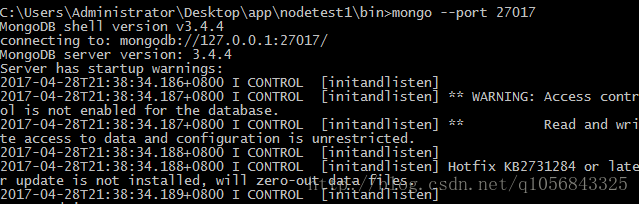
建立数据库连接时出现了warnings
出现这个警告的原因是新版本的MongDB为了让我们创建一个安全的数据库
必须要进行验证
后来在外网找到了答案
解决方案如下:
创建管理员
use admin

db.createUser(

  {

    user: "userAdmin", //用户名

    pwd: "123", //密码

    roles: [ { role: "userAdminAnyDatabase", db: "admin" } ] //权限

  }

)
重启MongoDB服务器
mongod --auth --port 27017 --dbpath <关联路径>(端口默认就是27017可以不指定)

终端最后输出"[initandlisten] waiting for connections on port 27017",
启动完成
连接并认证
mongo --port 27017 -u "userAdmin" -p "123" --authenticationDatabase "admin"添加额外权限用户
use test

db.createUser(

  {

    user: "tester",

    pwd: "123",

    roles: [ { role: "readWrite", db: "test" },

             { role: "read", db: "reporting" } ]

  }

)
mongo --port 27017 -u "myTester" -p "xyz123" --authenticationDatabase "test"MongoDB更新了,使用mongoose也不能简单的建立连接了
必须要添加必要参数
var mongoose = require('mongoose');

var db = mongoose.createConnection('localhost', 'test', 27017, {user: 'tester', pass: '123'});
[转] Node.js使用MongoDB3.4+Access control is not enabled for the database解决方案的更多相关文章
- mongodb Access control is not enabled for the database 无访问控制解决方案
转载:https://blog.csdn.net/q1056843325/article/details/70941697 今天使用MongoDB时遇到了一些问题 建立数据库连接时出现了warning ...
- 安装、卸载 node.js出错 Could not access network location *:\node.js\ 出错
上周五,WIN10自动更新系统,导致我的node.js 和 Gradle 还有解压的winRAR都不能用!!!可恶 自动更新!!可恶啊!!! 然后我想把node.js重新卸载了再安装,结果 很慌很慌, ...
- 解决js ajax跨越请求 Access control allow origin 异常
// 解决跨越请求的问题 response.setHeader("Access-Control-Allow-Origin", "*");
- mongo11---Access control is not enabled for the database
今天使用MongoDB时遇到了一些问题 建立数据库连接时出现了warnings 出现这个警告的原因是新版本的MongDB为了让我们创建一个安全的数据库 必须要进行验证 后来在外网找到了答案 解决方案如 ...
- Oracle Applications Multiple Organizations Access Control for Custom Code
档 ID 420787.1 White Paper Oracle Applications Multiple Organizations Access Control for Custom Code ...
- Node.js 打造实时多人游戏框架
在 Node.js 如火如荼发展的今天,我们已经可以用它来做各种各样的事情.前段时间UP主参加了极客松活动,在这次活动中我们意在做出一款让“低头族”能够更多交流的游戏,核心功能便是 Lan Party ...
- Use Node.js DDP Client on Arduino Yun to Access Meteor Server
Use Node.js DDP Client on Arduino Yun to Access Meteor Server 概述 在Arduino Yun上安装 Node.js, 并測试与 Meteo ...
- Node.js学习笔记 02 Implementing flow control
What is flow control? 和其它语言一样,Node.js 在代码编写时,如何组织代码,如何写出clean code都是不可避免的难点. 同时,由于Node.js的天然特性(异步,事件 ...
- Node.js高级编程读书笔记 - 4 构建Web应用程序
Outline 5 构建Web应用程序 5.1 构建和使用HTTP中间件 5.2 用Express.js创建Web应用程序 5.3 使用Socket.IO创建通用的实时Web应用程序 5 构建Web应 ...
随机推荐
- ES6学习笔记七Generator、Decorators
Generator异步处理 { // genertaor基本定义,next()一步步执行 let tell=function* (){ yield 'a'; yield 'b'; return 'c' ...
- 查询设备的IP地址/掩码/MAC/网关
import commands, sys import platform from _utils.patrol2 import run_cmd, data_format, report_format ...
- office xml 方式
office2007以上版本(2003需要增加2007插件)可以采用xml方式操作生成excel,效率高,无并发问题,比传统com组件方式更方便
- xtrabackup
mysqldump备份方式是采用逻辑备份,其最大的缺陷就是备份和恢复速度都慢,对于一个小于50G的数据库而言,这个速度还是能接受的,但如果数据库非常大,那再使用mysqldump备份就不太适合了.而使 ...
- 认证 (authentication) 和授权 (authorization) 的区别
authorization 授权 authentication 身份认证 用户认证流程: 1.用户使用username和password登录 2.系统验证这个password对于该username是正 ...
- 022_nginx常用模块之ngx_http_upstream_check_module
ngx_http_upstream_check_module 该模块可以为Tengine提供主动式后端服务器健康检查的功能. 该模块在Tengine-1.4.0版本以前没有默认开启,它可以在配置编译选 ...
- 通过uwsgi+nginx启动flask的python web程序
通过uwsgi+nginx启动flask的python web程序 一般我们启动python web程序的时候都是通过python直接启动主文件,测试的时候是可以的,当访问量大的时候就会出问题pyth ...
- git命令(版本控制之道读书笔记)
1.在Windows中安装完git后,需要进行一下配置:$ git config --global user.name "zhangliang"$ git config --glo ...
- Caffeine缓存
在本文中,我们来看看 Caffeine — 一个高性能的 Java 缓存库. 缓存和 Map 之间的一个根本区别在于缓存可以回收存储的 item. 回收策略为在指定时间删除哪些对象.此策略直接影响缓存 ...
- CSS入门(二)
一.组合选择器 每个选择器位可以是任意基础选择器或选择器组合 1.群组选择器 可以一次性控制多个选择器 选择器之间用逗号(,)隔开 div,.d1,#div{ color:red; } 2.子代(后代 ...