
Django 2.0 学习(20):Django 中间件详解
Django 中间件详解
Django中间件
在Django中,中间件(middleware)其实就是一个类,在请求到来和结束后,Django会根据自己的规则在合适的时机执行中间件中相应的方法。
- 1.执行完所有的request方法到达执行流程;
- 2.执行中间件的其他方法;
- 3.经过所有response方法,返回客户端;
注意:如果在其中任意中间件中request方法return了值,就会执行当前中间件的response方法,返回给用户,然后抛出错误,不会再执行下一个中间件。

Django 1.9版本之前,如果在request方法中遇到return,会执行最后一个中间件的response方法,然后依次回传。
中间件(类)中5种方法
中间件种可以定义5个方法,分别是:
- process_request(self, request)
- process_view(self, request, callback, callback_args, callback_kwargs)
- process_template_response(self, request, response)
- process_exception(self, request, exception)
- process_response(self, request, response)
1.process_request(self, request),process_response(self, request, response)
当用户发起请求的时候会依次经过所有的中间件,这个时候的请求是process_request,最后到达views函数中,views函数处理后,再依次穿过中间件,这个时候是process_response,最后返回给请求者,在Django中叫做中间件,在其他web框架中,有的叫管道或httphandle
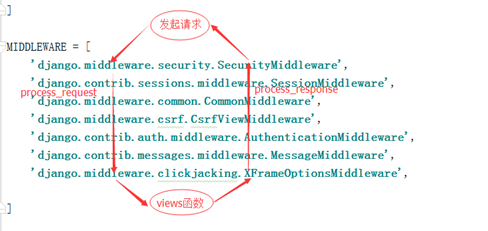
上述截图中的中间件都是Django中的,我们也可以定义自己的中间件,自己写一个类(但是必须继承MiddlewareMixin),下文会对自定义中间件进行详细介绍。
2.process_view(self, request, callback, callback_args, callback_kwargs)
- 执行完所有中间件的request方法
- url匹配成功
- 拿到试图函数的名称、参数(注意不执行),再执行process_view()方法
- 最后去执行视图函数
练习 1
from django.utils.deprecation import MiddlewareMixin

class M1(MiddlewareMixin):

    def process_request(self, request):

        print("M1.request")

    def process_view(self, request, callback, callback_args, callback_kwargs):

        print("M1.process_view")

    def process_response(self, request, response):

        print("M1.response")

        return response

class M2(MiddlewareMixin):

    def process_request(self, request):

        print("M2.request")

    def process_view(self, request, callback, callback_args, callback_kwargs):

        print("M2.process_view")

    def process_response(self, request, response):

        print("M2.response")

        return response
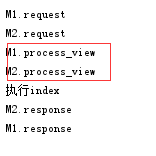
执行结果为:
练习 2
既然process_view拿到视图函数的名称、参数(不执行),再执行process_view()方法,最后才去执行视图函数。那么在执行process_view环节,可以直接把函数执行返回吗?
from django.utils.deprecation import MiddlewareMixin

class M1(MiddlewareMixin):

    def process_request(self, request):

        print("M1.request")

    # callback视图函数名称,callback_args,callback_kwargs视图函数执行所需要的参数

    def process_view(self, request, callback, callback_args, callback_kwargs):

        print("M1.process_view")

        response = callback(request, *callback_args, **callback_kwargs)

        return response

    def process_response(self, request, response):

        print("M1.response")

        return response

class M2(MiddlewareMixin):

    def process_request(self, request):

        print("M2.request")

    def process_view(self, request, callback, callback_args, callback_kwargs):

        print("M2.process_view")

    def process_response(self, request, response):

        print("M2.response")

        return response
执行结果为:
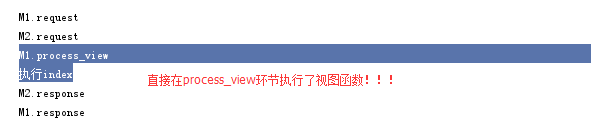
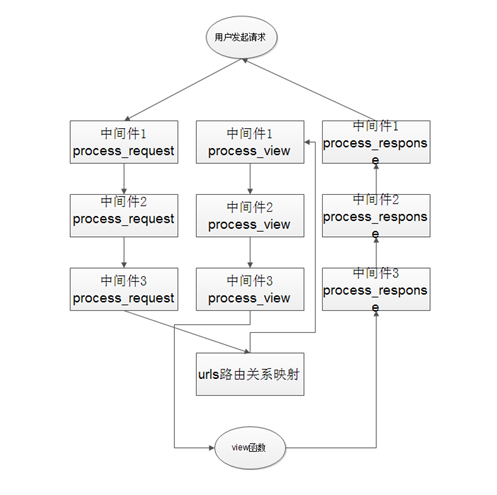
结论:如果process_view函数有返回值,跳转到最后一个中间件,执行最后一个中间件的response方法,逐步返回。和process_request方法不一样,request方法在当前中间件的response方法返回。其过程分析图如下:
3.process_exception(self, request, exception)
from django.utils.deprecation import MiddlewareMixin

class M1(MiddlewareMixin):

    def process_request(self, request):

        print("M1.request")

    # callback视图函数名称,callback_args,callback_kwargs视图函数执行所需要的参数

    def process_view(self, request, callback, callback_args, callback_kwargs):

        print("M1.process_view")

        # response = callback(request, *callback_args, **callback_kwargs)

        # return response

    def process_response(self, request, response):

        print("M1.response")

        return response

    def process_exception(self, request, exception):

        print("M1.exception")

class M2(MiddlewareMixin):

    def process_request(self, request):

        print("M2.request")

    def process_view(self, request, callback, callback_args, callback_kwargs):

        print("M2.process_view")

    def process_response(self, request, response):

        print("M2.response")

        return response

    def process_exception(self, request, exception):

        print("M2.exception")
process_exception默认不执行,所以添加process_exception方法,啥也没执行
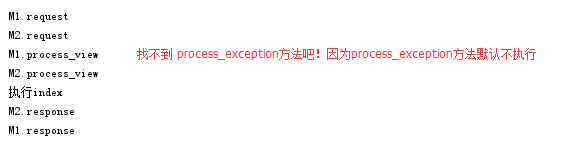
process_exception方法只有在视图函数执行出错的时候才会执行
M1.request

M2.request

M1.process_view

M2.process_view

执行index

M2的process_exception

M1的process_exception

Internal Server Error: /index/

Traceback (most recent call last):

  File "C:\Users\Administrator\AppData\Local\Programs\Python\Python36\lib\site-packages\django\core\handlers\exception.py", line 41, in inner

    response = get_response(request)

  File "C:\Users\Administrator\AppData\Local\Programs\Python\Python36\lib\site-packages\django\core\handlers\base.py", line 187, in _get_response

    response = self.process_exception_by_middleware(e, request)

  File "C:\Users\Administrator\AppData\Local\Programs\Python\Python36\lib\site-packages\django\core\handlers\base.py", line 185, in _get_response

    response = wrapped_callback(request, *callback_args, **callback_kwargs)

  File "F:\untitled1\app01\views.py", line 7, in index

    int("ok")

ValueError: invalid literal for int() with base 10: 'ok'

M2.response

M1.response

[02/Jul/2018 16:43:59] "GET /index/ HTTP/1.1" 500 62663
1.执行完所有request方法;
2.执行所有process_view方法;
3.如果视图函数出错,执行process_exception(最终response,process_exception的return值),如果process_exception方法有了返回值就不再执行其他中间件的process_exception,直接执行response方法响应;
4.执行所有response方法;
5.最后返回process_exception的返回值;
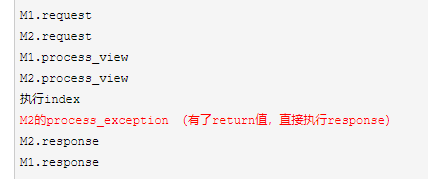
process_exception应用:在视图函数执行出错时,返回错误信息。这样页面就不会报错了:
from django.utils.deprecation import MiddlewareMixin

from django.http import HttpResponse

class M1(MiddlewareMixin):

    def process_request(self, request):

        print("M1.request")

    # callback视图函数名称,callback_args,callback_kwargs视图函数执行所需要的参数

    def process_view(self, request, callback, callback_args, callback_kwargs):

        print("M1.process_view")

        # response = callback(request, *callback_args, **callback_kwargs)

        # return response

    def process_response(self, request, response):

        print("M1.response")

        return response

    def process_exception(self, request, exception):

        print("M1.exception")

class M2(MiddlewareMixin):

    def process_request(self, request):

        print("M2.request")

    def process_view(self, request, callback, callback_args, callback_kwargs):

        print("M2.process_view")

    def process_response(self, request, response):

        print("M2.response")

        return response

    def process_exception(self, request, exception):

        print("M2.exception")

        return HttpResponse("出错了!!")
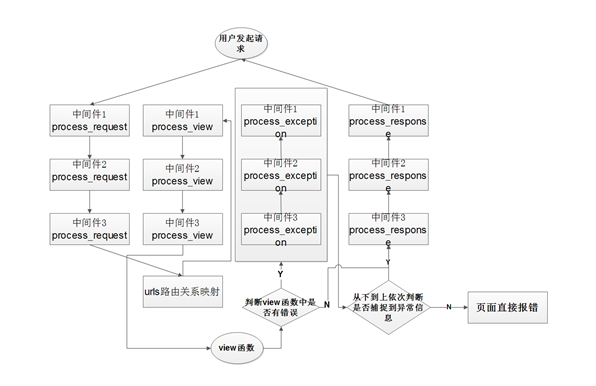
其过程分析如下图所示:
4.process_template_response(self, request, response)
from django.utils.deprecation import MiddlewareMixin

from django.shortcuts import HttpResponse

class M1(MiddlewareMixin):

    def process_request(self, request):

        print("M1.request")

    # callback视图函数名称,callback_args,callback_kwargs视图函数执行所需要的参数

    def process_view(self, request, callback, callback_args, callback_kwargs):

        print("M1.process_view")

        # response = callback(request, *callback_args, **callback_kwargs)

        # return response

    def process_response(self, request, response):

        print("M1.response")

        return response

    def process_exception(self, request, exception):

        print("M1.exception")

class M2(MiddlewareMixin):

    def process_request(self, request):

        print("M2.request")

    def process_view(self, request, callback, callback_args, callback_kwargs):

        print("M2.process_view")

    def process_response(self, request, response):

        print("M2.response")

        return response

    def process_exception(self, request, exception):

        print("M2.exception")

        return HttpResponse("出错了!!")

    def process_template_response(self, request, response):

        print("M2.process_template_response")

        return response
process_template_response方法默认不执行
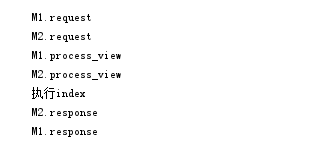
process_template_response方法特性:只有在试图函数的返回对象中有render方法才会执行,并把对象的render方法的返回值返回给用户(注意:不返回试图函数的return结果了,而是返回视图函数return值(对象)的render方法)
class M2(MiddlewareMixin):

    def process_request(self, request):

        print("M2.request")

    def process_view(self, request, callback, callback_args, callback_kwargs):

        print("M2.process_view")

    def process_response(self, request, response):

        print("M2.response")

        return response

    def process_exception(self, request, exception):

        print("M2.exception")

        return HttpResponse("出错了!!")

    def process_template_response(self, request, response):

        # 如果试图函数中的返回值中有render方法,才会执行process_template_response

        print("M2.process_template_response")

        return response
视图函数(views.py)
from django.shortcuts import render,HttpResponse

# Create your views here.

class Foo():

    def __init__(self,requ):

        self.req=requ

    def render(self):

        return HttpResponse('OKKKK')

def index(request):

    print("执行index")

    obj=Foo(request)

    return obj
执行结果为:
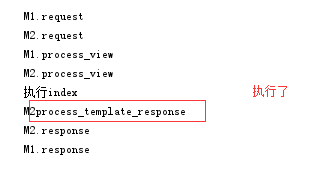
应用:
既然process_template_response不返回视图函数的return的结果,而是返回视图函数return(对象)的render方法(多加了一个环节)。就可以在这个视图函数返回对象的render方法里,做返回值的二次加工。多加工几个,视图函数就可以随便使用了(好比喷雾器有了多个喷头,换不同的喷头出不同的水,返回值就可以组件化了)
from django.shortcuts import render,HttpResponse

# Create your views here.

class Dict():   #对视图函数返回值做二次封装 !!

    def __init__(self,requ,msg):

        self.req=requ

        self.msg=msg

    def render(self):

        a=self.msg #在render方法里面 把视图函数的 返回值 制作成字典 、列表等。。。

                   #  如果新增了其他 一个视图函数直接,return对象 即可!不用每个视图函数都写 制作字典 列表 拼接的逻辑了

        return HttpResponse(a)    #

def index(request):

    print("执行index")

    obj=Dict(request,"vv")

    return obj
自定义中间件
1.在项目文件下创建Middle文件夹,并在该文件夹下面创建custom_middle.py文件,该文件代码如下:
from django.utils.deprecation import MiddlewareMixin

class Middle1(MiddlewareMixin):

    def process_request(self,request):

        print("来了")

    def process_response(self, request,response):

        print('走了')
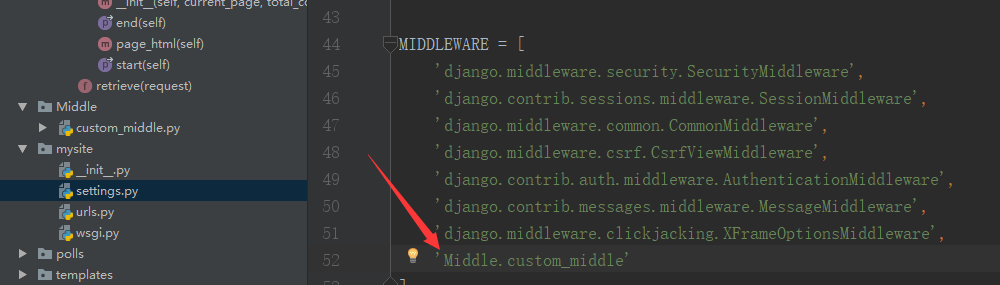
2.在settings.py文件中,注册该中间件(Django项目中的settings模块中,有一个MIDDLEWARE_CLASSES变量,其中每个元素都是一个中间件)
执行结果为

为什么结果报错了??这是因为自定义的中间件response方法没有return,交给下一个中间件,导致http请求中断了!注意:自定义的中间件request方法不要return,因为返回值中间件不再往下执行,导致http请求到达不了视图层,因为request在视图之前执行。
from django.utils.deprecation import MiddlewareMixin

class Middle1(MiddlewareMixin):

    def process_request(self,request):

        print("来了")     # 不用return Django内部自动帮我们传递

    def process_response(self, request,response):

        print('走了')

        return response     # 执行完了这个中间件一定要 传递给下一个中间件
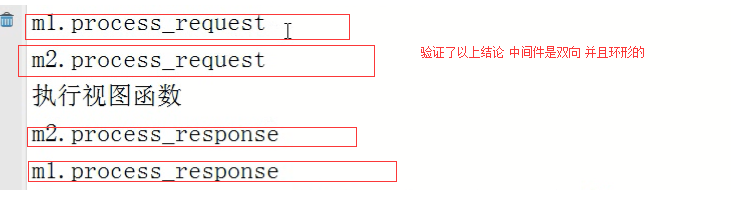
**执行结果为
中间件应用场景
由于中间件工作在视图函数执行前、执行后(就像所有视图函数的装饰器),适合所有的请求/一部分请求做批处理,其应用主要有:
- 1.IP限制:放在中间件类的列表中,组织某些IP访问;
- 2.URL访问过滤:如果用户访问的是login视图(放过),如果访问其他视图(需要检测是不是有session,有则放过;否则返回login),这样省得在多个视图函数上面写装饰器;
- 3.缓存(CDN):客户端请求来了,中间件去缓存看看有没有数据,有直接返回给用户,没有再去逻辑层执行视图函数;
Django 2.0 学习(20):Django 中间件详解的更多相关文章
- tensorflow 1.0 学习:十图详解tensorflow数据读取机制
本文转自:https://zhuanlan.zhihu.com/p/27238630 在学习tensorflow的过程中,有很多小伙伴反映读取数据这一块很难理解.确实这一块官方的教程比较简略,网上也找 ...
- Django 2.0 学习(07):Django 视图(进阶-续)
接Django 2.0 学习(06):Django 视图(进阶),我们将聚焦在使用简单的表单进行处理和精简代码. 编写简单表单 我们将用下面的代码,来替换之前的detail模板("polls ...
- Django中间件详解
Django中间件详解 中间件位置 WSGI 主要负责的就是负责和浏览器和应用之家沟通的桥梁 浏览器发送过来一个http请求,WSGI负责解包,并封装成能够给APP使用的environ,当app数据返 ...
- Asp.Net MVC学习总结之过滤器详解(转载)
来源:http://www.php.cn/csharp-article-359736.html 一.过滤器简介 1.1.理解什么是过滤器 1.过滤器(Filters)就是向请求处理管道中注入额外的 ...
- [深入学习Web安全](5)详解MySQL注射
[深入学习Web安全](5)详解MySQL注射 0x00 目录 0x00 目录 0x01 MySQL注射的简单介绍 0x02 对于information_schema库的研究 0x03 注射第一步—— ...
- Shell学习之Bash变量详解(二)
Shell学习之Bash变量详解 目录 Bash变量 Bash变量注意点 用户自定义变量 环境变量 位置参数变量 预定义变量 Bash变量 用户自定义变量:在Bash中由用户定义的变量. 环境变量:这 ...
- Linux学习之用户配置文件详解(十四)
Linux学习之用户配置文件详解 目录 用户信息文件/etc/password 影子文件/etc/shadow 组信息文件/etc/group 组密码文件/etc/gshadow 用户信息文件/etc ...
- Spark2.1.0——内置RPC框架详解
Spark2.1.0——内置RPC框架详解 在Spark中很多地方都涉及网络通信,比如Spark各个组件间的消息互通.用户文件与Jar包的上传.节点间的Shuffle过程.Block数据的复制与备份等 ...
- expect学习笔记及实例详解【转】
1. expect是基于tcl演变而来的,所以很多语法和tcl类似,基本的语法如下所示:1.1 首行加上/usr/bin/expect1.2 spawn: 后面加上需要执行的shell命令,比如说sp ...
随机推荐
- Windows下Redis安装及使用
1.下载安装Redis(安装直接下一步就行,此步骤省略) Redis-x64-3.2.100.exe 2.Redis使用 安装目录如下: ①cmd启动redis: ②将redis安装为服务 此时如果安 ...
- css忽略某一层的存在:pointer-events:none
其实早知道这个属性,但是一直没有去研究过.今天正好在twitter看到这个词,就去研究了下,正好解决了目前遇到的一个小难题,所以分享下.嗯,其实这是个比较简单的CSS3属性. 在某个项目中,很多元素需 ...
- Netty源码分析第2章(NioEventLoop)---->第7节: 处理IO事件
Netty源码分析第二章: NioEventLoop 第七节:处理IO事件 上一小节我们了解了执行select()操作的相关逻辑, 这一小节我们继续学习select()之后, 轮询到io事件的相关 ...
- Netty源码分析第8章(高性能工具类FastThreadLocal和Recycler)---->第3节: recycler的使用和创建
Netty源码分析第八章: 高性能工具类FastThreadLocal和Recycler 第三节: recycler的使用和创建 这一小节开始学习recycler相关的知识, recycler是n ...
- Windows下LimeSDR Mini使用说明
本文内容.开发板及配件仅限用于学校或科研院所开展科研实验! 淘宝店铺名称:开源SDR实验室 LimeSDR链接:https://item.taobao.com/item.htm?spm=a230r.1 ...
- JAVA之异常处理(一)
JAVA之异常处理(一) 1.异常概述 在程序的开发过程中,可能存在各种各样的错误,有些错误是可以避免的,而有些错误却是意想不到的,在Java中把这些可能发生的错误称为异常.异常类的继承关系如下图. ...
- 琴声不等式--jensen
(来自百度百科) 1. 凹函数,不加权 2. 凹函数,加权 3. 凸函数,不加权 4. 凸函数,加权 应用 在EM算法Q函数的推导中,用到了第二个不等式(凹函数,加权)
- Cocos2dx源码赏析(1)之启动流程与主循环
Cocos2dx源码赏析(1)之启动流程与主循环 我们知道Cocos2dx是一款开源的跨平台游戏引擎,而学习开源项目一个较实用的办法就是读源码.所谓,"源码之前,了无秘密".而笔者 ...
- 拒绝滥用golang defer机制
原文链接 : http://www.bugclosed.com/post/17 defer机制 go语言中的defer提供了在函数返回前执行操作的机制,在需要资源回收的场景非常方便易用(比如文件关闭, ...
- ExternalAccessory串口通信
ExternalAccessory 使用文档 项目下载地址 前言 公司希望通过串口通信的方式实现苹果手机与公司产品进行通信,通过Lighting接口,也就是苹果的数据线.苹果的API External ...