
用asp连接Access数据库 制作简单登陆界面
【题外话:最近做Internet作业,在这写一个适合初学入门的ASP连接ACCESS数据库做登陆界面的简单的例子,以慰藉我一口气把以前做过的系统中的PHP代码全改成ASP代码来临时应付作业的心情......然后,这个小例子很简单的。】
【前提条件:你已经在Windows下配置搭建了IIS服务器】
该例实现的功能为:
连接Access数据库;
登陆页面选择管理员或账户登陆;
用户界面显示当前用户信息;
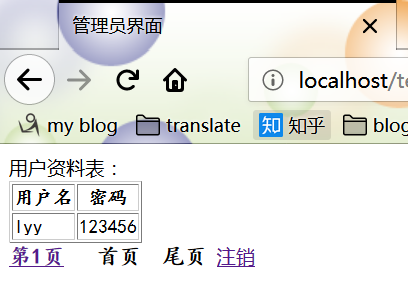
管理员界面显示数据库中所有用户资料信息 并 实现分页功能(每页最多五行);
实现注销功能。
【注:本例并没有做页面设计,可以自己加一些CSS、js之类的进行美化】
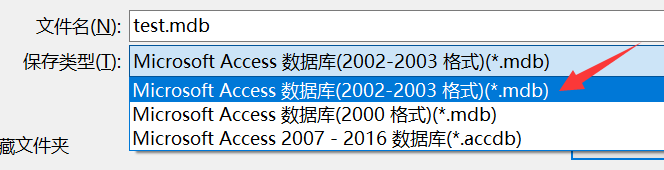
首先,创建Access数据库:(注意这里选择2002-2003版本的)
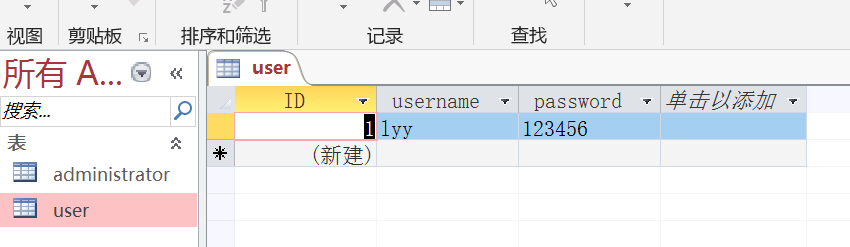
然后,创建表,添加字段:我这里简单举例,管理员表和用户表一样,你可以添加其他字段做的更丰富。
然后编写以下代码即可:
conn.asp(连接数据库)
 <%

 Session.CodePage=65001

 Response.Charset="UTF-8"

 '连接数据库开始

 dim conn,rs,sql

 'on error resume next

 'dbpath为你自己设置的数据库路径

 dbpath="D:/AccessDB/test.mdb"

 set conn=Server.CreateObject("ADODB.Connection")

 conn.Open "Provider=Microsoft.Jet.OLEDB.4.0; data source="&dbpath

 '创建记录对象

 set rs=server.createobject("adodb.recordset")

 %>
conn.asp
【注:dbpath="D:/AccessDB/test.mdb" 我是将数据库放在了D盘的AccessDB目录下,路径请根据你自己的情况来设置】
index.asp(登陆主页面)
<html>
<head>
<meta http-equiv="Content-Type" content="text/html; charset=utf-8">
<title>登陆界面</title>
</head>
<form id="loginForm" action="login.asp" method="post">
<ul style="border:1px solid #CCC;">
<label>权 限:</label>
<select id="sel_type" name="sel_type">
<option value="1">账户</option>
<option value="2">管理员</option>
</select>
<label class="p2">账 号:</label>
<input type="text" id="userName" name="userName" /> <label class="p2">密 码:</label>
<input type="password" id="userPwd" name="userPwd"/> <input type="submit" name="submit" value="登录"/>
<input type="reset" value="重置">
</ul>
</form>
</html>
index.asp
login.asp(登陆检测)
 <%@Language="vbscript" Codepage="65001"%>

 <!-- #include file="conn.asp" -->

 <%

 Session.CodePage=65001

 Response.Charset="UTF-8"

 username = Request.Form("userName")

 password = Request.Form("userPwd")

 flag = Request.Form("sel_type")

 if username = "" or password = "" then

     response.Write("用户名或密码不能为空!")

     Response.Write("返回<a href='index.asp'>登录主页</a><br />")

     response.End()

 end if

 if flag = "1" then

     '账户

     '打开数据库判断用户是否存在,user为表名,namee为字段名

     set rsc=server.createobject("adodb.recordset")

     sqlc="select * from [user] where username='"&request.Form("userName")&"' and password='"&request.Form("userPwd")&"'"

     rsc.open sqlc,conn,1,1

     if rsc.eof then

         Response.Write("用户名或密码错误!")

         Response.Write("返回<a href='index.asp'>登录主页</a><br />")

         Response.End()

     else

         session("username")=rsc("username")

         session("password")=rsc("password")

     end if

     rsc.close

     set rsc=nothing

     '登陆成功跳转到用户界面

     response.Redirect("user.asp")

 else

     '管理员

     set rsc=server.createobject("adodb.recordset")

     sqlc="select * from administrator where username='"&request.Form("userName")&"' and password='"&request.Form("userPwd")&"'"

     rsc.open sqlc,conn,1,1

     if rsc.eof then

         Response.Write("用户名或密码错误!")

         Response.Write("返回<a href='index.asp'>登录主页</a><br />")

         Response.End()

     else

         session("username")=rsc("username")

         session("password")=rsc("password")

     end if

     rsc.close

     set rsc=nothing

     '登陆成功跳转到管理员界面

     response.Redirect("admi.asp")

 end if

 %>
login.asp
user.asp(用户界面)
 <%@Language="vbscript" Codepage="65001"%>

 <!-- #include file="conn.asp" -->

 <%

 if session("username")="" then

     response.Redirect("index.asp")

 else

     username = session("username")

     password = session("password")

 end if

 %>

 <html>

 <head>

   <meta http-equiv="Content-Type" content="text/html; charset=utf-8">

   <title>用户界面</title>

 </head>

 <%

     Response.Charset="UTF-8"

     Response.Write("</br>")

     Response.Write("账    号:" & username & "</br>")

     Response.Write("密    码:" & password & "</br>")

 %>

 <a href="logout.asp">注销</a>

 </html>
user.asp
admi.asp(管理员界面)
<%@Language="vbscript" Codepage="65001"%>
<!-- #include file="conn.asp" -->
<%
if session("username")="" then
response.Redirect("index.asp")
else
username = session("username")
password = session("password")
end if
%>
<html>
<head>
<meta http-equiv="Content-Type" content="text/html; charset=utf-8">
<title>管理员界面</title>
</head>
用户资料表:
<font style="font:bold 18px KaiTi;">
<%
set rs=server.createobject("adodb.recordset")
sql="select * from [user]"
rs.open sql,conn,1,1 rs.pagesize = 5
curpage = 1
if Request.QueryString("curpage") <>"" then
curpage = Request.QueryString("curpage")
end if
rs.absolutepage = curpage response.write("<table border='#CCF solid 1px'>")
response.write("<tr><th>用户名</th><th>密码</th></tr>")
for i = 1 to rs.pagesize
if rs.eof then
exit for
end if
response.write("<tr>")
response.write("<td>"&rs("username")&"</td>")
response.write("<td>"&rs("password")&"</td>")
response.write("</tr>")
rs.movenext
next
response.write("</table>") for i = 1 to rs.pagecount
%>
<a href ='./admi.asp?curpage=<%=i%>'>第<%=i%>页</a>
<%
next
if curpage=1 then
response.write("首页 ")
else
response.write("<a href ='admi.asp?curpage=1'>首页</a> ")
end if if curpage>1 then
%>
<a href ="admi_userInfo.asp?curpage=<%=curpage-1%>">上一页</a>
<%
end if if rs.pagecount>=curpage+1 then
%>
<a href ="admi_userInfo.asp?curpage=<%=curpage+1%>">下一页</a>
<%
end if if rs.pagecount < curpage+1 then
response.write("尾页")
else
%>
<a href ="admi_userInfo.asp?curpage=<%=rs.pagecount%>">尾页</a>
<%end if%>
</font> <a href="logout.asp">注销</a>
</html>
admi.asp
logout.asp(注销界面)
 <%@Language="vbscript" Codepage="65001"%>

 <!-- #include file="conn.asp" -->

 <html>

   <head>

     <meta http-equiv="Content-Type" content="text/html; charset=utf-8">

     <title>注销界面</title>

   </head>

 </html>

 <%

 session("username")=""

 session("password")=""

 Response.Write(" 谢谢您的使用!返回 <a href='index.asp'>登录主页</a><br />")

 %>
logout.asp
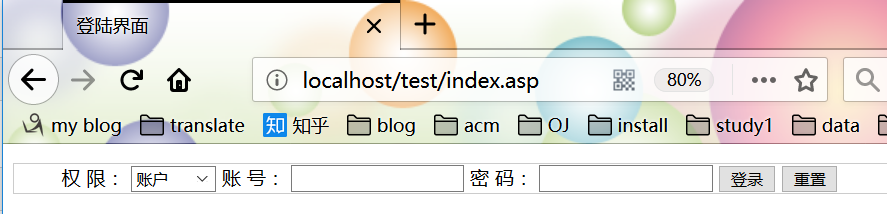
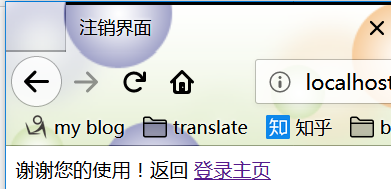
效果如下:(我是将以上代码文件都放在了C:\inetpub\wwwroot\test目录下,这里我设置的默认目录就是wwwroot)
(页面不美观、不要在意、自己设计哇......)

用asp连接Access数据库 制作简单登陆界面的更多相关文章
- ASP连接access 数据库的增删改查 - imsoft.cnblogs
假设数据库文件名叫data.mdb里面有2个表:1.admin2.news假设admin是保存用户名和密码,里面有字段:UserName,PassWord.假设我们要在判断一个用户名叫name,密码是 ...
- 🈲Eclipse通过jdbc连接数据库制作简单登陆界面【新手必看】
一.前言: 做网站开发,要求有多种搭配方式,前台技术可以使用PHP.ASP.JSP.ASP.NET.CGI等任何一种: 需要用到的基础语言用的最多的就是HTML/CSS.JS.JAVA.XML这些了, ...
- Eclipse通过jdbc连接数据库制作简单登陆界面
一.前言: 做网站开发,要求有多种搭配方式,前台技术可以使用PHP.ASP.JSP.ASP.NET.CGI等任何一种: 需要用到的基础语言用的最多的就是HTML/CSS.JS.JAVA.XML这些了, ...
- ASP连接ACCESS数据库
Set conn2 = Server.CreateObject("ADODB.Connection") conn2.Open "Provider=Microsoft.Je ...
- JSP制作简单登陆
JSP制作简单登陆界面 运行环境 eclipse+tomcat+MySQL 不知道的可以参考Jsp运行环境--Tomcat 项目列表 这里我先把jsp文件先放在Web-INF外面访问 需要建立的几个文 ...
- asp.net连接Access数据库实现登陆功能
这里话就不多说了,直接演示代码. 连接access数据库首先需要配置web.config <appSettings> <add key="AccessConnString& ...
- ASP.net分别连接SQLserver数据库与连接Access数据库精英版
-------------------------连接access2003 字符串------------------------- Provider=Microsoft.Jet.OLEDB.4.0; ...
- 【.net 深呼吸】连接Access数据库应注意的几点
本地数据库可以有Y种选择,比如Sqlite.SQL Server Express.SQL Local DB.SQL Server CE.Access等,本文老周选用比较著名的Access本地数据库,在 ...
- C#连接Access数据库(详解)
做一个用VS2012的C#连接Access数据库的备忘, SQL数据库固然强大,有大微软的强力技术支持,LINQ的方便操作,但是如果写一个小程序对数据库方面没有什么大的要求的话,将来在数据库方面就可以 ...
随机推荐
- BOM-使用定时器
window对象包含4个定时器专用方法,说明如下表所示,使用它们可以实现代码定时运行,避免连续执行,这样可以设计动画 方法 说明 setInterval() 按照指定的周期,(以毫秒为单位)来调用函数 ...
- 【转】Dubbo声明式缓存
缓存的应用非常广泛,为了提高数据访问的速度.Dubbo也不例外,它提供了声明式缓存,以减少用户加缓存的工作量. 一.Dubbo中缓存策略 lru 基于最近最少使用原则删除多余缓存,保持最热的数据被缓存 ...
- wcf远程服务器返回错误404
最近根据quartz.net 和wcf做资讯内容定时推送,wcf调用的时候出现远程服务器返回错误404,一直找不到原因是什么,客户端和服务器地址和配置都没啥问题,最后发现wcf请求数据,有传输大小限制 ...
- [NodeJs] 用Nodejs+Express搭建web,nodejs路由和Ajax传数据并返回状态,nodejs+mysql通过ajax获取数据并写入数据库
小编自学Nodejs,看了好多文章发现都不全,而且好多都是一模一样的 当然了,这只是基础的demo,经供参考,但是相信也会有收获 今天的内容是用Nodejs+Express搭建基本的web,然后呢no ...
- Myeclipse使用过程配置汇总
1.下载安装及破解方法 myeclipse2014专业版下载地址链接:https://pan.baidu.com/s/1i62YOGt 密码:nlqj : 下载后安装到最后一步先不要打开软件,如 ...
- 【node】node的核心模块---http模块,http的服务器和客户端
nodejs事件机制 ##### http服务器和客户端 node.js标准库提供了http模块,其中封装了一个高效的http服务器和一个简易的http客户端 HTTP服务器 1. http.crea ...
- mysql 客户端
MySQL是基于C/S模式的数据库管理系统.MySQL公司开发了众多的客户端软件来帮助用户管理MySQL软件,最著名的就是 MySQL Command Line Client 和 MySQL-Work ...
- 事件驱动模型 IO多路复用 阻塞IO与非阻塞IO select epool
一.事件驱动 1.要理解事件驱动和程序,就需要与非事件驱动的程序进行比较.实际上,现代的程序大多是事件驱动的,比如多线程的程序,肯定是事件驱动的.早期则存在许多非事件驱动的程序,这样的程序,在需要等待 ...
- spring boot(17)-@Async异步
验证码的异步机制 上一篇讲过可以用邮件发验证码,通常我们在某网站发验证码时,首先会提示验证码已发送,请检查邮箱或者短信,这就是图中的1和3.然而此时查看邮箱或短信可能并没有收到验证码,往往要过几秒种才 ...
- [翻译] EAIntroView
EAIntroView https://github.com/ealeksandrov/EAIntroView This is highly customizable drop-in soluti ...