
dom学习要点
Dom操作
1.文本内容操作
- innerText:操作文本
- innerHtml:操作全内容
//innerText标签:

<div id='i2' ><a>土味程序员</a></div>

item=document.getElementById('i2');

item.innerText;

  结果:"土味程序员"

item.innerHTML;

  结果:"<a>土味程序员</a>"
innerText的作用是获取文本内容,而innerHTML的作用则连标签一起获取(全内容)。
赋值的方式item.innerText="程序员";item.innerHTML="<p>程序员</p>";
注意innerHTML可以修改标签。
- value:
- input :获取当前标签的值
- select:获取选中的value值
select:获取选中的value值 - textarea:获取当前标签值
//input 标签,获取input标签中文本框输入的值,同时也可以赋值;
<input id="i1" type="text" value="user"> item=document.getElementById("i1"); item.value;
"wag"
item.value="程序员";
"程序员" //select标签selectedIndex;则是获取逻辑顺序;
item=document.getElementById("i2");
<select id="i2">
<option value="11">北京</option>
<option value="12">上海</option>
<option value="13">福州</option>
</select>
item.value;
结果:"13"
item.value;
结果 :"11"
item.value=13; item.selectedIndex;
结果:2
item.selectedIndex;
结果:0 //textarea标签
item=document.getElementById("i3")
<textarea id="i3">ndioansdian</textarea>
item.value;
结果: "ndioansdian"
item.value="chengxuyuan";
结果"chengxuyuan"
例子:请输入关键字;
<div>

    <input id ='i1' type="text" onfocus="Focus();"  onblur="Blur();"  value="请输入关键字" />

</div>

<script type="text/javascript">

    function Focus()

    {

        item=document.getElementById("i1");

        if(item.value=="请输入关键字")

        {

            item.value="";

        }

    }

    function Blur(){

        item=document.getElementById("i1");

        if(item.value.length==0)

        {

            item.value="请输入关键字";

        }

    }

</script>
2.样式操作:
- classList 样式级操作
- classList.add(class)
- classList.Remove(class)
- style属性级操作
两种方式都可以操作属性,classList用于操作量级大于style,蒙蔽?请看以下例子(控制台console操作执行)
//classList操作
<div id="i2" class="c1 c2 " style="font-size:35px;">土味程序员</div>
item = document.getElementById("i2");
item.classList;
结果:DOMTokenList(2) ["c1", "c2", value: "c1 c2 "]
item.classList.add("c3");
结果:undefined
item.classList;
结果:DOMTokenList(3) ["c1", "c2", "c3", value: "c1 c2 c3"]
item.classList.remove("c3");
结果:undefined
item.classList;
结果:DOMTokenList(2) ["c1", "c2", value: "c1 c2"] //style操作
item.style.color="red";
结果:"red"
item.style.color="blue";
结果:"blue"
item.style.fontSize="16px";
结果:"16px"
//需要注意的是在html中字体大小的写法是:font-size;而在javascript中则是fontSize;
3.属性操作
- attribute
- setAttribute 为标签添加某个属性,没有该属性则创建该属性
- removeAttribute 删除标签的某个属性
- attributes 查询标签的所有属性
请看例子:
item=document.getElementById("i2");
输出:<div id="i2" class="c1 c2 " style="font-size:40px;">土味程序员</div>
item.removeAttribute("style");
输出:undefined
item;
<div id="i2" class="c1 c2 ">土味程序员</div>
输出:item.setAttribute("style","color:blue;")
undefined
item;
输出:<div id="i2" class="c1 c2 " style="color:blue;">土味程序员</div>
item.attributes;
输出:NamedNodeMap {0: id, 1: class, 2: style, id: id, class: class, style: style, length: 3}
属性包括:id,class,style,value,name......
4.标签的创建
标签的创建一般有以下两种形式:字符串创建和对象创建两种方式
- 字符串方式
字符串创建方式:标签字符串tag=;
插入方式位置有以下四种方式,如图:
- insertAdjacentHTML();方法
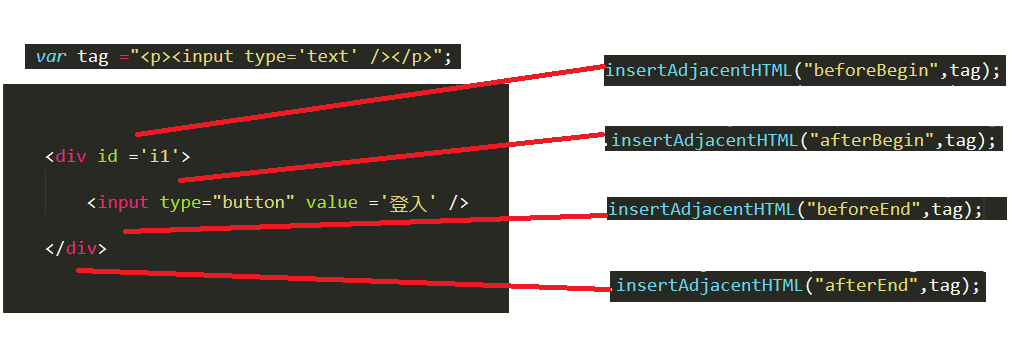
- 对象方式
- document.createElement('标签名');创建标签
- document.appendChild('标签名');插入某个标签
    <input type="button" name="create" value="创建标签" onclick="create_tag();" />

    <div id ="i1">

        <input type="text" />

    </div>

<script type="text/javascript">

    function create_tag(){

        //创建input标签

        var tag=document.createElement("input");

        //为input标签,添加text属性

        tag.setAttribute('type','text');

        //为input标签添加属性字体大小为16px;

        tag.style.fontSize ='16px';

        //创建标签P标签

        var p=document.createElement("p");

        //包裹tag标签

        p.appendChild(tag);

        //为input标签包裹一层P标签

        document.getElementById("i1").appendChild(p);

    }
5.提交表单
任何标签都可以通过JavaScript 来提交表单。
<body>

    <form id ="f1" action="http://www.baidu.com">

        <!-- a标签 -->

        <a onclick="submitFrom();">我是a</a>

        <!-- div标签 -->

        <div onclick = "submitFrom();">我是div</div>

    </form>

    <script type="text/javascript">

        function submitFrom(){

            //提交表单

            item=document.getElementById("f1").submit();

        }

    </script>

</body>
6.其他
- console.log();输出框
- alert();弹出框
- confirm(“真的需要删除吗”);true fasle;确认框
- location
- locaiont.href;获取当前页面的ual
- location.href = " ";重定向,跳转
- location.href = location.href; 页面刷新
- location.href =location.reload();页面刷新
7.事件操作
事件操作一般有以下几种方式:
1.直接标签绑定方式
<div id ='i1'>

        <input type='text' />

    </div>

    <table id ='i2'>

        <thead>

            <tr>

                <th id ='i3' onmouseover="MouseOver('i3');" onmouseout="Mouseout('i3');">h</th>

                <th id ='i4' onmouseover="MouseOver('i4');" onmouseout="Mouseout('i4');">h</th>

                <th id ='i5' onmouseover="MouseOver('i5');" onmouseout="Mouseout('i5');">h</th>

            </tr>

        </thead>

    </table>

    <script>

        function MouseOver(id)

        {

            item=document.getElementById(id);

            item.style.backgroundColor = "red";

        }

        function Mouseout(id)

        {

            item=document.getElementById(id);

            console.log(item);

            item.style.backgroundColor = "";

        }

    </script>
2.先获取Dom对象,然后进行绑定
    <div id ='i1'>

        <input type='text' />

    </div>

    <table id ='i2'>

        <thead>

            <tr>

                <th>w</th>

                <th>w</th>

                <th>w</th>

            </tr>

        </thead>

    </table>

    <script>

        item=document.getElementById("i2");

        //获取要修改的对象

        child_tag = item.children[0].children[0].children;

        console.log(child_tag);

        for(var i=0;i<child_tag.length;i++)

        {

           //onmouseover事件,光标放在指定标签时,触发

           child_tag[i].onmouseover=function(){

                //谁调用onmouserover,this就指向谁

                this.style.backgroundColor ="red";

           }

        }

        for(var i=0;i<child_tag.length;i++)

        {

            //onmouseout事件,光标离开该标签时,触发

            child_tag[i].onmouseout=function(){

                this.style.backgroundColor ="" ;

            }

        }

    </script>
上述代码中this有两种绑定方式:
方法1
<div>

    <input type="button" onclick="clickOn(this)" />

</div>

<script>

    function clickOn(self){

       //self 代指当前点击的标签

    }

</script>
方法2
<input type='button' id='i1' />

<script type="text/javascript">

    document.getElementById("i1").conlick=

    fucntion(){

        //this 代指当前标签。。

    };

</script>
3.通过addEventListener函数绑定
<div id='mymain' >

    <div id ='mycontent'>

        土味程序员

    </div>

</div>

<script>

    main = document.getElementById('mymain');

    content= document.getElementById('mycontent');

    main.addEventListener("click",function(){console.log('main');},false);

    content.addEventListener("click",function(){console.log('mycontent');},false);

</script>
使用addEventListener函数来添加事件,第一个参数是事件,第二个参数是匿名函数,第三个参数是用做(冒泡/捕捉)的选择。默认是:false捕捉。
如果点击标签《土味程序员》,先打印‘main’后打印‘mycontent’ ,如果第三个参数为true,则先打印‘mycontent’后打印‘main’。
dom学习要点的更多相关文章
- 【C#】第3章学习要点(一)--整体把握
分类:C#.VS2015 创建日期:2016-06-18 使用教材:(十二五国家级规划教材)<C#程序设计及应用教程>(第3版) 一.使用别人已经设计好的类简化你的代码编写工作量 当让你去 ...
- 【C#】1.1 第1章学习要点
分类:C#.VS2015 创建日期:2016-06-14 教材:十二五国家级规划教材<C#程序设计及应用教程>(第3版) 一.配套源程序(VS2015版)的运行截图 VS2015版的配套源 ...
- 成为Java高手的25个学习要点
成为Java高手的25个学习要点 想成为Java大牛吗?不妨来学习这25个要点. 1. 你需要精通面向对象分析与设计(OOA/OOD).涉及模式(GOF,J2EEDP)以及综合模式.你应该了解UML, ...
- 前端基础-BOM和DOM学习
JavaScript分为 ECMAScript,BOM,DOM. BOM:是指浏览器对象模型,使JavaScript有能力与浏览器进行对象. DOM:是指文档对象模型,通过它,可以访问HTML文档的所 ...
- HTML DOM 学习
HTML DOM 学习 By: Mirror王宇阳 E-mail:2821319009@qq.com 博客主页:https://www.cnblogs.com/wangyuyang1016/ DOM ...
- Java Web编程技术学习要点及方向
学习编程技术要点及方向亮点: 传统学习编程技术落后,应跟著潮流,要对业务聚焦处理.要Jar, 不要War:以小为主,以简为宝,集堆而成.去繁取简 Spring Boot,明日之春(future of ...
- JavaScript的学习要点
概要 了解Javascript历史以及Javascript三个不同组成部分: ECMAScript DOM(文档对象模型) BOM(浏览器对象模型) ECMAScript 目标 掌握Javascrip ...
- JavaScript DOM学习总结(一)
DOM 什么是DOM?简单地说DOM是一套对文档内容进行抽象和概念化的方法. W3C给出的DOM定义是这样的:"一个与系统平台和编程语言无关的接口,程序和脚本以通过这个接口动态的访问和修 ...
- 【C#】1.3 WPF应用程序学习要点
分类:C#.VS2015 创建日期:2016-06-14 使用教材:十二五国家级规划教材<C#程序设计及应用教程>(第3版) 一.要点概述 <C#程序设计及应用教程>(第3版) ...
随机推荐
- CF893F:Subtree Minimum Query(线段树合并)
Description 给你一颗有根树,点有权值,m次询问,每次问你某个点的子树中距离其不超过k的点的权值的最小值.(边权均为1,点权有可能重复,k值每次询问有可能不同,强制在线) Input 第一行 ...
- 【原创】大叔经验分享(53)kudu报错unable to find SASL plugin: PLAIN
kudu安装后运行不正常,master中找不到任何tserver,查看tserver日志发现有很多报错: Failed to heartbeat to master:7051: Invalid arg ...
- [luogu2680] 运输计划
题面 很明显, 由于是求最长路的最小值, 我们可以使用二分求解. 我们二分一个长度\(mid\), 将所有使得\(dis(u, v)\)大于\(mid\)的点对\((u, v)\)找出, 设总共有 ...
- webpack超详细配置, 使用教程(图文)
流程 webpack安装 Step 1: 首先安装Node.js, 可以去Node.js官网下载. Step2: 在Git或者cmd中输入下面这段代码, 通过全局先将webpack指令安装进电脑中np ...
- 【jq】JQuery对select的操作
下拉框 <select id="selectID" name="selectName"> <option vlaue="1" ...
- 如何向女朋友解释int==Integer为true
原:https://juejin.im/post/5c7f3cb25188251b883cada2 int==Integer为什么返回true 先看现象吧 执行下面的代码及输出结果: int a = ...
- 求助:将以下ES5格式代码转换为ES6格式!!!
function Slider(id){ //属性 // 1. 通过id获取元素对象(大盒子) this.bigBox = document.getElementById(i ...
- windows下搭建permeate漏洞测试系统实战
最近一直在搭建漏洞测试环境练习. 在此期间遇到很多问题,但是通过学习都一一解决.通过写此文来记录遇到的问题和解决方法. 首先,在github上看到了一个不错的permeate渗透测试系统.于是想搭建拿 ...
- 【翻译】R 中的设计模式
目录 R 中的设计模式 不动点算法 包装器模式 接口模式 柯里化(Currying) 闭包(Closures) 缓存模式 计数器模式 R 中的设计模式 本文翻译自 Design Patterns in ...
- 一天半时间大致的学习了HTML和CSS.
目前需要经常练习的知识: 1.正则表达式 2.CSS 3.编程