
python matplotlib quiver——画箭头、风场
理解参考:https://blog.csdn.net/liuchengzimozigreat/article/details/84566650
以下实例
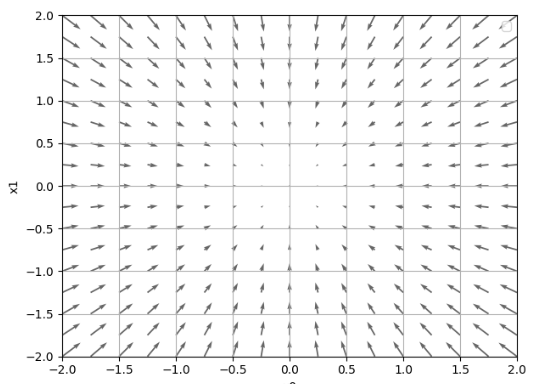
import numpy as np

import matplotlib.pyplot as plt

def function(x):

    return np.sum(x**2)#return x[0]**2 + x[1]**2

def _numerical_gradient_no_batch(f,x):

    h = 1e-4

    grad = np.zeros_like(x)

    for idx in range(x.size):

        tmp_va1 = x[idx]

        x[idx] = float(tmp_va1) + h

        fxh1 =f(x)

        x[idx] = tmp_va1 -h

        fxh2 = f(x)

        grad[idx] = (fxh1- fxh2)/(2*h)

        x[idx] = tmp_va1

    print("grad:"+str(grad))

    return grad

def numerical_gradient(f,X):

    if X.ndim == 1:

        return _numerical_gradient_no_batch(f,X)

    else:

        grad = np.zeros_like(X)

        for idx,x in enumerate(X):

            grad[idx] = _numerical_gradient_no_batch(f,x)

        return grad

def function_2(x):

    if x.ndim == 1:

        return np.sum(x **2)

    else:

        return np.sum(x**2,axis=1)

def tangent_line(f,x):

    d = numerical_gradient(f,x)

    print(d)

    y = f(x) - d * x

    return lambda t : d * t + y

print(_numerical_gradient_no_batch(function_2,np.array([3.0,4.0])))

print(numerical_gradient(function_2,np.array([3.0,4.0])))

print(numerical_gradient(function_2,np.array([[3.0,4.0],[0.0,2.0],[3.0,0.0]])))

if __name__ =='__main__':

    x0= np.arange(-2,2.5,0.25)

    x1=np.arange(-2,2.5,0.25)

    X,Y= np.meshgrid(x0,x1)

    X = X.flatten()

    Y = Y.flatten()

    grad = numerical_gradient(function_2,np.array([X,Y]))

    plt.figure()

    plt.quiver(X,Y,-grad[0],-grad[1],angles="xy",color="#666666")

    plt.xlim([-2,2])

    plt.ylim([-2,2])

    plt.xlabel('x0')

    plt.ylabel('x1')

    plt.grid()

    plt.legend()

    plt.draw()

    plt.show()
python matplotlib quiver——画箭头、风场的更多相关文章
- Python matplotlib pylab 画张图
from pylab import * w1 = 1 w2 = 25 fs = 18 y = np.arange(-2,2,0.001) x = w1*y*log(y)-1.0/w2*exp(-(w2 ...
- Python - matplotlib 数据可视化
在许多实际问题中,经常要对给出的数据进行可视化,便于观察. 今天专门针对Python中的数据可视化模块--matplotlib这块内容系统的整理,方便查找使用. 本文来自于对<利用python进 ...
- 转:使用 python Matplotlib 库 绘图 及 相关问题
使用 python Matplotlib 库绘图 转:http://blog.csdn.net/daniel_ustc/article/details/9714163 Matplotlib ...
- 安装python Matplotlib 库
转:使用 python Matplotlib 库 绘图 及 相关问题 使用 python Matplotlib 库绘图 转:http://blog.csdn.net/daniel_ustc ...
- 在matlab 画箭头
[转载]在matlab 画箭头 原文地址:在matlab 画箭头作者:纯情小郎君 完整见链接http://www.mathworks.com/matlabcentral/fx_files/14056/ ...
- python matplotlib 中文显示参数设置
python matplotlib 中文显示参数设置 方法一:每次编写代码时进行参数设置 #coding:utf-8import matplotlib.pyplot as pltplt.rcParam ...
- python matplotlib plot 数据中的中文无法正常显示的解决办法
转发自:http://blog.csdn.net/laoyaotask/article/details/22117745?utm_source=tuicool python matplotlib pl ...
- python matplotlib画图产生的Type 3 fonts字体没有嵌入问题
ScholarOne's 对python matplotlib画图产生的Type 3 fonts字体不兼容,更改措施: 在程序中添加如下语句 import matplotlib matplotlib. ...
- 菱形实现气泡Bubble,菱形画箭头,菱形画三角形
菱形实现气泡Bubble,菱形画箭头,菱形画三角形 >>>>>>>>>>>>>>>>>>&g ...
随机推荐
- MVC 导出Execl 的总结几种方式 (四)
这种方式我个人还是比较喜欢的,使用部分视图的方式,导出Execl 这样在编辑样式上也是很方便的 第一步: 编辑导出视图页 @using H5UpdateImage.Models; @{ Layout ...
- C# 值类型 引用类型
CLR 定义了两种类型,ReferenceTypes引用类型 和 ValueTypes 值类型.我们定义的各种Class都是引用类型,而我们用的decimal int 之类是值类型. 他们有什么区别呢 ...
- Implementation:Bellman-ford
单源最短路径算法Bellman-ford练习,可以处理有负边的情况(也可以在存在负圈时及时终止) #include <iostream> #include <cstdlib> ...
- jQuery基础(工具函数,浏览器信息,检测节点,字符串,$.extend())
1.获取浏览器的名称与版本信息 在jQuery中,通过$.browser对象可以获取浏览器的名称和版本信息 如$.browser.chrome为true,表示当前为Chrome浏览器, $.bro ...
- 一起玩转CoordinatorLayout
作为Material Design风格的重要组件,CoordinatorLayout协调多种组件的联动,实现各种复杂的效果,在实际项目中扮演着越来越重要的角色.本篇博客将由浅到深,带你一起玩转Coor ...
- ZZCMS8.2 用户密码重置漏洞
前言 一个找回密码处的逻辑漏洞, 还是有点意思的. 正文 首先是定位找回密码功能对应的代码位置,使用找回密码的功能,然后抓包即可 下面去 getpassword.php 里面看看, 首先包含了一些文件 ...
- Eclipse 配置 maven 的两个 settings 文件
eclipse配置的settings文件名完全可以自定义,而本机maven只认识settings.xml文件. eclipse里配置maven有一个叫全局的,有一个叫用户的.这两个文件可以和本机mav ...
- maven属性、profile、资源过滤、不同环境构建项目
maven针对不同环境构建项目 maven使用属性.profile及资源过滤支持针对不同环境构建项目 maven属性 maven共有六类属性 1.最常见的是自定义属性,即在pom文件里通过<pr ...
- 2java.lang.NoClassDefFoundError异常
1.错误信息 2.错误分析: JVM读到程序的第三行,会在当前路径 "D:\java" 下寻找com.yangquan.aolun这个包路径下的Cat类,但当前路径下根本就没有co ...
- 三、vue如何配置路由 、获取路由的参数、部分刷新页面、缓存页面
1.路由配置:所有的启动文件都在最初始的main.js文件里面,这个文件中首先需要引入: 2.路由文件配置说明: 3.如何获取页面url的参数? this.$route.query 4.页面之 ...