
PipelineDB Install and Test
Installation
Prerequisites:
CentOS Linux release 7.2.1511 (Core)
Download
[root@citus1 ~]# wget https://s3-us-west-2.amazonaws.com/download.pipelinedb.com/pipelinedb-0.9.7u4-centos7-x86_64.rpm

[root@citus1 ~]# sudo rpm -ivh pipelinedb-0.9.7u4-centos7-x86_64.rpm
This will install PipelineDB at /usr/lib/pipelinedb.
To install at a prefix of your choosing, use the --prefix argument:
[root@citus1 ~]# rpm -ivh --prefix=/path/to/pipelinedb pipelinedb-0.9.7u4-centos7-x86_64.rpm
Initializing PipelineDB
Once PipelineDB is installed, you can initialize a database directory. This is where PipelineDB will store all the files and data associated with a database.
[root@citus1 ~]# useradd pipeline

[root@citus1 ~]# su - pipeline

[pipeline@citus1 ~]$ pipeline-init -D /data/pipelinedata
where /data/pipelinedata is a nonexistent directory.
Running PipelineDB
To run the PipelineDB server in the background, use the pipeline-ctl driver and point it to your newly initialized data directory:
[root@citus1 ~]# mkdir /var/log/pipelinedb

[root@citus1 ~]# chown pipeline:root /var/log/pipelinedb

[pipeline@citus1 ~]$ pipeline-ctl -D /data/pipelinedata -l /var/log/pipelinedb/pipelinedb.log start

[pipeline@citus1 ~]$ cat /var/log/pipelinedb/pipelinedb.log

LOG:  could not bind IPv4 socket: Address already in use

HINT:  Is another postmaster already running on port ? If not, wait a few seconds and retry.

LOG:  could not bind IPv6 socket: Cannot assign requested address

HINT:  Is another postmaster already running on port ? If not, wait a few seconds and retry.

WARNING:  could not create listen socket for "localhost"

FATAL:  could not create any TCP/IP sockets
Because I’ve installed citusDB for port 5432,So change the pipelinedb port.
[pipeline@citus1 pipelinedata]$ vi pipelinedb.conf

[pipeline@citus1 pipelinedata]$ pipeline-ctl -D /data/pipelinedata -l /var/log/pipelinedb/pipelinedb.log start

server starting
The -l option specifies the path of a logfile to log to. The pipeline-ctl driver can also be used to stop running servers:
[pipeline@citus1 pipelinedata]$ pipeline-ctl -D /data/pipelinedata stop

waiting for server to shut down.... done

server stopped
The PipelineDB server can also be run in the foreground directly:
[pipeline@citus1 pipelinedata]$ pipelinedb -D /data/pipelinedata
Now enable continuous query execution. This only needs to be done once and is remembered across restarts.
[pipeline@citus1 ~]$ psql -h localhost -p  -d pipeline -c "ACTIVATE"

ACTIVATE

[pipeline@citus1 ~]$ psql -h localhost -p  -d pipeline -c "CREATE STREAM wiki_stream (hour timestamp, project text, title text, view_count bigint, size bigint);CREATE CONTINUOUS VIEW wiki_stats ASSELECT hour, project, count(*) AS total_pages, sum(view_count) AS total_views, min(view_count) AS min_views, max(view_count) AS max_views, avg(view_count) AS avg_views, percentile_cont(0.99) WITHIN GROUP (ORDER BY view_count) AS p99_views, sum(size) AS total_bytes_servedFROM wiki_streamGROUP BY hour, project;"
Now we’ll decompress the dataset as a stream and write it to stdin, which can be used as an input to COPY:
curl -sL http://pipelinedb.com/data/wiki-pagecounts | gunzip | \

        psql -h localhost -p  -d pipeline -c "        COPY wiki_stream (hour, project, title, view_count, size) FROM STDIN"
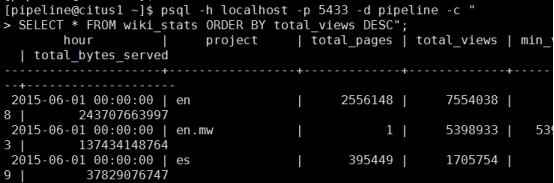
Note that this dataset is large, so the above command will run for quite a while (cancel it whenever you’d like). As it’s running, select from the continuous view as it ingests data from the input stream:
[pipeline@citus1 ~]$ psql -h localhost -p -d pipeline -c "SELECT * FROM wiki_stats ORDER BY total_views DESC";
参考官网:http://docs.pipelinedb.com/installation.html#rpm
PipelineDB Install and Test的更多相关文章
- 如何简单愉快的上手PipelineDB
pipelineDB source:https://github.com/pipelinedb/pipelinedb 安装PipelineDB ./configure CFLAGS="-g ...
- centOS 搭建pipelineDB docs
#下载docs git clone https://github.com/pipelinedb/docs.git #安装python-sphinx &python-dev yum instal ...
- PipelineDB On Kafka
PipelineDB 安装yum install https://s3-us-west-2.amazonaws.com/download.pipelinedb.com/pipelinedb-0.9.8 ...
- OEL上使用yum install oracle-validated 简化主机配置工作
环境:OEL 5.7 + Oracle 10.2.0.5 RAC 如果你正在用OEL(Oracle Enterprise Linux)系统部署Oracle,那么可以使用yum安装oracle-vali ...
- org.jboss.deployment.DeploymentException: Trying to install an already registered mbean: jboss.jca:service=LocalTxCM,name=egmasDS
17:34:37,235 INFO [Http11Protocol] Starting Coyote HTTP/1.1 on http-0.0.0.0-8080 17:34:37,281 INFO [ ...
- 如何使用yum 下载 一个 package ?如何使用 yum install package 但是保留 rpm 格式的 package ? 或者又 如何通过yum 中已经安装的package 导出它,即yum导出rpm?
注意 RHEL5 和 RHEL6 的不同 How to use yum to download a package without installing it Solution Verified - ...
- Install and Configure SharePoint 2013 Workflow
这篇文章主要briefly introduce the Install and configure SharePoint 2013 Workflow. Microsoft 推出了新的Workflow ...
- Basic Tutorials of Redis(1) - Install And Configure Redis
Nowaday, Redis became more and more popular , many projects use it in the cache module and the store ...
- Hadoop学习日志- install hadoop
资料来源 : http://www.tutorialspoint.com/hadoop/hadoop_enviornment_setup.htm Hadoop 安装 创建新用户 $ su passwo ...
随机推荐
- 微信小程序把玩(二十)slider组件
原文:微信小程序把玩(二十)slider组件 slider滑动组件用的不太多,在其他平台反正我是用的不多 主要属性: wxml <slider max="100" step= ...
- Android零基础入门第18节:EditText的属性和使用方法
原文:Android零基础入门第18节:EditText的属性和使用方法 EditText与TextView非常相似,它甚至与TextView 共用了绝大部分XML属性和方法.EditText与Tex ...
- delphi读取ini文件
ini文件在系统配置及应用程序参数保存与设置方面,具有很重要的作用,所以可视化的编程一族,如vb.vc.vfp.delphi等都提供了读写ini文件的方法,其中delphi中操作ini文件,最为简洁, ...
- Spring MVC的工作原理,我们来看看其源码实现
前言 开心一刻 晚上陪老丈人吃饭,突然手机响了,我手贱按了免提……哥们:快出来喝酒!哥几个都在呢!我:今天不行,我现在陪老丈人吃饭呢.哥们:那你抓紧喝,我三杯白酒,把我岳父放倒了才出来的,你也快点.看 ...
- 在DBGrid增加一列CheckBox(而非DBCheckBox)
自:http://rabbitfox.blog.sohu.com/33264033.html http://community.csdn.net/Expert/topic/5342/5342920.x ...
- 关于Eurekalog解决不能发邮件的问题
最近无意中发现在盒子论坛中有人回答了本文的问题,最后在Eurekalog的安装目录中的ExceptionLog.pas找到了多发送的Rest命令的地方,现传上来,有需要的朋友下载下面的文件. 因为16 ...
- nginx 配置https并自签名证书
2016-10-28 转载请注明出处:http://daodaoliang.com/ 作者: daodaoliang 版本: V1.0.1 邮箱: daodaoliang@yeah.net 参考链接: ...
- SYN5605型 多通道时间间隔测量仪
SYN5605型 多通道时间间隔测量仪 时间间隔测量设备多通道时间间隔测量32路时间间隔测量仪使用说明视频链接; http://www.syn029.com/h-pd-80-0_310_6_-1. ...
- DNS之缓存服务器部署流程
环境介绍 [root@dns ~]# cat /etc/centos-releaseCentOS release 6.6 (Final)[root@dns ~]# ifconfig eth0|sed ...
- C++按格式接收输入字符(京东,滴滴,360笔试必用)
头一次起这种标题,为了对得起这个标题,我尽量多写点~ 最近还是一边实习一遍投简历--笔试--面试,然而发现了自己的好多问题. 在答了京东笔试(滴滴,360也是这样的)的题后,发现与腾讯,阿里等公司的不 ...