
abp(net core)+easyui+efcore实现仓储管理系统——使用 WEBAPI实现CURD (十二)
abp(net core)+easyui+efcore实现仓储管理系统目录
abp(net core)+easyui+efcore实现仓储管理系统——ABP总体介绍(一)
abp(net core)+easyui+efcore实现仓储管理系统——解决方案介绍(二)
abp(net core)+easyui+efcore实现仓储管理系统——领域层创建实体(三)
abp(net core)+easyui+efcore实现仓储管理系统——定义仓储并实现 (四)
abp(net core)+easyui+efcore实现仓储管理系统——创建应用服务(五)
abp(net core)+easyui+efcore实现仓储管理系统——展现层实现增删改查之控制器(六)
abp(net core)+easyui+efcore实现仓储管理系统——展现层实现增删改查之列表视图(七)
abp(net core)+easyui+efcore实现仓储管理系统——展现层实现增删改查之增删改视图(八)
abp(net core)+easyui+efcore实现仓储管理系统——展现层实现增删改查之菜单与测试(九)
abp(net core)+easyui+efcore实现仓储管理系统——使用 WEBAPI实现CURD (十一)
上接(abp(net core)+easyui+efcore实现仓储管理系统——使用 WEBAPI实现CURD (十一)),在这一篇文章中我们创建服务接口与服务实现类,并创建控制器类。
二、定义应用服务接口需要用到的分页类
为了在进行查询时使用, PagedSupplierResultRequestDto被用来将模块数据传递到基础设施层.
1. 在Visual Studio 2017的“解决方案资源管理器”中,右键单击“ABP.TPLMS.Application”项目,在弹出菜单中选择“添加” > “新建文件夹”,并重命名为“Suppliers”
2. 使用鼠标右键单击我们刚才创建的“Suppliers”文件夹,在弹出菜单中选择“添加” > “新建文件夹”,并重命名为“Dto”。
3.右键单击“Dto”文件夹,然后选择“添加” > “类”。 将类命名为 PagedSupplierResultRequestDto,然后选择“添加”。代码如下。
using Abp.Application.Services.Dto;

using System;

using System.Collections.Generic;

using System.Text;

namespace ABP.TPLMS.Supplier.Dto

{

     public class PagedSupplierResultRequestDto : PagedResultRequestDto

    {

        public string Keyword { get; set; }

     }

}
4.右键单击“Dto”文件夹,然后选择“添加” > “类”。 将类命名为 SupplierDto,然后选择“添加”。代码如下。
using Abp.Application.Services.Dto;

using Abp.AutoMapper;

using ABP.TPLMS.Entitys;

using System;

using System.Collections.Generic;

using System.Text;

namespace ABP.TPLMS.Suppliers.Dto

{

    [AutoMapFrom(typeof(Supplier))]

    public class SupplierDto : EntityDto<int>

    {

        public string Address { get; set; }

        public string Name { get; set; }

        public string Email { get; set; }

        public string Code { get; set; }

        public int Sex { get; set; }

        public string LinkName { get; set; }

        public int Status { get; set; }

        public string Tel { get; set; }

        public string Mobile { get; set; }

        public DateTime CreationTime { get; set; }

    }

}
5.右键单击“Dto”文件夹,然后选择“添加” > “类”。 将类命名为 CreateUpdateSupplierDto,然后选择“添加”。代码如下。
using Abp.Application.Services.Dto;

using Abp.AutoMapper;

using ABP.TPLMS.Entitys;

using System;

using System.Collections.Generic;

using System.ComponentModel.DataAnnotations;

using System.Text;

namespace ABP.TPLMS.Suppliers.Dto

{

    [AutoMapTo(typeof(Supplier))]

    public  class CreateUpdateSupplierDto : EntityDto<int>

    {

        public const int MaxLength = ;

        [StringLength(MaxLength)]

        public string Address { get; set; }

        [Required]

        [StringLength(MaxLength)]

        public string Name { get; set; }

        [Required]

        [StringLength(MaxLength)]

        public string Email { get; set; }

        [Required]

        [StringLength()]

        public string Code { get; set; }

        public int Sex { get; set; }

        [StringLength(MaxLength)]

        public string LinkName { get; set; }

        public int Status { get; set; }

        [Required]

        [StringLength(MaxLength)]

        public string Tel { get; set; }

        [StringLength(MaxLength)]

        public string Mobile { get; set; }

    }

}
三、定义ISupplierAppService接口
6. 在Visual Studio 2017的“解决方案资源管理器”中,鼠标右键单击“Suppliers”文件夹,然后选择“添加” > “新建项”,在弹出对话框中选择“接口”。为应用服务定义一个名为 ISupplierAppService 的接口。代码如下。
using Abp.Application.Services;

using ABP.TPLMS.Suppliers.Dto;

using System;

using System.Collections.Generic;

using System.Text;

namespace ABP.TPLMS.Suppliers

{

    public interface ISupplierAppService : IAsyncCrudAppService<//定义了CRUD方法

             SupplierDto, //用来展示供应商

             int, //Supplier实体的主键

             PagedSupplierResultRequestDto, //获取供应商的时候用于分页

             CreateUpdateSupplierDto, //用于创建供应商

             CreateUpdateSupplierDto> //用于更新供应商

    {

    }

}
四、实现ISupplierAppService
7.在Visual Studio 2017的“解决方案资源管理器”中,右键单击“Suppliers”文件夹,然后选择“添加” > “新建项”,在弹出对话框中选择“类”。为应用服务定义一个名为 SupplierAppService 的服务类。代码如下。
using Abp.Application.Services;

using Abp.Domain.Repositories;

using ABP.TPLMS.Entitys;

using ABP.TPLMS.Suppliers.Dto;

using System;

using System.Collections.Generic;

using System.Text;

namespace ABP.TPLMS.Suppliers

{

   public class SupplierAppService :AsyncCrudAppService<Supplier, SupplierDto, int, PagedSupplierResultRequestDto,

                            CreateUpdateSupplierDto, CreateUpdateSupplierDto>,ISupplierAppService

    {

        public SupplierAppService(IRepository<Supplier, int> repository)

            : base(repository)

    {

    }

        public override Task<SupplierDto> Create(CreateUpdateSupplierDto input)

        {

            var sin = input;

            return base.Create(input);

        }

    }

}
五 创建SupplierController继承自TPLMSControllerBase
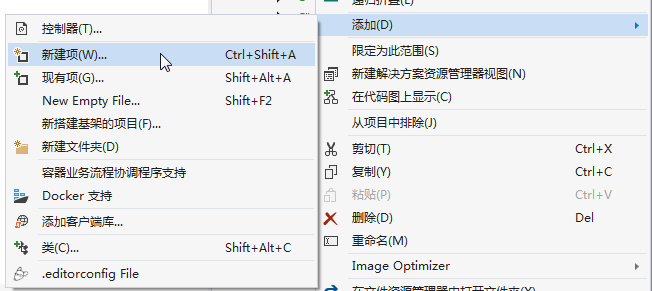
1. 在Visual Studio 2017的“解决方案资源管理器”中,右键单击在领域层“ABP.TPLMS.Web.Mvc”项目中的Controller目录。 选择“添加” > “新建项…”。如下图。
2. 在弹出对话框“添加新项-ABP.TPLMS.Web.Mvc”中选择“控制器类”,然后在名称输入框中输入“SupplierController”,然后点击“添加”按钮。如下图。

3.在SupplierController.cs文件中输入如下代码,通过构造函数注入对应用服务的依赖。
using System;

using System.Collections.Generic;

using System.Linq;

using System.Threading.Tasks;

using Abp.Application.Services.Dto;

using Abp.AspNetCore.Mvc.Authorization;

using Abp.Runtime.Validation;

using ABP.TPLMS.Controllers;

using ABP.TPLMS.Suppliers;

using ABP.TPLMS.Suppliers.Dto;

using ABP.TPLMS.Web.Models.Supplier;

using Microsoft.AspNetCore.Mvc;

using Microsoft.EntityFrameworkCore;

namespace ABP.TPLMS.Web.Controllers

{

    [AbpMvcAuthorize]

    public class SupplierController : TPLMSControllerBase

    {

        const int MaxNum= ;

        // GET: /<controller>/

        public async Task<IActionResult> Index()

        {

            var module = (await _supplierAppService.GetAll(new PagedSupplierResultRequestDto { MaxResultCount = MaxNum })).Items;
           // Paging not implemented yet

            SupplierDto cuModule = module.First();

            var model = new SupplierListViewModel

            {

                Supplier = cuModule,

                Suppliers=module

            };

            return View(model);

        }

        private readonly ISupplierAppService _supplierAppService;

        public SupplierController(ISupplierAppService supplierAppService)

        {

            _supplierAppService = supplierAppService;

        }

        public async Task<ActionResult> EditSupplierModal(int moduleId)

        {

            var module = await _supplierAppService.Get(new EntityDto<int>(moduleId));

            CreateUpdateSupplierDto cuSupplier = AutoMapper.Mapper.Map<CreateUpdateSupplierDto>(module);

            var model = new EditSupplierModalViewModel

            {

                Supplier = cuSupplier

            };

            return View("_EditSupplierModal", model);

        }

    }

}
abp(net core)+easyui+efcore实现仓储管理系统——使用 WEBAPI实现CURD (十二)的更多相关文章
- abp(net core)+easyui+efcore实现仓储管理系统——使用 WEBAPI实现CURD (十四)
abp(net core)+easyui+efcore实现仓储管理系统目录 abp(net core)+easyui+efcore实现仓储管理系统——ABP总体介绍(一) abp(net core)+ ...
- abp(net core)+easyui+efcore实现仓储管理系统——使用 WEBAPI实现CURD (十五)
core)+easyui+efcore实现仓储管理系统目录 abp(net core)+easyui+efcore实现仓储管理系统——ABP总体介绍(一) abp(net core)+easyui+e ...
- abp(net core)+easyui+efcore实现仓储管理系统——使用 WEBAPI实现CURD (十三)
abp(net core)+easyui+efcore实现仓储管理系统目录 abp(net core)+easyui+efcore实现仓储管理系统——ABP总体介绍(一) abp(net core)+ ...
- abp(net core)+easyui+efcore实现仓储管理系统——入库管理之六(四十二)
abp(net core)+easyui+efcore实现仓储管理系统目录 abp(net core)+easyui+efcore实现仓储管理系统——ABP总体介绍(一) abp(net core)+ ...
- abp(net core)+easyui+efcore实现仓储管理系统——出库管理之三(五十二)
abp(net core)+easyui+efcore实现仓储管理系统目录 abp(net core)+easyui+efcore实现仓储管理系统--ABP总体介绍(一) abp(net core)+ ...
- abp(net core)+easyui+efcore实现仓储管理系统——使用 WEBAPI实现CURD (十一)
abp(net core)+easyui+efcore实现仓储管理系统目录 abp(net core)+easyui+efcore实现仓储管理系统——ABP总体介绍(一) abp(net core)+ ...
- abp(net core)+easyui+efcore实现仓储管理系统——入库管理之四(四十)
abp(net core)+easyui+efcore实现仓储管理系统目录 abp(net core)+easyui+efcore实现仓储管理系统——ABP总体介绍(一) abp(net core)+ ...
- abp(net core)+easyui+efcore实现仓储管理系统——入库管理之八(四十四)
abp(net core)+easyui+efcore实现仓储管理系统目录 abp(net core)+easyui+efcore实现仓储管理系统——ABP总体介绍(一) abp(net core)+ ...
- abp(net core)+easyui+efcore实现仓储管理系统——出库管理之一(四十九)
abp(net core)+easyui+efcore实现仓储管理系统目录 abp(net core)+easyui+efcore实现仓储管理系统——ABP总体介绍(一) abp(net core)+ ...
随机推荐
- raft算法解析
一.raft算法引入 在寻找一种易于理解的一致性算法的研究(In Search of an Understandable Consensus Algorithm-extended version) 论 ...
- python面试题(二)字符串常用函数
今天在微信的公众号上看到了一遍python学习开发的文章,里面有一些python的面试题,碰巧最近python不知道学什么了,索性学一下这篇文章啊!!先写一下一些字符串的常用函数.(ps:本人太菜,若 ...
- [apue] 等待子进程的那些事儿
谈到等待子进程,首先想到的就是SIGCHLD信号与wait函数族,本文试图厘清二者的方方面面,以及组合使用时可能不小心掉进去的坑. 1. 首先谈单独使用SIGCHLD的场景.下面是一段典型的代码片段: ...
- sql语句一些简单的用法
- JAVA写入大文件DEMO
/** * 读取filePath的文件 * @param filePath 文件的路径 * @return List集合 文件中一行一行的数据 ...
- C# 中的委托和事件本质讲解
C# 中的委托和事件 文中代码在VS2005下通过,由于VS2003(.Net Framework 1.1)不支持隐式的委托变量,所以如果在一个接受委托类型的位置直接赋予方法名,在VS2003下会报错 ...
- Tensorflow教程(2)Tensorflow的常用函数介绍
1.tf.constant tf.constant用来定义一个常量,所谓常量,广义上讲就是“不变化的量”.我们先看下官方api是如何对constant函数来定义的: tf.constant( valu ...
- vue项目缓存最佳实践
需求 在开发vue的项目中有遇到了这样一个需求:一个视频列表页面,展示视频名称和是否收藏,点击进去某一项观看,可以收藏或者取消收藏,返回的时候需要记住列表页面的页码等状态,同时这条视频的收藏状态也需要 ...
- pdfminer获取每页的layout
#! python2 # coding: utf-8 import sys from pdfminer import pdfparser from pdfminer import pdfdocumen ...
- Java调用方法参数究竟是传值还是传址?
之前阅读<Head First Java>的时候,记得里面有提到过,Java在调用方法,传递参数的时候,采用的是pass-by-copy的方法,传递一份内容的拷贝,即传值.举一个最简单的例 ...