
Node: 开发命令行程序英文版 (Create Your Own CLI)
CLI, as an abbreviation of Command-line Interface, can receive user's input and give an immediate response in terminal.
In Node.js, globally installed packages have this kind of command line interface, taking 'http-server' as a brief example here:
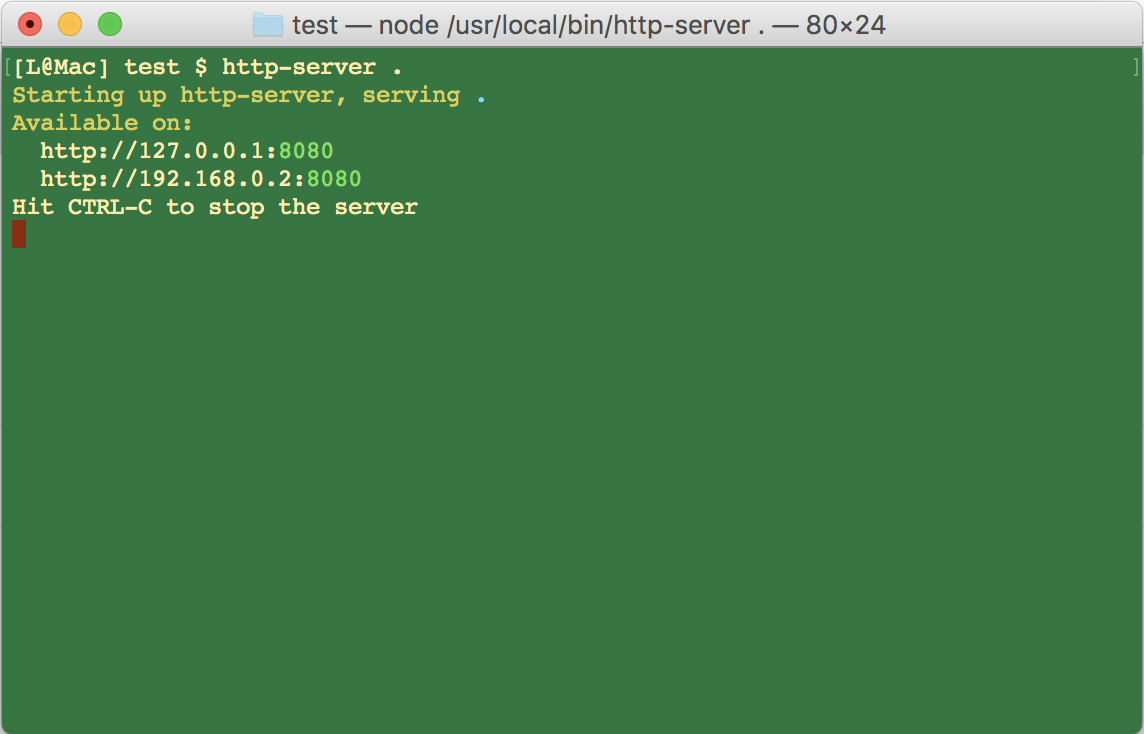
What if we wanna make one like that? Easy, create files below first:

After that, we will create a my-cli.js file in 'bin' folder:
#!/usr/bin/env node

console.log('hello my-cli');
Note that: The first line indicates it's an executable file in Node.js environment, and that's indispensable。
Also package.json config is a necessary step:
{

  "author": "Scott",

  "license": "MIT",

  "name": "my-cli",

  "version": "1.0.0",

  "description": "my-cli",

  "bin": {

    "my-cli": "bin/my-cli.js"

  },

  "preferGlobal": "true"

}
As above, we provide a 'bin' configuration which has global command 'my-cli' pointing to 'bin/my-cli.js', and the last property 'preferGlobal' states clearly it supports global installation.
Now we open a terminal and run the following command in 'my-cli' dev folder:
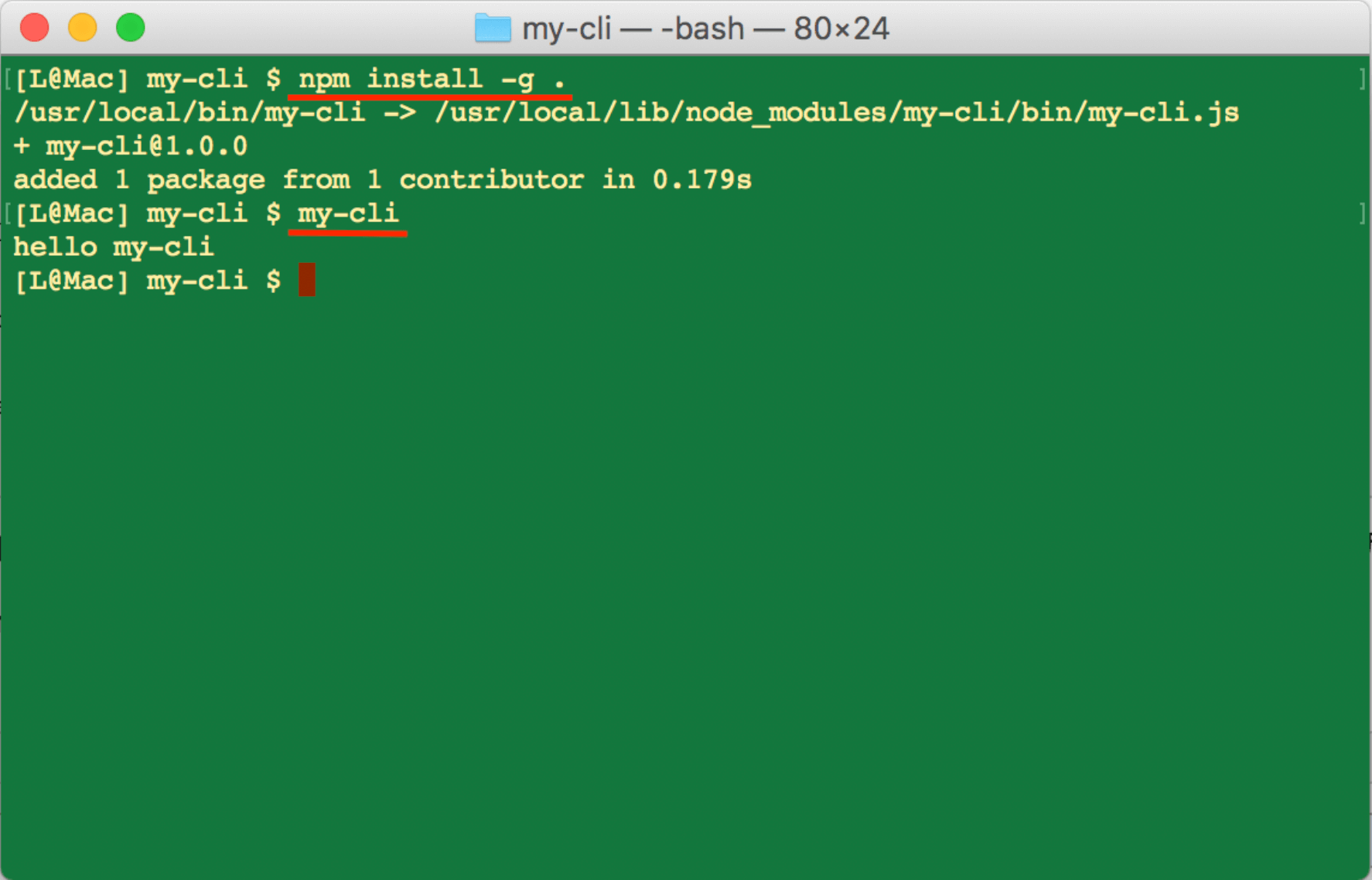
As picture shows, we can run 'my-cli' command globally after installing our package via 'npm install -g .', magic happens!
Now we already complete a simple CLI program, but is it short of something? Em..., maybe we can add interactions for command line, and also, make it support two usage: global execution and normal import.
After a slight improvement on file structure:
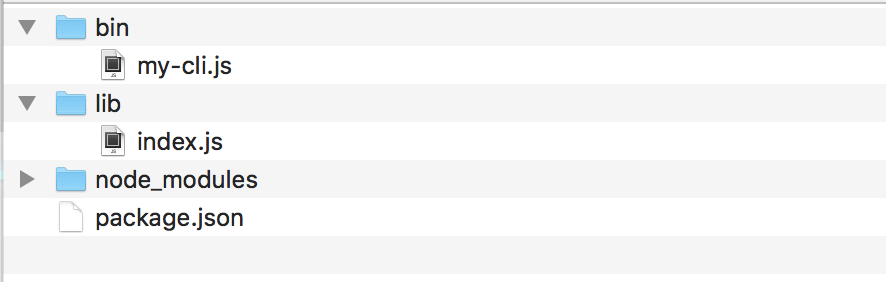
As we see, a 'lib' folder was created for some logic files, a demo code shows below:
let chalk = require('chalk');

let sayHello = name => {

  // special fonts by 'chalk' lib

  return chalk.bold('Hello, ') + chalk.bold.bgRed(name);

};

exports.sayHello = sayHello;
We defined a 'sayHello' function and return a greeting word by passing the name, we also use the 'chalk' lib for special fonts in terminal.
Now let's have a glance at 'bin/my-cli.js':
#!/usr/bin/env node

let readline = require('readline');

let lib = require('../lib/index.js');

// interaction

let interface = readline.createInterface({

  input: process.stdin,

  output: process.stdout

});

// question and answer

interface.question('What is your name? ', answer => {

  let greeting = lib.sayHello(answer);

  console.log(greeting);

  interface.close();

});
'readline' module is an encapsulation on stdin and stdout, used to prompt and receive user's input.
And last, some modifications should be done in package.json:
{

  "author": "Scott",

  "license": "MIT",

  "name": "my-cli",

  "version": "1.0.0",

  "description": "my-cli",

  "bin": {

    "my-cli": "bin/my-cli.js"

  },

  "main": "lib/index.js",

  "preferGlobal": "true",

  "dependencies": {

    "chalk": "^1.1.3"

  }

}
In addition to add 'bin' config, we also have the 'main' property, it's for the import in other lib, we will introduce it later.
Now we run 'npm install -g .' again to install globally, and open a new terminal:
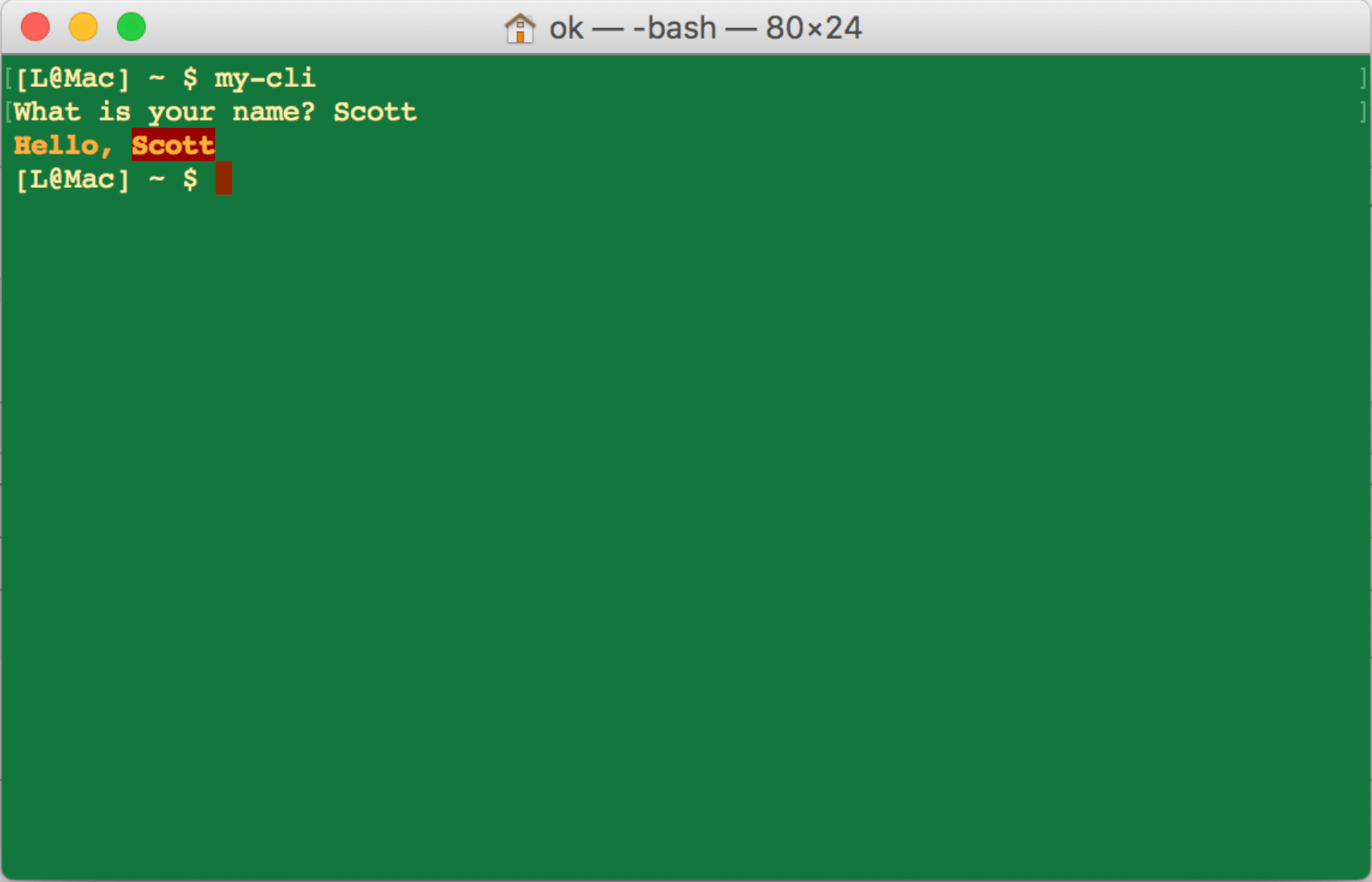
As the image shows, our program received command arguments and printed the right result.
We mentioned above, our program can be a common package imported in other libs, now we create a test folder to show the demo:

This directory is simple, only includes a test.js and node_modules folder, and in node_modules it consists of my-cli folder:
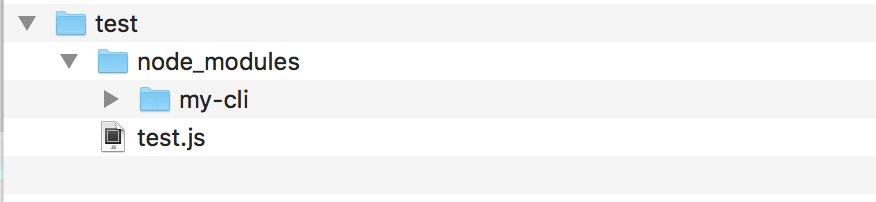
Now we just take a look at the test.js:
let cli = require('my-cli');

let greeting = cli.sayHello('Jack');

console.log(greeting);
And then we run this file in terminal, and result as below:
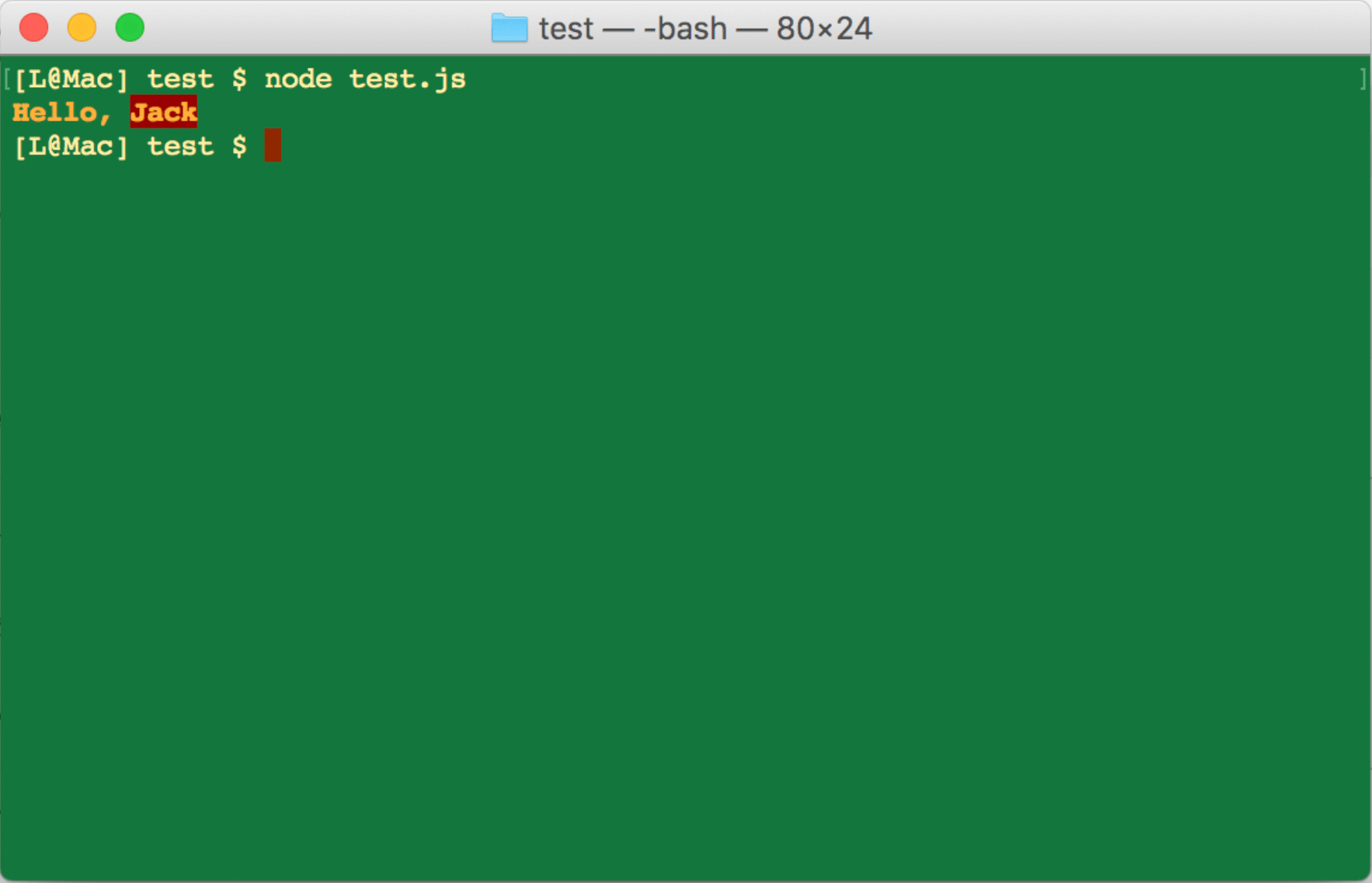
At last, we can publish this package to npm repository, for this step, you may refer to the official docs.
Reference:
https://bretkikehara.wordpress.com/2013/05/02/nodejs-creating-your-first-global-module
https://nodejs.org/api/readline.html
Node: 开发命令行程序英文版 (Create Your Own CLI)的更多相关文章
- Node: 开发命令行程序
CLI 的全称是 Command-line Interface (命令行界面),即在命令行接受用户的键盘输入并作出响应和执行的程序. 在 Node.js 中,全局安装的包一般都具有命令行界面的功能,例 ...
- Node.js 命令行程序开发教程
nodejs开发命令行程序非常方便,具体操作方式查看下面几篇文章 http://www.ruanyifeng.com/blog/2015/05/command-line-with-node.html ...
- Node.js 命令行程序开发资料
Node.js 命令行程序开发教程http://www.ruanyifeng.com/blog/2015/05/command-line-with-node.html用Node.js创建命令行工具ht ...
- Node.js 命令行程序开发教程 ---------http://www.ruanyifeng.com/blog/2015/05/command-line-with-node.html
五.yargs 模块 shelljs 只解决了如何调用 shell 命令,而 yargs 模块能够解决如何处理命令行参数.它也需要安装. $ npm install --save yargs yarg ...
- 2019-11-29-dotnet-使用-System.CommandLine-写命令行程序
title author date CreateTime categories dotnet 使用 System.CommandLine 写命令行程序 lindexi 2019-11-29 08:33 ...
- 2019-8-31-dotnet-使用-System.CommandLine-写命令行程序
title author date CreateTime categories dotnet 使用 System.CommandLine 写命令行程序 lindexi 2019-08-31 16:55 ...
- dotnet 使用 System.CommandLine 写命令行程序
在写命令行程序的时候,会遇到命令行解析的问题,以及参数的使用和规范化等坑.现在社区开源了命令行项目,可以帮助小伙伴快速开发命令行程序,支持自动的命令行解析和规范的参数 我写过一篇关于命令行解析的博客C ...
- 如何用node编写命令行工具,附上一个ginit示例,并推荐好用的命令行工具
原文 手把手教你写一个 Node.js CLI 强大的 Node.js 除了能写传统的 Web 应用,其实还有更广泛的用途.微服务.REST API.各种工具……甚至还能开发物联网和桌面应用.Java ...
- 如何用Node编写命令行工具
0. 命令行工具 当全局安装模块之后,我们可以在控制台下执行指定的命令来运行操作,如果npm一样.我把这样的模块称之为命令行工具模块(如理解有偏颇,欢迎指正) 1.用Node编写命令行工具 在Node ...
随机推荐
- 解决bootstrap-table表头filter-control select控件被遮挡显示不全的问题
[本文出自天外归云的博客园] 在使用bootstrap-table的extension——filter-control时(对应表格的data-filter-control="true&quo ...
- EasyNVR摄像机网页无插件直播方案H5前端构建之:如何区分PC端和移动端
背景分析 随着互联网基础设施建设的不断完善和发展,带宽的不断提速,尤其是光纤入户,4G/5G/NB-IoT各种网络技术的大规模商用,视频随时随地可看.可控的诉求越来越多,尤其是移动应用技术和前端技术的 ...
- GPRS 智能门禁控制器
本模块居于GPRS 2G网络,信号覆盖广,而且好. 主要用于微信门禁等,提供用户服务端搭建及相关接口. 您可以向门禁发送开门信号,并提醒开门成功的信号反馈. 同时支持发送开门ID号,并反馈成功ID号
- IBM X3650 M4 M5 设置服务器用UEFI模式启动支持磁盘GPT分区
1 系统启动 2 按 F1 3 进入BIOS 4 进入 System Configuration 5 找到 Boot Manager 6 找到Boot Modes 7 进入Boot Modes, 找到 ...
- CSP2019初赛游记
没想到居然ak了,就纪念一下吧. 这次的联赛,只能说是高三生活的一缕杂音了吧. 这次,我的心态可以说是非常平稳了.毕竟不再会有竞赛生涯的压力,也不会有患得患失的惶恐.不过也许我开考前的放声唱歌惊扰了一 ...
- spark笔记 环境配置
spark笔记 spark简介 saprk 有六个核心组件: SparkCore.SparkSQL.SparkStreaming.StructedStreaming.MLlib,Graphx Spar ...
- Linux系统下的SSH 使用总结
对于linux运维工作者而言,使用ssh远程远程服务器是再熟悉不过的了!对于ssh的一些严格设置也关系到服务器的安全维护,今天在此,就本人工作中使用ssh的经验而言,做一些总结记录来下. -bash: ...
- CentOS 7 编译安装clang+llvm
天在CentOS上将最新版本的LLVM套件(LLVM,Clang和Libc++)编译安装好了,中间遇到了不少问题.虽然已经有很多博客介绍如何编译安装LLVM了,但是根据我自己亲身体验的情况来看,还是有 ...
- RSA非对称式加解密笔记
1.服务器生成[公钥]和[私钥],成对生成: 2.客户端生成证书信息,使用[公钥]进行加密,前提是有公钥,并生成证书信息: 3.客户端发送自身的计算机名.MAC.用户名.证书内容给服务器: 4.服务器 ...
- 微信JS从1.0.0升级到1.1.2的一个坑
因为1.0.0不支持电脑端日期Picker滚动,升级成了1.1.2,结果发现日期选择不起作用了经过跟踪发现 通过控制台查看 resut[1].toString()居然是number类型,修改代码为() ...