
转 oracle 正则表达式和查询最大文件号 SQL
###sample 1
https://www.cnblogs.com/lxl57610/p/8227599.html
Oracle使用正则表达式离不开这4个函数:
1。regexp_like
2。regexp_substr
3。regexp_instr
4。regexp_replace
看函数名称大概就能猜到有什么用了。
regexp_like 只能用于条件表达式,和 like 类似,但是使用的正则表达式进行匹配,语法很简单:

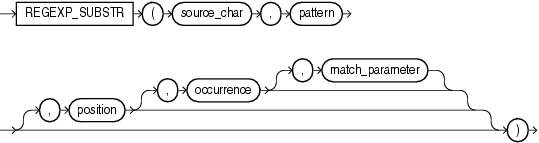
regexp_substr 函数,和 substr 类似,用于拾取合符正则表达式描述的字符子串,语法如下:
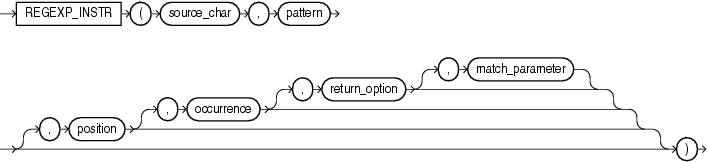
 regexp_instr 函数,和 instr 类似,用于标定符合正则表达式的字符子串的开始位置,语法如下:
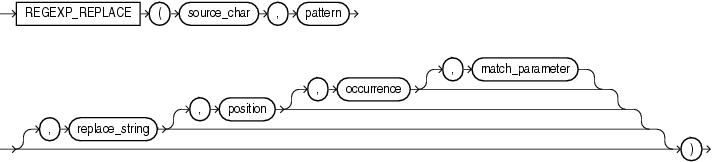
regexp_replace 函数,和 replace 类似,用于替换符合正则表达式的字符串,语法如下:
这里解析一下几个参数的含义:
1。source_char,输入的字符串,可以是列名或者字符串常量、变量。搜索字符串。可以是任意的数据类型char,VARCHAR2,nchar,CLOB,NCLOB类型
2。pattern,正则表达式。
3。match_parameter,匹配选项。
取值范围: i:大小写不敏感; c:大小写敏感;n:点号 . 不匹配换行符号;m:多行模式;x:扩展模式,忽略正则表达式中的空白字符。
4。position,标识从第几个字符开始正则表达式匹配。可选。搜索在字符串中的开始位置。如果省略,默认为1,这是第一个位置的字符串。
5。occurrence,标识第几个匹配组。可选。它是模式字符串中的第n个匹配位置。如果省略,默认为1。
6。replace_string,替换的字符串。
| 值 | 描述 |
| ^ | 匹配一个字符串的开始。如果与“m” 的match_parameter一起使用,则匹配表达式中任何位置的行的开头。 |
| $ | 匹配字符串的结尾。如果与“m” 的match_parameter一起使用,则匹配表达式中任何位置的行的末尾。 |
| * | 匹配零个或多个。 |
| + | 匹配一个或多个出现。 |
| ? | 匹配零次或一次出现。 |
| 。 | 匹配任何字符,除了空。 |
| | | 用“OR”来指定多个选项。 |
| [] | 用于指定一个匹配列表,您尝试匹配列表中的任何一个字符。 |
| [^] | 用于指定一个不匹配的列表,您尝试匹配除列表中的字符以外的任何字符。 |
| () | 用于将表达式分组为一个子表达式。 |
| {M} | 匹配m次。 |
| {M,} | 至少匹配m次。 |
| {M,N} | 至少匹配m次,但不多于n次。 |
| \ n | n是1到9之间的数字。在遇到\ n之前匹配在()内找到的第n个子表达式。 |
| [..] | 匹配一个可以多于一个字符的整理元素。 |
| [:] | 匹配字符类。 |
| [==] | 匹配等价类。 |
| \ d | 匹配一个数字字符。 |
| \ D | 匹配一个非数字字符。 |
| \ w | 匹配包括下划线的任何单词字符。 |
| \ W | 匹配任何非单词字符。 |
| \ s | 匹配任何空白字符,包括空格,制表符,换页符等等。 |
| \ S | 匹配任何非空白字符。 |
| \A | 在换行符之前匹配字符串的开头或匹配字符串的末尾。 |
| \Z | 匹配字符串的末尾。 |
| *? | 匹配前面的模式零次或多次发生。 |
| +? | 匹配前面的模式一个或多个事件。 |
| ?? | 匹配前面的模式零次或一次出现。 |
| {N}? | 匹配前面的模式n次。 |
| {N,}? | 匹配前面的模式至少n次。 |
| {N,M}? | 匹配前面的模式至少n次,但不超过m次。 |
说了一堆文绉绉的,现在开始实例演练了,在此之前先建好一个表。

create table tmp as

with data as (

  select 'like' as id ,'a9999' as str from dual union all

  select 'like'       ,'a9c'          from dual union all

  select 'like'       ,'A7007'        from dual union all

  select 'like'       ,'123a34cc'     from dual union all

  select 'substr'     ,'123,234,345'  from dual union all

  select 'substr'     ,'12,34.56:78'  from dual union all

  select 'substr'     ,'123456789'    from dual union all

  select 'instr'      ,'192.168.0.1'  from dual union all

  select 'replace'    ,'(020)12345678' from dual union all

  select 'replace'    ,'001517729C28' from dual

)

select * from data ;

select * from tmp ;

ID      STR

------- -------------

like    a9999

like    a9c

like    A7007

like    123a34cc

substr  123,234,345

substr  12,34.56:78

substr  123456789

instr   192.168.0.1

replace (020)12345678

replace 001517729C28
regexp_like 例子:
select str from tmp where id='like' and regexp_like(str,'A\d+','i'); -- 'i' 忽略大小写

STR

-------------

a9999

a9c

A7007

123a34cc

select str from tmp where id='like' and regexp_like(str, 'a\d+');

STR

-------------

a9999

a9c

123a34cc

select str from tmp where id='like' and regexp_like(str,'^a\d+');

STR

-------------

a9999

a9c

select str from tmp where id='like' and regexp_like(str,'^a\d+$');

STR

-------------

a9999
##sample 说明:第一列来源,第二列 匹配模式 ,第三列 哪个位置 ,第四类 第几个匹配组
regexp_substr 例子:
col str format a15;

select

  str,

  regexp_substr(str,'[^,]+')     str,

  regexp_substr(str,'[^,]+',1,1) str,

  regexp_substr(str,'[^,]+',1,2) str,  -- occurrence 第几个匹配组

  regexp_substr(str,'[^,]+',2,1) str   -- position 从第几个字符开始匹配

from tmp

where id='substr';

STR             STR             STR             STR             STR

--------------- --------------- --------------- --------------- ---------------

123,234,345     123             123             234             23

12,34.56:78     12              12              34.56:78        2

123456789       123456789       123456789                       23456789

select

  str,

  regexp_substr(str,'\d')        str,

  regexp_substr(str,'\d+'  ,1,1) str,

  regexp_substr(str,'\d{2}',1,2) str,

  regexp_substr(str,'\d{3}',2,1) str

from tmp

where id='substr';

STR             STR             STR             STR             STR

--------------- --------------- --------------- --------------- ---------------

123,234,345     1               123             23              234

12,34.56:78     1               12              34

123456789       1               123456789       34              234

select regexp_substr('123456789','\d',1,level) str  --取出每位数字,有时这也是行转列的方式

from dual

connect by level<=9

STR

---------------

1

2

3

4

5

6

7

8

9
regex_instr 例子:
col ind format 9999;

select

  str,

  regexp_instr(str,'\.'    ) ind ,

  regexp_instr(str,'\.',1,2) ind ,

  regexp_instr(str,'\.',5,2) ind

from tmp where id='instr';

STR               IND   IND   IND

--------------- ----- ----- -----

192.168.0.1         4     8    10

select

  regexp_instr('192.168.0.1','\.',1,level) ind ,  -- 点号. 所在的位置

  regexp_instr('192.168.0.1','\d',1,level) ind    -- 每个数字的位置

from dual

connect by level <=  9

  IND   IND

----- -----

    4     1

    8     2

   10     3

    0     5

    0     6

    0     7

    0     9

    0    11

    0     0
regex_replace 例子:
select

  str,

  regexp_replace(str,'020','GZ') str,

  regexp_replace(str,'(\d{3})(\d{3})','<\2\1>') str -- 将第一、第二捕获组交换位置,用尖括号标识出来

from tmp

where id='replace';

STR             STR             STR

--------------- --------------- ---------------

(020)12345678   (GZ)12345678    (020)<456123>78

001517729C28    001517729C28    <517001>729C28
综合应用的例子:
col row_line format a30;

with sudoku as (

  select '020000080568179234090000010030040050040205090070080040050000060289634175010000020' as line

  from dual

),

tmp as (

  select regexp_substr(line,'\d{9}',1,level) row_line,

  level col

  from sudoku

  connect by level<=9

)

select regexp_replace( row_line ,'(\d)(\d)(\d)(\d)(\d)(\d)(\d)(\d)(\d)','\1 \2 \3 \4 \5 \6 \7 \8 \9') row_line

from tmp

ROW_LINE

------------------------------

0 2 0 0 0 0 0 8 0

5 6 8 1 7 9 2 3 4

0 9 0 0 0 0 0 1 0

0 3 0 0 4 0 0 5 0

0 4 0 2 0 5 0 9 0

0 7 0 0 8 0 0 4 0

0 5 0 0 0 0 0 6 0

2 8 9 6 3 4 1 7 5

0 1 0 0 0 0 0 2 0
##sample 2
##sample 说明:第一列来源,第二列 匹配模式 ,第三列 哪个位置 ,第四类 第几个匹配组
##meet the issue usera99.dbf> usera100.dbf, so change to sql from
select max(FILE_NAME) "max",TABLESPACE_NAME from dba_data_files group by TABLESPACE_NAME;
##to new sql
select b.file_name max,b.tablespace_name
from (select max(to_number(regexp_substr(FILE_NAME, '\d+', 1, 1))) num,
tablespace_name
from dba_data_files
group by tablespace_name) a,
dba_data_files b
where a.tablespace_name = b.tablespace_name
and b.file_name like '%'||a.num||'%';
or
select b.file_name max,b.tablespace_name,a.num
from (select max(to_number(replace(regexp_substr(file_name,'\d+[.]',1,1),'.','') )) num,
tablespace_name
from dba_data_files
group by tablespace_name) a,
dba_data_files b
where a.tablespace_name = b.tablespace_name
and b.tablespace_name='B1'
and b.file_name like '%'||a.num||'%';
转 oracle 正则表达式和查询最大文件号 SQL的更多相关文章
- Oracle EBS-SQL (OM-1):查询订单发货明细.sql
select mtrh.request_number 发货单号, mmt.transaction_date 发货时间, ...
- Oracle EBS中查询Profile的各种SQL【转载】
1.List E-Business Suite Profile Option Values For All Levels SELECT p.profile_option_name SHORT_NAME ...
- 【转】Oracle EBS中查询Profile的各种SQL
参考 http://blog.csdn.net/pan_tian/article/details/7652968#t0 Using API FND_PROFILE.save to update pro ...
- oracle的分页查询,mabatis的sql配置
<select id="getCardcaseByPage" resultType="Cardcase" > select * from ( sel ...
- 【oracle查询】oracle查询字段显示#号 (井号)
客户反映字段查询为井号,我自己没有遇到这种情况,于是上网百度了一下. 下面的答案很好地解决了问题,哈哈哈.
- oracle系统表查询
oracle查询用户下的所有表 select * from all_tab_comments -- 查询所有用户的表,视图等select * from user_tab_comments -- 查询本 ...
- Oracle正则表达式函数:regexp_like、regexp_substr、regexp_instr、regexp_replace
Oracle正则表达式函数:regexp_like.regexp_substr.regexp_instr.regexp_replace --去掉所有特殊字符,只剩字母 SELECT REGEXP ...
- 数据字典 dba_free_space及相对文件号RELATIVE_FNO 小结
1.1 dba_free_space 1.1.1 概述 SQL> desc dba_free_space; Name Type Nullable Default Comments ------- ...
- Oracle 特殊字符模糊查询的方法
最近在写DAO层的时候,遇到一个问题,就是使用like进行模糊查询时,输入下划线,无法精确查到数据,而是返回所有的数据. 这让我很好奇,百度之后才发现,原来是因为有些特殊字符需要进行转义才可以进行查询 ...
随机推荐
- 小型SSM项目出现Failed to load ApplicationContext错误的解决方法(个人向)
使用单元测试的时候,出现了Failed to load ApplicationContext错误,在添加了一个新的Mapper.xml文件才出现的,在保证其他配置文件没有出错的情况下,检查mapper ...
- 纯数据结构Java实现(9/11)(AVL)
欢迎访问我的自建博客: CH-YK Blog.
- 项目Beta冲刺(团队)--6/7
课程名称:软件工程1916|W(福州大学) 作业要求:项目Beta冲刺 团队名称:葫芦娃队 作业目标:进行新一轮的项目冲刺,尽力完成并完善项目 团队博客 队员学号 队员昵称 博客地址 04160242 ...
- 前端重定向,index.html文件被浏览器缓存,导致整个应用都是旧的
解决方法:https://github.com/ant-design/ant-design-pro/issues/1365#issuecomment-384496088
- 表之间的数据匹配(Oracle)
来源表1: 来源表2: 生成一个交叉表: sql: select t.course_name,max(case when t.month='200706' then 'o' else '*' end) ...
- URI和URL的区别(转)
1说明: 这段时间写android的时候用到了URL和URI,有点分不清楚,于是做了一个系统性的学习.在这里将自己的学习笔记粘贴出来,希望对大家有帮助. 1)Java类库里有两个对应的类java.ne ...
- "<<"和“>>”运算
- vo bo po dao pojo dto
Recommended for you: Get network issues from WhatsUp Gold. Not end users. DAO: Data access object d ...
- 洛谷 P2577 [ZJOI2005]午餐 题解
每日一题 day56 打卡 Analysis 算法:贪心+dp 容易想到贪心:吃饭慢的先打饭节约时间, 所以先将人按吃饭时间从大到小排序. 然后就是dp了: 首先,应该想到f[i][j][k]:前i个 ...
- 文本编辑器vim——三种模式、显示行号、插入命令、行快速定位、行内定位
1.vim的三种工作模式: (1)利用vim命令新建文件: 点击entre键执行命令后,开始向文本中输入想要写入的内容: (2)命令行模式(ESC): 不管用户处于何种模式,只要单击Esc键,即可进入 ...