
一步一步学Silverlight 2系列(12):数据与通信之WebClient
概述
Silverlight 2 Beta 1版本发布了,无论从Runtime还是Tools都给我们带来了很多的惊喜,如支持框架语言Visual Basic, Visual C#, IronRuby, Ironpython,对JSON、Web Service、WCF以及Sockets的支持等一系列新的特性。《一步一步学Silverlight 2系列》文章带您快速进入Silverlight 2开发。
本文将介绍如何在Silverlight 2中使用Web Client进行通信。
简单示例
编写一个简单的示例,在该示例中,选择一本书籍之后,我们通过Web Client去查询书籍的价格,并显示出来,最终的效果如下:
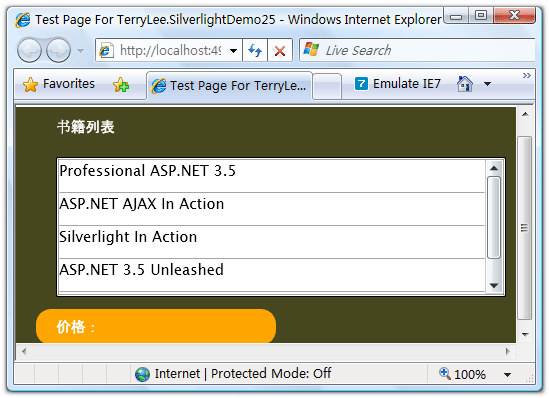
编写界面布局,XAML如下:
<Grid Background="#46461F">

    <Grid.RowDefinitions>

        <RowDefinition Height="40"></RowDefinition>

        <RowDefinition Height="*"></RowDefinition>

        <RowDefinition Height="40"></RowDefinition>

    </Grid.RowDefinitions>

    <Grid.ColumnDefinitions>

        <ColumnDefinition></ColumnDefinition>

    </Grid.ColumnDefinitions>

    <Border Grid.Row="0" Grid.Column="0" CornerRadius="15"

            Width="240" Height="36"

            Margin="20 0 0 0" HorizontalAlignment="Left">

        <TextBlock Text="书籍列表" Foreground="White"

                   HorizontalAlignment="Left" VerticalAlignment="Center"

                   Margin="20 0 0 0"></TextBlock>

    </Border>

    <ListBox x:Name="Books" Grid.Row="1" Margin="40 10 10 10"

             SelectionChanged="Books_SelectionChanged">

        <ListBox.ItemTemplate>

            <DataTemplate>

                <StackPanel>

                    <TextBlock Text="{Binding Name}" Height="32"></TextBlock>

                </StackPanel>

            </DataTemplate>

        </ListBox.ItemTemplate>

    </ListBox>

    <Border Grid.Row="2" Grid.Column="0" CornerRadius="15"

            Width="240" Height="36" Background="Orange"

            Margin="20 0 0 0" HorizontalAlignment="Left">

        <TextBlock x:Name="lblPrice" Text="价格:" Foreground="White"

                   HorizontalAlignment="Left" VerticalAlignment="Center"

                   Margin="20 0 0 0"></TextBlock>

    </Border>

</Grid>
为了模拟查询价格,我们编写一个HttpHandler,接收书籍的No,并返回价格:
public class BookHandler : IHttpHandler

{

    public static readonly string[] PriceList = new string[] {

        "66.00",

        "78.30",

        "56.50",

        "28.80",

        "77.00"

    };

    public void ProcessRequest(HttpContext context)

    {

        context.Response.ContentType = "text/plain";

        context.Response.Write(PriceList[Int32.Parse(context.Request.QueryString["No"])]);

    }

    public bool IsReusable

    {

        get

        {

            return false;

        }

    }

}
在界面加载时绑定书籍列表,关于数据绑定可以参考一步一步学Silverlight 2系列(11):数据绑定。
void UserControl_Loaded(object sender, RoutedEventArgs e)

{

    List<Book> books = new List<Book>() {

        new Book("Professional ASP.NET 3.5"),

        new Book("ASP.NET AJAX In Action"),

        new Book("Silverlight In Action"),

        new Book("ASP.NET 3.5 Unleashed"),

        new Book("Introducing Microsoft ASP.NET AJAX")

    };

    Books.ItemsSource = books;

}
接下来当用户选择一本书籍时,需要通过Web Client去获取书籍的价格,在Silverlight 2中,所有的网络通信API都设计为了异步模式。在声明一个Web Client实例后,我们需要为它注册DownloadStringCompleted事件处理方法,在下载完成后将会被回调,然后再调用DownloadStringAsync方法开始下载。
void Books_SelectionChanged(object sender, SelectionChangedEventArgs e)

{

    Uri endpoint = new Uri(String.Format("http://localhost:49955/BookHandler.ashx?No={0}",Books.SelectedIndex));

    WebClient client = new WebClient();

    client.DownloadStringCompleted += new DownloadStringCompletedEventHandler(client_DownloadStringCompleted);

    client.DownloadStringAsync(endpoint);

}

void client_DownloadStringCompleted(object sender, DownloadStringCompletedEventArgs e)

{

    if (e.Error == null)

    {

        lblPrice.Text = "价格:" + e.Result;

    }

    else

    {

        lblPrice.Text = e.Error.Message;

    }

}
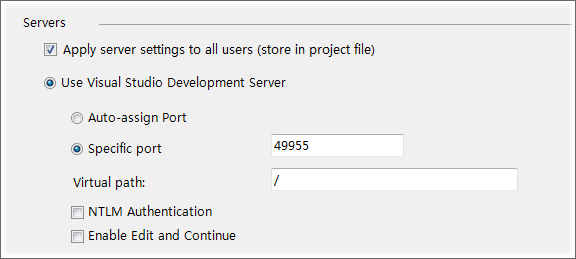
注意大家可以在Web Application Project的属性页中,把ASP.NET Development Server的端口号设置为一个固定的端口号:
最后完整的代码如下:
public partial class Page : UserControl

{

    public Page()

    {

        InitializeComponent();

    }

    void UserControl_Loaded(object sender, RoutedEventArgs e)

    {

        List<Book> books = new List<Book>() {

            new Book("Professional ASP.NET 3.5"),

            new Book("ASP.NET AJAX In Action"),

            new Book("Silverlight In Action"),

            new Book("ASP.NET 3.5 Unleashed"),

            new Book("Introducing Microsoft ASP.NET AJAX")

        };

        Books.ItemsSource = books;

    }

    void Books_SelectionChanged(object sender, SelectionChangedEventArgs e)

    {

        Uri endpoint = new Uri(String.Format("http://localhost:49955/BookHandler.ashx?No={0}",Books.SelectedIndex));

        WebClient client = new WebClient();

        client.DownloadStringCompleted += new DownloadStringCompletedEventHandler(client_DownloadStringCompleted);

        client.DownloadStringAsync(endpoint);

    }

    void client_DownloadStringCompleted(object sender, DownloadStringCompletedEventArgs e)

    {

        if (e.Error == null)

        {

            lblPrice.Text = "价格:" + e.Result;

        }

        else

        {

            lblPrice.Text = e.Error.Message;

        }

    }

}
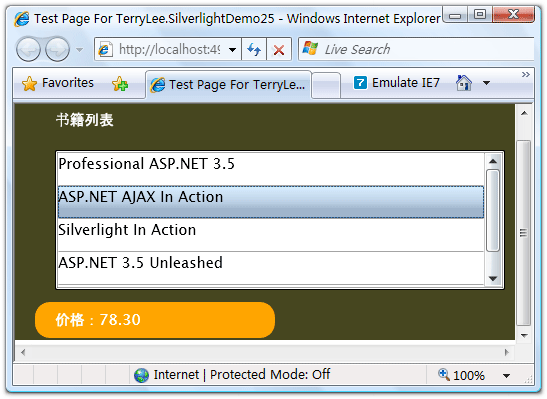
运行后效果如下:
当我们选择其中一本书籍时,将会显示出它的价格:
结束语
本文简单介绍了Silverlight 2中使用Web Client进行通信的知识,在Silverlight 2中,提供的通信API非常丰富,后面将会介绍其他的方式。你可以从这里下载本文示例代码。
出处:http://terrylee.cnblogs.com
本文版权归作者和博客园共有,欢迎转载,但未经作者同意必须保留此段声明,且在文章页面明显位置给出原文连接,否则保留追究法律责任的权利。
一步一步学Silverlight 2系列(12):数据与通信之WebClient的更多相关文章
- 一步一步学Silverlight 2系列文章
概述 由TerryLee编写的<Silverlight 2完美征程>一书,已经上市,在该系列文章的基础上补充了大量的内容,敬请关注.官方网站:http://www.dotneteye.cn ...
- 一步一步学Silverlight 2系列(32):图形图像综合实例—“功夫之王”剧照播放
概述 Silverlight 2 Beta 1版本发布了,无论从Runtime还是Tools都给我们带来了很多的惊喜,如支持框架语言Visual Basic, Visual C#, IronRuby, ...
- 一步一步学Silverlight 2系列(31):图形图像综合实例—实现水中倒影效果
概述 Silverlight 2 Beta 1版本发布了,无论从Runtime还是Tools都给我们带来了很多的惊喜,如支持框架语言Visual Basic, Visual C#, IronRuby, ...
- 一步一步学Silverlight 2系列(30):使用Transform实现更炫的效果(下)
概述 Silverlight 2 Beta 1版本发布了,无论从Runtime还是Tools都给我们带来了很多的惊喜,如支持框架语言Visual Basic, Visual C#, IronRuby, ...
- 一步一步学Silverlight 2系列(29):使用Transform实现更炫的效果(上)
概述 Silverlight 2 Beta 1版本发布了,无论从Runtime还是Tools都给我们带来了很多的惊喜,如支持框架语言Visual Basic, Visual C#, IronRuby, ...
- 一步一步学Silverlight 2系列(28):图片处理
概述 Silverlight 2 Beta 1版本发布了,无论从Runtime还是Tools都给我们带来了很多的惊喜,如支持框架语言Visual Basic, Visual C#, IronRuby, ...
- 一步一步学Silverlight 2系列(27):使用Brush进行填充
概述 Silverlight 2 Beta 1版本发布了,无论从Runtime还是Tools都给我们带来了很多的惊喜,如支持框架语言Visual Basic, Visual C#, IronRuby, ...
- 一步一步学Silverlight 2系列(26):基本图形
概述 Silverlight 2 Beta 1版本发布了,无论从Runtime还是Tools都给我们带来了很多的惊喜,如支持框架语言Visual Basic, Visual C#, IronRuby, ...
- 一步一步学Silverlight 2系列(25):综合实例之Live Search
概述 Silverlight 2 Beta 1版本发布了,无论从Runtime还是Tools都给我们带来了很多的惊喜,如支持框架语言Visual Basic, Visual C#, IronRuby, ...
- 一步一步学Silverlight 2系列(24):与浏览器交互相关辅助方法
概述 Silverlight 2 Beta 1版本发布了,无论从Runtime还是Tools都给我们带来了很多的惊喜,如支持框架语言Visual Basic, Visual C#, IronRuby, ...
随机推荐
- laravel 查询构造器
//查询构造器public function query(){ $bool = DB::table('student')->insert([ ['name' => '王五', 'age' ...
- 自定义table样式
.tableWrap { width: 100%; border-collapse:collapse; border-top:1px solid #e9e9e9; border-left:1px so ...
- LCD1602和LCD12864
1602 字符型(字符型的模组) 只能显示数字与字符,不可以显示汉字 12864 点阵型(图形型的模组) 可根据需求任意显示字符 数字 汉字 图形 1602 为16字乘2行12864 为128列点阵乘 ...
- MongoDB学习day10--Mongoose的populate实现关联查询
一.Mongoose populate官方文档 https://mongoosejs.com/docs/populate.html 二.Mongoose populate关联查询 1.定义ref va ...
- 【spring data jpa】报错如下:Caused by: javax.persistence.EntityNotFoundException: Unable to find com.rollong.chinatower.server.persistence.entity.staff.Department with id 0
报错如下: org.springframework.orm.jpa.JpaObjectRetrievalFailureException: Unable to find com.rollong.chi ...
- 【转载】云计算的三种服务模式:IaaS,PaaS和SaaS
一张图就看懂了.其他的都不用说了. 原文:http://blog.csdn.net/hjxgood/article/details/18363789
- BUPT复试专题—科学计算器(2009)
题目描述 给你一个不带括号的表达式,这个表达式只包含加.减.乘.除,请求出这个表 达式的最后结果,最后结果一定是整数: 输入 一个数学表达式,只包括数字,数字保证是非负整数,以及五种运算符 " ...
- BUPT 2012复试机考 3T
97. 二叉排序树 时间限制 1000 ms 内存限制 65536 KB 题目描述 二叉排序树,也称为二叉查找树.可以是一颗空树,也可以是一颗具有如下特性的非空二叉树: 若左子树非空,则左子树上所有节 ...
- jmeter - DBC Request之Query Type
工作中遇到这样一个问题: 需要准备10W条测试数据,利用jmeter中的JDBC Request向数据库中批量插入这些数据(只要主键不重复就可以,利用函数助手中的Random将主键的ID末尾五位数随机 ...
- HBase技术简介
一.HBase简介 HBase – Hadoop Database,是一个高可靠性.高性能.面向列.可伸缩的分布式存储系统,利用HBase技术可在廉价PC Server上搭建起大规模结构化存储集群. ...