
Django-报错解决方法
无法使用Django新建项目:'django-admin.py’不是内部或外部命令
找到site-packages/django/bin(如 D:\Program Files\Anaconda3\Lib\site-packages\django\bin),把这个路径加入系统环境变量中。
error: unrecognized arguments: getall
原因:django版本和代码里的requirements.txt要求的不符
解决:重装django制定版本的代码
要用 pip 安装指定版本的 Python 包,只需通过 == 操作符 指定

pip install robotframework==2.8.7

将安装robotframework 2.8.7 版本。
‘WSGIRequest’ object has no attribute ‘user’
这是Django版本的问题,
1.9之前,中间件的key为MIDDLEWARE_CLASSES,
1.9之后,为MIDDLEWARE。
所以在开发环境和其他环境的版本不一致时,要特别小心,会有坑。需要在settings里面把MIDDLEWARE改为MIDDLEWARE_CLASSES 即可
TypeError at / ‘bool’ object is not callable
使用 Django自带的 auth 用户验证功能,编写函数,使用 is_authenticated 检查用户是否登录报错
def index(request, pid=None, del_pass=None):

  if request.user.is_authenticated():

    username = request.user.username

    useremail = request.user.email

  messages.get_messages(request)

  template = get_template('index.html')

  html = template.render(context=locals(), request=request)

  return HttpResponse(html)
查询相关资料,发现 is_authenticated 是属性而不是方法,我们应该把括号去掉,这样就没什么问题了。
将 if request.user.is_authenticated(): 改为 if request.user.is_authenticated:
错误编码1050
python manage.py migrate myapp --fake # 数据库表结构同步成功
错误编码1146
1.同步数据库
项目建起来后,同步数据库,加入自定义的app
python manage.py syncdb
2.创建初始的迁移脚本
python manage.py makemigrations appname
3.同步迁移数据库
python manage.py migrate appname
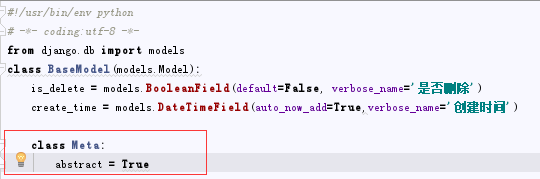
user.User.basemodel_ptr: (fields.E300) Field defines a relation with model ‘BaseModel’, which is either not installed, or is abstract.
Django-报错解决方法的更多相关文章
- django.db.utils.InternalError: (1060, "Duplicate column name 'user_id'")迁移报错解决方法
django.db.utils.InternalError: (1060, "Duplicate column name 'user_id'")迁移报错解决方法 django.db ...
- eclipse创建的maven项目,pom.xml文件报错解决方法
[错误一:]maven 编译级别过低 [解决办法:] 使用 maven-compiler-plugin 将 maven 编译级别改为 jdk1.6 以上: <!-- java编译插件 --> ...
- MyEclipse Server view报错解决方法
MyEclipse Server view报错解决方法 方法/步骤 启动MyEclipse,弹出一个框,报错. ---------------------------------------- ...
- Loadrunner参数化逗号报错解决方法
Loadrunner参数化逗号报错解决方法 介绍Loadrunner参数化时,参数中包含有逗号时出错的解决方法. 在Loadrunner进行参数化时,参数中如果含有逗号,编辑保存后会报错: 此 ...
- Android Studio support 26.0.0-alpha1 Failed to resolve: com.android.support:appcompat-v7:27.+ 报错解决方法
AS下如何生成自定义的.jks签名文件, 以及如何生成数字签名 链接:http://www.cnblogs.com/smyhvae/p/4456420.html 链接:http://blog.csdn ...
- iOS url带中文下载时 报错解决方法
问题描述:下载文件时, 请求带中文的URL的资源时,比如:http://s237.sznews.com/pic/2010/11/23/e4fa5794926548ac953a8a525a23b6f2/ ...
- jquery jssdk分享报错解决方法
jssdk分享报错解决方法 一般都是参数传错了
- create-react-app创建项目后,运行npm run eject报错解决方法
运行npm run eject报错解决方法 主要问题是脚手架添加.gitgnore文件,但是却没有本地仓库,使用以下命令操作以下就可以了 git init git add . git commit - ...
- 打开struts-config.xml 报错 解决方法Could not open the editor
打开struts-config.xml 报错 解决办法Could not open the editor 错误信息:Could not open the editor: Project XXX is ...
- CitrixSmartAuditor安装报错解决方法
报错1:安装过程中报错 解决方法: SQLServer的配置: http://www.cnblogs.com/weizhengLoveMayDay/p/3267756.html 报错2:无法连接到Sm ...
随机推荐
- 在 Vue 项目中(vue-cli2,vue-cli3)使用 pug 简化 HTML 的编写
使用 pug 的原因: 使得 HTML 写起了来更加清晰和快捷 用法: Vue 的用法没有变化: <template lang="pug"> transition(na ...
- redis存储对象(转)
原文地址:http://www.cnblogs.com/JKayFeng/p/5911544.html 为什么要实现序列化接口 当一个类实现了Serializable接口(该接口仅为标记接口,不包含任 ...
- BFS POJ 3414 Pots
题目传送门 /* BFS:六种情况讨论一下,BFS轻松解决 起初我看有人用DFS,我写了一遍,TLE..还是用BFS,结果特判时出错,逗了好长时间 看别人的代码简直是受罪,还好自己终于发现自己代码的小 ...
- 题解报告:hdu 2588 GCD(欧拉函数)
Description The greatest common divisor GCD(a,b) of two positive integers a and b,sometimes written ...
- 计算科学(转自wiki)
计算科学(也称科学计算 scientific computation 或 SC)是一个快速增长的多学科领域,使用先进的计算能力来理解和解决复杂的问题. 计算科学包括三个不同的方面: 1. 开发用于解决 ...
- [ CQOI 2014 ] 数三角形
\(\\\) Description 求 \(N\times M\) 的网格图上有多少个格点构成的三角形. 当三点共线的时候我们不认为这是一个三角形. \(n,m\le 10^4\) \(\\\) S ...
- CF861B Which floor?
思路: 暴力枚举. 实现: #include <bits/stdc++.h> using namespace std; int n, m, x, y; bool check(int x, ...
- Pro ASP.NET Core MVC 6th 第三章
第三章 MVC 模式,项目和约定 在深入了解ASP.NET Core MVC的细节之前,我想确保您熟悉MVC设计模式背后的思路以及将其转换为ASP.NET Core MVC项目的方式. 您可能已经了解 ...
- The Runtime Interaction Model for Views-UI布局事件处理流程
The Runtime Interaction Model for Views Any time a user interacts with your user interface, or any t ...
- 梦想CAD控件打印相关
一.打印设置 在顶部快速访问工具栏单击打印按钮或者直接输入PLOT命令或者点击打印控制的打印设置按钮打开打印对话框.c#代码实现如下: //打印设置 private void Print1() { ...