
[转]Dialog
在Android开发中,我们经常会需要在Android界面上弹出一些对话框,比如询问用户或者让用户选择。这些功能我们叫它Android Dialog对话框,在我们使用Android的过程中,我归纳了一下,Android Dialog的类型无非也就7种,下面我分别向大家介绍这7种Android Dialog对话框的使用方法,希望对大家能有所帮助。
1.该效果是当按返回按钮时弹出一个提示,来确保无误操作,采用常见的对话框样式。
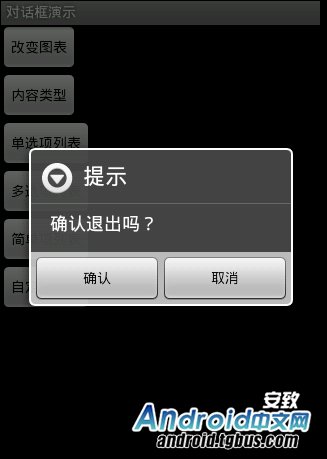
创建dialog对话框方法代码如下:
|
1
2
3
4
5
6
7
8
9
10
11
12
13
14
15
16
17
18
19
|
protected void dialog() { AlertDialog.Builder builder = new Builder(Main.this); builder.setMessage("确认退出吗?"); builder.setTitle("提示"); builder.setPositiveButton("确认", new OnClickListener() { @Override public void onClick(DialogInterface dialog, int which) { dialog.dismiss(); Main.this.finish(); } }); builder.setNegativeButton("取消", new OnClickListener() { @Override public void onClick(DialogInterface dialog, int which) { dialog.dismiss(); } }); builder.create().show(); } |
在onKeyDown(int keyCode, KeyEvent event)方法中调用此方法
|
1
2
3
4
5
6
|
public boolean onKeyDown(int keyCode, KeyEvent event) { if (keyCode == KeyEvent.KEYCODE_BACK && event.getRepeatCount() == 0) { dialog(); } return false; } |
2.改变了对话框的图表,添加了三个按钮

创建dialog的方法代码如下:
|
1
2
3
4
5
6
7
8
9
10
11
12
13
14
15
16
17
18
19
20
21
22
23
24
25
26
|
Dialog dialog = new AlertDialog.Builder(this).setIcon( android.R.drawable.btn_star).setTitle("喜好调查").setMessage( "你喜欢李连杰的电影吗?").setPositiveButton("很喜欢", new OnClickListener() { @Override public void onClick(DialogInterface dialog, int which) { // TODO Auto-generated method stub Toast.makeText(Main.this, "我很喜欢他的电影。", Toast.LENGTH_LONG).show(); } }).setNegativeButton("不喜欢", new OnClickListener() { @Override public void onClick(DialogInterface dialog, int which) { // TODO Auto-generated method stub Toast.makeText(Main.this, "我不喜欢他的电影。", Toast.LENGTH_LONG) .show(); } }).setNeutralButton("一般", new OnClickListener() { @Override public void onClick(DialogInterface dialog, int which) { // TODO Auto-generated method stub Toast.makeText(Main.this, "谈不上喜欢不喜欢。", Toast.LENGTH_LONG) .show(); } }).create(); dialog.show(); |
3.信息内容是一个简单的View类型
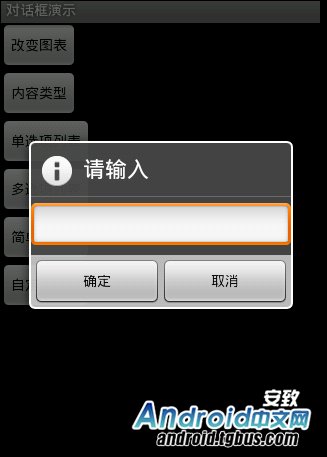
创建dialog方法的代码如下:
|
1
2
3
4
|
new AlertDialog.Builder(this).setTitle("请输入").setIcon( android.R.drawable.ic_dialog_info).setView( new EditText(this)).setPositiveButton("确定", null) .setNegativeButton("取消", null).show(); |
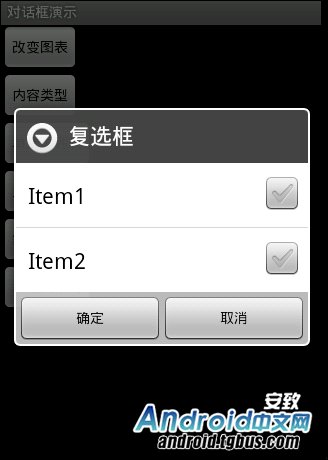
4.信息内容是一组单选框
创建dialog方法的代码如下:
|
1
2
3
4
|
new AlertDialog.Builder(this).setTitle("复选框").setMultiChoiceItems( new String[] { "Item1", "Item2" }, null, null) .setPositiveButton("确定", null) .setNegativeButton("取消", null).show(); |
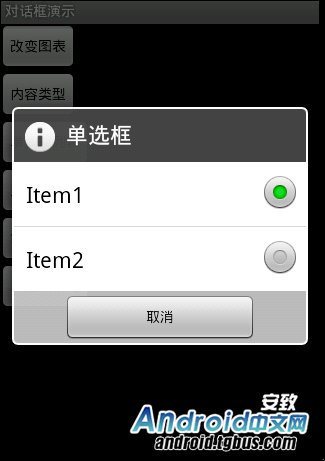
5.信息内容是一组多选框
创建dialog方法的代码如下:
|
1
2
3
4
5
6
7
8
|
new AlertDialog.Builder(this).setTitle("单选框").setIcon( android.R.drawable.ic_dialog_info).setSingleChoiceItems( new String[] { "Item1", "Item2" }, 0, new DialogInterface.OnClickListener() { public void onClick(DialogInterface dialog, int which) { dialog.dismiss(); } }).setNegativeButton("取消", null).show(); |
6.信息内容是一组简单列表项
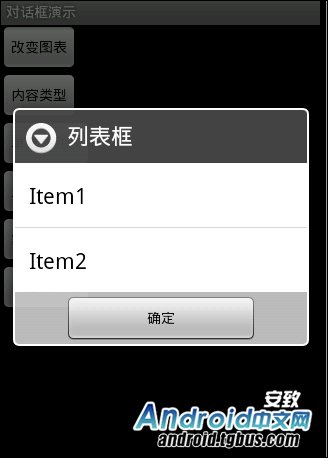
创建dialog的方法代码如下:
|
1
2
3
|
new AlertDialog.Builder(this).setTitle("列表框").setItems( new String[] { "Item1", "Item2" }, null).setNegativeButton( "确定", null).show(); |
7.信息内容是一个自定义的布局
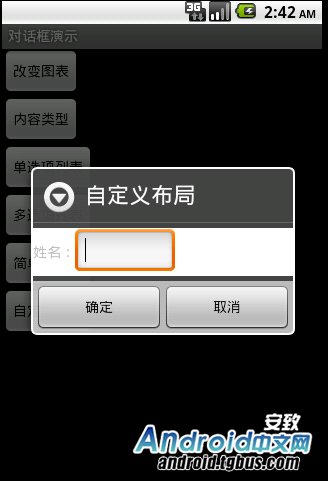
dialog布局文件代码如下:
|
1
2
3
4
5
6
7
8
9
10
11
12
|
<?xml version="1.0" encoding="utf-8"?> android:layout_height="wrap_content" android:layout_width="wrap_content" android:background="#ffffffff" android:orientation="horizontal" android:id="@+id/dialog"> <TextView android:layout_height="wrap_content" android:layout_width="wrap_content" android:id="@+id/tvname" android:text="姓名:" /> <EditText android:layout_height="wrap_content" android:layout_width="wrap_content" android:id="@+id/etname" android:minWidth="100dip"/> </LinearLayout> |
创建dialog方法的代码如下:
|
1
2
3
4
5
6
|
LayoutInflater inflater = getLayoutInflater(); View layout = inflater.inflate(R.layout.dialog, (ViewGroup) findViewById(R.id.dialog)); new AlertDialog.Builder(this).setTitle("自定义布局").setView(layout) .setPositiveButton("确定", null) .setNegativeButton("取消", null).show(); |
好了,以上7种Android dialog对话框的使用方法就介绍到这里了,基本都全了,如果大家在android开发过程中遇到dialog的时候就可以拿出来看看。
另外注,本文参考文章:
http://android.tgbus.com/Android/tutorial/201107/359812.shtml
[转]Dialog的更多相关文章
- 3java面试题 传智 发的 有用
第一章内容介绍 20 第二章JavaSE基础 21 一.Java面向对象 21 1. 面向对象都有哪些特性以及你对这些特性的理解 21 2. 访问权限修饰符public.private.protect ...
- 使用MonoTouch.Dialog简化iOS界面开发
MonoTouch.Dialog简称MT.D,是Xamarin.iOS的一个RAD工具包.它提供易于使用的声明式API,不需要使用导航控制器.表格等ViewController来定义复杂的应用程序UI ...
- 2000条你应知的WPF小姿势 基础篇<78-81 Dialog/Location/WPF设备无关性>
在正文开始之前需要介绍一个人:Sean Sexton. 来自明尼苏达双城的软件工程师.最为出色的是他维护了两个博客:2,000ThingsYou Should Know About C# 和 2,00 ...
- Android PopupWindow Dialog 关于 is your activity running 崩溃详解
Android PopupWindow Dialog 关于 is your activity running 崩溃详解 [TOC] 起因 对于 PopupWindow Dialog 需要 Activi ...
- 三个不常用的HTML元素:<details>、<summary>、<dialog>
前面的话 HTML5不仅新增了语义型区块级元素及表单类元素,也新增了一些其他的功能性元素,这些元素由于浏览器支持等各种原因,并没有被广泛使用 文档描述 <details>主要用于描述文档或 ...
- 10.JAVA之GUI编程弹出对话框Dialog
在上节基础上添加对话框显示错误信息. 代码如下: /*弹出对话框显示错误信息,对话框一般不单独出现,一般依赖于窗体.*/ /*练习-列出指定目录内容*/ import java.awt.Button; ...
- Easyui dialog中嵌入iframe
如果easyui dialog的地址属性用href超链接,easyui 不会加载整个url页面,只会截取url目标页的body体间的html, 如果想加载把其他页面 加载进dialog的iframe中 ...
- Android 底部弹出Dialog(横向满屏)
项目中经常需要底部弹出框,这里我整理一下其中我用的比较顺手的一个方式(底部弹出一个横向满屏的dialog). 效果图如下所示(只显示关键部分): 步骤如下所示: 1.定义一个dialog的布局(lay ...
- Android如何自定义dialog
; window.setAttributes(lp); // set the confirm button if (positiveButtonClickListener != null) { ((B ...
- bootstrop 日期控件 datepicker被弹出框dialog覆盖的解决办法
筒子们在使用bootstrap的日期控件(datepicker , 现在官网提供的名称叫 datetimepicker)时可能会遇到如上图的问题这是啥原因造成的呢? 答案很简单时输出的优先级造成的(z ...
随机推荐
- LR性能分析随笔(一)
一.关键词 吞吐量:对于吞吐量,单位时间内吞吐量越大,说明服务器的处理能力越好:而请求数仅表示客户端向服务器发出的请求数,与吞吐量一般成正比关系. HTTP:HTTP404表示文件或目录没有找到.有些 ...
- 04Servlet的生命周期
Servlet的生命周期 Servlet运行在Servlet容器中,其生命周期由容器来管理.Servlet的生命周期通过javax.servlet.Servlet接口中的init().service( ...
- 【LeetCode】9、Palindrome Number(回文数)
题目等级:Easy 题目描述: Determine whether an integer is a palindrome. An integer is a palindrome when it rea ...
- [Git]Please make sure you have the correct access rights and the repository exists
这个问题是这样,需要在已有github账号的A机器上,再创建一个github账号,新账号创建完毕,将代码通过机器A push上之后,再另一台机器B,clone 这个项目时报出了如下错误: Permis ...
- 对于 前端请求Django 后端服务出现403 Forbidden (CSRF token missing or incorrect.) 问题的解析
Django中使用ajax post向後臺傳送資料時403 Forbidden (CSRF token missing or incorrect.):的解決辦法 在Django中使用ajax post ...
- idea 如何将本地代码上传到github
1. 首先切换到项目根目录下 执行 git init 2. 点击项目右键->Git->Repository->Remotes->编辑URL 到github代码地址.
- Spring 获取当前activeProfile
WebApplicationContext wac = WebApplicationContextUtils.getWebApplicationContext(getServletContext()) ...
- maven使用nexus3.3在windows下搭建私服
1. 私服简介 私服是指私有服务器,是架设在局域网的一种特殊的远程仓库,目的是代理远程仓库及部署第三方构建.有了私服之后,当 Maven 需要下载构件时,直接请求私服,私服上存在则下载到本地仓库:否则 ...
- Mysql SQL查询今天、昨天、n天内、第n天------https://blog.csdn.net/baidu_27222643/article/details/60467585
Mysql SQL查询今天.昨天.n天内.第n天 https://blog.csdn.net/baidu_27222643/article/details/60467585
- PhantomJS & headless browser & pdf
PhantomJS http://phantomjs.org/ https://github.com/Medium/phantomjs https://github.com/Medium/phanto ...