
2014圣诞节一款纯css3实现的雪人动画特效
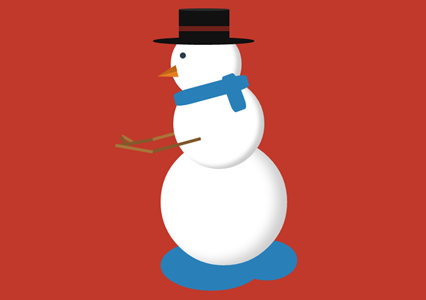
在2014年的圣诞节,爱编程小编给大家分分享一款纯css3实现的雪人动画特效。该实例实现一个雪人跳动的特效,效果图如下:
实现的代码。
html代码:
 <span class="text">lolwut<small>-@rsmswlln</small></span>

    <div class="body">

        <div class="hat">

            <div class="ribbon">

            </div>

        </div>

        <div class="face">

        </div>

        <div class="scarf">

        </div>

        <div class="right-arm">

            <div class="hand">

            </div>

        </div>

        <div class="left-arm">

            <div class="hand">

            </div>

        </div>

    </div>

    <div class="puddle">

    </div>
css代码:
 body {

  background: #c0392b;

}

.body {

  width: 250px;

  height: 250px;

  background: #ffffff;

  border-radius: 50%;

  box-shadow: inset -20px -5px 35px rgba(0, 0, 0, 0.2);

  position: absolute;

  right:;

  left:;

  margin: 300px auto;

  animation: jump 1s infinite;

}

.body:before {

  z-index:;

  content: "";

  width: 180px;

  height: 180px;

  background: #ffffff;

  border-radius: 50%;

  box-shadow: inset -10px -5px 10px rgba(0, 0, 0, 0.2);

  position: relative;

  display: inline-block;

  top: -120px;

  left: 25px;

}

.body:after {

  content: "";

  width: 140px;

  height: 140px;

  background: #ffffff;

  border-radius: 50%;

  box-shadow: inset -10px -5px 10px rgba(0, 0, 0, 0.2);

  position: relative;

  display: inline-block;

  top: -400px;

  left: 20px;

}

.body > .hat {

  width: 200px;

  height: 15px;

  border-radius: 50%;

  background-color: #111111;

  position: absolute;

  z-index:;

  top: -200px;

  left: -15px;

}

.body > .hat:before {

  content: "";

  width: 100px;

  height: 65px;

  background-color: #111111;

  display: inline-block;

  position: relative;

  top: -55px;

  left: 51px;

}

.body > .hat:after {

  z-index:;

  content: "";

  display: inline-block;

  position: relative;

  top: -145px;

  left: 51px;

  width: 100px;

  height: 5px;

  border-radius: 50%;

  background-color: #2b2b2b;

}

.body > .hat > .ribbon {

  height: 10px;

  width: 100px;

  background-color: #6d2018;

  position: relative;

  top: -90px;

  left: 51px;

  z-index:;

}

.body > .face {

  z-index:;

  width: 12px;

  height: 12px;

  background-color: #2c3e50;

  border-radius: 50%;

  position: absolute;

  top: -170px;

  left: 38px;

}

.body > .face:before {

  content: "";

  background-color: transparent;

  display: inline-block;

  position: relative;

  top: 30px;

  left: -45px;

  transform: rotate(-15deg);

  border-top: 12px solid transparent;

  border-bottom: 12px solid transparent;

  border-right: 40px solid #e67e22;

}

.body > .face:after {

  content: "";

  background-color: transparent;

  display: inline-block;

  position: relative;

  top:;

  left: -46px;

  transform: rotate(-15deg);

  border-top: 12px solid transparent;

  border-right: 40px solid #bf6516;

}

.body > .scarf {

  z-index:;

  width: 150px;

  height: 30px;

  background-color: #2980b9;

  position: absolute;

  top: -110px;

  left: 25px;

  transform: rotate(-15deg);

  border-radius: 20%;

}

.body > .scarf:after {

  content: "";

  width: 75px;

  height: 30px;

  background-color: #2980b9;

  display: inline-block;

  position: relative;

  top: 16px;

  left: 80px;

  transform: rotate(85deg);

  border-radius: 20%;

}

.body > .left-arm,

.body .right-arm {

  z-index:;

  width: 100px;

  height: 6px;

  background-color: #825a2c;

  position: absolute;

  top: 10px;

  left: -20px;

  transform: rotate(-15deg);

  animation: rub-right 0.5s infinite;

}

.body > .left-arm > .hand,

.body .right-arm > .hand {

  width: 25px;

  height: 6px;

  background-color: #825a2c;

  position: absolute;

  top: -32px;

  left: -60px;

  transform: rotate(75deg);

}

.body > .left-arm:after,

.body .right-arm:after {

  content: "";

  width: 75px;

  height: 6px;

  background-color: #a87439;

  display: inline-block;

  position: relative;

  top: -24px;

  left: -70px;

  transform: rotate(25deg);

}

.body > .left-arm.left-arm,

.body .right-arm.left-arm {

  background-color: #a87439;

  animation: rub-left 0.5s infinite;

  top: -15px;

  z-index:;

}

.body > .left-arm.left-arm > .hand,

.body .right-arm.left-arm > .hand {

  background-color: #a87439;

  top: -14px;

  transform: rotate(45deg);

}

.body > .left-arm.left-arm:after,

.body .right-arm.left-arm:after {

  background-color: #825a2c;

  transform: rotate(5deg);

  top: -12px;

  left: -74px;

}

.puddle {

  z-index: -1;

  width: 200px;

  height: 100px;

  background: #2980b9;

  border-radius: 50%;

  position: absolute;

  right:;

  left: -50px;

  margin: 500px auto;

}

.puddle:after {

  content: "";

  width: 120px;

  height: 80px;

  display: inline-block;

  border-radius: 50%;

  left: 150px;

  position: relative;

  background-color: #2980b9;

}

.text {

  text-align: center;

  font-family: 'Lobster', cursive;

  font-size: 74px;

  display: inline-block;

  transform: rotate(-15deg);

  position: absolute;

  margin: 50px 30px;

  color: #ffffff;

  text-shadow: 3px 3px 2px rgba(0, 0, 0, 0.5);

}

.text > small {

  font-size: 20px;

  display: block;

}

@keyframes rub-left {

  0% {

    margin-left: 0px;

    margin-top:;

  }

  50% {

    margin-left: 5px;

    margin-top: 1px;

  }

  100% {

    margin-left: 0px;

    margin-top:;

  }

}

@keyframes rub-right {

  0% {

    margin-left: 4px;

  }

  50% {

    margin-left: 0px;

  }

  100% {

    margin-left: 4px;

  }

}

@keyframes jump {

  0% {

    margin: 300px auto;

  }

  40% {

    margin: 250px auto;

  }

  80% {

    margin: 300px auto;

  }

}
via:http://www.w2bc.com/Article/13508
2014圣诞节一款纯css3实现的雪人动画特效的更多相关文章
- 纯css3 加载loading动画特效
最近项目中要实现当页面还没有加载完给用户提示正在加载的loading,本来是想做个图片提示的,但是图片如果放大电脑的分辨率就会感觉到很虚,体验效果很不好.于是就采用css3+js实现这个loading ...
- 纯CSS3绘制神奇宝贝伊布动画特效
在线演示 本地下载
- 纯css3实现的文字亮光特效
今天给大家分享一款纯css3实现的文字亮光特效.这款特效文字上一道亮光逐渐扫过文字.效果非常漂亮.一起看下效果: 在线预览 源码下载 实现的代码. html代码: <span class=& ...
- 推荐10款纯css3实现的实用按钮
在2014年的双11即将来临之季,爱编程小编为大家整理10款纯css3实现的按钮.希望这对坚守在前端的码农们有所帮助.亲,如果你有好的资源也可在本文留言,让从事编码的程序员们抱团.工作更轻松. No1 ...
- 一款纯css3实现的条纹加载条
之前为大家带来了很多加载动画. 基于prefixfree.js的进度加载条 ,基于jquery带百分比的响应式进度加载条.今天给大家分享一款纯css3实现的条纹加载条.带有响应式的效果.效果图如下 : ...
- 7款纯CSS3实现的炫酷动画应用
1.纯CSS3实现人物摇头动画 这次我们要来分享一款超级可爱的纯CSS3人物摇头动画,初始化的时候人物的各个部位是利用CSS3动画效果拼接而成,接下来就是人物听音乐的场景,一边听音乐一边摇着脑袋,十分 ...
- 7款纯CSS3实现的炫酷动画应用|慕课网只学有用的!
关于我们 | 时尚廊 ♦ 时尚廊,中国大陆地区首家以"Lounge"为概念的艺文空间 ♦ 7款纯CSS3实现的炫酷动画应用|慕课网只学有用的! 7款纯CSS3实现的炫酷动画应用
- 16款纯CSS3实现的loading加载动画
分享16款纯CSS3实现的loading加载动画.这是一款实用的可替代GIF格式图片的CSS3加载动画代码.效果图如下: 在线预览 源码下载 实现的代码. html代码: <div clas ...
- 一款纯css3实现的漂亮的404页面
之前为大家分享了那些创意有趣的404页面, html5和css3打造一款创意404页面, HTML5可爱的404页面动画很逗的机器人.今天再给大家分享一款纯css3实现的漂亮的404页面.效果图如下: ...
随机推荐
- 正向代理/反向代理理解、Nginx概述、安装及配置详解
一.Nginx概述 nginx是一款自由的.开源的.高性能的HTTP服务器和反向代理服务器:同时也是一个IMAP.POP3.SMTP代理服务器:nginx可以作为一个HTTP服务器进行网站的发布处理, ...
- sscanf %*s
一次在源码里看到 %*s 的格式,从未见过百思不得其解,今天用google的code搜索,搜到一些使用范例,猜测%*s 是说这里有一些字符,长度不一定,按正则表达式的习惯,*代办任意非负整数.例如: ...
- hadoop文件系统与I/O流
本文地址:http://www.cnblogs.com/archimedes/p/hadoop-filesystem-io.html,转载请注明源地址. hadoop借鉴了Linux虚拟文件系统的概念 ...
- Microsoft Visual C++ 14.0 is required问题的解决或warning: Debugger speedups using cython not found
今天在下载了 python3.64版本的安装后运行爬虫程序报错: warning: Debugger speedups using cython not found. Run '"C:\Py ...
- HTML中的attribute和property
一.概述 attribute和property是常常被弄混的两个概念. 简单来说,property则是JS代码里访问的: document.getElementByTagName('my-elemen ...
- 【树莓派】-bash: /usr/local/java/jdk1.8.0_161/bin/java: cannot execute binary file: Exec format error
遇到这样的问题:-bash: /usr/local/java/jdk1.8.0_161/bin/java: cannot execute binary file: Exec format error ...
- es5 - array - concat
/** * 描述:数组元素合并 * 使用:arr1.concat(arr2) * 参数:arr1.concat(arr2,arr3,arr...) * 说明: * 该concat方法创建一个新数组,该 ...
- Java设计模式(二)-单例模式
单例模式建议保证某个对象仅仅仅仅有一个实例,当仅仅有一个对象来协调整个系统的操作时,在计算机系统中.线程池.缓存.日志对象.对话框.打印机.显卡的驱动程序对象常被设计成单例.总之,选择单例模式就是为了 ...
- alibaba dexposed初步解析
alibaba新出了一个非侵入的aop库,感觉不错.那么楼主这次就来学习一下这个库的详细应用,原理以及能够达到的效果. 这里先给出相应的githubproject传送门:https://github. ...
- UNIX环境编程初步认识——编程环境搭建
前言 前期学习了Linux的一些基本知识后,在借助前期的学习的基础上想再初步认识一下操作系统的一些环境编程体系相关知识,当中环境的配置和搭建费了非常大的劲,须要一点点摸索和尝试,下边是环境搭建的 ...