
Centos7下源编译安装Postgresql 并设置开机自动启动postgresql.serivce 服务相关研究
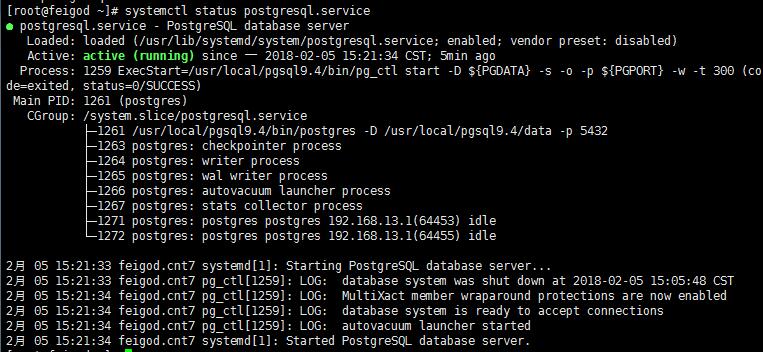
编写开机自动启动服务脚本:
# cat >> /usr/lib/systemd/system/postgresql.service >> EOF
[Unit]

Description=PostgreSQL database server

After=network.target

[Service]

Type=forking

User=postgres

Group=postgres

# Port number for server to listen on

Environment=PGPORT=5432

# Location of database directory

Environment=PGDATA=/usr/local/pgsql9.4/data

# Where to send early-startup messages from the server (before the logging

# options of postgresql.conf take effect)

# This is normally controlled by the global default set by systemd

# StandardOutput=syslog

# Disable OOM kill on the postmaster

OOMScoreAdjust=-1000

#ExecStartPre=/usr/local/pgsql9.4/bin/postgresql-check-db-dir ${PGDATA}

ExecStart=/usr/local/pgsql9.4/bin/pg_ctl start -D ${PGDATA} -s -o "-p ${PGPORT}" -w -t 300

ExecStop=/usr/local/pgsql9.4/bin/pg_ctl stop -D ${PGDATA} -s -m fast

ExecReload=/usr/local/pgsql9.4/bin/pg_ctl reload -D ${PGDATA} -s

# Give a reasonable amount of time for the server to start up/shut down

TimeoutSec=300

[Install]

WantedBy=multi-user.target
EOF
添加可执行权限:
chmod 754 /usr/lib/systemd/system/postgresql.service
设置为开机自启动:
systemctl enable postgresql.service
常用指令(以postgresql服务为例):
启动某服务:
systemctl start postgresql.service
停止某服务:
systemctl stop postgresql.service
重启某服务:
systemctl restart postgresql.service

service postgresql restart
使某服务自动启动(如tomcat服务):
systemctl enable postgresql.service
使某服务不自动启动:
systemctl disable postgresql.service
检查服务状态:
systemctl   status  postgresql.service (服务详细信息)

systemctl   is-active postgresql.service(仅显示是否Active)
显示所有已启动的服务:
systemctl list-units --type=service
Centos7下源编译安装Postgresql 并设置开机自动启动postgresql.serivce 服务相关研究的更多相关文章
- CentOS7 下源码安装 python3
CentOS 7 下源码安装 python3 在CentOS7下,默认安装的是python2.7:为满足项目要求,安装python3 的方法如下: 1. 首先安装python3.6可能使用的依 ...
- centos下安装memcached并设置开机自动启动-两种方法
方法一: 安装memcachedyum install memcached 启动服务并初始化service memcached start -p 11211 -l 127.0.0.1 -d 设置mem ...
- CentOS7下源码安装mysql5.6
目录 准备工作 运行环境 确认你的安装版本 下载mysql 安装mysql 准备安装环境 编译和安装 配置mysql 单实例配置 单实例配置方法 添加防火墙 ...
- 源码编译安装nginx及设置开机启动项
1.上传nginx文档:解压到/data目录下,并安装依赖包tar xf nginx-1.20.1.tar.gz -C /data/cd /data/nginx-1.20.1/ && ...
- centos7下源码安装mysql5.7.16
一.下载源码包下载mysql源码包 http://mirrors.sohu.com/mysql/MySQL-5.7/mysql-5.7.16.tar.gz 二.安装约定: 用户名:mysql 安装目录 ...
- CentOS7下源码安装5.6.23
清理CentOS7下的MariaDB. [root@localhost ~]#rpm -qa | gremp mariadb [root@localhost ~]# rpm -e --node ...
- centos7下源码安装多个nginx步骤完整版
1.下载:wget http://nginx.org/download/nginx-1.10.0.tar.gz 解压:tar -zxvf nginx-1.10.0.tar.gz 2. 执行下面 ...
- Windows 下安装redis 并且设置开机自动启动的过程.
1. 下载redis 的 windows下的安装文件 https://github.com/MicrosoftArchive/redis/releasesmsi文件下载地址https://github ...
- Linux下源码安装MySQL-5.6.25
从mysql-5.5起,mysql源码安装开始使用cmake了,因此我们得先安装cmake,配置安装目录./configure --perfix=/.....的时候和以前的会有些区别. 一.安装cma ...
随机推荐
- python中的基础坑
v = [lambda :x for x in range(10)] print(v) #[lambda :x,lambda :x....]10个匿名函数 print(v[0]) #lambda :x ...
- 2.7 Go交叉编译
Golang 支持交叉编译,在一个平台上生成另一个平台的可执行程序,最近使用了一下,非常好用,这里备忘一下. Mac 下编译 Linux 和 Windows 64位可执行程序 CGO_ENABLED= ...
- poj1149 经典建模
http://wenku.baidu.com/view/0ad00abec77da26925c5b01c.html 以上内容均为转载 #include<queue> #include< ...
- python基础:list与string互转
数据清洗必备技能 https://www.cnblogs.com/yaner2018/p/11162630.html
- OAUTH开放授权
OAUTH开放授权 OAUTH开放授权为用户资源的授权提供了一个安全的.开放而又简易的标准.OAUTH的授权不会使第三方触及到用户的帐号信息例如用户名与密码等,即第三方无需使用用户的用户名与密码就可以 ...
- springboot连接数据源,配置数据库
Spring官方DriverManagerDataSource的配置 修改yml #配置数据源的属性 spring: datasource: driver-class-name: com.mysql. ...
- spring设计模式之applicationContext.getBean("beanName")思想
1.背景 在实际开发中我们会经常遇到不同的业务类型对应不同的业务处理,而这个业务类型又是经常变动的; 比如说,我们在做支付业务的时候,可能刚开始需要实现支付宝支付和微信支付,那么代码逻辑可能如下 /* ...
- 处理异常方式try_catch_finally, throws,throw
如何处理 Exception 的异常: 抓抛模型:1.抓:异常的处理,有两种方式①try-catch-finally ②throws+异常类型 2.抛:一旦执行过程中出现异常,会抛出一个异常类的对 ...
- K-means聚类分析
一.原理 先确定簇的个数,K 假设每个簇都有一个中心点 centroid 将每个样本点划分到距离它最近的中心点所属的簇中 选择K个点做为初始的中心点 while() { 将所有点分配个K个中心点形成K ...
- position的值?
static(默认):按照正常文档流进行排列:relative(相对定位):不脱离文档流,参考自身静态位置通过 top, bottom, left, right 定位:absolute(绝对定位):参 ...