
Python笔记_第五篇_Python数据分析基础教程_相关安装和版本查看
1. IDE说明:
所有的案例用Anacoda中的Jupiter工具进行交互式讲解。
2. 版本和安装:
NumPy从如下网站安装:http://sourceforge.net/projects/numpy/files。
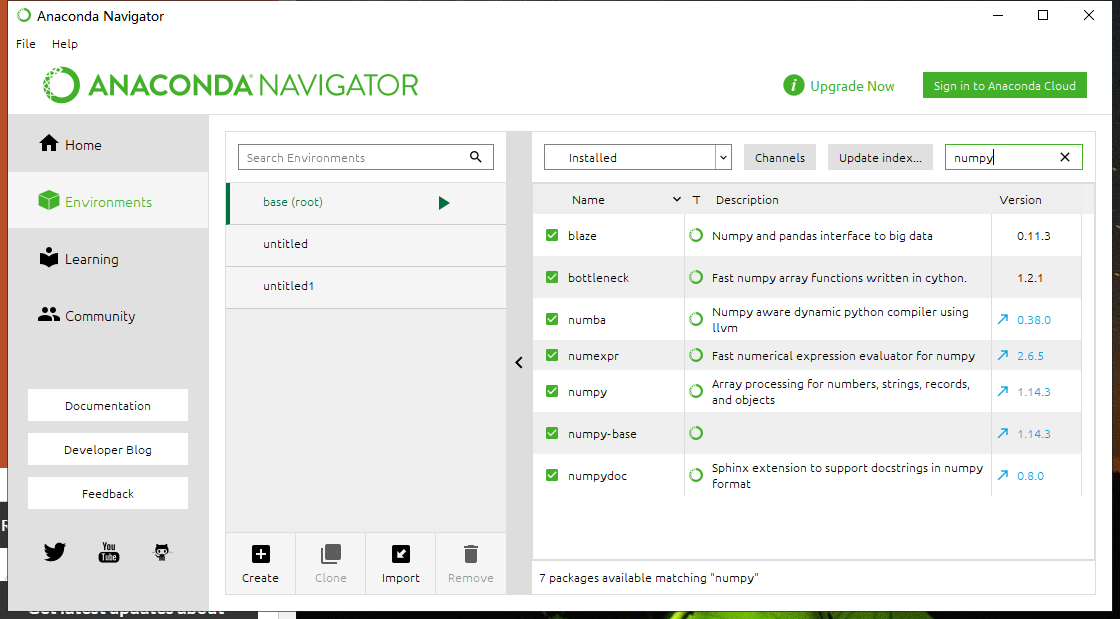
我们通过环境查看相关的版本。如果电脑上安装了Anaconda的话这些版本基本上都是最新版本的。
如果Anaconda的库不是最新的可以通过Prompt进行安装和更新。可以参照如下博客,非常简单。https://blog.csdn.net/xiexu911/article/details/80282440
3. 我们通过Anaconda打开Jupiter或spyder打开进行讲解。
4. 第一个简单操作:通过对比Python和NumPy的计算观察NumPy的运算速度:
from datetime import datetime

import numpy as np

# 纯Python写的程序

def pythonsum(n):

    a = []

    b = []

    c = []

    for i in range(n):

        a.append(i)

        b.append(i)

        c.append(a[i]**2 + b[i]**3)

    return c

# NumPy写的程序

def numpysum(n):

    a = np.arange(n,dtype=object) ** 2

    b = np.arange(n,dtype=object) ** 3

    c = a + b

    return c

# 进行比较测试

size = 30000

start = datetime.now()

c1 = pythonsum(size)

delta = datetime.now()-start

print("The last 2 elements of the sum",c1[-2:])

print("PythonSum elapsed time in microsecond",delta.microseconds)

start = datetime.now()

c2 = numpysum(size)

delta = datetime.now()-start

print("The last 2 elements of the sum",c2[-2:])

print("NumPySum elapsed time in microsecond",delta.microseconds)

# 10000的情况下:

#The last 2 elements of the sum [999500079996, 999800010000]

#PythonSum elapsed time in microsecond 15625

#The last 2 elements of the sum [999500079996 999800010000]

#NumPySum elapsed time in microsecond 15623

# 20000的情况下:

#The last 2 elements of the sum [7998000159996, 7999200020000]

#PythonSum elapsed time in microsecond 31247

#The last 2 elements of the sum [7998000159996 7999200020000]

#NumPySum elapsed time in microsecond 0

# 30000的情况下:

#The last 2 elements of the sum [26995500239996, 26998200030000]

#PythonSum elapsed time in microsecond 46871

#The last 2 elements of the sum [26995500239996 26998200030000]

#NumPySum elapsed time in microsecond 0
我们发现越是数据大NumPy的优势就能够体现出来了。注意我们用NumPy的时候规定dtype = object是为了放置数组的溢出,这个在很多教材中都没有提及。如果不写,在数值过大的时候,数组会产生溢出,导致计算的记过不一样。
第二个简单操作:通过help查看NumPy的帮助文档:
# -*- coding: utf-8 -*-

"""

Spyder Editor

This is a temporary script file.

"""

import numpy as np

help(np.arange)

#Help on built-in function arange in module numpy.core.multiarray:

#

#arange(...)

#    arange([start,] stop[, step,], dtype=None)

#

#    Return evenly spaced values within a given interval.

#

#    Values are generated within the half-open interval ``[start, stop)``

#    (in other words, the interval including `start` but excluding `stop`).

#    For integer arguments the function is equivalent to the Python built-in

#    `range <http://docs.python.org/lib/built-in-funcs.html>`_ function,

#    but returns an ndarray rather than a list.

#

#    When using a non-integer step, such as 0.1, the results will often not

#    be consistent.  It is better to use ``linspace`` for these cases.

#

#    Parameters

#    ----------

#    start : number, optional

#        Start of interval.  The interval includes this value.  The default

#        start value is 0.

#    stop : number

#        End of interval.  The interval does not include this value, except

#        in some cases where `step` is not an integer and floating point

#        round-off affects the length of `out`.

#    step : number, optional

#        Spacing between values.  For any output `out`, this is the distance

#        between two adjacent values, ``out[i+1] - out[i]``.  The default

#        step size is 1.  If `step` is specified as a position argument,

#        `start` must also be given.

#    dtype : dtype

#        The type of the output array.  If `dtype` is not given, infer the data

#        type from the other input arguments.

#

#    Returns

#    -------

#    arange : ndarray

#        Array of evenly spaced values.

#

#        For floating point arguments, the length of the result is

#        ``ceil((stop - start)/step)``.  Because of floating point overflow,

#        this rule may result in the last element of `out` being greater

#        than `stop`.

#

#    See Also

#    --------

#    linspace : Evenly spaced numbers with careful handling of endpoints.

#    ogrid: Arrays of evenly spaced numbers in N-dimensions.

#    mgrid: Grid-shaped arrays of evenly spaced numbers in N-dimensions.

#

#    Examples

#    --------

#np.arange(3)

#    array([0, 1, 2])

#np.arange(3.0)

#    array([ 0.,  1.,  2.])

#np.arange(3,7)

#    array([3, 4, 5, 6])

#np.arange(3,7,2)

#    array([3, 5])
Python笔记_第五篇_Python数据分析基础教程_相关安装和版本查看的更多相关文章
- Python笔记_第五篇_Python数据分析基础教程_前言
1. 前言: 本部分会讲解在Python环境下进行数值运算.以NumPy为核心,并讲解其他相关库的使用,诸如Matplotlib等绘图工具等. C.C++和Forttran等变成语言各有各的优势,但是 ...
- Python笔记_第五篇_Python数据分析基础教程_文件的读写
1. 读写文件(基本) savetxt.loadtxt i2 = np.eye(2) print(i2) np.savetxt(r"C:\Users\Thomas\Desktop\eye.t ...
- Python笔记_第五篇_Python数据分析基础教程_NumPy基础
1. NumPy的基础使用涵盖如下内容: 数据类型 数组类型 类型转换 创建数组 数组索引 数组切片 改变维度 2. NumPy数组对象: NumPy中的ndarray是一个多维数组对象,该兑现共有两 ...
- Python学习笔记【第五篇】:基础函数
一.函数:函数定义关键字def 后跟函数名称 def 函数名(参数): ... 函数体 ... 返回值 案例: # 定义函数 def say_hei( ...
- Python数据分析基础教程
Python数据分析基础教程(第2版)(高清版)PDF 百度网盘 链接:https://pan.baidu.com/s/1_FsReTBCaL_PzKhM0o6l0g 提取码:nkhw 复制这段内容后 ...
- Python 3基础教程1-环境安装和运行环境
本系列开始介绍Python3的基础教程,为什么要选中Python 3呢?之前呢,学Python 2,看过笨方法学Python,学了不到一个礼拜,就开始用Python写Selenium脚本.最近看到一些 ...
- Python全栈开发记录_第五篇(装饰器)
单独记录装饰器这个知识点是因为这个知识点是非常重要的,必须掌握的(代码大约150行). 了解装饰器之前要知道三个知识点 作用域,上一篇讲到过顺序是L->E->G->B 高阶函数: 满 ...
- Python笔记(二十五)_魔法方法_描述符
描述符的属性方法 __get__(self, instance, owner): 用于访问属性,返回属性的值 __set__(self, instance, value): 用于给属性赋值时,返回属性 ...
- [Python笔记]第十六篇:web框架之Tornado
Tornado是一个基于python的web框架,xxxxx 安装 python -m pip install tornado 第一个Tornado程序 安装完毕我们就可以新建一个app.py文件,放 ...
随机推荐
- spoj694--Distinct Substrings
个人第一道后缀数组题目.对于每一个后缀suffix(i),都有len-sa[i]个前缀(也即有len-sa[i]个不同的字符串),其中与排名前一位的后缀有height[i]个共同的前缀,最后所得到的新 ...
- Java之反射 — 用法及原理
Java之反射 - 用法及原理 定义 Java反射机制是在运行状态中,对于任意一个类,都能够知道这个类的所有属性和方法:对于任意一个对象,都能够调用它的任意方法和属性:这种动态获取信息以及动态调用对象 ...
- 015.Delphi插件之QPlugins,FMX插件窗口
内嵌FMX的插件窗口,效果还是很可以的.退出时,会报错,很诡异啊. 主窗口代码如下 unit Frm_Main; interface uses Winapi.Windows, Winapi.Messa ...
- html5移动端主流适配方案
1.流式布局(百分比布局) 案例:京东移动端 优点:简单方便,只需要固定高度,宽度自适应: 缺点:大屏幕手机实际显示的不协调. 2.响应式布局 优点:可以节约成本,不用再做专门的web app网 ...
- ELK之 elasticsearch ES集群 head安装
最近项目用到 jenkins ELK 也在一次重新学习了一次 jenkins 不用说了 玩得就是 插件 + base---shell , ELK 这几年最流得log收集平台,当然不止 ...
- java时间差
以下代码没什么意义,只是记录 long mstart = System.nanoTime(); int mIndex = 0 ; for (int i = 0; i < 100000000; i ...
- FreeCAD stp文件基于python脚本操作
FreeCAD对于3D模型处理这块的东西封装的还是很完善的,所以移植这块的东西还是有必要的! 首先下载FreeCAD编译好的库: https://www.freecadweb.org/wiki/Dow ...
- 指令——mv
一个完整的指令的标准格式: Linux通用的格式——#指令主体(空格) [选项](空格) [操作对象] 一个指令可以包含多个选项,操作对象也可以是多个. 指令:mv (move,移动,剪切) 作用 ...
- 111-PHP类变量之间的赋值标识为同一个对象
<?php class mao{ //定义猫类 public $age=0; //定义多个属性并初始化 public $weight=50; public $color='white'; } $ ...
- jQuery原理系列-Dom Ready
ready事件是jquery的一个很重要的功能,在很久很久以前,我们是使用window.onload监听页面加载成功的,onload事件的好处是你不用考虑浏览器兼容性,也不需要依赖任何框架就可以写,但 ...