
Android加载SD卡目录,文件夹遍历,图片设置,设置文件对应打开方式等
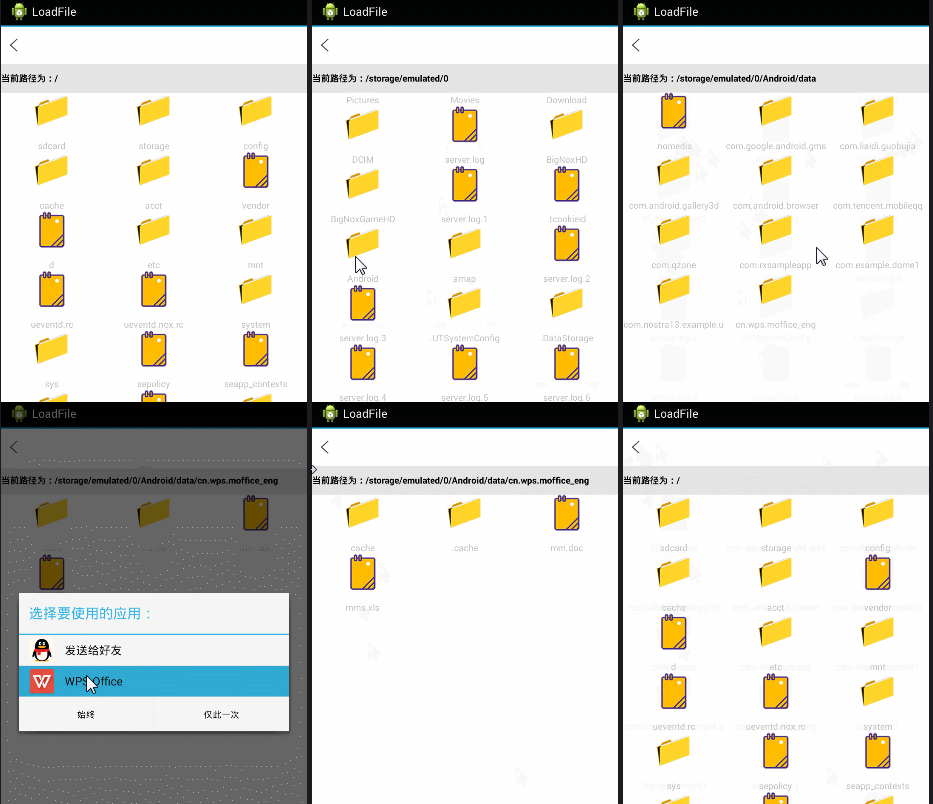
此案例主要说的是Android使用GridView加载SD卡下所有目录,文件夹多层遍历,文件图标修改,设置文件对应打开方式等功能。
如图:
public class GridViewFile extends Activity implements View.OnClickListener {

    private Context context;

    private TextView tv_title, textView;

    private GridView listView;

    private final String MUSIC_PATH = "/";

    // 记录当前路径下 的所有文件的数组

    File currentParent;

    // 记录当前路径下的所有文件的文件数组

    File[] currentFiles;

    @Override

    protected void onCreate(Bundle savedInstanceState) {

        super.onCreate(savedInstanceState);

        setContentView(R.layout.activity_main);

        context = this;

        initView();

    }

    public void initView() {

        findViewById(R.id.public_top_img_close).setOnClickListener(this);

        listView = (GridView) findViewById(R.id.gridview);

        textView = (TextView) findViewById(R.id.llss);

        onLoad();

    }

    public void onLoad() {

        ListSongsName();

    }

    private void ListSongsName() {

        // 获取系统的SD卡目录

        File root = new File(MUSIC_PATH);

        // 如果SD卡存在

        if (root.exists()) {

            currentParent = root;

            currentFiles = root.listFiles();// 获取root目录下的所有文件

            // 使用当前陆慕下的全部文件,文件夹来填充ListView

            inflateListView(currentFiles);

        }

        // 为ListView的列表项的单击事件绑定监视器

        listView.setOnItemClickListener(new AdapterView.OnItemClickListener() {

            @Override

            public void onItemClick(AdapterView<?> parent, View view,

                    int position, long id) {

                // 用户点击了文件,则调用手机已安装软件操作该文件

                if (currentFiles[position].isFile()) {

                    onError(currentFiles[position].getPath() + "1");

                    Intent intent = OpenFile.openFile(currentFiles[position]

                            .getPath());

                    startActivity(intent);

                } else {

                    // 获取currentFiles[position]路径下的所有文件

                    File[] tmp = currentFiles[position].listFiles();

                    if (tmp == null || tmp.length == 0) {

                        Toast.makeText(GridViewFile.this, "空文件夹!",

                                Toast.LENGTH_SHORT).show();

                    }// if

                    else {

                        // 获取用户单击的列表项对应的文件夹,设为当前的父文件夹

                        currentParent = currentFiles[position];

                        // 保存当前文件夹内的全部问价和文件夹

                        currentFiles = tmp;

                        inflateListView(currentFiles);

                    }

                }

            }

        });

    }

    // 更新列表

    private void inflateListView(File[] files) {

        if (files.length == 0)

            Toast.makeText(GridViewFile.this, "sd卡不存在", Toast.LENGTH_SHORT)

                    .show();

        else {

            // 创建一个List集合,List集合的元素是Map

            List<Map<String, Object>> listItems = new ArrayList<Map<String, Object>>();

            for (int i = 0; i < files.length; i++) {

                Map<String, Object> listItem = new HashMap<String, Object>();

                // 如果当前File是文件夹,使用folder图标;否则使用file图标

                Log.i("path", files[i].getPath());

                Log.i("path", files[i].getName());

                if (files[i].isDirectory())

                    listItem.put("icon", R.drawable.file_wenjianjia);

                // else if(files[i].isFi)

                else

                    listItem.put("icon", R.drawable.file_wenjian1);

                listItem.put("fileName", files[i].getName());

                // 添加List项

                listItems.add(listItem);

            }

            // 创建一个SimpleAdapter

            SimpleAdapter simpleAdapter = new SimpleAdapter(this, listItems,

                    R.layout.acheshi_item, new String[] { "icon", "fileName" },

                    new int[] { R.id.imageView1, R.id.text_path });

            // 位ListView设置Adpter

            listView.setAdapter(simpleAdapter);

            try {

                textView.setText("当前路径为:" + currentParent.getCanonicalPath());

            } catch (IOException e) {

                e.printStackTrace();

            }

        }

    }

    @Override

    public void onClick(View v) {

        onbey();

    }

    // 返回上层菜单

    private void onbey() {

        try {

            if (!MUSIC_PATH.equals(currentParent.getCanonicalPath())) {

                // 获取上一层目录

                currentParent = currentParent.getParentFile();

                // 列出当前目录下的所有文件

                currentFiles = currentParent.listFiles();

                // 再次更新ListView

                inflateListView(currentFiles);

            } else {

                new AlertDialog.Builder(this)

                        .setIcon(R.drawable.ic_launcher)

                        .setTitle("提示")

                        .setMessage("确定要退出吗?")

                        .setPositiveButton("确定",

                                new DialogInterface.OnClickListener() {

                                    @Override

                                    public void onClick(DialogInterface dialog,

                                            int which) {

                                        finish();

                                    }

                                })

                        .setNegativeButton("取消",

                                new DialogInterface.OnClickListener() {

                                    @Override

                                    public void onClick(DialogInterface dialog,

                                            int which) {

                                    }

                                }).create().show();

            }

        } catch (Exception e) {

            e.printStackTrace();

        }

    }

    public void onError(Object error) {

        Toast.makeText(getApplicationContext(), error + "", Toast.LENGTH_LONG)

                .show();

    }

    protected void onDestroy() {

        super.onDestroy();

    }

}
不要忘记在AndroidManifest.xml加权限哦!
 <!-- SD卡权限 -->

    <uses-permission android:name="android.permission.WRITE_EXTERNAL_STORAGE" />

    <uses-permission android:name="android.permission.MOUNT_UNMOUNT_FILESYSTEMS" />
Android加载SD卡目录,文件夹遍历,图片设置,设置文件对应打开方式等的更多相关文章
- 动态加载sd卡或者手机内置存储卡的so库
package com.wsc.utils; import android.content.Context; import com.wsc.common.Entrance; import com.ws ...
- Android NDK加载SD卡中的so
最近公司框架刚移植完成,由于框架程序要调用子程序,每个子程序都是一个so文件,有好几百个,把所有的so和apk打包不现实,及时可以升级维护也很麻烦.所以需要放SD卡中.考虑两种方式 1 放到设备中的 ...
- listview异步加载sd卡图片
package com.example.gridview; import java.io.File; import java.io.FileOutputStream; import java.io.I ...
- android 获取所有SD卡目录
//返回sd卡路径public static List<String> getStorageDirectories(Context context) { StorageManager sm ...
- PDF 补丁丁 0.4.1.804 测试版发布:合并文件夹的图片和PDF文件,自由生成多层次书签
新的测试版增强了合并文件的功能,可以合并文件夹内的图片和PDF文件,还可以在合并文件列表上直接指定与合并文件对应的PDF书签标题.通过拖放文件项目生成多层次的PDF书签.如下图所示: 另外,新的测试版 ...
- Eclipse中查看Android模拟器SD卡目录
· 有时候用到Android模拟器来模拟SD卡相关操作,在Eclipse中可以直接查看SD卡目录: 首先,新建模拟器的时候要创建SD卡,存储的大小根据需要创建: 启动模拟器,在Eclipse中打开视图 ...
- 将文件放到Android模拟器的SD卡中的两种解决方法
两种方式:一.窗口界面操作1.打开DDMS页面2.打开File Explorer页,如果没有,在Window --> Show View -->File Explorer3.一般就在mnt ...
- android 删除SD卡或者手机的缓存图片和目录
public static final String TEMP_PHOTO_FILE_NAME = "temp_photo.jpg"; private static String ...
- 将文件放到Android模拟器的SD卡
1.打开DDMS页面2.打开File Explorer页,如果没有,在Window –> Show View –>File Explorer3.一般就在mnt –> sdcard中4 ...
随机推荐
- XE6 & IOS开发之开发者账号、苹果证书(3):关于在XE6中使用苹果证书的简单介绍
网上能找到的关于Delphi XE系列的移动开发的相关文章甚少,本文尽量以详细的图文内容.傻瓜式的表达来告诉你想要的答案. 原创作品,请尊重作者劳动成果,转载请注明出处!!! 1.关于在XE6中使用苹 ...
- [转载]《民航科技》2012年4月专家论坛:程延松《关于中国民航SWIM框架及技术实现探讨》
专家介绍:程延松,现任成都民航空管发展有限公司总经理,理学博士,高级工程师,长期从事空管技术研究和产品研发工作,作为课题负责人,参与了国家863计划.国家科技支撑计划.国家空管委重点课题.民航局重点课 ...
- 转来的emacs配置文件,自动安装插件
网上转来的emacs配置文件,便于自动安装插件,收藏起来 http://www.gogae.org/post-7/ EMACS是一个伪装成代码编辑器的操作系统. EMACS是一个非常强大的代码编辑器, ...
- Nice Validator(Form验证)及Juery zTree控件
http://niceue.com/validator/demo/match.php http://www.ztree.me/v3/demo.php#_603
- (Hibernate进阶)Hibernate映射——多对一单向关联映射(四)
介绍基于基本映射的关联关系映射. 概念 基本映射是对一个实体进行映射,关联映射就是处理多个实体之间的关系,将关联关系映射到数据库中,所谓的关联关系在对象模型中有一个或多个引用. 分类 关联关系分为上述 ...
- 监控数据库运行 - MS SQL 日常维护管理常用脚本(二)
查看数据库登录名信息 use mastergoSELECT name AS LoginName , dbname AS DefaultDB , createdate AS CreateDate, up ...
- click 事件 arguments.callee 每次点击自动* 2
今天在测试JQUERY(版本3.0,向下兼容3.0)时发现一个很特别的现象,代码如下: $($('button').get(4)).click(function(){ alert($(this).ht ...
- Robot Framework:RF中对时间操作的datetime库常用关键字
[转自:http://blog.csdn.net/r455678/article/details/52993765] 1.对固定日期进行操作,增加或减去单位时间或者时间段 2.对两个时间段进行操作 3 ...
- webservice wsdl axis2报错 Provider com.bea.xml.stream.MXParserFactory not found
错误信息: Exception in thread "main" javax.xml.stream.FactoryConfigurationError: Provider com. ...
- Redis性能点
AliRedis是来自阿里巴巴的基于Redis改造的缓存产品,目前还未开源.网上只能搜到这么一篇资料<AliRedis单机180w QPS, 8台服务器构建1000w QPS Cache集群&g ...