
TRichTextBox – A universal RichTextBox which can display animated images and more
TRichTextBox – A universal RichTextBox which can display animated images and more



Summary
Displaying images in a RichTextBox is a common requirement, with limited solutions available. Pasting through Clipboard or embedding into RTF content only supports static images. This article describes how to insert Windows control objects into a RichTextBox and use them to host images. It is a straightforward -- but flexible and usable -- solution. An attached demo project shows a simple example of the result:

Introduction
Quite often here at EE, I come across questions about how to insert images into a RichTextBox. Especially for developers working with Instant Messaging (IM) projects, emotion icons are inevitable elements besides handling chat text messages. A crying picture sounds much louder than pale text like "I'm crying", "I want to cry". However, RichTextBox is basically the only choice left for programmers, unless you write your own reader or browser. Using a web browser control is actually not a bad option. We may discuss it in the following articles (but not this one).
There are two "standard" ways of displaying static images in a RichTextBox. The CodeProject article, Insert Plain Text and Images into RichTextBox at Runtime, describes two ways of implementing in much detail:
- Copying an image to the Clipboard and pasting the data into the target
RichTextBox. - Reading the RTF specification and inserting image data through a metafile wrapped with RTF tags.
Molesting the content of Clipboard is really annoying, and not good programming practice. For example, I'm used to copying words as a backup while typing, and I'll definitely copy the whole article again before I post it to a forum. In case anything goes wrong, I have the Clipboard as an emergency backup tool.
Actually, it's trivial to restore the original Clipboard data after pasting the image, and a responsible developer should do it:
public void InsertImage()

{

  ...

  string lstrFile = fileDialog.FileName;

  Bitmap myBitmap = new Bitmap(lstrFile);

  //keep the clipboard data before set image in it.

  object orgData = Clipboard.GetDataObject

  Clipboard.SetDataObject(myBitmap);

  DataFormats.Format myFormat = DataFormats.GetFormat (DataFormats.Bitmap);

  if(NoteBox.CanPaste(myFormat)) {

    NoteBox.Paste(myFormat);

  }

  else {

    MessageBox.Show("The data format that you attempted site" +

      " is not supportedby this control.");

  }

//Restore the original data.

Clipboard.SetDataObject(orgData )

  ...

}
The fatal problem of both of the above solutions is that they disable the animation of a GIF image. An animated GIF file contains multiple frames of images. "Copy & Paste" just reads the first frame of the image so the animation stops. While "RTF tagging" transforms the image data into a huge string, and the RTF specification does not extend enough to support getting the next active frame from a string.
Insert Windows Controls
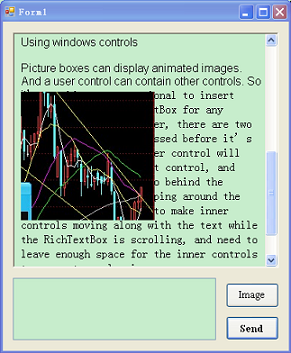
Picture boxes can display animated images. And a user control can contain other controls. So there is nothing unconventional about inserting controls into a RichTextBox for any possible purpose. There are two issues that need to be addressed before it would be working:
- First, an inner control stays still in the parent control, and...
- Second, the input text will go behind the control instead of wrapping around it.
We need to make inner controls move along with the text while the RichTextBox is scrolling, and we need to leave enough space for the inner controls to prevent overlapping -- and covering up the nearby text as shown here:
To resolve the above issues, the start point of the text can be used as a reference point to decide the control's position relative to the text. When the content moves from PosA to PosB, the PictureBox must move to a new position as well, which is easily calculated:
thePictureBox.newPosition = PosB - PosA + thePictureBox.oldPosition = PosB - Delta
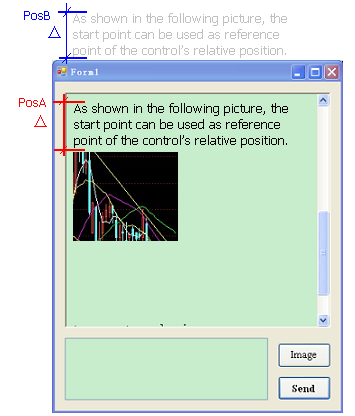
The RichTextBox.GetPositionFromCharIndex method allows us to retrieve the beginning position (PosA) of the text with a character index of zero. We need to store this value and, in the VScroll event, use the same method to retrieve the new start position (PosB) of the text. Then we can set the new position of the inner controls.
The call to GetPositionFromCharIndex is a little expensive. Consider that tens or even hundreds of images could be inserted into the RichTextBox during a session of chat, so frequent calls to the function would make scrolling very sluggish.
An alternative call to get the new position is a Win32 API GetScrollPos(). In most cases, the value obtained from GetScrollPos() is almost exactly the negated value to the one coming from GetPositionFromCharIndex... with a couple of points differentiation, which makes no difference to the naked eye. However, further tests reveal that the number returned from GetScrollPos() does not change if the user clicks on the slider bar and drags. The new position value can only be retrieved after the user releases the mouse button. So the pictures do not move while scrolling, and then they fly to the new positions only after the scrolling stops. We have to send messages to notify the position change while dragging. So we must add some more coding logic. Finally, the call to get the position in VScroll is:
private void TRichTextBox_VScroll(object sender, EventArgs e)

{

    Point pt = new Point();

    SendMessage(this.Handle, EM_GETSCROLLPOS, 0, ref pt);

    foreach (MetaInfo one in ControlList)

    {

        one.TheControl.Location =

           new Point(one.TheControl.Location.X, -pt.Y - one.DeltaY);

    }

}
Using the code
All the deductive procedure is to make using the technique easy and simple. Firstly, derive your RichTextBox from TRichTextBox in Form1.Designer.cs:
private Trestan.TRichTextBox richTextBox1;

this.richTextBox1 = new Trestan.TRichTextBox();
Secondly, wherever you need to use a PictureBox to display an image, simply call richTextBox1.AddControl to add it in the list:
PictureBox thePic = new PictureBox();

                    thePic.Image = theImage;

                    thePic.Size = theImage.Size;

                    this.richTextBox1.AddControl(thePic);
That's it! TRichTextBox takes care of everything else for you.
Bonus / Notes
- GDI+ seems more delicate than GDI functions. Some images can be loaded by GDI functions, but will crash in GDI+. So a simple sanity check is called before setting the image to
PictureBox, in which multiple frames are read one by one, and the image will be discarded if any exception is caught. - A self-management function
RemoveSome(), which will automatically truncate messages received in earlier time using the length of the text and the number of images received as thresholds. - Most interestingly, you are not limited to adding only
PictureBoxcontrols into aTRichTextBox; you can insert virtually any kind of control into it. And they will all scroll with the text as an integrated part of the content. As illustrated in the following picture, a button is affixed to each line of the message. Thus theTRichTextBoxgains more potential to become a client side reader in a P2P forum with no centralized website.
Final result:
License
This article, along with any associated source code and files, is licensed under The Code Project Open License (CPOL)
TRichTextBox – A universal RichTextBox which can display animated images and more的更多相关文章
- Windows-universal-samples学习笔记系列五:Custom user interactions
Custom user interactions Basic input Complex inking Inking Low latency input Simple inking Touch key ...
- 设备管理 USB ID
发现个USB ID站点,对于做设备管理识别的小伙伴特别实用 http://www.linux-usb.org/usb.ids 附录: # # List of USB ID's # # Maintain ...
- QML Image Element
QML Image Element The Image element displays an image in a declarative user interface More... Image元 ...
- Building Applications with Force.com and VisualForce (DEV401) (二二):Visualforce Componets (Tags) Library Part II
Dev401-023:Visualforce Pages: Visualforce Componets (Tags) Library Part II Apex:pageBlockTable1.A ...
- universal image loader自己使用的一些感受
1.全局入口的Application定义初始化: ImageLoaderConfiguration configuration = new ImageLoaderConfiguration.Build ...
- Insert Plain Text and Images into RichTextBox at Runtime
Insert Plain Text and Images into RichTextBox at Runtime' https://www.codeproject.com/Articles/4544/ ...
- 如何使用 App Studio 快速定制你自己的 Universal Windows App
之前我为大家介绍过 App Studio 这只神器可以帮助大家快速制作一个 Windows Phone 8 的应用,今天之所以在写一篇关于 App Studio 的文章是因为,App Studio 经 ...
- Animated Scroll to Top
Due to a number of requests, I'm writing a detail tutorial on how to create an animated scroll to to ...
- Android中Universal Image Loader开源框架的简单使用
UIL (Universal Image Loader)aims to provide a powerful, flexible and highly customizable instrument ...
随机推荐
- 新浪微博UWP UI意见征求
各位园主,卑职最近在忙一些新浪微博UWP的事儿,其中有一些UI上的design和实现,拿出来见见公婆,请大家给个意见: 您是喜欢A还是B.麻烦直接回在评论区了,写A或B,愿意多写几句意见的更欢迎! 先 ...
- Spring RabbitMq概述
Spring AMQP consists of a handful of modules, each represented by a JAR in the distribution. These m ...
- 【读书笔记】javascript 继承
在JavaScript中继承不像C#那么直接,C#中子类继承父类之后马上获得了父类的属性和方法,但JavaScript需要分步进行. 让Brid 继承 Animal,并扩展自己fly的方法. func ...
- Windbg用法详解
工作空间 WinDBG的工作空间中保存了以下几种信息 调试会话状态: 包括断点,打开的源文件,用户定义的别名(alias)等. 调试器设置:包括符号文件路径,可执行映像文件路径,源文件路径,用I+/I ...
- C#Light 再推荐,顺便介绍WP8 功能展示项目
由于在项目中验证了C#Light脚本,C#Light的健壮和稳定程度已经得到了很大的提升. 现在可以更好的把C#Light介绍给大家使用,同时也有更多的自信,告诉大家这是一个已经具有商业价值的类库. ...
- Unity3D核心类型一览
Unity3D核心类型一览 本文记录了Unity3D的最基本的核心类型.包括Object.GameObject.Component.Transform.Behaviour.Renderer.Colli ...
- XMPie Tracking 操作
XMPie Tracking 操作 1.1 打开页面 我们随便打开一个页面,这里打开landing.aspx 我们想要跟踪页面,选中DW上面的TrackingàTracking Page Vis ...
- Java-继承,多态-0922-04
定义类Human,具有若干属性和功能:定义其子类Man.Woman: 在主类Test中分别创建子类.父类和上转型对象,并测试其特性. 父类: package com.lianxi3; public c ...
- Atitit数据库层次架构表与知识点 attilax 总结
Atitit数据库层次架构表与知识点 attilax 总结 第一阶段,大概理论(三五天 数据库的类型,网状,层次,树形数据库,kv数据库.Oodb Er模型 sql 并发控制与lock Acid ...
- Linux初学 - 解决chkconfig Segmentation fault(core dumped)
yum install *chkconfig*