
【前端】Vue2全家桶案例《看漫画》之一、添加四个导航页
转载请注明出处:http://www.cnblogs.com/shamoyuu/p/vue_vux_app_1.html
项目github地址:https://github.com/shamoyuu/vue-vux-iconan
继续上一篇文章,这次以实际项目为主题。
我们做一个看漫画的APP,名字就叫爱柯南,但是不会只有柯南一个。
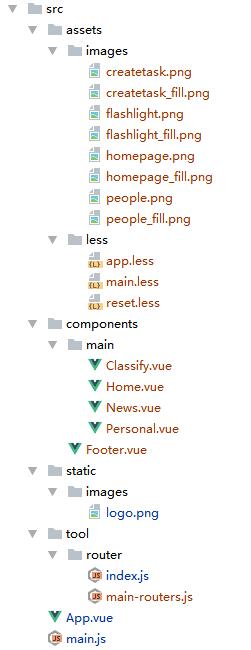
首先在components下新建main文件夹,用来存放4个主导航页。
在这个文件夹下新建4个vue文件,分别是Home.vue、News.vue、Classify.vue、Personal.vue,内容都一样
<template>

    <div>

        <h1>{{msg}}</h1>

        <img src="@/static/images/logo.png">

    </div>

</template>

<script>

    export default {

        data () {

            return {

                msg: "首页" //把这里都改一下

            }

        }

    }

</script>

<style scoped>

</style>
@这里可以简单地理解为src根路径。
然后修改tool/router/index.js文件
import Vue from 'vue'

import Router from 'vue-router'

import Home from '@/components/main/Home'

import News from '@/components/main/News'

import Classify from '@/components/main/Classify'

import Personal from '@/components/main/Personal'

Vue.use(Router);

export default new Router({

    routes: [

        {

            path: '/',

            redirect: '/home'

        },

        {

            path: '/home',

            name: 'home',

            component: Home

        },

        {

            path: '/news',

            name: 'news',

            component: News

        },

        {

            path: '/classify',

            name: 'classify',

            component: Classify

        },

        {

            path: '/personal',

            name: 'personal',

            component: Personal

        }

    ]

});
然后在components下新建Footer.vue文件,用来处理底部导航
<template>

    <tabbar @on-index-change="foo">

        <tabbar-item selected>

            <img slot="icon" src="../assets/images/homepage.png">

            <img slot="icon-active" src="../assets/images/homepage_fill.png">

            <span slot="label">首页</span>

        </tabbar-item>

        <tabbar-item>

            <img slot="icon" src="../assets/images/flashlight.png">

            <img slot="icon-active" src="../assets/images/flashlight_fill.png">

            <span slot="label">最新</span>

        </tabbar-item>

        <tabbar-item>

            <img slot="icon" src="../assets/images/createtask.png">

            <img slot="icon-active" src="../assets/images/createtask_fill.png">

            <span slot="label">分类</span>

        </tabbar-item>

        <tabbar-item>

            <img slot="icon" src="../assets/images/people.png">

            <img slot="icon-active" src="../assets/images/people_fill.png">

            <span slot="label">我的</span>

        </tabbar-item>

    </tabbar>

</template>

<script>

    import {Tabbar, TabbarItem} from 'vux'

    import router from '@/tool/router/index.js'

    export default {

        name: 'AppFooter',

        components: {

            Tabbar,

            TabbarItem

        },

        methods: {

            foo: function (newindex, oldindex) {

                switch (newindex){

                    case  :

                        router.replace('/home');

                        break;

                    case :

                        router.replace('/news');

                        break;

                    case :

                        router.replace('/classify');

                        break;

                    case :

                        router.replace('/personal');

                        break;

                }

            }

        }

    }

</script>

<style>

</style>
需要注意的是,我们这里并不采用vux官方API里demo的跳转方式(在TabbarItem上加link),而是用on-index-change事件,在这个事件里我们通过router.replace来切换路由,否则你在多次点击底部导航之后再回退的话,会把前面点过的再回退一遍。
我们再添加几个less样式,来初始化和添加全局样式。
在assets下新建less文件夹,在里面新建
app.less
#app {

    .weui-tabbar__item.weui-bar__item_on .weui-tabbar__icon,

    .weui-tabbar__item.weui-bar__item_on .weui-tabbar__icon > i,

    .weui-tabbar__item.weui-bar__item_on .weui-tabbar__label {

        color: #1296DB

    }

}
reset.less
button {

    -webkit-tap-highlight-color: rgba(, , , );

    -webkit-appearance: none;

    padding: ;

    margin: ;

    outline: none;

    border: none;

    border-radius: ;

    background: transparent;

}
main.less
@import '~vux/src/styles/reset.less';

@import "reset";

@import "app";
然后修改APP.vue文件
<template>

    <div id="app">

        <router-view/>

        <app-footer></app-footer>

    </div>

</template>

<script>

    import AppFooter from './components/Footer.vue'

    export default {

        name: 'app',

        components: {

            AppFooter

        }

    }

</script>

<style lang="less">

    @import "./assets/less/main.less";

</style>
上面用到的几个图片,可以直接到github里下载。

【前端】Vue2全家桶案例《看漫画》之一、添加四个导航页的更多相关文章
- 【前端】Vue2全家桶案例《看漫画》之番外篇、express上传漫画(可选)
转载请注明出处:http://www.cnblogs.com/shamoyuu/p/vue_vux_app_extra_1.html 项目github地址:https://github.com/sha ...
- 【前端】Vue2全家桶案例《看漫画》之六、图片阅读页
转载请注明出处:http://www.cnblogs.com/shamoyuu/p/vue_vux_app_6.html 项目github地址:https://github.com/shamoyuu/ ...
- 【前端】Vue2全家桶案例《看漫画》之四、漫画页
转载请注明出处:http://www.cnblogs.com/shamoyuu/p/vue_vux_app_4.html 项目github地址:https://github.com/shamoyuu/ ...
- 【前端】Vue2全家桶案例《看漫画》之二、完成首页基本样式
转载请注明出处:http://www.cnblogs.com/shamoyuu/p/vue_vux_app_2.html 项目github地址:https://github.com/shamoyuu/ ...
- 【前端】Vue2全家桶案例《看漫画》之七、webpack插件开发——自动替换服务器API-URL
转载请注明出处:http://www.cnblogs.com/shamoyuu/p/vue_vux_app_7.html 项目github地址:https://github.com/shamoyuu/ ...
- 【前端】Vue2全家桶案例《看漫画》之五、引入axios
转载请注明出处:http://www.cnblogs.com/shamoyuu/p/vue_vux_app_5.html 项目github地址:https://github.com/shamoyuu/ ...
- 【前端】Vue2全家桶案例《看漫画》之三、引入vuex
转载请注明出处:http://www.cnblogs.com/shamoyuu/p/vue_vux_app_3.html 项目github地址:https://github.com/shamoyuu/ ...
- Vue2全家桶+Element搭建的PC端在线音乐网站
目录 1,前言 2,已有功能 3,使用 4,目录结构 5,页面效果 登录页 首页 排行榜 歌单列表 歌单详情 歌手列表 歌手详情 MV列表 MV详情 搜索页 播放器 1,前言 项目基于Vue2全家桶及 ...
- Vue2全家桶之一:vue-cli(vue脚手架)超详细教程
本文转载于:https://www.jianshu.com/p/32beaca25c0d 都说Vue2简单上手容易,的确,看了官方文档确实觉得上手很快,除了ES6语法和webpack的配置让你感到 ...
随机推荐
- jumpserver v0.4.0 基于 CenOS7 的安装详解
标签(linux): jumpserver 笔者Q:972581034 交流群:605799367.有任何疑问可与笔者或加群交流 笔者已经弃用Jumpserver,并自已开发了shell跳板机. sh ...
- MathUtils
package com.yqw.java.util;/** * 数字转换工具 */public class MathUtils { /** * short转byte */ ...
- java对象引用-要掌握的细节2
目的:加深对java引用变量的理解,避免数据的处理的偏差. 问题: 1.一个集合List ,将新建Student对象stu放入List之后,再给stu的成员变量例如id,name赋值.此时List中的 ...
- Vue.js根据列表某列值更新filter
<!DOCTYPE html> <html> <head> <meta charset="utf-8" /> <title&g ...
- spring之AspectJ基于xml AOP编程
一.引言: AspectJ框架不仅实现了面向切面编程,而且还支持注解,spring将它引入自己的规范之中. 二.需要了解: AspectJ是基于java语言的AOP框架 spring2.0之后支持As ...
- javascript:Json 和数组的遍历
首先看代码示例var json={a:1,b:2,c:3}; //json var array={1,2,3}; //数组 alert(json.a); //弹出1 或alert(json['a']) ...
- Go笔记-流程控制
[if] if 是用于测试某个条件的语句,如果该条件(逻辑型或布尔型)成立,则会执行大括号内的代码,第一个大括号必须和if 或者else同行,否则非法 // 方式1 if condition { // ...
- Oracle 12cR1 RAC 在VMware Workstation上安装(中)—图形界面安装
Oracle 12cR1 RAC 在VMware Workstation上安装(中)—图形界面安装 1.1 图形界面安装 1.1.1 安装GRID 安装日志:/u01/app/oraInvento ...
- 使用hbase小结
背景 hbase中一张表的rowkey定义为时间戳+字符串 需求 根据时间戳和列簇中某列的值为"abc",导出一天内的数据到excel中. 使用FilterList FilterL ...
- BZOJ 2916: [Poi1997]Monochromatic Triangles [计数]
题意:空间中有n个点,任意3个点不共线.每两个点用红线或者蓝线连接,如果一个三角形的三边颜色相同,那么称为同色三角形.给你一组数据,计算同色三角形的总数. 考虑补集,异色三角形 每个点的边红色和蓝色两 ...