
底部导航栏-----FragmentTabHost
【说明】
1、主界面上添加父容器:FragmentTabHost
属于v4兼容包
需要指定该id为android:id/tabhost,不能修改,表示由android系统来托管这个id。
本身是一个FrameLayout的子类
2、显示内容区域
作为每选一个导航按钮,将显示导航对应的内容。这个内容区域需要使用一个容器来表示。
必须设定这个容器的id为android:id/tabcontent
3、导航区域
需要指定导航元素——TabWidget
【注意】
1、指定id时为android:id/tabhost,绑定时使用android.R.id.tabhost.
2、每一个Tab对应的Fragment的会填充到tabcontext上
【效果】
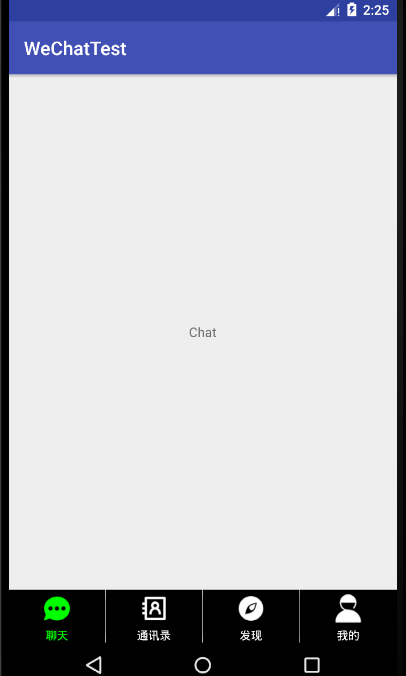
【项目结构】
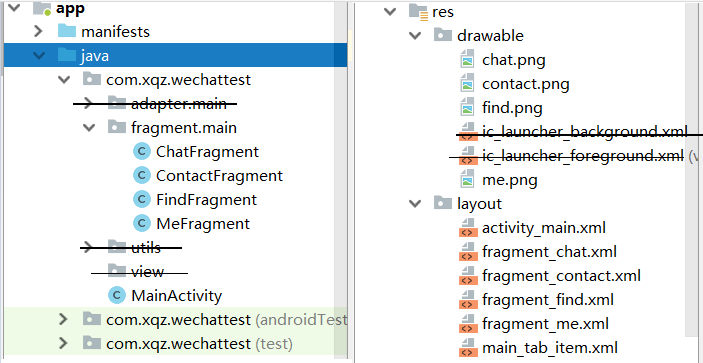
【步骤】
①修改activity_main.xml
<?xml version="1.0" encoding="utf-8"?>

<android.support.v4.app.FragmentTabHost xmlns:android="http://schemas.android.com/apk/res/android"

    xmlns:app="http://schemas.android.com/apk/res-auto"

    xmlns:tools="http://schemas.android.com/tools"

    android:layout_width="match_parent"

    android:layout_height="match_parent"

    tools:context=".MainActivity"

    android:id="@android:id/tabhost">

    <LinearLayout

        android:layout_width="match_parent"

        android:layout_height="match_parent"

        android:orientation="vertical">

        <FrameLayout

            android:id="@android:id/tabcontent"

            android:layout_width="match_parent"

            android:layout_height="0dp"

            android:layout_weight="1">

        </FrameLayout>

        <TabWidget

            android:id="@android:id/tabs"

            android:layout_width="match_parent"

            android:layout_height="?attr/actionBarSize"

            android:layout_gravity="bottom">

        </TabWidget>

    </LinearLayout>

</android.support.v4.app.FragmentTabHost>
②创建main_tab_item.xml底部导航的单个布局
 <?xml version="1.0" encoding="utf-8"?>

 <LinearLayout

     xmlns:android="http://schemas.android.com/apk/res/android"

     android:layout_width="match_parent"

     android:layout_weight="1"

     android:layout_height="wrap_content"

     android:orientation="vertical"

     android:background="@color/blackBg">

     <ImageView

         android:id="@+id/ivTab"

         android:layout_width="40dp"

         android:layout_height="40dp"

         android:layout_gravity="center"

         android:padding="5sp"

         android:scaleType="fitCenter"

         android:src="@mipmap/ic_launcher"

         />

     <TextView

         android:id="@+id/tvTab"

         android:layout_width="match_parent"

         android:layout_height="wrap_content"

         android:gravity="center"

         android:textColor="@color/writeTx"

         android:text="聊天"

         android:textSize="12sp"/>

 </LinearLayout>
底部导航栏-----FragmentTabHost的更多相关文章
- TextView+Fragment实现底部导航栏
前言:项目第二版刚上线没多久,产品又对需求进行了大改动,以前用的是左滑菜单,现在又要换成底部导航栏,于是今天又苦逼加班了.花了几个小时实现了一个底部导航栏的demo,然后总结一下.写一篇博客.供自己以 ...
- Android (争取做到)最全的底部导航栏实现方法
本文(争取做到)Android 最全的底部导航栏实现方法. 现在写了4个主要方法. 还有一些个人感觉不完全切题的方法也会简单介绍一下. 方法一. ViewPager + List<View> ...
- Android应用底部导航栏(选项卡)实例
现在很多android的应用都采用底部导航栏的功能,这样可以使得用户在使用过程中随意切换不同的页面,现在我采用TabHost组件来自定义一个底部的导航栏的功能. 我们先看下该demo实例的框架图: 其 ...
- Android 修改底部导航栏navigationbar的颜色
Android 修改底部导航栏navigationbar的颜色 getWindow().setNavigationBarColor(Color.BLUE); //写法一 getWindow().set ...
- Android底部导航栏——FrameLayout + RadioGroup
原创文章,转载请注明出处http://www.cnblogs.com/baipengzhan/p/6285881.html Android底部导航栏有多种实现方式,本文详细介绍FrameLayout ...
- Android底部导航栏创建——ViewPager + RadioGroup
原创文章,引用请注明出处:http://www.cnblogs.com/baipengzhan/p/6270201.html Android底部导航栏有多种实现方式,本文详解其中的ViewPager ...
- 二、Fragment+RadioButton实现底部导航栏
在App中经常看到这样的tab底部导航栏 那么这种效果是如何实现,实现的方式有很多种,最常见的就是使用Fragment+RadioButton去实现.下面我们来写一个例子 首先我们先在activi ...
- Android学习笔记- Fragment实例 底部导航栏的实现
1.要实现的效果图以及工程目录结构: 先看看效果图吧: 接着看看我们的工程的目录结构: 2.实现流程: Step 1:写下底部选项的一些资源文件 我们从图上可以看到,我们底部的每一项点击的时候都有不同 ...
- [置顶]
xamarin android Fragment实现底部导航栏
前段时间写了篇关于Fragment的文章,介绍了基础的概念,用静态和动态的方式加载Fragment Xamarin Android Fragment的两种加载方式.下面的这个例子介绍xamarin ...
随机推荐
- 第三章之S5PV210串口初始化
1,在start.S中执行373行b lowlevel_init跳转到/board/samsung/goni/lowlevel.S中,此代码中初始化一样硬件. 找到241行,此行执行URAT初始化,如 ...
- 在Workload Automation中实现suspend分析
1. 背景 这里涉及到两个工具analyze_suspend.py和Workload Automation. 下面analyze_suspend.py简称为ASPY,Workload Automati ...
- HTML学习之制作导航网页
前言 今天用HTML写了一个网址导航,源代码如下: <html> <head> <title>网址导航</title> </head> &l ...
- python 工具安装
1. whl文件的安装:pip install 文件名.whl 2. 压缩包中有setup.py的安装:python setup.py install 3. 利用anaconda下载安装:conda ...
- 更多细节的理解RSA算法
一.概述 RSA算法是1977年由Ron Rivest.Adi Shamir 和 Leonard Adleman三人组在论文A Method for Obtaining Digital Signatu ...
- 超实用的JavaScript代码段 Item5 --图片滑动效果实现
先上图 鼠标滑过那张图,显示完整的哪张图,移除则复位: 简单的CSS加JS操作DOM实现: <!doctype html> <html> <head> <me ...
- git fatal: 远程 origin 已经存在。
不小心将git远程地址配错了,再次配置提示以下错误: fatal: 远程 origin 已经存在. 此时只需要将远程配置删除,重新添加即可: git remote rm origin git remo ...
- search_request.go
package types type SearchRequest struct { // 搜索的短语(必须是UTF-8格式),会被分词 // 当值为空字符串时关键词会从下面的Token ...
- golang 1.8 优雅关闭
// main.go package main import ( "fmt" "log" "net/http" "os" ...
- .net core微服务之基于Docker+Consul+Registrator服务注册服务发现
一.Docker部分: 先拉最新的asp.net core的镜像: docker pull microsoft/aspnetcore 将下载下来的镜像重命名,为什么要重命名?等会讲Registrato ...