
[Canvas]游戏增加怪物爆炸效果,改善箭头形状
请点此下载代码并用浏览器打开试玩。
图例:
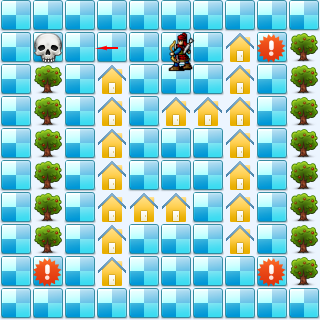
代码:
<!DOCTYPE html>
<html lang="utf-8">
<meta http-equiv="Content-Type" content="text/html; charset=utf-8"/>
<head>
     <title>地图加载 英雄可以射箭了 怪物爆炸 19.3.7 7:59 by:逆火狂飙 horn19782016@163.com</title>

     <style>
     #canvas{
        background:#ffffff;
        cursor:pointer;
        margin-left:10px;
        margin-top:10px;
        -webkit-box-shadow:3px 3px 6px rgba(0,0,0,0.5);
        -moz-box-shadow:3px 3px 6px rgba(0,0,0,0.5);
        box-shadow:3px 3px 6px rgba(0,0,0,0.5);
     }

     #controls{
        margin-top:10px;
        margin-left:15px;
     }
     </style>

    </head>

     <body onload="init()">
        <div id="controls">
            <input id='animateBtn' type='button' value='开始'/>
        </div>

        <canvas id="canvas" width="160px" height="160px" >
            出现文字表示你的浏览器不支持HTML5
        </canvas>
     </body>
</html>
<script type="text/javascript">
<!--
var paused=true;
animateBtn.onclick=function(e){
    paused=! paused;

    if(paused){
        animateBtn.value="开始";

    }else{
        animateBtn.value="停止";

        window.requestAnimationFrame(animate);
    }
}

var ctx;// 绘图环境
var r;// 表盘半径
var terrain;
var hero;
var arrows;
var monsterMng;
function init(){
    // init Canvas
    var canvas=document.getElementById('canvas');
    r=160;
    canvas.width =2*r;
    canvas.height=2*r;
    ctx=canvas.getContext('2d');

    terrain=new Terrain();
    hero=new Hero();

    arrows=new Array();
    monsterMng=new MonsterMng();

    // 响应键盘事件
    canvas.addEventListener('keydown', doKeyDown, true);
    canvas.focus();
    window.addEventListener('keydown', doKeyDown, true);
};

function draw(){
    // Clear Canvas
    ctx.clearRect(0,0,ctx.canvas.width,ctx.canvas.height);
    ctx.fillStyle="#ECF5FF";
    ctx.fillRect(0,0,ctx.canvas.width,ctx.canvas.height);

    terrain.paint(ctx);
    monsterMng.paint(ctx);
    hero.paint(ctx);

    for(var i=arrows.length-1;i>-1;i--){
        var arrow=arrows[i];
        var x=parseInt(arrow.x / 32,10);
        var y=parseInt(arrow.y / 32,10);

        // 箭矢射中怪物所在
        if(monsterMng.getValue(x,y)==1){
            monsterMng.setValue(x,y,2);
            arrows.splice(i,1);
            break;
        }

        // 箭矢射中树木房屋等障碍物
        if(terrain.getValue(x,y)!=0){
            arrows.splice(i,1);
        }
    }

    // 画箭矢
    for(var i=0;i<arrows.length;i++){
        var arrow=arrows[i];

        arrow.paint(ctx);
    }

    // 胜利条件
    if(monsterMng.hasMonster()==false){
        alert("You win!");
        init();
    }
}

function animate(){
    if(!paused){
        draw();
        window.requestAnimationFrame(animate); /// 让浏览器自行决定帧速率
    }
}

function doKeyDown(e) {
    var keyID = e.keyCode ? e.keyCode :e.which;
    if(keyID === 38 || keyID === 87)  { // up arrow and W
        hero.move('up');
        e.preventDefault();
    }
    if(keyID === 39 || keyID === 68)  { // right arrow and D
        hero.move('right');
        e.preventDefault();
    }
    if(keyID === 40 || keyID === 83)  { // down arrow and S
        hero.move('down');
        e.preventDefault();
    }
    if(keyID === 37 || keyID === 65)  { // left arrow and A
        hero.move('left');
        e.preventDefault();
    }

    if(keyID === 32 )  { // SpaceBar
        var a=new Arrow(hero.x+16,hero.y+16,hero.direction);
        arrows.push(a);
        console.log('arrows.length='+arrows.length);
        e.preventDefault();
    }
}

//---------------------------------------------------地形类定义开始------------------------------------------------------------------->>
Terrain=function(){
    this.files=["road.png","tree.png","home.png"];

    this.maps=new Array(
        [0,0,0,0,0,0,0,0,0,0],
        [0,0,1,1,1,1,1,1,0,0],
        [0,0,0,0,0,0,0,0,0,0],
        [0,0,2,2,2,2,2,2,2,0],
        [0,0,0,0,0,0,2,0,0,0],
        [0,0,0,2,0,0,2,0,0,0],
        [0,0,0,2,0,0,0,0,0,0],
        [0,2,2,2,2,2,2,2,0,0],
        [0,0,0,0,0,0,0,0,0,0],
        [0,1,1,1,1,1,1,1,1,0],
    );
}
Terrain.prototype={
    files:[],
    // Property
    maps:0,

    // method
    paint:function(ctx){
        for(var i=0;i<this.maps.length;i++){
            var arr=this.maps[i];

            for(var j=0;j<arr.length;j++){
                var value=arr[j];

                var img=new Image();
                img.src=this.files[value];

                ctx.drawImage(img,i*32,j*32);
            }
        }
    },

    getValue:function(i,j){
        if(i<0 || i>=this.maps.length){
            return undefined;
        }
        var arr=this.maps[i];
        if(j<0 || j>=arr.length){
            return undefined;
        }
        var value=arr[j];
        return value;
    },

    setValue:function(i,j,value){
        if(i<0 || i>=this.maps.length){
            return undefined;
        }
        var arr=this.maps[i];
        if(j<0 || j>=arr.length){
            return undefined;
        }
        arr[j]=value;
    },
}
//---------------------------------------------------地形类定义结束-------------------------------------------------------------------<<

//---------------------------------------------------英雄类定义开始------------------------------------------------------------------->>
Hero=function(){
    this.pngs=[
        {left:0,top:10,width:40,height:40},
        {left:0,top:66,width:40,height:40},
        {left:0,top:120,width:40,height:40},
        {left:0,top:180,width:40,height:40},
    ];
}
Hero.prototype={
    pngs:[],
    x:160,
    y:160,
    xTo:160,
    yTo:160,
    step:32,
    direction:'up',

    paint:function(ctx){
        var img=new Image();
        img.src='bowman.png';

        var index=0;
        if(this.direction=='up'){
            index=3;
        }
        if(this.direction=='down'){
            index=0;
        }
        if(this.direction=='left'){
            index=1;
        }
        if(this.direction=='right'){
            index=2;
        }
        var pos=this.pngs[index];
        ctx.drawImage(img,pos.left,pos.top,pos.width,pos.height,this.x,this.y,pos.width,pos.height);
    },

    move:function(direction){
        this.direction=direction;

        if(this.direction=='up'){
            this.yTo-=this.step;
        }
        if(this.direction=='down'){
            this.yTo+=this.step;
        }
        if(this.direction=='left'){
            this.xTo-=this.step;
        }
        if(this.direction=='right'){
            this.xTo+=this.step;
        }

        if(terrain.getValue(this.xTo/this.step,this.yTo/this.step)==0){
            this.x=this.xTo;
            this.y=this.yTo;
        }else{
            this.xTo=this.x;
            this.yTo=this.y;
        }
    }
}
//---------------------------------------------------英雄类定义结束-------------------------------------------------------------------<<

//---------------------------------------------------箭矢类定义开始------------------------------------------------------------------->>
Arrow=function(x,y,direction){
    this.x=x;
    this.y=y;
    this.direction=direction;
}
Arrow.prototype={
    x:0,
    y:0,
    velocity:1,// 飞行速度
    len:16,// 箭杆长
    direction:'',

    // method
    paint:function(ctx){
        var x1=this.x,y1=this.y;
        var leaf=4;//箭头箭羽长
        var x2,y2,x3,y3;
        var angle=getRad(15);

        if(this.direction=='up'){
            this.y-=this.velocity;
            y1=this.y-this.len;
            x1=this.x;

            y2=y1+leaf*Math.cos(angle);
            x2=x1-leaf*Math.sin(angle);
            y3=y2;
            x3=x1+leaf*Math.sin(angle);
        }
        if(this.direction=='down'){
            this.y+=this.velocity;
            y1=this.y+this.len;
            x1=this.x;
            y2=y1-leaf*Math.cos(angle);
            x2=x1-leaf*Math.sin(angle);
            y3=y2;
            x3=x1+leaf*Math.sin(angle);
        }
        if(this.direction=='left'){
            this.x-=this.velocity;
            x1=this.x-this.len;
            y1=this.y;

            x2=x1+leaf*Math.cos(angle);
            y2=y1-leaf*Math.sin(angle);
            x3=x2;
            y3=y1+leaf*Math.sin(angle);
        }
        if(this.direction=='right'){
            this.x+=this.velocity;
            x1=this.x+this.len;
            y1=this.y;

            x2=x1-leaf*Math.cos(angle);
            y2=y1-leaf*Math.sin(angle);
            x3=x2;
            y3=y1+leaf*Math.sin(angle);
        }

        ctx.beginPath();
        ctx.lineWidth = 2;
        ctx.strokeStyle = "#ff0000";
        ctx.lineTo(this.x,this.y);
        ctx.lineTo(x1,y1);
        ctx.lineTo(x2,y2);
        ctx.lineTo(x3,y3);
        ctx.lineTo(x1,y1);

        ctx.stroke();
        ctx.closePath();
    },
}
//---------------------------------------------------箭矢类定义结束-------------------------------------------------------------------<<

//---------------------------------------------------怪物管理类定义开始------------------------------------------------------------------->>
MonsterMng=function(){
    this.files=["","skull.png","bomb.png",];

    this.maps=new Array(
        [0,0,0,0,0,0,0,0,0,0],
        [0,1,0,0,0,0,0,0,1,0],
        [0,0,0,0,0,0,0,0,0,0],
        [0,0,0,0,0,0,0,0,0,0],
        [0,0,0,0,0,0,0,0,0,0],
        [0,0,0,0,0,0,0,0,0,0],
        [0,0,0,0,0,0,0,0,0,0],
        [0,0,0,0,0,0,0,0,0,0],
        [0,1,0,0,0,0,0,0,1,0],
        [0,0,0,0,0,0,0,0,0,0],
    );
}
MonsterMng.prototype={
    files:[],
    // Property
    maps:[],

    // method
    paint:function(ctx){
        for(var i=0;i<this.maps.length;i++){
            var arr=this.maps[i];

            for(var j=0;j<arr.length;j++){
                var value=arr[j];

                if(value!=0){
                    var img=new Image();
                    img.src=this.files[value];

                    ctx.drawImage(img,i*32,j*32);
                }
            }
        }
    },

    // 判断怪物还是否存在
    hasMonster:function(){
        var count=0;
        for(var i=0;i<this.maps.length;i++){
            var arr=this.maps[i];

            for(var j=0;j<arr.length;j++){
                var value=arr[j];

                if(value==1){
                    count++;// 累计怪物数
                }
            }
        }

        // 怪物数大于零就是还有怪物
        return count>0;
    },

    getValue:function(i,j){
        if(i<0 || i>=this.maps.length){
            return undefined;
        }
        var arr=this.maps[i];
        if(j<0 || j>=arr.length){
            return undefined;
        }
        var value=arr[j];
        return value;
    },

    setValue:function(i,j,value){
        if(i<0 || i>=this.maps.length){
            return undefined;
        }
        var arr=this.maps[i];
        if(j<0 || j>=arr.length){
            return undefined;
        }
        arr[j]=value;
    },
}
//---------------------------------------------------怪物管理类定义结束-------------------------------------------------------------------<<
//  常规函数:角度得到弧度
function getRad(degree){
    return degree/180*Math.PI;
}
//-->
</script>
2019年3月7日08点50分
[Canvas]游戏增加怪物爆炸效果,改善箭头形状的更多相关文章
- Atitit 游戏引擎---物理系统(1)------爆炸效果
Atitit 游戏引擎---物理系统(1)------爆炸效果 1.1. 动画框架的来源flex,jqueryuijs,anim , cocos2d 1 1.2. Jqueryui的特效库 1 1.3 ...
- jQuery 打气球小游戏 点击气球爆炸效果
最近在学习前端,看到偶尔看到前端小游戏,就想自己写一个小游戏,奈何水平有限,只能写打气球这种简单的,所有的气球都是动态生成的,气球的颜色也是随机的 html部分 <div class=" ...
- 【微信小程序项目实践总结】30分钟从陌生到熟悉 web app 、native app、hybrid app比较 30分钟ES6从陌生到熟悉 【原创】浅谈内存泄露 HTML5 五子棋 - JS/Canvas 游戏 meta 详解,html5 meta 标签日常设置 C#中回滚TransactionScope的使用方法和原理
[微信小程序项目实践总结]30分钟从陌生到熟悉 前言 我们之前对小程序做了基本学习: 1. 微信小程序开发07-列表页面怎么做 2. 微信小程序开发06-一个业务页面的完成 3. 微信小程序开发05- ...
- Java坦克大战 (五) 之产生敌方坦克和爆炸效果
本文来自:小易博客专栏.转载请注明出处:http://blog.csdn.net/oldinaction 在此小易将坦克大战这个项目分为几个版本,以此对J2SE的知识进行回顾和总结,希望这样也能给刚学 ...
- canvas游戏小试:画一个按方向键移动的圆点
canvas游戏小试:画一个按方向键移动的圆点 自己对canvas,但又有一颗做游戏的心TT.然后记录一下对canvas的学习吧,用一个按方向键控制的小圆点来做练习.(编程时用了一些es6的语法) ...
- [一位菜鸟的COCOS-2D编程之路]打飞机中机种敌机和战机损毁时的爆炸效果
1.第一步,添加爆炸动画 //添加玩家飞机飞行动画 id _playerFlyAction; id _playerBlowupAnimation; //战机爆炸动画 id _enemyBlowupAn ...
- WPF编游戏系列 之七 动画效果(2)
原文:WPF编游戏系列 之七 动画效果(2) 上一篇已经对关闭窗口图标进行了动画效果处理,本篇将对窗口界面的显示和关闭效果进行处理.由于所有的动画效果都是针对窗口界面的Canvas,所以 ...
- WPF编游戏系列 之六 动画效果(1)
原文:WPF编游戏系列 之六 动画效果(1) 本篇主要针对界面进行动画效果处理.首先在打开或关闭界面时,使其产生动态效果而不是生硬的显示或消失(如下图).其次在鼠标放到关闭窗口图标上时, ...
- 【CSS】398- 原生JS实现DOM爆炸效果
爆炸动效分享 前言 此次分享是一次自我组件开发的总结,还是有很多不足之处,望各位大大多提宝贵意见,互相学习交流. 分享内容介绍 通过原生js代码,实现粒子爆炸效果组件 组件开发过程中,使用到了公司内部 ...
随机推荐
- 《廖雪峰 . Git 教程》学习总结
基本上,Git就是以下面的命令顺序学习的.文中笔记是从廖雪峰老师的 Git教程 中总结出来的,方面查阅命令. 1.基础 git config --global user.name "Your ...
- Memory access Tracing/Profiling
https://mahmoudhatem.wordpress.com/2017/03/22/workaround-for-linux-perf-probes-issue-for-oracle-trac ...
- OOP设计模式[JAVA]——04命令模式
命令模式 命令模式的意图 命令模式属于对象的行为模式.别名又叫:Action或Transaction. 命令模式把一个请求或者操作封装到一个对象中.命令模式允许系统使用不同的请求把客户端参数化,对请求 ...
- 在ASP.NET Web API中使用OData的单例模式
从OData v4开始增加了对单例模式的支持,我们不用每次根据主键等来获取某个EDM,就像在C#中使用单例模式一样.实现方式大致需要两步: 1.在需要实现单例模式的导航属性上加上[Singleton] ...
- Delphi XE5 android 获取网络状态《转》
unit Androidapi.JNI.Network; interface function IsConnected: Boolean; function IsWiFiConnected: Bool ...
- 快速将wax配置到项目中进行lua开发
通过Finder浏览到你保存该项目的文件夹.创建三个新的文件夹:wax.scripts和Classes. 第一:首先,下载源代码的压缩包.Wax放在GitHub上(https://github.com ...
- C#编程(十九)----------部分类
部分类 C#中使用关键字partial把类,结构或结构放在多个文件中.一般情况下,一个类全部驻留在单个文件中.但有时候,多个开发人员需要访问同一个类,或者某种类型的代码生成器生成了一个类的某部分,所以 ...
- 【python】python读写文件,都不乱码
读是按照文本的编码方式读取,写是按照文本的编码方式追加 import chardet fileName = 'E:/2/采集数据_pswf12_180大0小35750_20181206.txt' # ...
- Calendar获取当天的初始时间,当月的初始时间,当年的初始时间
如下:
- Spring常用表单验证注解
下面是主要的验证注解及说明: 注解 适用的数据类型 说明 @AssertFalse Boolean, boolean 验证注解的元素值是false @AssertTrue Boolean, boole ...