
React脚手架创建一个React应用以及项目目录结构详解
react脚手架
用来帮助程序员快速创建一个基于xxx库的模板项目,包含了所有需要的配置,指定好了所有的依赖,可以直接安装/编译/运行一个简单效果
react提供了一个专门用于创建react项目的脚手架库: create-react-app
项目的整体技术架构为: react + webpack + es6 + babel + eslint
使用脚手架开发的项目的特点: 模块化(js是一个一个模块编写的), 组件化(界面是由多个组件组合编写实现的), 工程化(实现了自动构建/运行/打包的项目)
使用react脚手架创建项目并启动
下载脚手架:npm install -g create-react-app
创建项目:create-react-app react-app
进入项目目录:cd react-app
启动项目:npm start
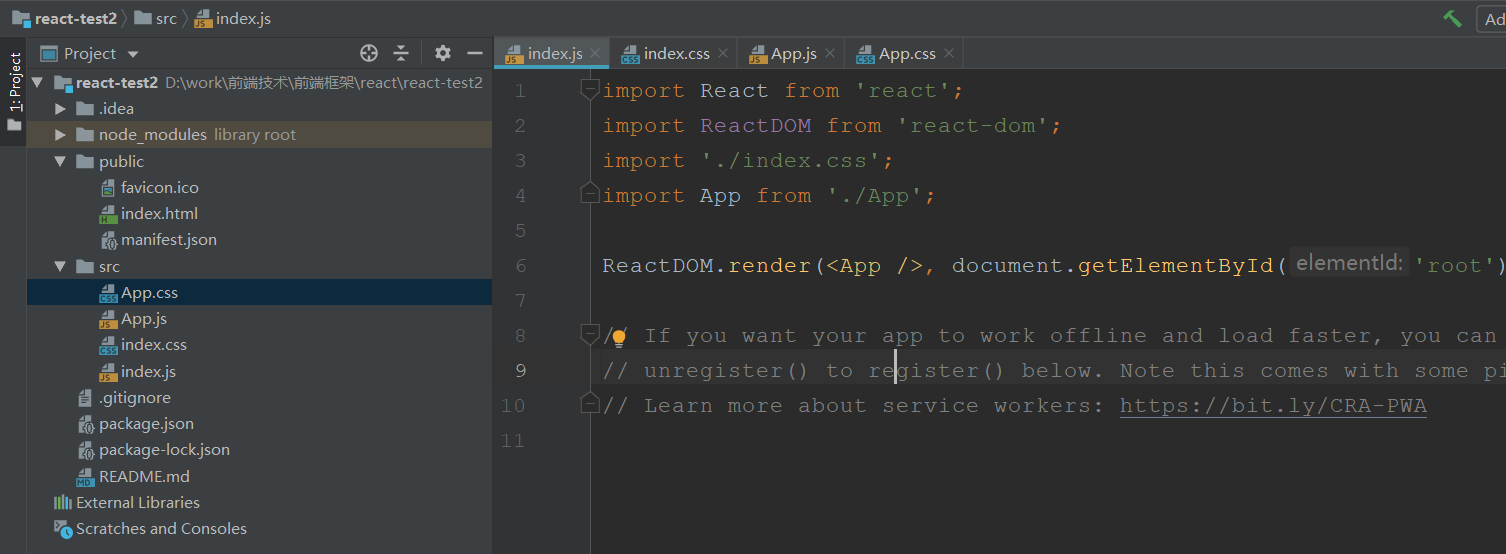
react脚手架创建项目目录结构

node_modules-------第三方依赖模块文件夹
public
| -- index.html------------------------主页面
src:
.gitignore-------git版本管制忽略的配置
package.jos-------应用包配置文件
README.md-------应用描述说明的readme文件
基于脚手架项目编写应用案例
实现如下的效果

使用脚手架创建项目

拆分组件
应用组件: App------state: comments/array
添加评论组件: comment-add-------state: username/string, content/string props: add/func
评论列表组件: comment-list-------- props: comment/object, delete/func, index/number
评论项组件: comment-item-------- props: comments/array, delete/func


上面是拆分的每个组件,并且将页面组件在App.js中引入
实现静态组件并且实现动态组件(组件动态化,也就是添加数据交互)
App.js中引入comment组件
import React, { Component } from 'react';
import './App.css';

import Comment from './views/comment/comment'
class App extends Component {
  render() {
    return (
      <div className="App">
        <Comment/>
      </div>
    );
  }
}

export default App;
comment组件
组件中引入comment-add和comment-list组件
import React, { Component } from 'react';
import './comment.css';

import CommentAdd from './comment-add/comment-add'
import CommentList from './comment-list/comment-list'
class Comment extends Component {
  // 给组建对象指定state属性,可以不用constructor
  state = {
    comments: [
      {username: 'Tom', content: '一个虚拟DOM(元素)是一个一般的js对象, 准确的说是一个对象树(倒立的)'},
      {username: 'Jack', content: '虚拟DOM保存了真实DOM的层次关系和一些基本属性,与真实DOM一一对应'},
      {username: 'Jack', content: '用JS对象树表示DOM树的结构;然后用这个树构建一个真正的DOM树插到文档当中'},
      {username: 'Jack', content: '这里render不断在执行更新date数据,但是input是不会更新的'},
      {username: 'Jack', content: '拆分组件: 拆分界面,抽取组件,实现静态组件: 使用组件实现静态页面效果'},
      {username: 'Jack', content: '数据保存在哪个组件,如果是这个数据只是某个组件需要用到,那么就放在该组件,如果有两个组件需要用到'},
      {username: 'Jack', content: '子组件改变父组件的状态(状态在哪个组件,更新状态的行为就应该定义在哪个组件,父组件定义函数,传给子组件调用)'}
    ]
  }

  // 给comment-add组件调用的添加评论的方法
  addComment = (comment) => {
    const {comments} = this.state
    comments.unshift(comment)
    this.setState({comments}) // 更新状态
  }

  // 给comment-item组件调用的删除评论的方法(这里先把这个方法传个comment-list组件,再由comment-list传给comment-item)
  deleteComment = (index) => {
    const {comments} = this.state
    comments.splice(index, 1)
    this.setState({comments}) // 更新状态
  }

  render() {
    const {comments} = this.state
    return (
      <div className="comment">
        <h1 className='comment-title'>请发表对React的评论</h1>
        <div className='comment-main'>
          <div className='comment-content-left'>
            <CommentAdd addComment={this.addComment}/>
          </div>
          <div className='comment-content-right'>
            {/*<CommentList comments={comments}/>*/}
            <CommentList comments={comments} deleteComment={this.deleteComment}/>
          </div>
        </div>
      </div>
    );
  }
}

export default Comment;
.comment-list-title{
  font-size: 30px;
  height: 59px;
  border-bottom: 1px solid #cccccc;
}
.comment-list-content{
  min-height: 20px;
  max-height: 419px;
  overflow-y: auto;
  padding: 10px 0;
  box-sizing: border-box;
}
.no-comment-list{
  color: #FF4A16;
}
comment-add组件
import React, { Component } from 'react';
import './comment-add.css';
import propTypes from 'prop-types'

class CommentAdd extends Component {
  static propTypes = {
    addComment: propTypes.func.isRequired
  }
  state = {
    username: '',
    content: ''
  }

  // 一个事件需要使用bind绑定this,太麻烦,而已使用箭头函数(里面没有this,使用外围的this)
  handleSubmit = () => {
    // 收集表单数据
    const comment = this.state
    // 更新状态
    this.props.addComment(comment)

    // 清除输入框的数据
    this.setState({
      username: '',
      content: ''
    })
  }

  handleNameChange = (event) => {
    const username = event.target.value
    this.setState({username: username})
  }

  handleContentChange = (event) => {
    const content = event.target.value
    this.setState({content: content})
  }

  render() {
    const {username, content} = this.state
    return (
      <div className="comment-add">
        <div className='user-name-content'>
          <h5 className='user-name-title'>用户名</h5>
          <input className='user-name-input' type='text' value={username} onChange={this.handleNameChange}/>
        </div>
        <div className='comment-content'>
          <h5 className='comment-content-title'>评论内容</h5>
          <textarea className='comment-content-input' type='text' value={content} onChange={this.handleContentChange}/>
        </div>
        <div className='submit-btn' onClick={this.handleSubmit}>提交</div>
      </div>
    );
  }
}

export default CommentAdd;
.comment-add{
  width: 100%;
}
.user-name-content,.comment-content{
  width: 100%;
  margin-bottom: 20px;
}
.user-name-title,.comment-content-title{
  margin-bottom: 5px;
  font-size: 20px;
  color: #000000;
}
.user-name-input{
  width: 100%;
  height: 40px;
  line-height: 40px;
  padding: 0 6px;
  box-sizing: border-box;
  border-radius: 4px;
  outline: none;
  border: 1px solid #cccccc;
}
.comment-content-input{
  width: 100%;
  height: 240px;
  padding: 4px;
  box-sizing: border-box;
  border-radius: 4px;
  outline: none;
  border: 1px solid #cccccc;
}
.submit-btn{
  width: 70px;
  height: 30px;
  text-align: center;
  line-height: 30px;
  font-size: 16px;
  color: black;
  border: 1px solid #cccccc;
  border-radius: 4px;
  cursor: pointer;
  margin: 0 auto;
}
comment-list组件
组件中引入comment-item组件
import React, { Component } from 'react';
import PropTypes from 'prop-types'
import './comment-list.css';

import CommentItem from '../comment-item/comment-item'
class CommentList extends Component {
  // 子组件类指定接收数据的属性
  static propTypes = {
    comments: PropTypes.array.isRequired,
    deleteComment: PropTypes.func.isRequired
  }

  render() {
    const {comments, deleteComment} = this.props
    const display = comments.length === 0? 'block' : 'none'

    return (
      <div className="comment-list">
        <h2 className='comment-list-title'>评论回复</h2>
        <div className='comment-list-content'>
          {comments.map((comment, index) => <CommentItem comment={comment} index={index} key={index} deleteComment={deleteComment} />)}
        </div>
        <div className='no-comment-list' style={{display}}>暂无评论,在左侧添加您对React的评价!!!</div>
      </div>
    );
  }
}

export default CommentList;
.comment-list-title{
  font-size: 30px;
  height: 59px;
  border-bottom: 1px solid #cccccc;
}
.comment-list-content{
  min-height: 20px;
  max-height: 419px;
  overflow-y: auto;
  padding: 10px 0;
  box-sizing: border-box;
}
.no-comment-list{
  color: #FF4A16;
}
comment-item组件
import React, { Component } from 'react';
import './comment-item.css';
import PropTypes from "prop-types";

class CommentItem extends Component {
  // 子组件类指定接收数据的属性
  static propTypes = {
    comment: PropTypes.object.isRequired,
    index: PropTypes.number.isRequired,
    deleteComment: PropTypes.func.isRequired
  }

  handleDelete = () => {
    const {comment, index, deleteComment} = this.props
    // 提示
    if (window.confirm(`确定删除${comment.username}的评论吗`)) { // confirm方法不是全局的,需要用window来调用
      // 确定后删除
      deleteComment(index)
    }
  }

  render() {
    const {comment} = this.props

    return (
      <div className="comment-item">
        <div className='comment-item-top'>
          <h3 className='comment-item-user'>{comment.username}说:</h3>
          <div className='comment-item-delete'><p onClick={this.handleDelete}>删除</p></div>
        </div>
        <div className='comment-item-content'>{comment.content}</div>
      </div>
    );
  }
}

export default CommentItem;
.comment-item{
  width: 100%;
  border: 1px solid #cccccc;
  border-radius: 4px;
  min-height: 20px;
  padding: 0 10px;
  box-sizing: border-box;
  margin-bottom: 20px;
}
.comment-item-top{
  height: 40px;
  width: 100%;
  display: flex;
}
.comment-item-user{
  flex:;
  height: 40px;
  line-height: 40px;
}
.comment-item-delete{
  width: 80px;
  height: 40px;
}
.comment-item-delete p{
  width: 50px;
  height: 20px;
  border: 1px solid #cccccc;
  text-align: center;
  line-height: 20px;
  border-radius: 4px;
  cursor: pointer;
  margin: 10px auto 0;
  font-size: 12px;
  color: #0a25ff;
}
.comment-item-content{
  width: 100%;
  min-height: 20px;
  padding: 10px 0;
  box-sizing: border-box;
}
React脚手架创建一个React应用以及项目目录结构详解的更多相关文章
- Angular-cli新建项目目录结构详解
Angular-cli新建项目目录结构详解 在上一篇博客中我们已经通过Angular CLI命令行工具创建出来一个全新的Angular项目,要想写项目,首先我们要先搞清楚项目的目录结构是怎样的,每个文 ...
- [转]Angular项目目录结构详解
本文转自:https://blog.csdn.net/yuzhiqiang_1993/article/details/71191873 版权声明:本文为博主原创文章,转载请注明地址.如果文中有什么纰漏 ...
- vue项目目录结构详解
项目简介基于 vue.js 的前端开发环境,用于前后端分离后的单页应用开发,可以在开发时使用 ES Next.scss 等最新语言特性.项目包含: 基础库: vue.js.vue-router.vue ...
- 脚手架创建一个React项目
一.安装 1.安装node.js 官网地址 https://nodejs.org/en/ 进入后点击下载,官方网站会根据你的系统类型推荐最适合你安装的版本.(如果已经安装了node.js跳过此步)如下 ...
- react用脚手架创建一个react单页面项目,react起手式
官网地址:https://react.docschina.org/ 确保本地安装了Node.js node的版本大于8.10 npm的版本大于5.6 1.在本地的某个位置创建一个文件夹,执行以下 ...
- 应用脚手架创建一个React项目
安装脚手架,这里会自动安装到你的nodejs里面 npm install create-react-app -g 进入创建目录 我这里创建一个为 react03的项目,等待下载..... create ...
- IntelliJ IDEA创建Maven+SSM+Tomcat+Git项目【全程详解】
记录一下整个创建项目的过程,其中包括: Maven 项目创建: SSM配置文件: Tomcat配置: Git配置: Git忽略文件Ignore配置: 图文讲解,通俗易懂,易上手. 一.创建Maven ...
- Vue脚手架(vue-cli)搭建和目录结构详解
一.环境搭建 1.安装node.npm.webpack,不多说 2.安装vue-cli脚手架构建工具,打开命令行工具输入:npm install vue-cli -g,安装完成之后输入 vue -V( ...
- 自定义一个compass可编译的目录结构
在学习compass的过程中, 根绝文档说明,如果使用compass create myObject命令会创建一个标准的Compass项目目录结构,如下图: 此时如果使用compass compile ...
随机推荐
- 个人觉得非常好用的mysql客户端工具的HeidiSQL
感觉比Navicat好用,能显示注释,而且还有绿色版,轻量级 下载地址:http://www.heidisql.com/download.php
- spring-boot-2.0.3源码篇 - 国际化
前言 针对spring boot,网上已有很多优质的系列教程,我就不再班门弄斧了(实际上是担心没别人写的好,哈哈哈!).但是还是想蹭蹭spring boot的热度,即使不考虑微服务,spring bo ...
- vue中关于dom的操作
mounted 个人理解为DOM结构准备就绪了,可以开始加载vue数据了, 挂载点,配合使用 mounted:function(){ this.$nextTick(function(){ //this ...
- Sphinx coreseek 3.2
功能 中文的拆词索引 MySQL中like模糊查询. >1>5>%可以用索引 配置 用编辑器打开 path 配置 改绝对路径 https://blog.csdn.net/u013 ...
- loggin(日志模块)
这是一个提供日志功能的模块,它可以让你更敏捷的为你程序提供日志功能 一.常用日志记录场景及最佳解决方案: 日志记录方式 最佳记录日志方案 普通情况下,在控制台显示输出 print()报告正常程序操作过 ...
- ModBus通信协议的【主从模式】
主从模式 (1) 至少且只有一个主机,其他的都是从机 (2) 不管任何时候,从机都不能主动向主机发送数据 (3) 主机具有访问从机的权限,从机不可以主动访问从机,任何一次数据交换,都要由主机发起 (4 ...
- Hive案例05-学生成绩表综合案例
1. 数据说明 (1) student表 hive> select * from student; # 学生ID 学生姓名 性别 年龄 所在系 # sid sname sex age dept ...
- eclipse中安装windowbuilder插件、应用及卸载
一.安装windowbuilder插件 1.找到对应版本的windowbuilder 连接地址:http://www.eclipse.org/windowbuilder/download.php 如图 ...
- Fundebug前端JavaScript插件更新至1.2.0
摘要: Fundebug的前端JavaScript错误监控插件更新至1.2.0:支持监控WebSocket连接错误:修复了监控unhandledrejection错误的BUG,即未用catch处理的P ...
- BZOJ2705: [SDOI2012]Longge的问题(欧拉函数)
题意 题目链接 Sol 开始用反演推发现不会求\(\mu(k)\)慌的一批 退了两步发现只要求个欧拉函数就行了 \(ans = \sum_{d | n} d \phi(\frac{n}{d})\) 理 ...