
SharePoint 2013 APP 开发示例 (三)使用远程的web资源
在这个示例里我们将详细介绍 TokenHelper 类, 我们将看到它是怎么简单地从远程web站点访问SharePoint的。我们还将取到它的一些值。这将帮助我们理解连接是怎么被构造的,同时也方便我们的以一的调试。我们将创建一个简单的 auto-hosted app,用TokenHelper类从相关的SharePoint服务器读取数据,并显示在页面上。我们还将取出一些token的值以方便看到它们的内容。
1. 打开Visual Studio 2012.
2. 创建一个新的 C# SharePoint app 项目:RemoteWebApp。
3. 选择 Autohosted (它是缺省项).
这将生成二个projects. 第一个是 SharePoint app web, 第二个是远程web站点。当debug时,远程的web app 将运行在本地的IIS Express上。当通过
remote web site. When debugging, the remote web app will run on a local copy of IIS Express. When deployed
Office Store 或一个 App 目录,远程的web将被发布到 Azure 云。
4. 按F5运行app
这个页面将查询host web 站咪的title,并显示在页面上。它只用了几行就做到了,因为它使用了TokenHelper 这个类。我们下面将详细介绍它的使用。
5. 停止调试
6. 打开Default.aspx.cs
7. 注释Page_Load() 里已有的代码
8. 加入下面的引用:
using Microsoft.IdentityModel.S2S.Protocols.OAuth2;

using Microsoft.SharePoint.Client;

using System;

using System.Collections.Generic;

using System.Data;

using System.Globalization;

using System.Linq;

using System.Web;

using System.Web.Configuration;

using System.Web.UI;

using System.Web.UI.WebControls;
9. 加入下面的代码到Page_Load() :
// Get app info from web.config

            string clientID = string.IsNullOrEmpty(WebConfigurationManager.AppSettings.Get("ClientId"))

                                ? WebConfigurationManager.AppSettings.Get("HostedAppName")

                                : WebConfigurationManager.AppSettings.Get("ClientId");

            string clientSecret = string.IsNullOrEmpty(WebConfigurationManager.AppSettings.Get("ClientSecret"))

                                ? WebConfigurationManager.AppSettings.Get("HostedAppSigningKey")

                                : WebConfigurationManager.AppSettings.Get("ClientSecret");
client ID 和 secret 是从远程web的配置文件读取到的,ID 指向 app, secret 被用作获取 access tokens。
10. 加入下面的代码到Page_Load() :
// Get values from Page.Request

            string reqAuthority = Request.Url.Authority;

            string hostWeb = Page.Request["SPHostUrl"];

            string hostWebAuthority = (new Uri(hostWeb)).Authority;
11. 加入下面的代码到Page_Load() :
// Get Context Token

            string contextTokenStr = TokenHelper.GetContextTokenFromRequest(Request);

            SharePointContextToken contextToken =

                TokenHelper.ReadAndValidateContextToken(contextTokenStr, reqAuthority);

            // Read data from the Context Token

            string targetPrincipalName = contextToken.TargetPrincipalName;

            string cacheKey = contextToken.CacheKey;

            string refreshTokenStr = contextToken.RefreshToken;

            string realm = contextToken.Realm;
SharePoint 还将传递encode context token, ReadAndValidateContextToken() 方法把它转换成一个 SharePointContextToken 对象,这样就更容易访问它的内容, 验证这个token指的是验证它的地址是来自这个app。剩下的代码就是从token里取出一些值.
12. 把这下面这个方法加到 Default 页面.
private static string GetFormattedPrincipal(string principalName, string hostName, string realm)

        {

            if (!String.IsNullOrEmpty(hostName))

            {

                return String.Format(CultureInfo.InvariantCulture, "{0}/{1}@{2}", principalName, hostName, realm);

            }

            else

            {

                return String.Format(CultureInfo.InvariantCulture, "{0}@{1}", principalName, realm);

            }

        }
13. 加入下面的代码到Page_Load() :
// Create principal and client strings

            string targetPrincipal = GetFormattedPrincipal(targetPrincipalName, hostWebAuthority, realm);

            string appPrincipal = GetFormattedPrincipal(clientID, null, realm);
app principal 哪个app正在做请求; target principal 确认哪个application, host 和 realm 将收到请求。
14. 加入下面的代码到Page_Load() :
// Request an access token from ACS

            string stsUrl = TokenHelper.AcsMetadataParser.GetStsUrl(realm);

            OAuth2AccessTokenRequest oauth2Request =

                OAuth2MessageFactory.CreateAccessTokenRequestWithRefreshToken(

                    appPrincipal, clientSecret, refreshTokenStr, targetPrincipal);

            OAuth2S2SClient client = new OAuth2S2SClient();

            OAuth2AccessTokenResponse oauth2Response = client.Issue(stsUrl, oauth2Request) as OAuth2AccessTokenResponse;

            string accessTokenStr = oauth2Response.AccessToken;
这是连接回到host web的关键, 这段代码请求 OAuth access token 并把它送到 Access Control Service (ACS). ACS发布了 access token 并且把它返回到远程的。这里能用同步调用,因为在服务端而不是在sharepoint。
15. 加入下面的代码到Page_Load() :
// Build the CSOM context with the access token

            ClientContext clientContext = TokenHelper.GetClientContextWithAccessToken(hostWeb, accessTokenStr);

            clientContext.Load(clientContext.Web, web => web.Title);

            clientContext.ExecuteQuery();
这里我们用access token创建一个CSOM client context 去请求 sharepoint . 我们这里用同步的ExecuteQuery(),因为这是服务端的代码。
16. 加入下面的代码到Page_Load() 显示数据 :
// Dump values to the page

            DataTable dt = new DataTable();

            dt.Columns.Add("Name");

            dt.Columns.Add("Value");

            dt.Rows.Add("QueryString", Request.QueryString);

            dt.Rows.Add("clientID", clientID);

            dt.Rows.Add("clientSecret", clientSecret);

            dt.Rows.Add("hostWeb", hostWeb);

            dt.Rows.Add("contextTokenStr", contextTokenStr);

            dt.Rows.Add("contextToken", contextToken);

            dt.Rows.Add("targetPrincipalName", targetPrincipalName);

            dt.Rows.Add("cacheKey", cacheKey);

            dt.Rows.Add("refreshTokenStr", refreshTokenStr);

            dt.Rows.Add("realm", realm);

            dt.Rows.Add("targetPrincipal", targetPrincipal);

            dt.Rows.Add("appPrincipal", appPrincipal);

            dt.Rows.Add("stsUrl", stsUrl);

            dt.Rows.Add("oauth2Request", oauth2Request);

            dt.Rows.Add("client", client);

            dt.Rows.Add("oauth2Response", oauth2Response);

            dt.Rows.Add("accessTokenStr", accessTokenStr);

            dt.Rows.Add("Host Web Title", clientContext.Web.Title);

            grd.DataSource = dt;

            grd.DataBind();
17. 打开Default.aspx 页面.
18. 加入下面的GridView :
<asp:GridView ID="grd" runat="server" CellPadding="4" ForeColor="#333333" GridLines="None" AutoGenerateColumns="True" Width="100%">

            <AlternatingRowStyle BackColor="White" />

            <EditRowStyle BackColor="#2461BF" />

            <FooterStyle BackColor="#507CD1" Font-Bold="True" ForeColor="White" />

            <HeaderStyle BackColor="#507CD1" Font-Bold="True" ForeColor="White" />

            <PagerStyle BackColor="#2461BF" ForeColor="White" HorizontalAlign="Center" />

            <RowStyle BackColor="#EFF3FB" />

            <SelectedRowStyle BackColor="#D1DDF1" Font-Bold="True" ForeColor="#333333" />

            <SortedAscendingCellStyle BackColor="#F5F7FB" />

            <SortedAscendingHeaderStyle BackColor="#6D95E1" />

            <SortedDescendingCellStyle BackColor="#E9EBEF" />

            <SortedDescendingHeaderStyle BackColor="#4870BE" />

        </asp:GridView>
19. 按 F5 运行APP.
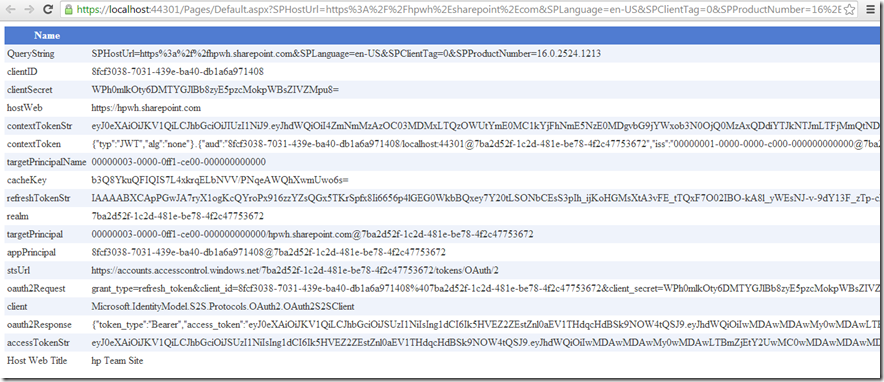
这个app显示了远程站点的 default 页面,显示了这个站点的token的值。这些值让我们更方便地调试我们的app。
SharePoint 2013 APP 开发示例 (三)使用远程的web资源的更多相关文章
- SharePoint 2013 APP 开发示例 系列
SharePoint 2013 APP 安全: SharePoint 2013 APP 开发示例 (一)List 读写 SharePoint 2013 APP 开发示例 (二)获取用户信息 Share ...
- SharePoint 2013 APP 开发示例 (五)跨域访问 Web Service (REST API)
虽然 JQuery 也能通过授权header实现跨域, 但SharePoint 提供了更简单的方法,它被实现在SP.RequestExecutor里 .它能访问跨域的服务包括REST AP ...
- SharePoint 2013 APP 开发示例 (二)获取用户信息
SharePoint 2013 APP 开发示例 (二)获取用户信息 这个示例里,我们将演示如何获取用户信息: 1. 打开 Visual Studio 2012. 2. 创建一个新的 SharePo ...
- SharePoint 2013 APP 开发示例 (六)服务端跨域访问 Web Service (REST API)
上个示例(SharePoint 2013 APP 开发示例 (五)跨域访问 Web Service (REST API))是基于JavaScript,运行在web browser内去访问REST AP ...
- SharePoint 2013 APP 开发示例 (四)JQuery访问REST
这个示例里,我们将用JQuery AJAX去发送一个 REST请求,并查看返回结果.为了让我们更好地理解REST 接口,我们将添加一个输入框让用户可以指定REST的URL, 这将让我们尝试着用构造的U ...
- SharePoint 2013 APP 开发示例 (一)List 读写
在这个示例里,我们将创建一个页面测试 SharePoint APP的权限.这个页面有二个按钮,一个从documents里读数据,一个往documents里写数据: 1. 打开Visual Studio ...
- SharePoint 2013 App 开发—SharePoint Hosted方式,
这篇文章会依据简单的Demo,介绍一下SharePoint Hosted 方式开发App 的步骤和说明. 这种方式的环境相比较Office 365 要麻烦一些,如果不可以连接到Internet 或者还 ...
- SharePoint 2013 App 开发—Auto Hosted 方式
Auto Hosted 方式,自动使用Windows Azure来作为host,这种模式将App 发布到Office 365上的SharePoint Developer Site上.这种方式可以不用花 ...
- SharePoint 2013 App 开发—App开发概述
基于安全性的考虑,SharePoint App 不能像其它两种方式一样,直接使用安全性更高的服务端代码的API.Javascript 扮演极为重要的角色,在SharePoint App中与ShareP ...
随机推荐
- vue2.0中使用pug(jade)
第一部分:pug(jade)模板引擎 pug,原名jade,是流行的HTML模板引擎,它是HAML在JavaScript上的实现,最大的特色是使用缩进排列替代成对标签. 它简化了HTML的成对标签的写 ...
- select 下拉选中
<body> <select name="" id=""> <option value="">张三< ...
- 请允许我转载一篇关于套接字的博客:Socket
这一篇文章,我将图文并茂地介绍Socket编程的基础知识,我相信,如果你按照步骤做完实验,一定可以对Socket编程有更好地理解. 本文源代码,可以通过这里下载 http://files.cnblog ...
- ASP.NET Core使用log4net记录日志
.NET常用的日志组件有NLog.Log4net等,.NET CORE下微软也自带了日志组件,到目前为止还没用过,而我本人常用的是log4net,下面简单讲讲.NET CORE下怎么使用log4net ...
- 【JVM.3】虚拟机性能监控与故障处理工具
一.概述 经过前面两章对于虚拟机内存分配与回收技术各方面的介绍,相信读者已经建立了一套比较完整的理论基础.理论总是作为指导实践的工具,能把这些执行应用到实际工作中才是我们的最终目的.接下来我们会从实践 ...
- 如何在java项目中使用lucene
lucene是一个开源的全文检索引擎工具包,但它不是一个成型的搜索引擎,它的功能就是负责将文本数据按照某种分词算法进行分词,分词后的结果存储在索引库中,然后根据关键字从索引库检检索. 那么应该如何使用 ...
- 《吃了么》Alpha版本发布说明
1.功能描述 功能一 查询周边餐厅 选中一条后,会跳转到相应餐厅的网址,获取具体的信息: 功能二 查询指定地点地餐厅 功能三 查询菜谱 具体的菜谱: 还有收藏夹的功能,点击标题栏的心形图标可以将菜 ...
- 跟踪分析Linux内核的启动过程--实验报告 分析 及知识重点
跟踪分析Linux内核的启动过程 攥写人:杨光 学号:20135233 ( *原创作品转载请注明出处*) ( 学习课程:<Linux内核分析>MOOC课程http://mooc.stud ...
- [2017BUAA软工]个人项目
软工个人项目 一.Github项目地址 https://github.com/Lydia-yang/2017BUAA-SoftwareEngineering 二.解题思路 在刚开始拿到题目的时候,关于 ...
- HDU 5702 Solving Order
http://acm.hdu.edu.cn/showproblem.php?pid=5702 Problem Description Welcome to HDU to take part in th ...