
EntityFramework 学习 一 Update Entity Graph using DbContext:
使用主键属性
每个实体必须有主键
默认值的id属性值必须为0
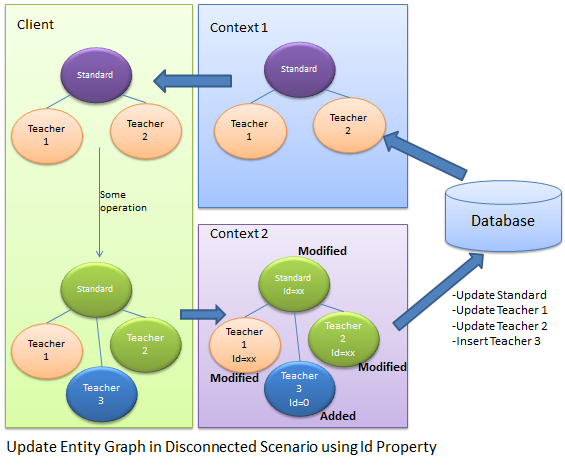
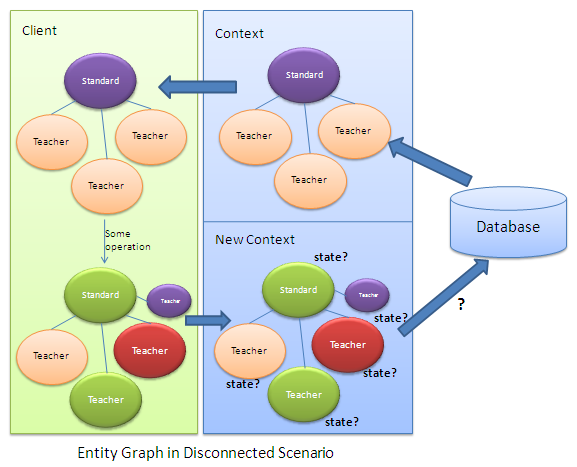
在context2中,它不知道实体的状态,
只能通过实体的主键来判断实体的状态
如果主键为0,则是新的对象,不为0 就是修改
Standard disconnectedStandard = null;

using (var context = new SchoolDBEntities())

{

    context.Configuration.ProxyCreationEnabled = false;

    disconnectedStandard = context.Standards.Where(s => s.StandardId == 58).Include(s => s.Teachers).FirstOrDefault<Standard>();

}

//Update Standard in disconnected mode

disconnectedStandard.StandardName = "Edited Standard Name";

//Update teachers collection by editing first teacher and adding new teacher

disconnectedStandard.Teachers.ElementAt(0).TeacherName = "Edited Teacher Name";

disconnectedStandard.Teachers.Add(new Teacher() { TeacherName = "New Teacher", StandardId = disconnectedStandard.StandardId });

using (var newContext = new SchoolDBEntities())

{

    //mark standard based on StandardId

    newContext.Entry(disconnectedStandard).State = disconnectedStandard.StandardId == 0 ? EntityState.Added : EntityState.Modified;

    //mark teacher based on StandardId

    foreach (Teacher tchr in disconnectedStandard.Teachers)

        newContext.Entry(tchr).State = tchr.TeacherId == 0 ? EntityState.Added : EntityState.Modified;

    newContext.SaveChanges();

}
使用主键的好处有:
1.不需要多余的代码来决定实体的状态
2.良好的性能
不好的地方有 ;
1.每个实体都需要有主键,没有主键就不能确定实体的状态
2.不能决定unchanged状态的实体,如果实体没有改变也会被设置为modified状态,这就没必要去更新没有改变的实体
3.不能删除实体
方法2:
设置实体的State属性
首先,创建一个带有枚举参数的接口
interface IEntityObjectState

{

    EntityObjectState ObjectState { get; set; }

}

public enum EntityObjectState

{

    Added,

    Modified,

    Deleted,

    Unchanged

}
其次,每个实体都实现该接口
public partial class Standard:IEntityObjectState

{

    public Standard()

    {

        this.Students = new HashSet<Student>();

        this.Teachers = new HashSet<Teacher>();

    }

    public int StandardId { get; set; }

    public string StandardName { get; set; }

    public string Description { get; set; }

    public virtual ICollection<Student> Students { get; set; }

    public virtual ICollection<Teacher> Teachers { get; set; }

    [NotMapped]

    public EntityObjectState ObjectState

    {

        get;

        set;

    }

}

public partial class Teacher:IEntityObjectState

{

    public Teacher()

    {

        this.Courses = new HashSet<Course>();

    }

    public int TeacherId { get; set; }

    public string TeacherName { get; set; }

    public Nullable<int> StandardId { get; set; }

    public virtual ICollection<Course> Courses { get; set; }

    public virtual Standard Standard { get; set; }

    [NotMapped]

    public EntityObjectState ObjectState

    {

        get;

        set;

    }

}
在客户端设置实体的状态
Teacher existingTeacher = null;

using (var context = new SchoolDBEntities())

{

    context.Configuration.ProxyCreationEnabled = false;

    existingTeacher = context.Teachers.FirstOrDefault<Teacher>();

}

Standard disconnectedStandard = new Standard() { StandardName = "New Standard", ObjectState = EntityObjectState.Added };

existingTeacher.ObjectState = EntityObjectState.Modified;

//add existing teacher(in db) to standard

disconnectedStandard.Teachers.Add(existingTeacher);

//add new standard

disconnectedStandard.Teachers.Add(new Teacher() { TeacherName = "New teacher", StandardId = disconnectedStandard.StandardId, ObjectState = EntityObjectState.Added });
using (var newContext = new SchoolDBEntities())

{

    //check the ObjectState property and mark appropriate EntityState

    if (disconnectedStandard.ObjectState == EntityObjectState.Added)

        newContext.Entry(disconnectedStandard).State = System.Data.Entity.EntityState.Added;

    else if (disconnectedStandard.ObjectState == EntityObjectState.Modified)

        newContext.Entry(disconnectedStandard).State =System.Data.Entity.EntityState.Modified;

    else if (disconnectedStandard.ObjectState == EntityObjectState.Deleted)

        newContext.Entry(disconnectedStandard).State = System.Data.Entity.EntityState.Deleted;

    else

        newContext.Entry(disconnectedStandard).State = System.Data.Entity.EntityState.Unchanged;

    //check the ObjectState property of each teacher and mark appropriate EntityState

    foreach (Teacher tchr in disconnectedStandard.Teachers)

    {

        if (tchr.ObjectState == EntityObjectState.Added)

            newContext.Entry(tchr).State = System.Data.Entity.EntityState.Added;

        else if (tchr.ObjectState == EntityObjectState.Modified)

            newContext.Entry(tchr).State = System.Data.Entity.EntityState.Modified;

        else if (tchr.ObjectState == EntityObjectState.Deleted)

            newContext.Entry(tchr).State = System.Data.Entity.EntityState.Deleted;

        else

            newContext.Entry(tchr).State = System.Data.Entity.EntityState.Unchanged;

    }

    //save changes

    newContext.SaveChanges();

}
EntityFramework 学习 一 Update Entity Graph using DbContext:的更多相关文章
- EntityFramework 学习 一 Add Entity Graph using DbContext:
//Create student in disconnected mode Student newStudent = new Student() { StudentName = "New S ...
- Entity Framework Tutorial Basics(27):Update Entity Graph
Update Entity Graph using DbContext: Updating an entity graph in disconnected scenario is a complex ...
- EntityFramework 学习 一 Update Existing Entity using DBContext in Disconnected Scenario
using System; using System.Collections.Generic; public partial class Student { public Student() { th ...
- EntityFramework 学习 一 Delete Entity using DBContext in Disconnected Scenario
Student studentToDelete; . Get student from DB using (var ctx = new SchoolDBEntities()) { studentToD ...
- EntityFramework 学习 一 Validate Entity
可以为实体实现自定义验证,重写DBContext中的个ValidateEntity方法 protected override System.Data.Entity.Validation.DbEntit ...
- EntityFramework 学习 一 Colored Entity in Entity Framework 5.0
You can change the color of an entity in the designer so that it would be easy to see related groups ...
- Entity Framework Tutorial Basics(26):Add Entity Graph
Add Entity Graph using DbContext: Adding entity graph with all new entities is a simple task. We can ...
- EntityFramework 学习 一 Disconnected Entities
如何把断开的实体添加到新的context上下文中 1.首先,我们需要把实体附加到新的context上下文实例中. 2.其次,手动的给实体设置适当的实体状态,因为新的context上下文不知道断开的实体 ...
- Entityframework:“System.Data.Entity.Internal.AppConfig”的类型初始值设定项引发异常。
<configSections> <!-- For more information on Entity Framework configuration, visit http:// ...
随机推荐
- 用第三方下载工具下载官方XCode独立安装包的方法
用第三方下载工具下载官方XCode独立安装包的方法 下载步骤 下载 aria2 工具配置好并启动 (利用其支持配置Cookie并多线程下载的功能.而迅雷则不支持设置Cookie,所以不支持这种需要登录 ...
- ws 无法热替换的问题
这个坑自己踩过并且第二次就记录一下,因为一直习惯用ws, 使用热部署的时候发现无法自动同步热更新,找了很多方法,具体解决方式如下: webstorm默认保存在临时文件夹,根据下面路径将默认勾选项去除即 ...
- 让Category支持添加属性与成员变量【转载】
Category是Objective-C中常用的语法特性,通过它可以很方便的为已有的类来添加函数.但是Category不允许为已有的类添加新的属性或者成员变量. 一种常见的办法是通过runti ...
- openwrt修改密码
默认情况下root是没有密码的 需要设置密码后才能开启ssh 修改/etc/shadow文件: root:$1$wEehtjxj$YBu4quNfVUjzfv8p/PBo5.:0:0:99999:7: ...
- 网页上10秒倒计时,完了后就自动跳转到另一个网页上html代码
用html代码的话就这样: <meta http-equiv="Refresh" content="10;URL=http://www.baidu.com" ...
- python入门课程 第一章 课程介绍
1-1 Python入门课程介绍特点: 优雅.明确.简单适合领域: web网站和各种网络服务 系统工具和脚本 作为"胶水"语言把其他语言开发的模块包装起来方 ...
- Windows环境下搭建SVN服务器
使用 VisualSVN Server来实现主要的 SVN功能则要比使用原始的 SVN和Apache相配合来实现源代码的 SVN管理简单的多,下面就看看详细的说明. VisualSVN Server的 ...
- 关于使用Tomcat服务器出现413错误的解决办法(Request Entity Too Large)
解决的办法: 修改tomcat的配置文件C:/MinyooCMS/tomcat/conf/server.xml(或者安装在D盘文件路径是D: /MinyooCMS/tomcat/conf/server ...
- GitHub从无到有
一步一步教你如何在GitHub上上传自己的项目 2018年07月04日 09:23:40 夏雨薇安 阅读数:22764 首先你得注册一个自己的GitHub账号,注册网址:https://githu ...
- asp.net mvc 反射应用
using System; using System.Collections.Generic; using System.Linq; using System.Text; using System.T ...