
跨域CORS
  /// <summary>

     /// js跨域过滤器

     /// </summary>

     [AttributeUsage(AttributeTargets.Class, AllowMultiple = true)]

     public class CORSAttribute : Attribute, IServiceBehavior

     {

         public void AddBindingParameters(ServiceDescription serviceDescription, ServiceHostBase serviceHostBase, Collection<ServiceEndpoint> endpoints, BindingParameterCollection bindingParameters)

         {

         }

         /// <summary>

         /// 扩展拦截

         /// </summary>

         /// <param name="serviceDescription"></param>

         /// <param name="serviceHostBase"></param>

         public void ApplyDispatchBehavior(ServiceDescription serviceDescription, ServiceHostBase serviceHostBase)

         {

             foreach (ChannelDispatcher channelDispatch in serviceHostBase.ChannelDispatchers)

             {

                 foreach (EndpointDispatcher endpointDispatch in channelDispatch.Endpoints)

                 {

                     endpointDispatch.DispatchRuntime.MessageInspectors.Add(new CrossDomain());

                 }

             }

         }

         public void Validate(ServiceDescription serviceDescription, ServiceHostBase serviceHostBase)

         {

         }

     }
2.
 /// <summary>

     /// js跨域过滤器

     /// </summary>

     public class CrossDomain : IDispatchMessageInspector

     {

         #region IDispatchMessageInspector

         /// <summary>

         ///     token验证

         /// </summary>

         /// <param name="request"></param>

         /// <param name="channel"></param>

         /// <param name="instanceContext"></param>

         /// <returns></returns>

         public object AfterReceiveRequest(ref Message request, IClientChannel channel, InstanceContext instanceContext)

         {

             if (CrossDomain.DealOptions(ref request))

             {

                 return "";

             }

             return string.Empty;

         }

         /// <summary>

         ///     回复内容

         /// </summary>

         /// <param name="reply"></param>

         /// <param name="correlationState"></param>

         public void BeforeSendReply(ref Message reply, object correlationState)

         {

             if ((string)correlationState == "")

                 reply = MessageTempleHelper.GetDefault(JsonResultCode.SUCESS.ToString(), "OPTIONS");

             else

                 CrossDomain.DealtMessage(ref reply);

         }

         #endregion

         /// <summary>

         /// 对已处理的消息进行cross加工

         /// </summary>

         /// <param name="msg"></param>

         public static void DealtMessage(ref Message msg)

         {

             try

             {

                 var ct = ((HttpResponseMessageProperty)msg.Properties["httpResponse"]).Headers["Content-Type"];

                 if (MimeTypes.Contains(ct))

                 {

                     if (ct == MimeTypes[])

                     {

                         if (!msg.Properties.ContainsKey("WebBodyFormatMessageProperty"))

                         {

                             msg.Properties.Add("WebBodyFormatMessageProperty", new WebBodyFormatMessageProperty(WebContentFormat.Json));

                         }

                         else if (msg.Properties["WebBodyFormatMessageProperty"] == new WebBodyFormatMessageProperty(WebContentFormat.Xml)) //强制将xml返回值改为json

                         {

                             msg.Properties.Remove("WebBodyFormatMessageProperty");

                             msg.Properties.Add("WebBodyFormatMessageProperty", new WebBodyFormatMessageProperty(WebContentFormat.Json));

                         }

                     }

                     var property = new HttpResponseMessageProperty();

                     property.StatusCode = HttpStatusCode.OK;

                     property.Headers.Add("Content-Type", ct);

                     property.Headers.Add("Access-Control-Allow-Methods", "GET, POST, PUT, DELETE, OPTIONS");

                     property.Headers.Add("Access-Control-Allow-Origin", "*");

                     property.Headers.Add("Access-Control-Allow-Headers", "Content-Type,X-Requested-With,Accept,imUserID,accessToken,appkey,userID,token");

                     property.Headers.Add("Access-Control-Request-Methods", "GET, POST, PUT, DELETE, OPTIONS");

                     property.SuppressEntityBody = false;

                     property.SuppressPreamble = false;

                     if (msg.Properties.ContainsKey("httpResponse"))

                         msg.Properties.Remove("httpResponse");

                     msg.Properties.Add("httpResponse", property);

                 }

             }

             catch (Exception ex)

             {

                 Log4NetUtil.WriteErrLog("CrossDomain.DealtMessage", ex);

             }

         }

         /// <summary>

         /// 处理新的消息

         /// </summary>

         /// <param name="msg"></param>

         public static void DealNewMessage(ref Message msg)

         {

             try

             {

                 msg.Properties.Add("WebBodyFormatMessageProperty", new WebBodyFormatMessageProperty(WebContentFormat.Json));

                 var property = new HttpResponseMessageProperty();

                 property.StatusCode = HttpStatusCode.OK;

                 property.Headers.Add("Content-Type", MimeTypes[]);

                 property.Headers.Add("Access-Control-Allow-Methods", "GET, POST, PUT, DELETE, OPTIONS");

                 property.Headers.Add("Access-Control-Allow-Origin", "*");

                 property.Headers.Add("Access-Control-Allow-Headers", "Content-Type,X-Requested-With,Accept,imUserID,accessToken,appkey,userID,token");

                 property.Headers.Add("Access-Control-Request-Methods", "GET, POST, PUT, DELETE, OPTIONS");

                 property.SuppressEntityBody = false;

                 property.SuppressPreamble = false;

                 if (msg.Properties.ContainsKey("httpResponse"))

                     msg.Properties.Remove("httpResponse");

                 msg.Properties.Add("httpResponse", property);

             }

             catch { }

         }

         /// <summary>

         /// 对当前请求是OPTIONS进行处理

         /// </summary>

         /// <param name="request"></param>

         /// <returns>已处理为true,未处理为false</returns>

         public static bool DealOptions(ref Message request)

         {

             try

             {

                 if (((System.ServiceModel.Channels.HttpRequestMessageProperty)request.Properties["httpRequest"]).Method == "OPTIONS")

                 {

                     WebOperationContext.Current.OutgoingResponse.Headers.Add("Access-Control-Allow-Methods", "GET, POST, PUT, DELETE, OPTIONS");

                     WebOperationContext.Current.OutgoingResponse.Headers.Add("Access-Control-Allow-Origin", "*");

                     WebOperationContext.Current.OutgoingResponse.Headers.Add("Access-Control-Allow-Headers", "Content-Type,X-Requested-With,Accept,imUserID,accessToken,appkey,userID,token");

                     WebOperationContext.Current.OutgoingResponse.Headers.Add("Access-Control-Request-Methods", "GET, POST, PUT, DELETE, OPTIONS");

                     WebOperationContext.Current.OutgoingResponse.StatusCode = HttpStatusCode.Accepted;

                     request.Close();

                     return true;

                 }

             }

             catch { }

             return false;

         }

         private static string[] _mimeTypes = null;

         /// <summary>

         /// html格式

         /// </summary>

         public static string[] MimeTypes

         {

             get

             {

                 if (_mimeTypes == null)

                 {

                     _mimeTypes = new string[] {

                         "application/json; charset=utf-8",

                         "image/png"

                     };

                 }

                 return _mimeTypes;

             }

         }

     }

    <script type="text/javascript">

        $(function () {

            $("button").click(function () {

                var postData = JSON.stringify({ name: "ASDF.txt", md5Code: "F006096956B5062F8EFB72AF4DF59BC2"});

                console.log(postData);

                $.ajax({

                    url: "http://127.0.0.1:16060/FileService/GetInfo",

                    headers: {

                        imUserID: "e82287ac45c14040ba8ef34b9c2dac29",

                        accessToken: "U6wJgLoAdxVXUpx5R6AdZnFW/ytU+kgnVzaejZZoSdR31lNoRmDsQz42viOP7Jtm3iz8L2COA16r9rl5YUvZPhpHAAWxLNJBWWjHGKibHYejUuerO9qoxEkb6Yi+apPf60MzfmZ+SIgwhs6UBYOx2AbTkMdywYPCgKh8Q/mlVImUz0BU6WG4QCqgdqIefGi3"

                    },

                    contentType: "application/json; charset=utf-8",

                    type: "post",

                    dataType: "json",

                    data: postData,

                    success: function (data) {

                        $("#s").html(JSON.stringify(data));

                        console.log(data);

                    },

                    error: function (e) {

                        $("#e").html(e);

                        console.log(e);

                    }

                });

            });

        });

    </script>
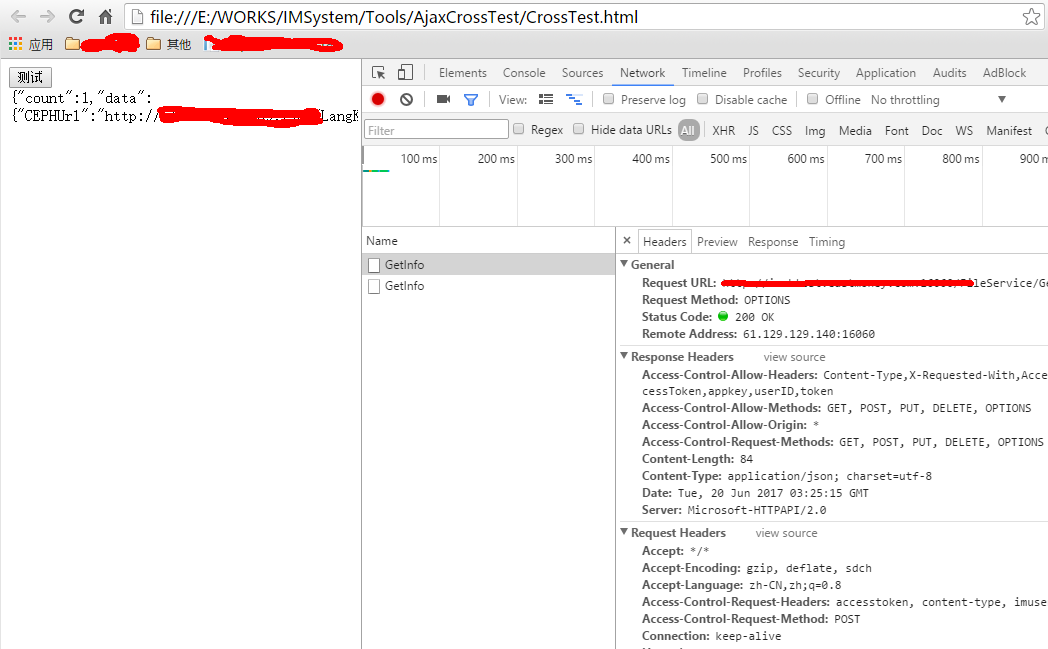
测试结果:
跨域CORS的更多相关文章
- netCore2.0 Api 跨域(Cors)
1.在使用netCore2.0 使用WebApi的过程中涉及到了跨域处理. 在Microsoft.AspNetCore.All包中包含跨域Cors的处理,不必单独添加. 2.打开Startup.cs文 ...
- python 全栈开发,Day100(restful 接口,DRF组件,DRF跨域(cors组件))
昨日内容回顾 1. 为什么要做前后端分离? - 前后端交给不同的人来编写,职责划分明确.方便快速开发 - 针对pc,手机,ipad,微信,支付宝... 使用同一个接口 2. 简述http协议? - 基 ...
- IIS Manager 配置文件修该,允许跨域CORS访问
IIS Manager 配置文件修该,允许跨域CORS访问 IIS Manager 的api访问会出现跨域问题,需要 IIS Manager的配置文件中修改. 配置文件的路径:C:\Program F ...
- zuul+security跨域Cors问题解决
zuul+security跨域Cors问题解决 简介 场景 在服务后台都会出现跨域cors问题,不过一般spring解决起来比较方便,在框架+框架的基础上,问题就显得特别明显了,各种冲突,不了解源码的 ...
- 解决dotnet-Angular的跨域(cors)问题
解决dotnet-Angular的跨域(cors)问题 前言 之前学了点 Angular ,打算用 dotnet core 做后端,之前没接触过这方面的东西,理所当然的遇到了跨域问题,之后也解决了,所 ...
- MVC跨域CORS扩展
一般的基于浏览器跨域的主要解决方法有这么几种:1.JSONP 2.IFrame方式 3.通过flash实现 4.CORS跨域资源共享 ,这里我们主要关注的是在MVC里面的CORS ...
- Js 跨域CORS报错 Response for preflight has invalid HTTP status code 405
问题 公司项目H5调用接口遇到Response for preflight has invalid HTTP status code 405这样的错误,是使用PUT方式提交请求接口.Content-T ...
- 浏览器和服务器实现跨域(CORS)判定的原理
前端对Cross-Origin Resource Sharing 问题(CORS,中文又称'跨域')应该很熟悉了.众所周知出于安全的考虑,浏览器有个同源策略,对于不同源的站点之间的相互请求会做限制(跨 ...
- Web高级 Ajax和跨域CORS
Asynchronous JavaScript and XML 1. XMLHttpRequest 前端开发都知道,不多说. var xhr = new XMLHttpRequest(); xhr.o ...
随机推荐
- scp 命令快速使用讲解
在 Linux 下使用 scp 命令 scp 是安全拷贝协议(Secure Copy Protocol)的缩写,和众多 Linux/Unix 使用者所熟知的拷贝(cp)命令一样.scp 的使用方式类似 ...
- 安装Vmware 以及 Vmware 中安装Ubuntu 以及其中问题?
在vmware中安装ubuntu 过程中 安装窗口太小,无法继续下一步? 按住alt键,用鼠标拖动linux的安装窗体,向上移动就能看到下面的确定按钮. 如何安装Vmware-tools? 1.VM菜 ...
- Mysql net start mysql启动,提示发生系统错误 5 拒绝访问,原因所在以及解决办法
1,Mysql net start mysql启动,提示发生系统错误 5 拒绝访问 在dos下运行net start MySQL 不能启动mysql!提示发生系统错误 5:拒绝访问!切换到管理员模式 ...
- SQL SERVER大话存储结构(2)_非聚集索引如何查找到行记录
如果转载,请注明博文来源: www.cnblogs.com/xinysu/ ,版权归 博客园 苏家小萝卜 所有.望各位支持! 1 行记录如何存储 这里引入两个 ...
- sscanf( )函数初体验
解析字符串,将%格式的内容,存储到后面的参数中 %% - 返回一个百分号 % %c - ASCII 值对应的字符 %d - 包含正负号的十进制数(负数.0.正数) %e - 使用小写的科学计数法(例如 ...
- sql查询优化整理
1.对查询进行优化,应尽量避免全表扫描,首先应考虑在 where 及 order by 涉及的列上建立索引. 2.应尽量避免在 where 子句中对字段进行 null 值判断,否则将导致引擎放弃使用索 ...
- Spring BeanFactory源码学习
一.BeanFactory BeanFactory是Spring IOC容器的基础,是IOC容器的基础接口,所有的容器都是从它这里继承实现而来.BeanFactory提供了最基本的IOC容器的功能,即 ...
- JAVA并发编程实战---第二章:线程安全性
对象的状态是指存储在状态变量中的数据.对象的状态可能包括其他依赖对象的域.例如HashMap的状态不仅存储在HashMap本身,还存储在许多Map.Entry对象中.对象的状态中包含了任何可能影响其外 ...
- struts-config.xml的配置
1.<struts-config> 元素 <struts-cofnig> 元素是 Struts 配置文件的根元素.<struts-config> 元素有 8 个子 ...
- Longest Substring Without Repeating Characters2015年6月9日
Given a string, find the length of the longest substring without repeating characters. For example, ...