
wp7之换肤原理简单分析
wp7之换肤原理简单分析
纠结很久。。。感觉勉强过得去啦。还望各位大牛指点江山
百度找到这篇参考文章http://www.cnblogs.com/sonyye/archive/2012/03/12/2392679.html#2329255
还有这篇:http://www.cnblogs.com/xumingxiang/archive/2012/03/23/2413342.html
进入正文吧
1 UI代码很简单,一个listbox 和一个标题textblock,一个button按钮
<phone:PhoneApplicationPage

    x:Class="ChangeSkin.MainPage"

    xmlns="http://schemas.microsoft.com/winfx/2006/xaml/presentation"

    xmlns:x="http://schemas.microsoft.com/winfx/2006/xaml"

    xmlns:phone="clr-namespace:Microsoft.Phone.Controls;assembly=Microsoft.Phone"

    xmlns:shell="clr-namespace:Microsoft.Phone.Shell;assembly=Microsoft.Phone"

    xmlns:d="http://schemas.microsoft.com/expression/blend/2008"

    xmlns:mc="http://schemas.openxmlformats.org/markup-compatibility/2006"

    mc:Ignorable="d" d:DesignWidth="480" d:DesignHeight="768"

    FontFamily="{StaticResource PhoneFontFamilyNormal}"

    FontSize="{StaticResource PhoneFontSizeNormal}"

    Foreground="{StaticResource PhoneForegroundBrush}"

    SupportedOrientations="Portrait" Orientation="Portrait"

    shell:SystemTray.IsVisible="True">

    <!--LayoutRoot 是包含所有页面内容的根网格-->

    <Grid x:Name="LayoutRoot"  >

        <Grid.RowDefinitions>

            <RowDefinition Height="Auto"/>

            <RowDefinition Height="*"/>

        </Grid.RowDefinitions>

        <!--TitlePanel 包含应用程序的名称和页标题-->

        <StackPanel x:Name="TitlePanel" Grid.Row="0" Margin="12,17,0,28">

            <TextBlock x:Name="ApplicationTitle" Text="我的应用程序" />

            <TextBlock x:Name="PageTitle" Text="页面名称"  Margin="9,-7,0,0" Style="{StaticResource PhoneTextTitle1Style}"/>

        </StackPanel>

        <!--ContentPanel - 在此处放置其他内容-->

        <Grid x:Name="ContentPanel" Grid.Row="1" Margin="12,0,12,0">

            <ListBox Name="lb">

                <ListBox.ItemTemplate>

                    <DataTemplate>

                        <TextBlock   Text="{Binding}" Name="lbText"></TextBlock>

                    </DataTemplate>

                </ListBox.ItemTemplate>

            </ListBox>

            <Button Content="换皮肤" HorizontalAlignment="Left" Margin="157,471,0,0" VerticalAlignment="Top" Click="Button_Click_1"  />

        </Grid>

    </Grid>

</phone:PhoneApplicationPage>
截图如下: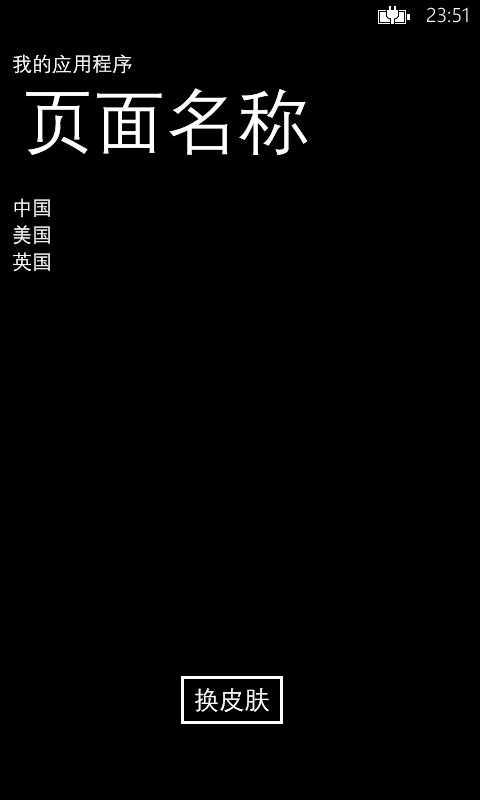
2 新建一个皮肤资源文件,
(ps:这里比较繁琐:新建一个页面文件,删除cs文件,然后找一下这个路径资源文件来参考 C:\Program Files (x86)\Microsoft SDKs\Windows Phone\v7.1\Design\DarkBlue\System.Windows.xaml ,为啥微软不直接提供一个新建皮肤文件?????)
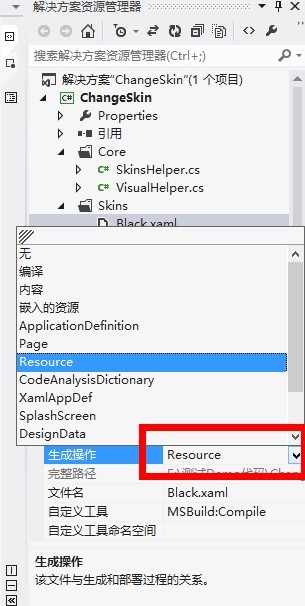
设置Resource,非常重要啊,看下图
皮肤里面文件代码:
<ResourceDictionary

  xmlns="http://schemas.microsoft.com/winfx/2006/xaml/presentation"

  xmlns:x="http://schemas.microsoft.com/winfx/2006/xaml"

  xmlns:System="clr-namespace:System;assembly=mscorlib">

    <Style TargetType="TextBlock" x:Key="tbox">

        <Setter Property="Foreground" Value="White"></Setter>

    </Style>

</ResourceDictionary>
3、后台代码
using System;

using System.Collections.Generic;

using System.Linq;

using System.Text;

using System.Windows;

namespace ChangeSkin

{

    public class SkinsHelper

    {

        /// <summary>

        /// 得到皮肤资源文件

        /// </summary>

        /// <param name="Light"></param>

        /// <returns></returns>

        public static ResourceDictionary GetSkinResource(SkinsType Light = SkinsType.Green)

        {

            ResourceDictionary resourceDictionary = new ResourceDictionary();

            string uri = "/ChangeSkin;component/Skins/";

            //这里一定要设置Black.xaml生成操作为Resource

            switch (Light)

            {

                case SkinsType.Green: uri += "Green.xaml"; break;

                case SkinsType.Black: uri += "Black.xaml"; break;

                default: uri += "Green.xaml"; break;

            }

            Application.LoadComponent(resourceDictionary, new Uri(uri, UriKind.Relative));

            Application.Current.Resources.MergedDictionaries.Add(resourceDictionary);

            return resourceDictionary;

        }

    }

    public enum SkinsType

    {

        Green = 0,

        Black = 1

    }

}
4 工具类
using System;

using System.Net;

using System.Windows;

using System.Windows.Controls;

using System.Windows.Documents;

using System.Windows.Ink;

using System.Windows.Input;

using System.Windows.Media;

using System.Windows.Media.Animation;

using System.Windows.Shapes;

using System.Collections.Generic;

namespace JM.Common

{

    public class VisualHelper

    {

        //获取子类型

        public static T FindChildOfType<T>(DependencyObject root) where T : class

        {

            var queue = new Queue<DependencyObject>();

            queue.Enqueue(root);

            while (queue.Count > 0)

            {

                DependencyObject current = queue.Dequeue();

                for (int i = VisualTreeHelper.GetChildrenCount(current) - 1; 0 <= i; i--)

                {

                    var child = VisualTreeHelper.GetChild(current, i);

                    var typedChild = child as T;

                    if (typedChild != null)

                    {

                        return typedChild;

                    }

                    queue.Enqueue(child);

                }

            }

            return null;

        }

        public static List<T> GetVisualChildCollection<T>(object parent) where T : UIElement

        {

            List<T> visualCollection = new List<T>();

            GetVisualChildCollection(parent as DependencyObject, visualCollection);

            return visualCollection;

        }

        private static void GetVisualChildCollection<T>(DependencyObject parent, List<T> visualCollection) where T : UIElement

        {

            int count = VisualTreeHelper.GetChildrenCount(parent);

            for (int i = 0; i < count; i++)

            {

                DependencyObject child = VisualTreeHelper.GetChild(parent, i);

                if (child is T)

                {

                    visualCollection.Add(child as T);

                }

                else if (child != null)

                {

                    GetVisualChildCollection(child, visualCollection);

                }

            }

        }

    }

}
5 调用方法
private void SetSkins(SkinsType skin = SkinsType.Black)

        {

            SkinsHelper.GetSkinResource(skin);

            this.ApplicationTitle.SetValue(TextBlock.StyleProperty, Application.Current.Resources["tbox"]);

            //listbox文字颜色样式改变

            List<TextBlock> tbList= VisualHelper.GetVisualChildCollection<TextBlock>(lb);

            foreach (TextBlock textBlock in tbList)

            {

                textBlock.SetValue(TextBlock.StyleProperty, Application.Current.Resources["tbox"]);

            }

        }
测试结果:
测试结果:
测试结果:文字改变绿色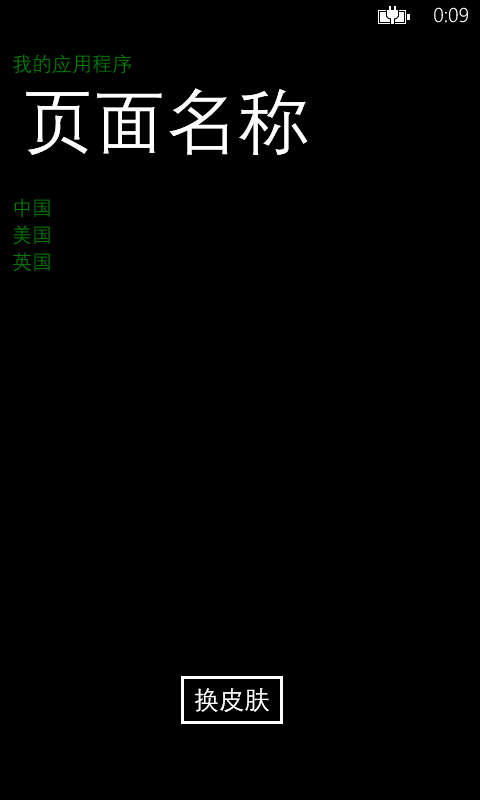
后记,如果想切换背景,添加更多效果,请增加样式,再写上对应调用样式代码
wp7之换肤原理简单分析的更多相关文章
- Android中插件开发篇之----应用换肤原理解析
一.前言 今天又到周末了,感觉时间过的很快呀.又要写blog了.那么今天就来看看应用的换肤原理解析.在之前的一篇博客中我说道了Android中的插件开发篇的基础:类加载器的相关知识.没看过的同学可以转 ...
- AbstractRoutingDataSource 实现动态数据源切换原理简单分析
AbstractRoutingDataSource 实现动态数据源切换原理简单分析 写在前面,项目中用到了动态数据源切换,记录一下其运行机制. 代码展示 下面列出一些关键代码,后续分析会用到 数据配置 ...
- mr原理简单分析
背景 又是一个周末一天一天的过的好快,今天的任务干啥呢,索引总结一些mr吧,因为前两天有面试问过我?我当时也是简单说了一下,毕竟现在写mr程序的应该很少很少了,废话不说了,结合官网和自己理解写起. 官 ...
- DevExpress 12.1 换肤 超级简单的方法(2013-11-5版)
本例子是按照DevExpress 12.1 版本 进行演示.请先准备好DevExpress.BonusSkins.v12.1.dll 和DevExpress.Utils.v12.1.dll 1.首先添 ...
- DWM1000 测距原理简单分析 之 SS-TWR
蓝点DWM1000 模块已经打样测试完毕,有兴趣的可以申请购买了,更多信息参见 蓝点论坛 正文: DWM1000 超宽带测距,使用的TOF(time of fly) 的方式,也就是计算无线电磁波传输时 ...
- DWM1000 测距原理简单分析 之 SS-TWR代码分析2 -- [蓝点无限]
蓝点DWM1000 模块已经打样测试完毕,有兴趣的可以申请购买了,更多信息参见 蓝点论坛 正文: 首先将SS 原理介绍中的图片拿过来,将图片印在脑海里. 对于DeviceA 和 DeviceB来说,初 ...
- DWM1000 测距原理简单分析 之 SS-TWR代码分析1 -- [蓝点无限]
蓝点DWM1000 模块已经打样测试完毕,有兴趣的可以申请购买了,更多信息参见 蓝点论坛 正文: 这一篇内容主要是通过官方源码理解SS-TWR 细节 代码下载链接:https://download.c ...
- Spring整合Mybatis原理简单分析
<bean id="sqlSessionFactory" class="org.mybatis.spring.SqlSessionFactoryBean" ...
- Android APK方式换肤实现原理
现在很多APP都有换肤的功能,例如微博,QQ等应用.这些应用的换肤原理是什么? 在用微博的时候,不难发现,当你要换肤时,先下载并安装一个皮肤apk,然后选择这个皮肤,就可以了. 这种方式就是把皮肤打包 ...
随机推荐
- IBM即将倒闭,微软也从崩溃18个月
IBM公司20发布2014在第三季度财报.其三阶季度净利润1800万美元,下跌99.6%. 可见IBM我已经危及. 技术专家sun收购崩溃,说明一些原因,自满技术公司可能已用完.. sun以前靠小型机 ...
- jAVA 得到Map价值
jAVA 获取Map中的值 Map<String, String> map=new HashMap<String, String>(); map.put("name& ...
- 如何完成Nexus 9上电后激活过程
所述被激活,因为它是Nexus 9经过努力获得启动OTA最新更新包,而且因为Google关闭一堵墙.原因无法下载更新包. 因为是第一次开机,它不能被设置usb debugging, 无法adb去杀死w ...
- Unix/Linux环境C编程新手教程(41) C语言库函数的文件操作具体解释
上一篇博客我们解说了怎样使用Linux提供的文件操作函数,本文主要解说使用C语言提供的文件操作的库函数. 1.函数介绍 fopen(打开文件) 相关函数 open,fclose 表头文件 #in ...
- Excel基于POI导入导出的Annotation化之路(一)
Excel在web项目里的使用变得越来越广泛,特别是和线下耦合度较高的业务,Excel导入导出变得非常频繁,尽管很多人写了诸多的工具方法,但是终究没有解决一个问题:有效的控制字段英文名称和实际表头名称 ...
- Hibernate实体映射配置(XML)简单三步完美配置
我们在使用Hibernate框架的时候,非常纠结的地方就是实体和表之间的映射,今天借助汤老师的思路写了小教程,以后配置不用纠结了! 第一步:写注释 格式为:?属性,表达的是本对象与?的?关系. 例:“ ...
- HTML5新增核心工具——canvas
原文:HTML5新增核心工具--canvas Canvas元素称得上是HTML5的核心所在,它是一个依靠JavaScript绘制华丽图像的元素. Canvas由一个可绘制地区HTML代码中的属性定义决 ...
- php错误及异常捕捉
原文:php错误及异常捕捉 在实际开发中,错误及异常捕捉仅仅靠try{}catch()是远远不够的. 所以引用以下几中函数. a) set_error_handler 一般用于捕捉 E_NOTI ...
- CSS3 Media Queries 详细介绍与使用方法
Media Queries 就是要在支援CSS3 的浏览器中才能正常工作,IE8 以下不支持. 而Media Queries 的套用方法千变万化,要套用在什么样的装置中,都可以自己来定义. 到底什么是 ...
- [译]Java 设计模式之迭代器
(文章翻译自java-design-pattern-iterator) 迭代器模式用于迭代遍历一个集合对象.它是一个经常被用到的模式,你可能以前使用过它.不管在任何时候你看见一些方法像hasNext( ...