
CentOS配置Hive
hive搭建共分为三种模式:1、embedded,2、local,3、remote server
在这里,主要是配置第3种模式:remote server模式,如下图所示:
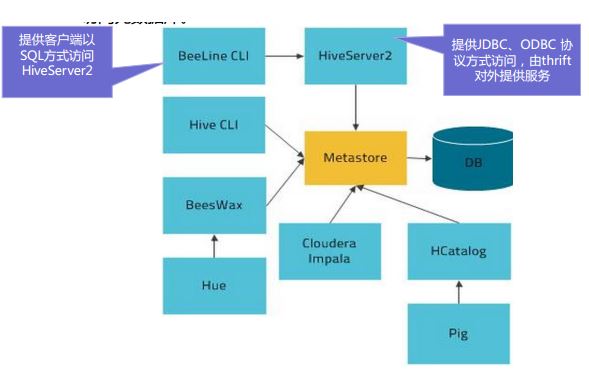
我的环境共三台虚拟机:Host0,Host2,Host3
在remote server模式中,Host0:Hive-server2
Host2:Hive-metastore
Host3:MySQL server
1、分别在Host0,Host2和Host3中安装hive-server2,hive-metastore,mysql-server
yum install hive-server2 -y
yum install hive-metastore -y
yum install mysql-server -y
2、在MySQL server中创建hive数据库以及hive用户,并设置hive用户可以远程登录
create database hive;

create user hive identified by '';

grant all PRIVILEGES on *.* to hive@’%’ identified by ‘123456’;

flush privileges;
3、在hive-metastore中设置hive配置文件,使其能连接到MySQL server
hive配置文件位置:/etc/hive/conf/hive-site.xml
向hive-site.xml中添加下列内容
<property>

  <name>javax.jdo.option.ConnectionURL</name>

  <value>jdbc:mysql://Host3:3306/hive?characterEncoding=UTF-8</value>

  <description>JDBC connect string for a JDBC metastore</description>

</property>

<property>

  <name>javax.jdo.option.ConnectionDriverName</name>

  <value>com.mysql.jdbc.Driver</value>

  <description>Driver class name for a JDBC metastore</description>

</property>

<property>

  <name>javax.jdo.option.ConnectionUserName</name>

  <value>hive</value>

</property>

<property>

  <name>javax.jdo.option.ConnectionPassword</name>

  <value></value>

</property>

<property>

  <name>hive.metastore.warehouse.dir</name>

  <!-- base hdfs path -->

  <value>/user/hive/warehouse</value>

  <description>location of default database for the warehouse</description>

</property>
4、在hdfs上创建hive.metastore.warehouse.dir目录,并修改权限
sudo -u hdfs hadoop fs -mkdir -p /user/hive/warehouse

sudo -u hdfs hadoop fs -chown -R hive:hive /user/hive
5、在hive-server2中设置hive配置文件,使其能连接到hive-metastore
hive配置文件位置:/etc/hive/conf/hive-site.xml
向hive-site.xml中添加下列内容
<property>

  <name>hive.metastore.uris</name>

  <value>thrift://Host2:9083</value>

</property>
6、分别在Host0,Host2中启动hive-server2,hive-metastore
service hive-server2 start

service hive-metastore start
7、在另一台虚拟机中进行测试(需要安装hive)
[root@client ~]# beeline

which: no hbase in (/usr/lib64/qt-3.3/bin:/usr/local/sbin:/usr/local/bin:/sbin:/bin:/usr/sbin:/usr/bin:/usr/java/jdk1..0_60/bin:/root/bin)

Beeline version 1.1.-cdh5.8.0 by Apache Hive

beeline> !connect jdbc:hive2://Host0:10000

scan complete in 11ms

Connecting to jdbc:hive2://Host0:10000

Enter username for jdbc:hive2://Host0:10000: 1

Enter password for jdbc:hive2://Host0:10000: *

Connected to: Apache Hive (version 1.1.-cdh5.8.0)

Driver: Hive JDBC (version 1.1.-cdh5.8.0)

Transaction isolation: TRANSACTION_REPEATABLE_READ

: jdbc:hive2://Host0:10000> show tables;

INFO  : Compiling command(queryId=hive_20160912015858_bd9495d2-191f-429c-bf01-a165821b6d9a): show tables

INFO  : Semantic Analysis Completed

INFO  : Returning Hive schema: Schema(fieldSchemas:[FieldSchema(name:tab_name, type:string, comment:from deserializer)], properties:null)

INFO  : Completed compiling command(queryId=hive_20160912015858_bd9495d2-191f-429c-bf01-a165821b6d9a); Time taken: 0.027 seconds

INFO  : Concurrency mode is disabled, not creating a lock manager

INFO  : Executing command(queryId=hive_20160912015858_bd9495d2-191f-429c-bf01-a165821b6d9a): show tables

INFO  : Starting task [Stage-:DDL] in serial mode

INFO  : Completed executing command(queryId=hive_20160912015858_bd9495d2-191f-429c-bf01-a165821b6d9a); Time taken: 0.061 seconds

INFO  : OK

+-----------+--+

| tab_name  |

+-----------+--+

+-----------+--+

No rows selected (0.389 seconds)
需要注意的是:如果在hiveserver2方式中没有使用Kerberos,则上述密码可以随意写
8、在Hive中创建表,并将数据导入表中
CREATE TABLE test(id int, A int, B int, C int) ROW FORMAT DELIMITED FIELDS TERMINATED BY ',';

load data inpath '/user/sqoop/sample' into table test;
/user/sqoop/sample表中的数据格式为:11419,9,160,48格式
当执行load data inpath '/user/sqoop/sample' into table test;后,/user/sqoop/sample里的数据就mv到了/user/hive/warehouse/test中去了,/user/sqoop/sample目录为空。
CentOS配置Hive的更多相关文章
- 指导手册 07 安装配置HIVE
指导手册 07 安装配置HIVE 安装环境及所需安装包: 1.操作系统:centos6.8 2.四台虚拟机:master :10.0.2.4, slave1:10.0.2.5,slave2:10. ...
- CentOS安装Hive
1.环境和软件准备: hive版本:apache-hive-2.3.6-bin.tar.gz,下载地址:https://mirrors.tuna.tsinghua.edu.cn/apache/hive ...
- 配置 Hive On Tez
配置 Hive On Tez 标签(空格分隔): hive Tez 部署底层应用 简单介绍 介绍:tez 是基于hive 之上,可以将sql翻译解析成DAG计算的引擎.基于DAG 与mr 架构本身的优 ...
- Centos搭建Hive
Centos搭建Hive 一.Hive简介 二.安装Hive 2.1hive下载 2.2上传解压 2.3配置hive相关的环境变量 三.Mysql 3.1安装mysql connector 3.2 将 ...
- Linux CentOS 配置Tomcat环境
一.下载Tomcat 下载Tomcat方式也有两种,可以参考我的前一篇博文Linux CentOS配置JDK环境,这边就不再赘述. 二.在Linux处理Tomcat包 1.创建tomcat文件夹 mk ...
- CentOS 配置防火墙操作实例(启、停、开、闭端口):
CentOS 配置防火墙操作实例(启.停.开.闭端口): 注:防火墙的基本操作命令: 查询防火墙状态: [root@localhost ~]# service iptables status< ...
- CentOS配置SSH免密码登录后,仍提示输入密码
CentOS配置SSH无密码登录需要3步: 生成公钥和私钥 导入公钥到认证文件,更改权限 测试 1.生成公钥和私钥 ssh-keygen -t dsa -P '' -f ~/.ssh/id_dsa 默 ...
- Hadoop之Hive(2)--配置Hive Metastore
Hive metastore服务以关系性数据库的方式存储Hive tables和partitions的metadata,并且提供给客户端访问这些数据的metastore service的API.下面介 ...
- CentOS配置ssh无密码登录
CentOS配置ssh无密码登录的注意点 前提配置:使用root登录修改配置文件:/etc/ssh/sshd_config,将其中三行的注释去掉,如下: 然后重启ssh服务:service s ...
随机推荐
- Python爬虫入门教程石家庄链家租房数据抓取
1. 写在前面 这篇博客爬取了链家网的租房信息,爬取到的数据在后面的博客中可以作为一些数据分析的素材.我们需要爬取的网址为:https://sjz.lianjia.com/zufang/ 2. 分析网 ...
- java中return、break、continue的区别
1.return @Testpublic void testReturn(){ for (int j = 1; j < 3; j++) { for (int i = 1; i < 5; i ...
- ubutu强制关闭应用程序的方法
1.打开终端,输入命令 top 2.查看应用程序PID号,比如是8080 3.然后终端输入 kill 8080 ,行了
- MVC 设计模式概述
(尊重劳动成果,转载请注明出处:http://blog.csdn.net/qq_25827845/article/details/53292312) 1.MVC设计模式: 如图所示,MVC模式(Mod ...
- SD从零开始33-37
[原创]SD从零开始33 Billing简介 Billing在SD流程链中的集成: Billing document表征SD流程链中的最后功能: Billing document在R/3系统的不同区域 ...
- WOSA/XFS PTR Form解析库—FormRule.h
#ifndef _FORMRULE_H_#define _FORMRULE_H_ #include <XFSPTR.H>#include <string>#include &l ...
- JavaScript实现IP地址的输入框方式
最近遇到一些这样的需求:实现一种IP地址的输入方式,就是输入3个字符或自动跳到下一个输入框内,删除的时候,一个输入框没有了字符,自动跳回上一个输入框.看到这里,相信大家都有一些想法了,没错,这种方法就 ...
- Fiddler抓包使用教程-会话图标
转载请标明出处:http://blog.csdn.net/zhaoyanjun6/article/details/72933882 本文出自[赵彦军的博客] 使用fiddler抓包时,会看到左侧按照顺 ...
- Bootstrap源码分析系列之整体架构
作为一名合格的前端工程师,你肯定听说过Bootstarp框架.确实可以说Bootstrap框架是最流行的前端框架之一.可是也有人说Bootstrap是给后端和前端小白用的,我认为只要学习它能给我们前端 ...
- Knockout学习,添加模板,事件,Mouseover,mouseout
<div class="rtitle">我的收藏</div> <div class="list_ul" data-bind=&qu ...