
TFS 2015 Build Agent failing syncing the repository 获取源码 不全 失败
当我们使用TFS2015d的生成代理时,我们将生成定义加入代理池队列中,但是代理可能无法完全下载我们在TFS代码浏览器中看到的所有目录,这肯定会导致编译失败呀!为什么呢?
原因在于tfscompile这个账号在某个项目的版本控制中,对某个源码目录没有权限
但是不可能啊,我们已经在根节点上给了权限了呀,
是的,你的确给了根目录所有权限,但是仔细观察你会发现,有个关于继承的隐藏开关

如果某个目录勾选了“关闭”,那么这个目录对TFSCOMPILE账号就无权访问,当然生成代理就无法下载咯。
因此,我们还是仔细点,挨个目录检查一遍。
当然,其实这个功能是有用的,比如我就是想让TFSCOMPILE不下载某个目录(比如branchs等)。
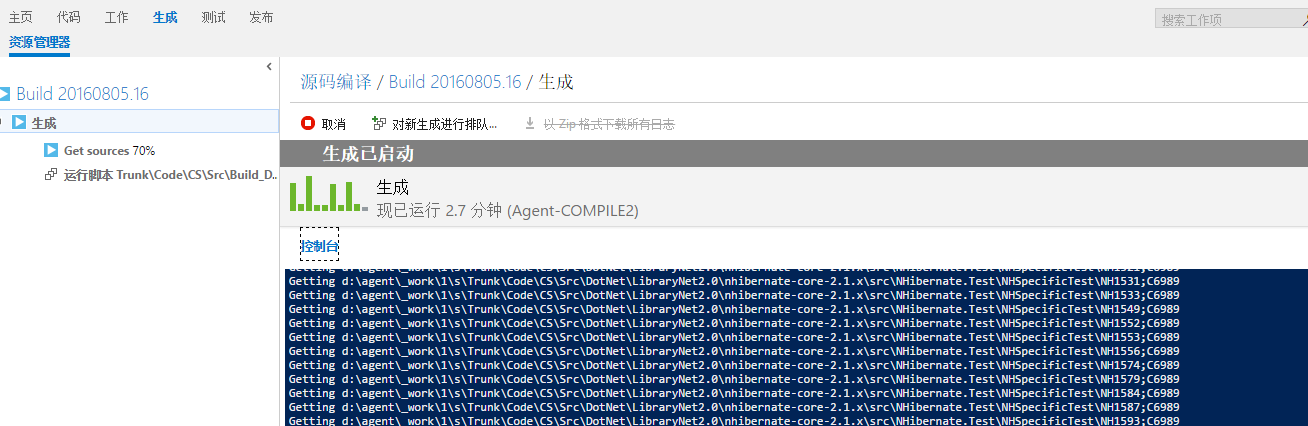
I would like to share with you my last struggle with TFS. I received a call from a colleague about some problem with the ‘new’ TFS build. Initially I tough it is only a miss-configuration and that the solution will be trivial, but as you can imagine, it wasn’t.
The problem lied in the fact that build agent couldn’t retrieve the sources and the error message was not treated as such. You could only see logged a (workspace version -1) inside the Get Sources step, after stating that syncing the repository was done.

As a first thing, I tough about agent not having sufficient rights to retrieve the source code. After a quick check and making sure that the agent service user has sufficient rights to retrieve the code, I run my build again and I got the same result. Didn’t helped.
Next thing I checked all sort of settings, running the build on a different build agent on different server, running the agent under different account, making sure that permissions for the _work folder are setup correctly, all sort of things. I ended up realizing that if I moved the code from that Team project to another team project, suddenly my build agent was able to retrieve the code again. There where two things, or the project was corrupted or there where some security issues. Thanks to the Microsoft support assistance, I managed to get to the right solution. And guess what? It was a security issue.
For an unknown reason the permission inheritance was disabled on the folder that contained all of the interested branches.
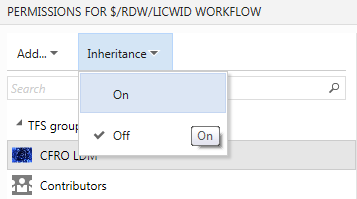
By enabling this setting, I saw that there is a small change in the way build agents are authenticated against TFVC. XAML build agent identifies itself with the user that agent runs under. 2015 build agent in the other hand, uses a Project Collection Build Service group to do so. It is added automatically to the source code permissions tree, and in order to propagate it needs to have the permission inheritance switched on or you need to manually set rights for that user group.
Same goes for the owner of the local workspace created by the agent.
You can change those settings by editing the security for a give item in the source control.
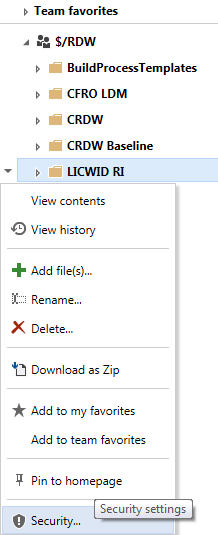
Once this is done, you should see your build agent syncing the sources correctly.
Hi Adam, that’s exactly what I do mention in the post. Also in yesterdays post on MSDN ALM Blog (http://blogs.msdn.com/b/visualstudioalm/archive/2016/01/07/receive-an-error-when-resolving-a-bug-created-by-your-build.aspx) they do mention the same: new build system uses a service account. That service account should be automatically inherited, and in case the inheritance is set to off, it doesn’t happen. You can have inheritance set to off and still make it work by manually adding the above mentioned account and granting the necessary rights.
TFS 2015 Build Agent failing syncing the repository 获取源码 不全 失败的更多相关文章
- 搭建TFS 2015 Build Agent环境(一)
Download the build agent Downloading the build agent is really simple. Navigate to your TFS control ...
- 搭建TFS 2015 Build Agent环境(四)
在通过TFS做DI时,我们经常用到FTP文件上传.TFS发布中,提供了cURL上载文件功能.要想使用此功能,请参考下面步骤启用: 1.登录BuildAgent所在的机器 2.打开cmd(以管理员权限运 ...
- 搭建TFS 2015 Build Agent环境(三)
在配置时,一定要注意下面的几个地方: 1.项目集合生成服务账号 中一定要包含: 2.Build Agent机器上防止Agent的路径一定要短,不要出现特殊字符,比如:C:\Agent 3.一定要安装V ...
- 搭建TFS 2015 Build Agent环境(二)
在执行和安装配置的过程中,注意一定要使用管理员权限运行:ConfigureAgent.cmd 和RunAgent.cmd.配置的过程中,要注意几个内容:1.TFS地址不要写DefaultCollect ...
- 瞎折腾之 NHibernate ORM框架的接触(MVC + Repository源码)(一)
在这炮火连天.技术更新迅猛的年代,不接触了解.甚至会用2~3种框架都不好意思说自己有多少年工作经验.况且出去面试也会有点吹牛的底子嘛. 这次折腾了NHibernate.其实这些ORM框架封装好了都是给 ...
- 浅谈 qmake 之 shadow build(将源码路径和构建路径分开,一套源码要分别用msvc2008、msvc2008、mingw分别编译又不互相干扰)
shadow build shadow build 是什么东西?就是将源码路径和构建路径分开(也就是生成的makefile文件和其他产物都不放到源码路径),以此来保证源码路径的清洁. 这不是qmake ...
- TFS: 解决The build agent error - the session for this agent already exists
来源:http://ericphan.net/blog/2016/6/10/solving-the-tfs-build-agent-error-the-session-for-this-agent-a ...
- #VSTS 日志# TFS 2015 Update 1 发布 – Git和TFVC代码库可以混合使用了
Visual Studio Team Foundation Server 2015 Update 1已经发布了. 这是 Team Foundation Server (TFS) 的最新版本,是 Mic ...
- How to Build Office Developer Tools Projects with TFS Team Build 2012
Introduction Microsoft Visual Studio 2012 provides a new set of tools for developing apps for Office ...
随机推荐
- 洛谷 P4128: bzoj 1815: [SHOI2006]有色图
题目传送门:洛谷 P4128. 计数好题,原来是 13 年前就出现了经典套路啊.这题在当年应该很难吧. 题意简述: \(n\) 个点的完全图,点没有颜色,边有 \(m\) 种颜色,问本质不同的图的数量 ...
- if语句引起的bug
最近维护高手留下的api项目,客户端反馈一个bug过来,然后查找到可能出错的代码位置,是一个if语句,乍一看好像没什么问题,代码如下: if (company.UserId != userId || ...
- gcc __attribute__关键字举例之visibility【转】
转自:https://blog.csdn.net/starstarstone/article/details/7493144?utm_source=tuicool&utm_medium=ref ...
- vs中如何统计整个项目的代码行数
在一个大工程中有很多的源文件和头文件,如何快速统计总行数? ------解决方案--------------------b*[^:b#/]+.*$^b*[^:b#/]+.*$ ctrl + shift ...
- Oracle SQL部分练习题
SQL练习题 注:查询列表不建议用 “*” 1.列出至少有一个雇员的所有部门: a. select * from dept where deptno in(select distinct ...
- springboot创建一个可执行的jar
让我们通过创建一个完全自包含的可执行jar文件来结束我们的示例,该jar文件可以在生产环境运行.可执行jars(有时候被成为胖jars "fat jars")是包含你的编译后的类和 ...
- MongoDB之pymongo
PyMongo是什么 PyMongo是驱动程序,使python程序能够使用Mongodb数据库,使用python编写而成. 安装 环境:Ubuntu 14.04+python2.7+MongoDB 2 ...
- Zookeeper集群搭建以及python操作zk
一.Zookeeper原理简介 ZooKeeper是一个开放源码的分布式应用程序协调服务,它包含一个简单的原语集,分布式应用程序可以基于它实现同步服务,配置维护和命名服务等. Zookeeper设计目 ...
- 使用Windows 2008R2中的NFS替代Samba协议,解决Windows 与Linux共享文件的问题
一.在Windows服务器上进行安装NFS服务 首先,打开服务管理器,选择添加角色: 选中文件服务,下一步: 出现一个提示,不管它,继续下一步: 在接下来的页面中选中“网络文件 ...
- hdu 2519 求组合数
求组合数 如果求C5 3 就是5*4*3/3*2*1 也就是(5/3)*(4/2)*(3/1) Sample Input5 //T3 2 //C3 25 34 43 68 0 Sample Outpu ...