
SQL语句导致性能问题
前阵子,突然收到服务器的报警信息,于是上服务器找问题,我擦,top看到mysql占的%cpu高得把我吓尿了
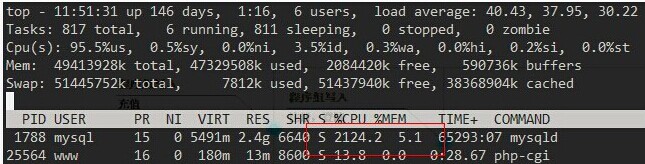
从以上的信息看,相信大家已经可以定位到底是那个程序导致服务器CPU负载过高了,但我们要做的是,找出mysql进程下,是什么动作导致服务器出现性能问题
以下做个实验,相信大家看了后也能猜到当时是什么导致高负载的,废话不多说:
表结构如下:
mysql> desc test1;

+---------+-------------+------+-----+---------+----------------+

| Field   | Type        | Null | Key | Default | Extra          |

+---------+-------------+------+-----+---------+----------------+

| id      | int(11)     | NO   | PRI | NULL    | auto_increment |

| role_id | int(11)     | NO   |     | 0       |                |

| referer | varchar(20) | NO   |     |         |                |

+---------+-------------+------+-----+---------+----------------+

3 rows in set (0.00 sec)

mysql> desc test2;

+--------------+---------+------+-----+---------+----------------+

| Field        | Type    | Null | Key | Default | Extra          |

+--------------+---------+------+-----+---------+----------------+

| id           | int(11) | NO   | PRI | NULL    | auto_increment |

| role_id      | int(11) | NO   | MUL | 0       |                |

| privilege_id | int(11) | NO   |     | 0       |                |

+--------------+---------+------+-----+---------+----------------+

3 rows in set (0.00 sec)
表的索引情况如下:
mysql> show index from test1;

+-------+------------+----------+--------------+-------------+-----------+-------------+----------+--------+------+------------+---------+

| Table | Non_unique | Key_name | Seq_in_index | Column_name | Collation | Cardinality | Sub_part | Packed | Null | Index_type | Comment |

+-------+------------+----------+--------------+-------------+-----------+-------------+----------+--------+------+------------+---------+

| test1 |          0 | PRIMARY  |            1 | id          | A         |         329 |     NULL | NULL   |      | BTREE      |         |

+-------+------------+----------+--------------+-------------+-----------+-------------+----------+--------+------+------------+---------+

1 row in set (0.00 sec)

mysql> show index from test2;

+-------+------------+----------+--------------+-------------+-----------+-------------+----------+--------+------+------------+---------+

| Table | Non_unique | Key_name | Seq_in_index | Column_name | Collation | Cardinality | Sub_part | Packed | Null | Index_type | Comment |

+-------+------------+----------+--------------+-------------+-----------+-------------+----------+--------+------+------------+---------+

| test2 |          0 | PRIMARY  |            1 | id          | A         |       12476 |     NULL | NULL   |      | BTREE      |         |

| test2 |          1 | role_id  |            1 | role_id     | A         |         415 |     NULL | NULL   |      | BTREE      |         |

+-------+------------+----------+--------------+-------------+-----------+-------------+----------+--------+------+------------+---------+

2 rows in set (0.00 sec)
当时执行show full processlist后,发现有好几百个连接在执行同一条SQL语句,看见SQL也还好,不复杂,是子查询
mysql> select privilege_id from t2 where role_id in (select role_id from t1 where id=193);
看着以上的SQL语句,写没什么问题啊,但用explain分析一看,我擦
mysql> explain select privilege_id from test2 where role_id in (select role_id from test1 where id=192);

+----+--------------------+-------+-------+---------------+---------+---------+-------+-------+-------------+

| id | select_type        | table | type  | possible_keys | key     | key_len | ref   | rows  | Extra       |

+----+--------------------+-------+-------+---------------+---------+---------+-------+-------+-------------+


|  1 | PRIMARY            | test2 | ALL   | NULL          | NULL    | NULL    | NULL  | 12476 | Using where |

|  2 | DEPENDENT SUBQUERY | test1 | const | PRIMARY       | PRIMARY | 4       | const |     1 |             |


+----+--------------------+-------+-------+---------------+---------+---------+-------+-------+-------------+

2 rows in set (0.00 sec)
当时MySQL版本是:
mysql> select  version();

+-----------+

| version() |

+-----------+

| 5.1.66    |

+-----------+

1 row in set (0.00 sec)
但把SQL语句的子查询修改为以下的写法,执行效率就就像喝了可乐一样爽^0^:
select a.privilege_id from test2 as a inner join test1 as b on a.role_id = b.role_id and b.id=192;
看效果对比:
mysql> select  version();

+-----------+

| version() |

+-----------+

| 5.1.66    |

+-----------+

1 row in set (0.00 sec)

mysql> explain select privilege_id from test2 where role_id in (select role_id from test1 where id=192);

+----+--------------------+-------+-------+---------------+---------+---------+-------+-------+-------------+

| id | select_type        | table | type  | possible_keys | key     | key_len | ref   | rows  | Extra       |

+----+--------------------+-------+-------+---------------+---------+---------+-------+-------+-------------+

|  1 | PRIMARY            | test2 | ALL   | NULL          | NULL    | NULL    | NULL  | 12476 | Using where |

|  2 | DEPENDENT SUBQUERY | test1 | const | PRIMARY       | PRIMARY | 4       | const |     1 |             |

+----+--------------------+-------+-------+---------------+---------+---------+-------+-------+-------------+

2 rows in set (0.00 sec)

mysql> explain select a.privilege_id from test2 as a inner join test1 as b on a.role_id = b.role_id and b.id=192;

+----+-------------+-------+-------+---------------+---------+---------+-------+------+-------+

| id | select_type | table | type  | possible_keys | key     | key_len | ref   | rows | Extra |

+----+-------------+-------+-------+---------------+---------+---------+-------+------+-------+

|  1 | SIMPLE      | b     | const | PRIMARY       | PRIMARY | 4       | const |    1 |       |

|  1 | SIMPLE      | a     | ref   | role_id       | role_id | 4       | const |   32 |       |

+----+-------------+-------+-------+---------------+---------+---------+-------+------+-------+

2 rows in set (0.00 sec)
相信大家也能看到修改后跟修改前的差别了吧!
以下用版本为5.5的版本测试下:
mysql> select version();

+------------+

| version()  |

+------------+

| 5.5.30-log |

+------------+

1 row in set (0.00 sec)

mysql> explain select privilege_id from test2 where role_id in (select role_id from test1 where id=192);

+----+--------------------+-------+-------+---------------+---------+---------+-------+-------+-------------+

| id | select_type        | table | type  | possible_keys | key     | key_len | ref   | rows  | Extra       |

+----+--------------------+-------+-------+---------------+---------+---------+-------+-------+-------------+

|  1 | PRIMARY            | test2 | ALL   | NULL          | NULL    | NULL    | NULL  | 12195 | Using where |

|  2 | DEPENDENT SUBQUERY | test1 | const | PRIMARY       | PRIMARY | 4       | const |     1 |             |

+----+--------------------+-------+-------+---------------+---------+---------+-------+-------+-------------+

2 rows in set (0.03 sec)

mysql> explain select a.privilege_id from test2 as a inner join test1 as b on a.role_id = b.role_id and b.id=192;

+----+-------------+-------+-------+---------------+---------+---------+-------+------+-------+

| id | select_type | table | type  | possible_keys | key     | key_len | ref   | rows | Extra |

+----+-------------+-------+-------+---------------+---------+---------+-------+------+-------+

|  1 | SIMPLE      | b     | const | PRIMARY       | PRIMARY | 4       | const |    1 |       |

|  1 | SIMPLE      | a     | ref   | role_id       | role_id | 4       | const |   32 |       |

+----+-------------+-------+-------+---------------+---------+---------+-------+------+-------+

2 rows in set (0.01 sec)
MySQL5.5的版本和5.1的情况一样,如果用类似的子查询,可能会存在性能问题
以下用版本为5.6的版本测试下:
mysql> select version();

+------------+

| version()  |

+------------+

| 5.6.10-log |

+------------+

1 row in set (0.00 sec)

mysql> explain select privilege_id from test2 where role_id in (select role_id from test1 where id=192);

+----+-------------+-------+-------+---------------+---------+---------+-------+------+-------+

| id | select_type | table | type  | possible_keys | key     | key_len | ref   | rows | Extra |

+----+-------------+-------+-------+---------------+---------+---------+-------+------+-------+

|  1 | SIMPLE      | test1 | const | PRIMARY       | PRIMARY | 4       | const |    1 | NULL  |

|  1 | SIMPLE      | test2 | ref   | role_id       | role_id | 4       | const |   32 | NULL  |

+----+-------------+-------+-------+---------------+---------+---------+-------+------+-------+

2 rows in set (0.07 sec)

mysql> explain select a.privilege_id from test2 as a inner join test1 as b on a.role_id = b.role_id and b.id=192;

+----+-------------+-------+-------+---------------+---------+---------+-------+------+-------+

| id | select_type | table | type  | possible_keys | key     | key_len | ref   | rows | Extra |

+----+-------------+-------+-------+---------------+---------+---------+-------+------+-------+

|  1 | SIMPLE      | b     | const | PRIMARY       | PRIMARY | 4       | const |    1 | NULL  |

|  1 | SIMPLE      | a     | ref   | role_id       | role_id | 4       | const |   32 | NULL  |

+----+-------------+-------+-------+---------------+---------+---------+-------+------+-------+

2 rows in set (0.04 sec)
看到的两种查询结果是一样高效的,从以上的案例可以看出,写通用且性能高的SQL相当重要,希望大家以后不要踩类似的坑@.@
总结:mysql5.6版本无论在性能还是功能上,已经比之前的版本提升了不少,是一个不错的选择,另外,sql语句写得不适当,会带来很严重的性能问题
|
作者:陆炫志 出处:xuanzhi的博客 http://www.cnblogs.com/xuanzhi201111 您的支持是对博主最大的鼓励,感谢您的认真阅读。本文版权归作者所有,欢迎转载,但请保留该声明。 |
SQL语句导致性能问题的更多相关文章
- 利用pl/sql执行计划评估SQL语句的性能简析
一段SQL代码写好以后,可以通过查看SQL的执行计划,初步预测该SQL在运行时的性能好坏,尤其是在发现某个SQL语句的效率较差时,我们可以通过查看执行计划,分析出该SQL代码的问题所在. 那么,作为 ...
- SQl语句查询性能优化
[摘要]本文从DBMS的查询优化器对SQL查询语句进行性能优化的角度出发,结合数据库理论,从查询表达式及其多种查询条件组合对数据库查询性能优化进行分析,总结出多种提高数据库查询性能优化策略,介绍索引的 ...
- mybatis的sql语句导致索引失效,使得查询超时
mybaitis书写sql需要特别注意where条件中的语句,否则将会导致索引失效,使得查询总是超时.如下语句会出现导致索引失效的情况: with test1 as (select count(C_F ...
- SQL语句导致cpu占用如此高
一般我们可以使用sql server自带的性能分析追踪工具sql profiler分析数据库设计所产生问题的来源,进行有针对性的处理.但我们也可以通过自己写SQL语句来有针对性的进行性能方面的查询.通 ...
- 提高SQL语句的性能
一.FROM子句中的表 FROM子表的安排或次序对性能有很大的影响,把较小的表放在前面,把较大的表放在后面,可以得到更高的效率. 二.WHERE子句中的次序 一般来自基表的字段放在结合操作的右侧,要被 ...
- mysql的sql语句的性能诊断分析
1> explain SQL,类似于Oracle中explain语句 例如:explain select * from nad_aditem; 2> select benchmark(co ...
- SQL 语句与性能之执行顺序
select * , t3.Name from t1 left join t2 on t1.sysno = t2.Asysno left join t3 on t3.sysno = t2.Bsysno ...
- SQL语句执行性能
通过设置STATISTICS我们可以查看执行SQL时的系统情况.选项有PROFILE,IO ,TIME.介绍如下: SET STATISTICS PROFILE ON:显示分析.编译和执行查询所需的时 ...
- SQL 语句与性能之联合查询和联合分类查询
select * from t1 left join t2 on t2.sysno =t1.ASysNo left join t3 on t3.sysno =t2.ASysNo left join t ...
随机推荐
- spring 事务-support 有事务得开启就参加 没有就不参加
spring 事务-support 有事务得开启就参加 没有就不参加
- 【刷题】LOJ 2587 「APIO2018」铁人两项
题目描述 比特镇的路网由 \(m\) 条双向道路连接的 \(n\) 个交叉路口组成. 最近,比特镇获得了一场铁人两项锦标赛的主办权.这场比赛共有两段赛程:选手先完成一段长跑赛程,然后骑自行车完成第二段 ...
- 【bzoj4537】 Hnoi2016—最小公倍数
http://www.lydsy.com/JudgeOnline/problem.php?id=4537 (题目链接) 题意 给出一个${n}$个点${m}$条边的无向图,每条边有两个权值${a,b} ...
- SpringBoot整合Mybatis之xml
SpringBoot整合Mybatis mybatis ORM框架.几个重要的概念: Mapper配置 : 可以使用基于XML的Mapper配置文件来实现,也可以使用基于Java注解的Mybatis注 ...
- 【java】JDK、JRE、JVM的关系
目录结构: contents structure [-] 什么是JDK,JRE,JVM 安装JDK的时候为什么有两个jre 专用JRE 共用JRE 共用JRE和专用JRE的对比 java的跨平台特性 ...
- AIO 开始不定时的抛异常: java.io.IOException: 指定的网络名不再可用
一天里会抛出几个这样的错误,但发现服务还在正常的运行. java.io.IOException: 指定的网络名不再可用. at sun.nio.ch.Iocp.translateErrorToIOEx ...
- Linux上SSH登录远程服务器免密码
在本地的客户端SSH到远程服务端时,每次都要输入用户名和密码,如果不想每次都输入密码则可以使用以下操作. 首先在本地的客户端输入 ssh-keygen [keysystem@localhost ~]$ ...
- Linux常用命令history/tcpdump/awk/grep
1. 历史命令回显history 查询是什么时间什么人操作过文件: echo 'export HISTTIMEFORMAT="%F %T `whoami` "' >> ...
- OpenStack中MySQL高可用配置
采用Heartbeat+DRBD+mysql高可用方案,配置两个节点的高可用集群 l 配置各节点互相解析 gb07 gb06 l 配置各节点时间同步 gb07 [root@gb07 ~]# ntp ...
- bzoj千题计划194:bzoj2115: [Wc2011] Xor
http://www.lydsy.com/JudgeOnline/problem.php?id=2115 边和点可以重复经过,那最后的路径一定是从1到n的一条路径加上许多环 dfs出任意一条路径的异或 ...