
在笛卡尔坐标系上描绘函数 y=4x^2-2/4x-3
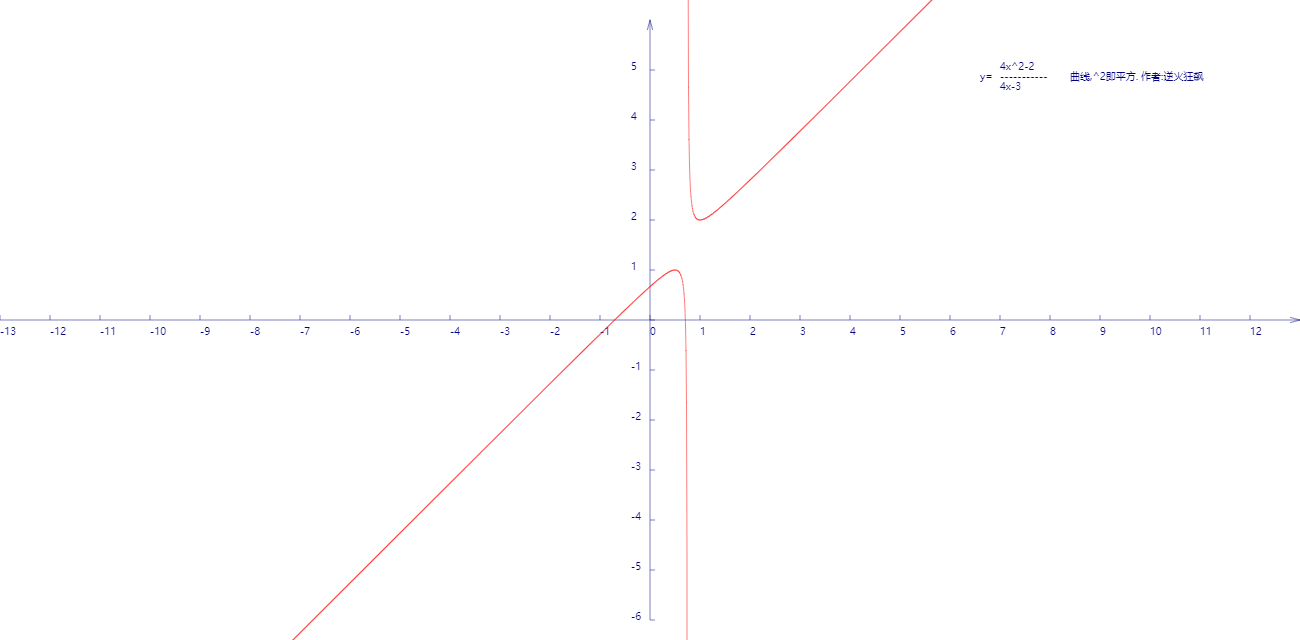
代码:
<!DOCTYPE html>
<html lang="utf-8">
<meta http-equiv="Content-Type" content="text/html; charset=utf-8"/>
<head>
     <title>函数4x^2-2/4x-3曲线勾画</title>
    </head>

     <body onload="draw()">
        <canvas id="myCanvus" width="1300px" height="640px" style="border:1px dashed black;">
            出现文字表示你的浏览器不支持HTML5
        </canvas>
     </body>
</html>
<script type="text/javascript">
<!--
    function draw(){
        var canvas=document.getElementById("myCanvus");
        var canvasWidth=1300;
        var canvasHeight=640;

        var context=canvas.getContext("2d");

        context.fillStyle = "white";
        context.fillRect(0, 0, canvasWidth, canvasHeight);

        context.strokeStyle = "black";
        context.fillStyle = "black";

        // 进行坐标变换:把原点放在左下角,东方为X轴正向,北方为Y轴正向
        var offsetY=320;// Y向偏移值,正值向上偏,用来画坐标轴
        var offsetX=650;// X向偏移值,正值向右偏,用来画坐标轴

        context.save();
        context.translate(0+offsetX,canvasHeight-offsetY);

        drawAxisXText(context);// 文字和线分开画比较好处理
        drawAxisYText(context);
        drawTitleText(context);

        context.rotate(getRad(180));
        context.scale(-1,1);

        drawAxisX(context);
        drawAxisY(context);
        drawCurve(context);

        context.restore();
    }

    function drawTitleText(ctx){
        ctx.lineWidth=0.5;
        ctx.strokeStyle='navy';
        ctx.fillStyle='navy';

        var x=350;
        var y=-250;

        // 写文字
        ctx.fillText("4x^2-2",x,y);
        ctx.fillText("-----------",x,y+10);
        ctx.fillText("4x-3",x,y+20);
        ctx.fillText("y=",x-20,y+10);
        ctx.fillText("曲线,^2即平方. 作者:逆火狂飙",x+70,y+10);
    }

    function drawCurve(ctx){
        var SU=50;// Scale Unit

        var cds=[{}];
        var cds2=[{}];

        var x,y;
        for(x=-13;x<=13;x+=0.01){

            if(x<3/4){
                y=(4*x*x-2)/(4*x-3);// 函数式在此
                var arr={"x":x,"y":y};
                cds.push(arr);
            }

            if(x>3/4){
                y=(4*x*x-2)/(4*x-3);// 函数式在此
                var arr={"x":x,"y":y};
                cds2.push(arr);
            }
        }

        // 将数组里面的点一段段连线
        //var ymax=-6,ymin=6,xmax,xmin;

        ctx.strokeStyle = "red";
        ctx.beginPath();

        for(var i=0; i<cds.length; i++){
            ctx.lineTo(cds[i].x*SU,cds[i].y*SU);
        }

        ctx.stroke();
        ctx.closePath();

        ctx.beginPath();
        for(var i=0; i<cds2.length; i++){
            ctx.lineTo(cds2[i].x*SU,cds2[i].y*SU);
        }

        ctx.stroke();
        ctx.closePath();

        // 极大值
        /*ctx.beginPath();
        ctx.moveTo(xmax*SU,ymax*SU-5);
        ctx.lineTo(xmax*SU,ymax*SU+5);

        ctx.save();
        ctx.scale(1,-1);
        ctx.fillText("ymax="+cutShort(ymax.toString(),8),xmax*SU,-ymax*SU);
        ctx.restore();

        ctx.stroke();
        ctx.closePath();

        // 极小值
        ctx.beginPath();
        ctx.moveTo(xmin*SU,ymin*SU-5);
        ctx.lineTo(xmin*SU,ymin*SU+5);

        ctx.save();
        ctx.scale(1,-1);
        ctx.fillText("ymin="+ymin,xmin*SU,-ymin*SU);
        ctx.restore();

        ctx.stroke();
        ctx.closePath();*/
    }

    function drawAxisX(ctx){
        ctx.save();

        ctx.lineWidth=0.5;
        ctx.strokeStyle='navy';
        ctx.fillStyle='navy';

        var start=-650;
        var end=650;

        // 画轴
        ctx.beginPath();
        ctx.moveTo(start, 0);
        ctx.lineTo(end, 0);
        ctx.stroke();
        ctx.closePath();

        // 画箭头
        ctx.beginPath();
        ctx.moveTo(end-Math.cos(getRad(15))*10, Math.sin(getRad(15))*10);
        ctx.lineTo(end, 0);
        ctx.lineTo(end-Math.cos(getRad(15))*10, -Math.sin(getRad(15))*10);
        ctx.stroke();
        ctx.closePath();

        // 画刻度
        var x,y;
        y=5;
        for(x=start;x<end;x+=50){
            ctx.beginPath();
            ctx.moveTo(x, 0);
            ctx.lineTo(x, y);

            ctx.stroke();
            ctx.closePath();
        }

        ctx.restore();
    }

    function drawAxisXText(ctx){
        ctx.lineWidth=0.5;
        ctx.strokeStyle='navy';
        ctx.fillStyle='navy';

        var start=-650;
        var end=650;

        // 写文字
        var x,y=5;
        for(x=start;x<end;x+=50){
            ctx.fillText(x/50,x,y+10);
        }
    }

    function drawAxisY(ctx){
        ctx.save();

        ctx.lineWidth=0.5;
        ctx.strokeStyle='navy';
        ctx.fillStyle='navy';

        var start=-300;
        var end=300;

        // 画轴
        ctx.beginPath();
        ctx.moveTo(0, start);
        ctx.lineTo(0, end);
        ctx.stroke();
        ctx.closePath();

        // 画箭头
        ctx.beginPath();
        ctx.moveTo(Math.sin(getRad(15))*10, end-Math.cos(getRad(15))*10);
        ctx.lineTo(0, end);
        ctx.lineTo(-Math.sin(getRad(15))*10, end-Math.cos(getRad(15))*10);
        ctx.stroke();
        ctx.closePath();

        // 画刻度
        var x,y;
        x=5;
        for(y=start;y<end;y+=50){
            ctx.beginPath();
            ctx.moveTo(x, y);
            ctx.lineTo(0, y);

            ctx.stroke();
            ctx.closePath();
        }
    }

    function drawAxisYText(ctx){
        ctx.lineWidth=0.5;
        ctx.strokeStyle='navy';
        ctx.fillStyle='navy';

        var start=-250;
        var end=350;

        // 写文字
        var x=-19,y=5;
        for(y=start;y<end;y+=50){

            if(y!=0){
                ctx.fillText(-y/50,x,y);
            }
        }
    }

    function getRad(degree){
        return degree/180*Math.PI;
    }

    function cutShort(str,length){
        if(str.length>length){
            str=str.substr(0,length)+"...";
        }

        return str;
    }
//-->
</script>
在笛卡尔坐标系上描绘函数 y=4x^2-2/4x-3的更多相关文章
- 在笛卡尔坐标系上描绘函数(x*x+1)/(x*x-1)曲线
代码: <!DOCTYPE html> <html lang="utf-8"> <meta http-equiv="Content-Type ...
- 在笛卡尔坐标系上描绘函数2*x+Math.sqrt(5-x*x)及其共轭函数2*x-Math.sqrt(5-x*x)曲线
代码如下: <!DOCTYPE html> <html lang="utf-8"> <meta http-equiv="Content-Ty ...
- 在笛卡尔坐标系上描绘y=x^2-4/x^2-2x-3曲线
<!DOCTYPE html> <html lang="utf-8"> <meta http-equiv="Content-Type&quo ...
- AcWing:112. 雷达设备(贪心 + 笛卡尔坐标系化区间)
假设海岸是一条无限长的直线,陆地位于海岸的一侧,海洋位于另外一侧. 每个小岛都位于海洋一侧的某个点上. 雷达装置均位于海岸线上,且雷达的监测范围为d,当小岛与某雷达的距离不超过d时,该小岛可以被雷达覆 ...
- HTML5 Canvas 笛卡尔坐标系转换尝试
<!DOCTYPE html> <html lang="utf-8"> <meta http-equiv="Content-Type&quo ...
- 如果是在有master上开启了该参数,记得在slave端也要开启这个参数(salve需要stop后再重新start),否则在master上创建函数会导致replaction中断。
如果是在有master上开启了该参数,记得在slave端也要开启这个参数(salve需要stop后再重新start),否则在master上创建函数会导致replaction中断.
- 使用神经网络来拟合函数y = x^3 +b
我们使用一个三层的小网络来,模拟函数y = x^3+b函数 import tensorflow as tf import numpy as np import matplotlib.pyplot as ...
- 自学Linux Shell16.4-在命令行上使用函数
点击返回 自学Linux命令行与Shell脚本之路 16.4-在命令行上使用函数 脚本函数不仅可以用作shell脚本命令,也可以用作命令行界面的命令.一旦在shell中定义了函数,可以从系统的任意目录 ...
- 函数 y=x^x的分析
关于函数 y=xx的分析: 由图像得,y在负无穷大到0图像处处不连续,故y的定义域为(0,正无穷大): 故该函数不就是y=e^(lnxx)吗? 1.定义域:我们变形一下,y=e^(xlnx),显然是0 ...
随机推荐
- SpringBoot学习:读取yml和properties文件的内容
一.在SpringBoot实现属性注入: 1).添加pom依赖jar包: <!-- 支持 @ConfigurationProperties 注解 --> <!-- https://m ...
- 解决Cocos2d-js 在使用 TiledMap时的黑线问题
在项目中,加载TiledMap时,如果当前显示分辨率与设计分辨率不符,做出的地图上会有黑线产生.屏幕移动时,也会有黑线. 解决的方式很简单.找到配置文件 CCConfig.js 一般情况是在 ra ...
- react native 生成APK
参考地址:React native Android 命令 打包apk 首先:尝试使用模拟器测试 这里是因为需要确认目前在电脑上的模拟器是可以正常运行的,并且,开发React native的应用程序,肯 ...
- 持续获取password
function GetPasswd { RunCounter=1 DB_PSSWD=getpassword while [ -z "${DB_PSSWD}" -a ${RunCo ...
- cobol COMP-3最后1位
"C" hex is positive, "D" hex is negative, and "F" hex is unsigned.
- 【BZOJ 2186】 2186: [Sdoi2008]沙拉公主的困惑 (欧拉筛,线性求逆元)
2186: [Sdoi2008]沙拉公主的困惑 Description 大富翁国因为通货膨胀,以及假钞泛滥,政府决定推出一项新的政策:现有钞票编号范围为1到N的阶乘,但是,政府只发行编号与M!互质的钞 ...
- 【FFT卷积】BZOJ3527-力
[题目大意] [思路] 很好这很FFT…… 想了半天也没明白到底什么是卷积∑的上下界,我当初学的时候没说一定要从0开始啊quq 我还是背不出FFT的模板我要狗带了 我上面写的什么乱七八糟的,要什么数学 ...
- 【高精度】POJ1001-Exponentiation
整个题库的第二题,原本都没有屑于去做,突发奇想抱着秒杀的心态去写了代码,却硬生生地吃了4个WA.. [思路]先去除掉小数点,进行最基本的高精度乘法运算,再在运算得到的结果中添加小数点输出. [前铺]让 ...
- 【最大流/费用流】BZOJ1834-[ZJOI2010]network 网络扩容
[题目大意] 给定一张有向图,每条边都有一个容量C和一个扩容费用W.这里扩容费用是指将容量扩大1所需的费用.求: 1. 在不扩容的情况下,1到N的最大流: 2. 将1到N的最大流增加K所需的最小扩容费 ...
- Problem G: 零起点学算法102——删除字符
#include<stdio.h> #include<string.h> int main() { ],a; while(gets(ch)!=NULL) { scanf(&qu ...