
【Azure Redis 缓存】Azure Cache for Redis 中如何快速查看慢指令情况(Slowlogs)
问题描述
当 Azure Redis 服务器负载过高的情况下,使用时就会遇见连接超时,命令超时,IO Socket超时等异常。为了能定位是那些因素引起的,可以参考微软官方文档( 管理 Azure Cache for Redis 的服务器负载 : https://docs.azure.cn/zh-cn/azure-cache-for-redis/cache-best-practices-server-load#avoid-long-running-commands) 开始以下因素的分析:
- 值大小 : 可以通过Redis-cli.exe 的bigkeys来进行分析 [redis-benchmark -h <your redis name>.redis.cache.chinacloudapi.cn -a [xxxxxxxxxxxxxxxxxx your access key ] -t GET -n 1000000 -d 1024 -P 50 -c 50]
- 避免出现客户端连接高峰 : 可以查看Redis Metrics中的连接数
- 内存压力 : 通过查看Redis Metrics中的内存使用量
- 避免长时间运行的命令 : 通过Azure Redis门户上的console或者是Redis-cli.exe 来执行 slowlog get 100指令
本文就重点演示在Azure Redis门户上的console页面执行 slowlog get 100 指令。
问题回答
因为Redis 服务器是单线程系统。 长时间运行的命令(官名:慢指令, Slowlog)可能导致客户端出现延迟或超时,因为服务器在忙于处理长时间运行的命令时无法响应任何其他请求。那么,如何来查看慢指令呢?
第一步: 登录Azure门户,选择需要查看的Redis服务,进入Console页面
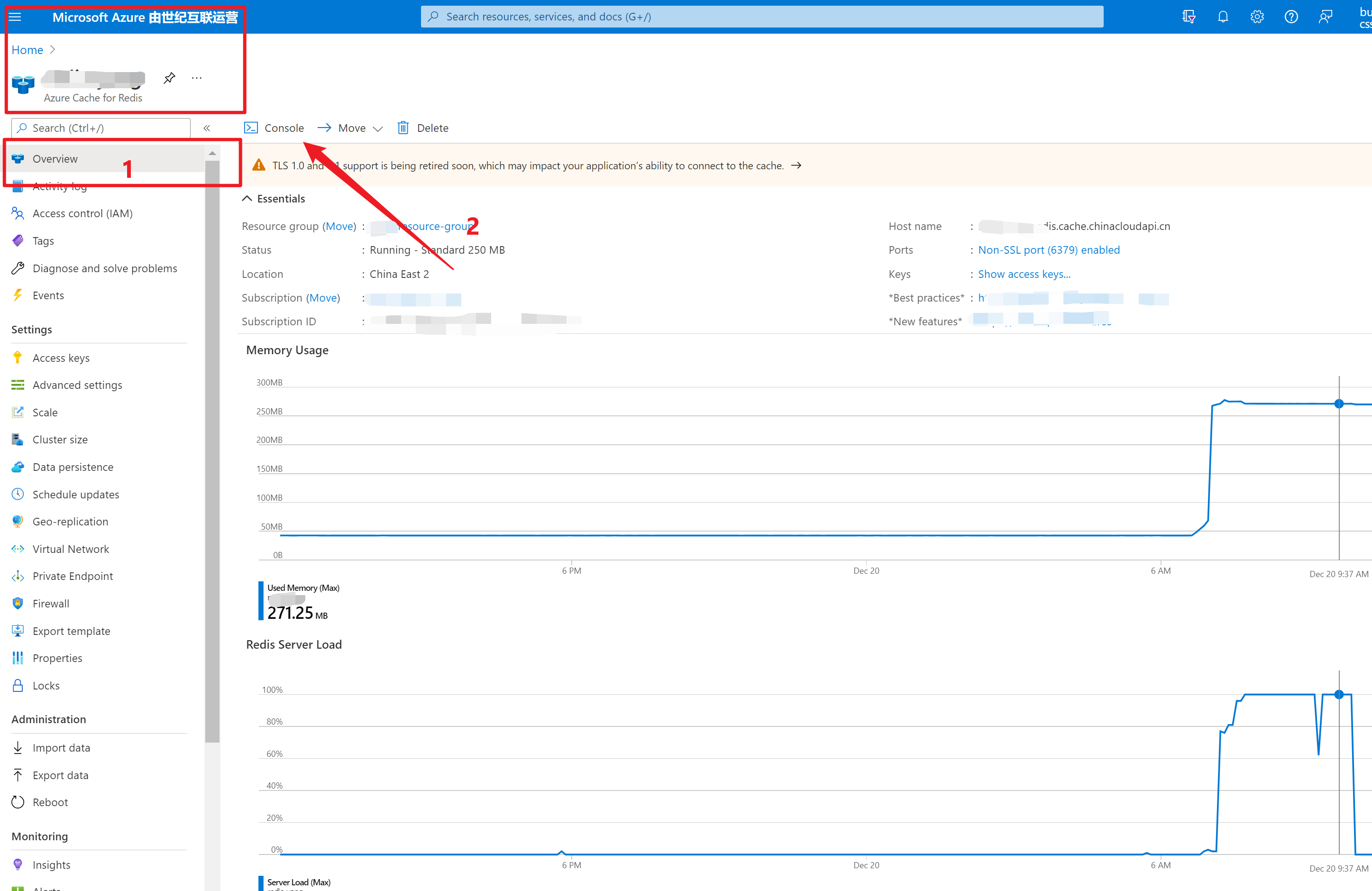
第二步:在Console命令页输入:slowlog get 100
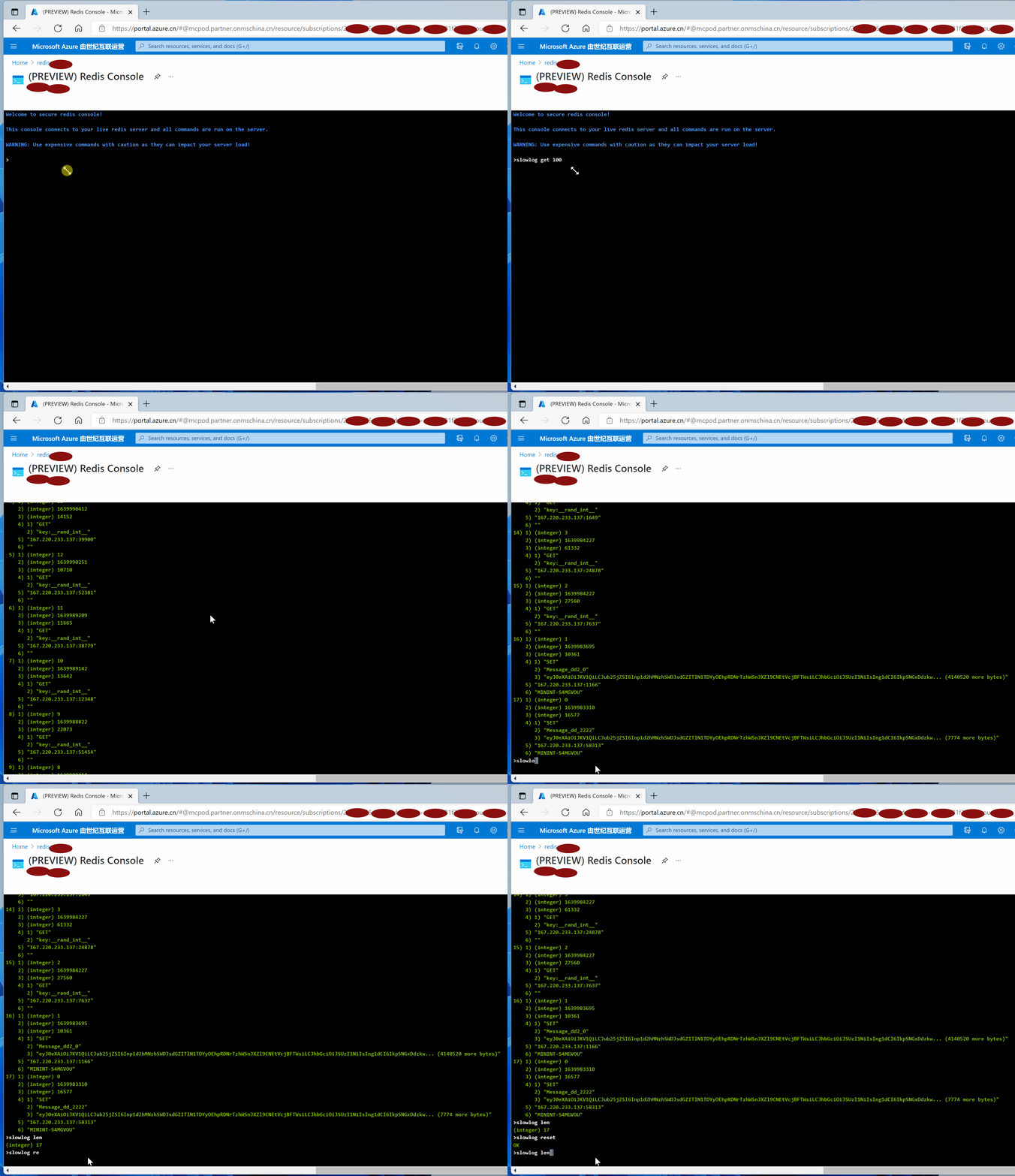
- slowlog get 100: 获取当前Redis服务中所记录的慢指令信息,每一个指令包含六部分内容,id,unix时间,指令执行时间(ms 微秒), 指令内容,客户端IP:端口,客户端机器名。
- slowlog len : 返回当前Redis服务器中所记录的慢指令日志中所记录指令数
- slowlog reset :清空当前慢指令记录
指令输出示例:
Welcome to secure redis console!

This console connects to your live redis server and all commands are run on the server.

WARNING: Use expensive commands with caution as they can impact your server load!

>slowlog get 100

 1) 1) (integer) 16

    2) (integer) 1639993957

    3) (integer) 10012

    4) 1) "GET"

       2) "key:__rand_int__"

    5) "167.220.233.137:14835"

    6) ""

 2) 1) (integer) 15

    2) (integer) 1639993727

    3) (integer) 10195

    4) 1) "GET"

       2) "key:__rand_int__"

    5) "167.220.233.137:19468"

    6) ""

 3) 1) (integer) 14

    2) (integer) 1639992068

    3) (integer) 13279

    4) 1) "GET"

       2) "key:__rand_int__"

    5) "167.220.233.137:46504"

    6) ""

 4) 1) (integer) 13

    2) (integer) 1639990412

    3) (integer) 14152

    4) 1) "GET"

       2) "key:__rand_int__"

    5) "167.220.233.137:39900"

    6) ""

 5) 1) (integer) 12

    2) (integer) 1639990251

    3) (integer) 10710

    4) 1) "GET"

       2) "key:__rand_int__"

    5) "167.220.233.137:52381"

    6) ""

 6) 1) (integer) 11

    2) (integer) 1639989209

    3) (integer) 11665

    4) 1) "GET"

       2) "key:__rand_int__"

    5) "167.220.233.137:38779"

    6) ""

 7) 1) (integer) 10

    2) (integer) 1639989142

    3) (integer) 13642

    4) 1) "GET"

       2) "key:__rand_int__"

    5) "167.220.233.137:12348"

    6) ""

 8) 1) (integer) 9

    2) (integer) 1639988822

    3) (integer) 22073

    4) 1) "GET"

       2) "key:__rand_int__"

    5) "167.220.233.137:51454"

    6) ""

 9) 1) (integer) 8

    2) (integer) 1639988414

    3) (integer) 13668

    4) 1) "GET"

       2) "key:__rand_int__"

    5) "167.220.233.137:1550"

    6) ""

10) 1) (integer) 7

    2) (integer) 1639987239

    3) (integer) 18846

    4) 1) "GET"

       2) "key:__rand_int__"

    5) "167.220.233.137:57350"

    6) ""

11) 1) (integer) 6

    2) (integer) 1639986196

    3) (integer) 12921

    4) 1) "GET"

       2) "key:__rand_int__"

    5) "167.220.233.137:1739"

    6) ""

12) 1) (integer) 5

    2) (integer) 1639986196

    3) (integer) 15833

    4) 1) "GET"

       2) "key:__rand_int__"

    5) "167.220.233.137:1739"

    6) ""

13) 1) (integer) 4

    2) (integer) 1639985175

    3) (integer) 14434

    4) 1) "GET"

       2) "key:__rand_int__"

    5) "167.220.233.137:1649"

    6) ""

14) 1) (integer) 3

    2) (integer) 1639984227

    3) (integer) 61332

    4) 1) "GET"

       2) "key:__rand_int__"

    5) "167.220.233.137:24878"

    6) ""

15) 1) (integer) 2

    2) (integer) 1639984227

    3) (integer) 27560

    4) 1) "GET"

       2) "key:__rand_int__"

    5) "167.220.233.137:7637"

    6) ""

16) 1) (integer) 1

    2) (integer) 1639983695

    3) (integer) 10361

    4) 1) "SET"

       2) "Message_dd2_0"

       3) "eyJ0eXAiOiJKV1QiLCJub25jZSI6Inp1d2hMNzhSWDJsdGZITlN1TDYyOEhpRDNrTzhWSnJXZl9CNEtVcjBFTWsiLCJhbGciOiJSUzI1NiIsIng1dCI6IkpSNGxDdzkw... (4140520 more bytes)"

    5) "167.220.233.137:1166"

    6) "MININT-S4MGVOU"

17) 1) (integer) 0

    2) (integer) 1639983310

    3) (integer) 16577

    4) 1) "SET"

       2) "Message_dd_2222"

       3) "eyJ0eXAiOiJKV1QiLCJub25jZSI6Inp1d2hMNzhSWDJsdGZITlN1TDYyOEhpRDNrTzhWSnJXZl9CNEtVcjBFTWsiLCJhbGciOiJSUzI1NiIsIng1dCI6IkpSNGxDdzkw... (7774 more bytes)"

    5) "167.220.233.137:58313"

    6) "MININT-S4MGVOU"

>slowlog len

(integer) 17

>slowlog reset

OK

>slowlog len

(integer) 0
Each entry from the slow log is comprised of the following six values:
- A unique progressive identifier for every slow log entry.
- The unix timestamp at which the logged command was processed.
- The amount of time needed for its execution, in microseconds.
- The array composing the arguments of the command.
- Client IP address and port.
- Client name if set via the CLIENT SETNAME command.
参考资料
SLOWLOG GET [count]:https://redis.io/commands/slowlog-get
管理 Azure Cache for Redis 的服务器负载: https://docs.azure.cn/zh-cn/azure-cache-for-redis/cache-best-practices-server-load#value-sizes
【Azure Redis 缓存】Azure Cache for Redis 中如何快速查看慢指令情况(Slowlogs)的更多相关文章
- 【Azure Redis 缓存 Azure Cache For Redis】如何设置让Azure Redis中的RDB文件暂留更久(如7天)
问题描述 Azure Redis和所有的Redis服务一样,可以让你保留存储在Redis中的数据.以防万一在Redis服务器出现故障的时候能尽可能小的减少数据的损失.在Azure Redis服务中,默 ...
- 【Azure Redis 缓存 Azure Cache For Redis】Azure Redis由低级别(C)升级到高级别(P)的步骤和注意事项, 及对用户现有应用的潜在影响,是否需要停机时间窗口,以及这个时间窗口需要多少的预估问题
问题描述 由于Azure Redis的性能在不同级别表现不同,当需要升级/缩放Redis的时候,从使用者的角度,需要知道有那些步骤? 注意事项? 潜在影响?停机事件窗口? 升级预估时间? 解决方案 从 ...
- spring boot redis 缓存(cache)集成
Spring Boot 集成教程 Spring Boot 介绍 Spring Boot 开发环境搭建(Eclipse) Spring Boot Hello World (restful接口)例子 sp ...
- 【Azure Redis 缓存 Azure Cache For Redis】在创建高级层Redis(P1)集成虚拟网络(VNET)后,如何测试VNET中资源如何成功访问及配置白名单的效果
当使用Azure Redis高级版时候,为了能更好的保护Redis的安全,启用了虚拟网路,把Redis集成在Azure中的虚拟网络,只能通过虚拟网络VENT中的资源进行访问,而公网是不可以访问的.但是 ...
- 【Azure Redis 缓存 Azure Cache For Redis】Redis性能问题,发现Server Load非常的高,导致正常连接/操作不成功
问题描述 在正常使用Azure Redis的服务中,突然发现Redis 的CPU达到了100%, 正常的使用中发现性能问题严重.从Redis的门户图表中,观察到CPU, Connection,Lent ...
- 【Azure Redis 缓存 Azure Cache For Redis】使用Redis自带redis-benchmark.exe命令测试Azure Redis的性能
问题描述 关于Azure Redis的性能问题,在官方文档中,可以查看到不同层级Redis的最大连接数,每秒处理请求的性能. 基本缓存和标准缓存 C0 (250 MB) 缓存 - 最多支持 256 个 ...
- 【Azure Redis 缓存 Azure Cache For Redis】Redis连接池
问题描述 Redis根据定价层说明,不同级别支持的连接数最多可达4万(同时),但是当短时间又大量连接请求建立的时候,Redis服务的服务压力非常大,到达100%.严重影响了高响应的要求.最严重时,经常 ...
- 高级运维(六):源码安装Redis缓存服务、常用Redis数据库操作指令、配置Redis主从服务器
一.源码安装Redis缓存服务 目标: 本案例要求先快速搭建好一台Redis服务器,并测试该缓存服务器: 1> 设置变量test,值为123 2> 查看变量test的值 3> 设置计 ...
- 【Redis缓存机制】1.Redis介绍和使用场景
(1)持久化数据库的缺点平常我们使用的关系型数据库有Mysql.Oracle以及SqlServer等,在开发的过程中,数据通常都是通过Web提供的数据库驱动来链接数据库进行增删改查. 那么,我们日常使 ...
随机推荐
- [源码解析] PyTorch 分布式 Autograd (2) ---- RPC基础
[源码解析] PyTorch 分布式 Autograd (2) ---- RPC基础 目录 [源码解析] PyTorch 分布式 Autograd (2) ---- RPC基础 0x00 摘要 0x0 ...
- Codeforces 1236F - Alice and the Cactus(期望+分类讨论)
Codeforces 题面传送门 & 洛谷题面传送门 期望好题. 首先拆方差: \[\begin{aligned} &E((x-E(x))^2)\\ =&E(x^2)-2E(x ...
- Atcoder 2444 - JOIOI 王国(二分)
题面传送门 记 \(mxi\) 为 IOI 国海拔的最大值,\(mni\) 为 IOI 国海拔的最小值,\(mxj\) 为 JOI 国海拔的最大值,\(mnj\) 为 JOI 国海拔的最小值. 不难发 ...
- Codeforces 917D - Stranger Trees(矩阵树定理/推式子+组合意义)
Codeforces 题目传送门 & 洛谷题目传送门 刚好看到 wjz 在做这题,心想这题之前好像省选前做过,当时觉得是道挺不错的题,为啥没写题解呢?于是就过来补了,由此可见我真是个大鸽子(( ...
- Telink BLE MESH PWM波的小结
本本针对Telink BLE MESH SDK 灯控的使用进行说明. 1.调整灯光的频率 默认情况下 SDK PWM波的频率是 600HZ的,有时我们需要将它调整频率,例如调整为4K,只需要更改参数 ...
- 充分利用nginx的reload功能平滑的上架和更新业务
以前更新我们都要停服务更新,不管什么时候更新,都可能有客户在访问,体验不好,二是如果有数据传输,可能会造成数据丢失. nginx reload可以不间断更新配置文件,原理就是当我们修改配置文件发起re ...
- Hive(二)【数据类型、类型转换】
目录 一.基本数据类型 案例实操 二.集合数据类型 案例实操 Map类型 三.类型转换 1.隐式类型转换 2.显示(强制)类型转换 一.基本数据类型 HIVE MySQL JAVA 长度 例子 TIN ...
- C语言把数字转换为字符串的函数
博主原文 C语言itoa()函数和atoi()函数详解(整数转字符C实现) C语言提供了几个标准库函数,可以将任意类型(整型.长整型.浮点型等)的数字转换为字符串. 1.int/float to st ...
- ybatis中查询出多个以key,value的属性记录,封装成一个map返回的方法
可以采用值做映射,也可以不采用映射方式 <resultMap id="configMap" type="java.util.Map" > <r ...
- Linux基础命令---mysql
mysql mysql是一个简单的sql shell,它可以用来管理mysql数据库. 此命令的适用范围:RedHat.RHEL.Ubuntu.CentOS.Fedora. 1.语法 m ...