
git rebase修改历史提交内容
简述
git提交历史中有一次提交的内容是有问题,因为每隔一段时间就要发一次版本,所以必须修改这次提交的内容,以便其不影响已经发布的版本。
大概是这样子的
      A --- B ---- C ---- D ---- E  ----- F ------

                  |        \              \

                 有问题      \-----发布      \---- 发布
所以这里需要修改C这次提交的内容。
解决过程
相关的操作可以参考7.6 Git 工具 - 重写历史
这里我创建了一个新的仓库,用来描述解决这个问题的过程。
1、先看一下提交记录
$ git log

commit aa3f6b723abf030b1692f9b573092ec782600d91

Author: solym <solym@sohu.com>

Date:   Sat Sep 29 14:34:36 2018 +0800

    第三次提交

commit e186c75c5431a6eb683d4640ac30c4b8900ba0c1

Author: solym <solym@sohu.com>

Date:   Sat Sep 29 14:34:11 2018 +0800

    第二次提交

commit ebcd3120d30c52125593601f296607c5dcc520a3

Author: solym <solym@sohu.com>

Date:   Sat Sep 29 14:33:48 2018 +0800

    第一次提交
这里假设是第二次提交的内容有问题,所以需要会到e186c75c5431a6eb683d4640ac30c4b8900ba0c1这个提交记录之前一次提交的位置来解决这个问题。
2、先将当前的修改用stash存储一下,后面解决完之后再释放出来
$ git stash

Saved working directory and index state WIP on master: aa3f6b7 第三次提交

HEAD is now at aa3f6b7 第三次提交
3、将 HEAD 通过rebase回退到有问题的位置前
 git rebase e186c75c5431a6eb683d4640ac30c4b8900ba0c1^ --interactive

warning: stopped at e186c75... 第二次提交

You can amend the commit now, with

  git commit --amend

Once you are satisfied with your changes, run

  git rebase --continue
4、在出来的编辑界面,将有问题的提交前的pick改为edit,然后保存退出
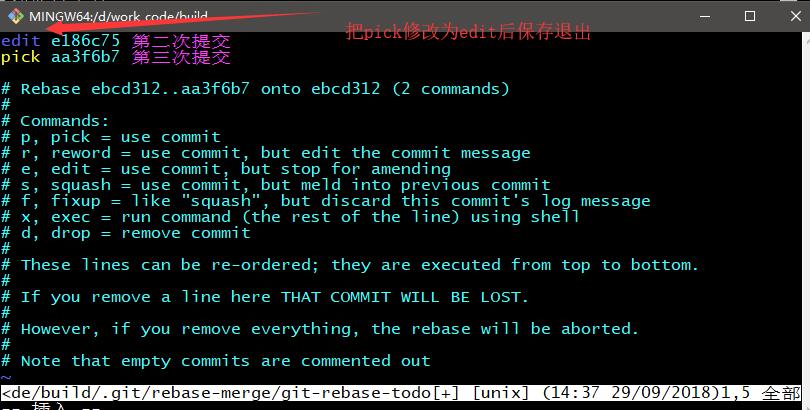
#  p, pick = use commit  使用提交(即保留它,不做修改)

#  r, reword = use commit, but edit the commit message 使用提交,但编辑提交的日志消息

#  e, edit = use commit, but stop for amending 使用提交,但停下来修改(就是要修改提交的内容)

#  s, squash = use commit, but meld into previous commit 使用提交,但融入此前的提交(就是与在此之前一个提交合并)

#  f, fixup = like "squash", but discard this commit's log message 类似于squash,但是丢弃此提交的日志消息

#  x, exec = run command (the rest of the line) using shell 运行shell命令

# d,drop = remove commit 删除提交
5、修改有问题的文件,解决后重新提交。注意提交使用的参数是--amend
$ vim A.cpp

$ git add A.cpp

$ git commit --amend

[detached HEAD 8b4daa5] 第二次提交

 Date: Sat Sep 29 14:34:11 2018 +0800

 2 files changed, 8 insertions(+), 1 deletion(-)

 create mode 100644 B.cpp
6、使用git rebase --continue逐步前进到最新的提交位置。
$ git rebase --continue

error: could not apply aa3f6b7... 第三次提交

When you have resolved this problem, run "git rebase --continue".

If you prefer to skip this patch, run "git rebase --skip" instead.

To check out the original branch and stop rebasing, run "git rebase --abort".

Could not apply aa3f6b7... 第三次提交

Auto-merging A.cpp

CONFLICT (content): Merge conflict in A.cpp
上面执行后因为有两处都有修改,需要解决冲突。
$ git status

interactive rebase in progress; onto ebcd312

Last commands done (2 commands done):

   edit e186c75 第二次提交

   pick aa3f6b7 第三次提交

No commands remaining.

You are currently rebasing branch 'master' on 'ebcd312'.

  (fix conflicts and then run "git rebase --continue")

  (use "git rebase --skip" to skip this patch)

  (use "git rebase --abort" to check out the original branch)

Unmerged paths:

  (use "git reset HEAD <file>..." to unstage)

  (use "git add <file>..." to mark resolution)

        both modified:   A.cpp

no changes added to commit (use "git add" and/or "git commit -a")
修改后再次提交即可
$ vim A.cpp

$ git add A.cpp

$ git commit -a

[detached HEAD 8070ac2] 第三次提交

 1 file changed, 6 insertions(+), 1 deletion(-)
然后重新执行
$ git rebase --continue

Successfully rebased and updated refs/heads/master.
如果还有冲突,则重复执行上面两步骤。
7、最后将stash存储的内容释放出来,继续工作
$ git stash pop

On branch master

Changes not staged for commit:

  (use "git add <file>..." to update what will be committed)

  (use "git checkout -- <file>..." to discard changes in working directory)

        modified:   B.cpp

no changes added to commit (use "git add" and/or "git commit -a")

Dropped refs/stash@{0} (fc32de3118386c30047df86670371c8ab049e0e0)
git rebase修改历史提交内容的更多相关文章
- git<git rebase 修改以前提交过的内容>
git rebase 使用总结: 使用git rebase 修改以前已经提交的内容 比如要修改之前的commit的 hashcode为:187f869c9d54c9297d6b0b1b4ff47d ...
- Git 修改历史提交信息 commit message
修改最近一条提交的消息 git commit --amend 进入vim模式 按字母 o 或者 insert键 开始修改内容 按 esc 推出编辑,最常用的是输入":q"直接退出, ...
- git 修改历史提交信息
当你不小心,写错了提交的注视/信息,该如何处理呢.理论上,SCM是不应该修改历史的信息的,提交的注释也是. 不过在git中,其commit提供了一个--amend参数,可以修改最后一次提交的信息. ...
- git删除所有历史提交记录,只留下最新的干净代码
git删除所有历史提交记录,只留下最新的干净代码 1.Checkout git checkout --orphan latest_branch 2. Add all the files git add ...
- Git 删除所有历史提交记录方法
Git 删除所有历史提交记录方法 切换分支 git checkout --orphan latest_branch 添加所有文件 git add -A 提交更改 git commit -am &quo ...
- git 如何更改某个提交内容/如何把当前改动追加到某次commit上? git rebase
原文地址 http://www.jianshu.com/p/8d666830e826 [自己总结] 0, git diff git diff a b 是以a为基准,把b和a的区别展示出来 ...
- 使用git Rebase让历史变得清晰
当多人协作开发一个分支时,历史记录通常如下方左图所示,比较凌乱.如果希望能像右图那样呈线性提交,就需要学习git rebase的用法. “Merge branch”提交的产生 我们的工作流程是:修改代 ...
- 通过git rebase修改commit message
今天发现一个项目的git commit message中的单词拼错了,需要修改一下.但这样简单的修改,需要通过git rebase才能完成. 首先要git rebase到需要修改message的那个c ...
- git rebase 合并多次提交.
一.应用场景 为什么需要合并多个提交呢? 常常一个功能的开发,修修补补 commit 了 n 多次,带来的结果就是提交过多过杂,不够直观,究竟哪些提交是对应这个功能的呢?还有就是,如果我要将这个功能迁 ...
随机推荐
- js面向对象实例
JSON方式来编写对象简单 不适合多个对象 var json={a:12, show:function (){ alert(this); }};json.show(); //理所当然弹出的是objec ...
- 查出了a表,然后对a表进行自查询,a表的别名t1,t2如同两张表,因为t1,t2查询的条件不一样,真的如同两张表,关联两张表,可以将两行或者多行数据合并成一行,不必使用wm_concat()函数。为了将t2表的数据全部查出来使用了右连接。
with a as( select nsr.zgswj_dm, count(distinct nsr.djxh) cnt, 1 z from hx_fp.fp_ly fp, hx_dj.dj_nsrx ...
- xss小结-从xss平台搭建到csp规则
0x00前言 xss是跨站脚本攻击,利用嵌入js代码达到‘控制’对方浏览器的作用,测试的时候我们是用alert(1)弹窗,而做CTF也好,实际中的漏洞利用也好一般是用xss获取管理员的cookie 0 ...
- 安装supset遇到的问题
1.缺少pyconfig.h文件问题(python3.4) 执行下列两行命令: $sudo apt-get install build-essential cmake $sudo apt-get in ...
- ENQUIRE the predecessor to the World Wide Web.
看Building Responsive Data Visualization for the Web时介绍到了Enquire,表示wiki类系统实现了它的核心思想. 有点好奇是如何实现的,所以大概看 ...
- Codeforces.578E.Walking(构造)
题目链接 \(Description\) 给定一个长为\(n\)的足迹序列(只包含\(L,R\)两种字符),你需要\(LRLRLR...\)这样交替在\(L\)和\(R\)上走(第一步可以选择\(L\ ...
- spring 空指针报错,Could not create connection to database server.
驱动问题,换成最近版本的mysql驱动
- Charles通用破解激活办法
Charles通用破解激活办法 适用于Charles任意版本的注册码,谁还会想要使用破解版呢. 目前最新版Charles 4.2.8. Registered Name: https://zhile.i ...
- C#ConcurrentDictionary源代码
using System; using System.Collections.Generic;using System.Text; using System.Threading; using Syst ...
- 获取SQL server 中的表和说明
SELECT 表名 = case when a.colorder = 1 then d.name else '' end, 表说明 = case w ...