
【WPF】实现类似QQ聊天消息的界面
最近公司有个项目,是要求实现类似 QQ 聊天这种功能的。
如下图
这没啥难的,稍微复杂的也就表情的解析而已。
表情在传输过程中的实现参考了新浪微博,采用半角中括号代表表情的方式。例如:“abc[doge]def”就会显示 abc,然后一个 ,再 def。
于是动手就干。
创建一个模板控件来进行封装,我就叫它 ChatMessageControl,有一个属性 Text,表示消息内容。内部使用一个 TextBlock 来实现。
于是博主三下五除二就写出了以下代码:
C#
[TemplatePart(Name = TextBlockTemplateName, Type = typeof(TextBlock))]

public class ChatMessageControl : Control

{

    public static readonly DependencyProperty TextProperty =

        DependencyProperty.Register(nameof(Text), typeof(string), typeof(ChatMessageControl), new PropertyMetadata(default(string), OnTextChanged));

    private const string TextBlockTemplateName = "PART_TextBlock";

    private static readonly Dictionary<string, string> Emotions = new Dictionary<string, string>

    {

        ["doge"] = "pack://application:,,,/WpfQQChat;component/Images/doge.png",

        ["喵喵"] = "pack://application:,,,/WpfQQChat;component/Images/喵喵.png"

    };

    private TextBlock _textBlock;

    static ChatMessageControl()

    {

        DefaultStyleKeyProperty.OverrideMetadata(typeof(ChatMessageControl), new FrameworkPropertyMetadata(typeof(ChatMessageControl)));

    }

    public string Text

    {

        get => (string)GetValue(TextProperty);

        set => SetValue(TextProperty, value);

    }

    public override void OnApplyTemplate()

    {

        _textBlock = (TextBlock)GetTemplateChild(TextBlockTemplateName);

        UpdateVisual();

    }

    private static void OnTextChanged(DependencyObject d, DependencyPropertyChangedEventArgs e)

    {

        var obj = (ChatMessageControl)d;

        obj.UpdateVisual();

    }

    private void UpdateVisual()

    {

        if (_textBlock == null)

        {

            return;

        }

        _textBlock.Inlines.Clear();

        var buffer = new StringBuilder();

        foreach (var c in Text)

        {

            switch (c)

            {

                case '[':

                    _textBlock.Inlines.Add(buffer.ToString());

                    buffer.Clear();

                    buffer.Append(c);

                    break;

                case ']':

                    var current = buffer.ToString();

                    if (current.StartsWith("["))

                    {

                        var emotionName = current.Substring();

                        if (Emotions.ContainsKey(emotionName))

                        {

                            var image = new Image

                            {

                                Width = ,

                                Height = ,

                                Source = new BitmapImage(new Uri(Emotions[emotionName]))

                            };

                            _textBlock.Inlines.Add(new InlineUIContainer(image));

                            buffer.Clear();

                            continue;

                        }

                    }

                    buffer.Append(c);

                    _textBlock.Inlines.Add(buffer.ToString());

                    buffer.Clear();

                    break;

                default:

                    buffer.Append(c);

                    break;

            }

        }

        _textBlock.Inlines.Add(buffer.ToString());

    }

}
因为这篇博文只是个演示,这里博主就只放两个表情好了,并且耦合在这个控件里。
XAML
<Style TargetType="local:ChatMessageControl">

    <Setter Property="Template">

        <Setter.Value>

            <ControlTemplate TargetType="local:ChatMessageControl">

                <TextBlock x:Name="PART_TextBlock"

                           TextWrapping="Wrap" />

            </ControlTemplate>

        </Setter.Value>

    </Setter>

</Style>
没啥好说的,就是包了一层而已。
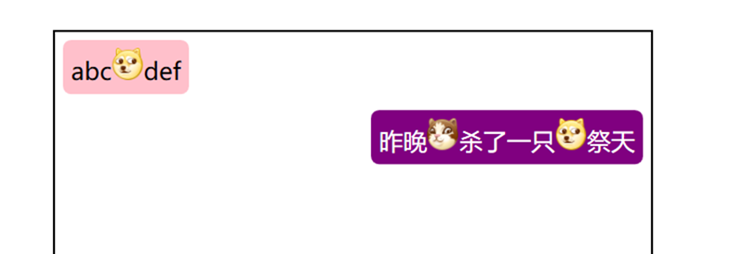
效果:
自我感觉良好,于是乎博主就提交代码,发了个版本到测试环境了。
但是,第二天,测试却给博主提了个 bug。消息无法选择、复制。

在 UWP 里,TextBlock 控件是有 IsTextSelectionEnabled 属性的,然而 WPF 并没有。这下头大了,于是博主去查了一下 StackOverflow,大佬们回答都是说用一个 IsReadOnly 为 True 的 TextBox 来实现。因为我这里包含了表情,所以用 RichTextBox 来实现吧。不管行不行,先试试再说。
在原来的代码上修改一下,反正表情解析一样的,但这里博主为了方便写 blog,就新开一个控件好了。
C#
[TemplatePart(Name = RichTextBoxTemplateName, Type = typeof(RichTextBox))]

public class ChatMessageControlV2 : Control

{

    public static readonly DependencyProperty TextProperty =

        DependencyProperty.Register(nameof(Text), typeof(string), typeof(ChatMessageControlV2), new PropertyMetadata(default(string), OnTextChanged));

    private const string RichTextBoxTemplateName = "PART_RichTextBox";

    private static readonly Dictionary<string, string> Emotions = new Dictionary<string, string>

    {

        ["doge"] = "pack://application:,,,/WpfQQChat;component/Images/doge.png",

        ["喵喵"] = "pack://application:,,,/WpfQQChat;component/Images/喵喵.png"

    };

    private RichTextBox _richTextBox;

    static ChatMessageControlV2()

    {

        DefaultStyleKeyProperty.OverrideMetadata(typeof(ChatMessageControlV2), new FrameworkPropertyMetadata(typeof(ChatMessageControlV2)));

    }

    public string Text

    {

        get => (string)GetValue(TextProperty);

        set => SetValue(TextProperty, value);

    }

    public override void OnApplyTemplate()

    {

        _richTextBox = (RichTextBox)GetTemplateChild(RichTextBoxTemplateName);

        UpdateVisual();

    }

    private static void OnTextChanged(DependencyObject d, DependencyPropertyChangedEventArgs e)

    {

        var obj = (ChatMessageControlV2)d;

        obj.UpdateVisual();

    }

    private void UpdateVisual()

    {

        if (_richTextBox == null)

        {

            return;

        }

        _richTextBox.Document.Blocks.Clear();

        var paragraph = new Paragraph();

        var buffer = new StringBuilder();

        foreach (var c in Text)

        {

            switch (c)

            {

                case '[':

                    paragraph.Inlines.Add(buffer.ToString());

                    buffer.Clear();

                    buffer.Append(c);

                    break;

                case ']':

                    var current = buffer.ToString();

                    if (current.StartsWith("["))

                    {

                        var emotionName = current.Substring();

                        if (Emotions.ContainsKey(emotionName))

                        {

                            var image = new Image

                            {

                                Width = ,

                                Height = ,

                                Source = new BitmapImage(new Uri(Emotions[emotionName]))

                            };

                            paragraph.Inlines.Add(new InlineUIContainer(image));

                            buffer.Clear();

                            continue;

                        }

                    }

                    buffer.Append(c);

                    paragraph.Inlines.Add(buffer.ToString());

                    buffer.Clear();

                    break;

                default:

                    buffer.Append(c);

                    break;

            }

        }

        paragraph.Inlines.Add(buffer.ToString());

        _richTextBox.Document.Blocks.Add(paragraph);

    }

}
XAML
<Style TargetType="local:ChatMessageControlV2">

    <Setter Property="Foreground"

            Value="Black" />

    <Setter Property="Template">

        <Setter.Value>

            <ControlTemplate TargetType="local:ChatMessageControlV2">

                <RichTextBox x:Name="PART_RichTextBox"

                             MinHeight="0"

                             Background="Transparent"

                             BorderBrush="Transparent"

                             BorderThickness="0"

                             Foreground="{TemplateBinding Foreground}"

                             IsReadOnly="True">

                    <RichTextBox.Resources>

                        <ResourceDictionary>

                            <Style TargetType="Paragraph">

                                <Setter Property="Margin"

                                        Value="0" />

                                <Setter Property="Padding"

                                        Value="0" />

                                <Setter Property="TextIndent"

                                        Value="0" />

                            </Style>

                        </ResourceDictionary>

                    </RichTextBox.Resources>

                    <RichTextBox.ContextMenu>

                        <ContextMenu>

                            <MenuItem Command="ApplicationCommands.Copy"

                                      Header="复制" />

                        </ContextMenu>

                    </RichTextBox.ContextMenu>

                </RichTextBox>

            </ControlTemplate>

        </Setter.Value>

    </Setter>

</Style>
XAML 稍微复杂一点,因为我们需要让一个文本框高仿成一个文字显示控件。
感觉应该还行,然后跑起来之后
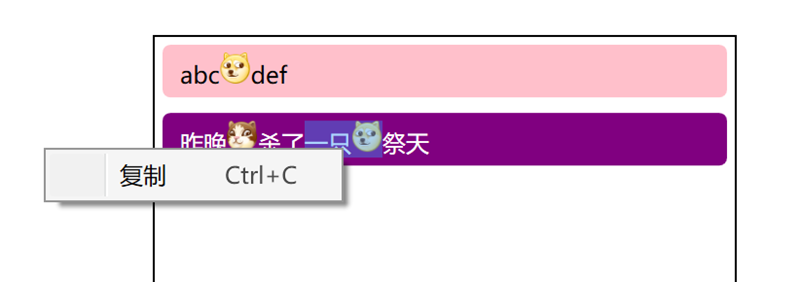
复制是能复制了,然而我的布局呢?

因为一时间也没想到解决办法,于是博主只能回滚代码,把 bug 先晾在那里了。
经过了几天上班带薪拉屎之后,有一天博主在厕所间玩着宝石连连消的时候突然灵光一闪。对于 TextBlock 来说,只是不能选择而已,布局是没问题的。对于 RichTextBox 来说,布局不正确是由于 WPF 在测量与布局的过程中给它分配了无限大的宽度。那么,能不能将两者结合起来,TextBlock 做布局,RichTextBox 做功能呢?想到这里,博主关掉了宝石连连消,擦上屁股,开始干活。
C#
[TemplatePart(Name = TextBlockTemplateName, Type = typeof(TextBlock))]

[TemplatePart(Name = RichTextBoxTemplateName, Type = typeof(RichTextBox))]

public class ChatMessageControlV3 : Control

{

    public static readonly DependencyProperty TextProperty =

        DependencyProperty.Register(nameof(Text), typeof(string), typeof(ChatMessageControlV3), new PropertyMetadata(default(string), OnTextChanged));

    private const string RichTextBoxTemplateName = "PART_RichTextBox";

    private const string TextBlockTemplateName = "PART_TextBlock";

    private static readonly Dictionary<string, string> Emotions = new Dictionary<string, string>

    {

        ["doge"] = "pack://application:,,,/WpfQQChat;component/Images/doge.png",

        ["喵喵"] = "pack://application:,,,/WpfQQChat;component/Images/喵喵.png"

    };

    private RichTextBox _richTextBox;

    private TextBlock _textBlock;

    static ChatMessageControlV3()

    {

        DefaultStyleKeyProperty.OverrideMetadata(typeof(ChatMessageControlV3), new FrameworkPropertyMetadata(typeof(ChatMessageControlV3)));

    }

    public string Text

    {

        get => (string)GetValue(TextProperty);

        set => SetValue(TextProperty, value);

    }

    public override void OnApplyTemplate()

    {

        _textBlock = (TextBlock)GetTemplateChild(TextBlockTemplateName);

        _richTextBox = (RichTextBox)GetTemplateChild(RichTextBoxTemplateName);

        UpdateVisual();

    }

    private static void OnTextChanged(DependencyObject d, DependencyPropertyChangedEventArgs e)

    {

        var obj = (ChatMessageControlV3)d;

        obj.UpdateVisual();

    }

    private void UpdateVisual()

    {

        if (_textBlock == null || _richTextBox == null)

        {

            return;

        }

        _textBlock.Inlines.Clear();

        _richTextBox.Document.Blocks.Clear();

        var paragraph = new Paragraph();

        var buffer = new StringBuilder();

        foreach (var c in Text)

        {

            switch (c)

            {

                case '[':

                    _textBlock.Inlines.Add(buffer.ToString());

                    paragraph.Inlines.Add(buffer.ToString());

                    buffer.Clear();

                    buffer.Append(c);

                    break;

                case ']':

                    var current = buffer.ToString();

                    if (current.StartsWith("["))

                    {

                        var emotionName = current.Substring();

                        if (Emotions.ContainsKey(emotionName))

                        {

                            {

                                var image = new Image

                                {

                                    Width = ,

                                    Height =

                                };// 占位图像不需要加载 Source 了

                                _textBlock.Inlines.Add(new InlineUIContainer(image));

                            }

                            {

                                var image = new Image

                                {

                                    Width = ,

                                    Height = ,

                                    Source = new BitmapImage(new Uri(Emotions[emotionName]))

                                };

                                paragraph.Inlines.Add(new InlineUIContainer(image));

                            }

                            buffer.Clear();

                            continue;

                        }

                    }

                    buffer.Append(c);

                    _textBlock.Inlines.Add(buffer.ToString());

                    paragraph.Inlines.Add(buffer.ToString());

                    buffer.Clear();

                    break;

                default:

                    buffer.Append(c);

                    break;

            }

        }

        _textBlock.Inlines.Add(buffer.ToString());

        paragraph.Inlines.Add(buffer.ToString());

        _richTextBox.Document.Blocks.Add(paragraph);

    }

}
C# 代码相当于把两者结合起来而已。
XAML
<Style TargetType="local:ChatMessageControlV3">

    <Setter Property="Foreground"

            Value="Black" />

    <Setter Property="Template">

        <Setter.Value>

            <ControlTemplate TargetType="local:ChatMessageControlV3">

                <Grid>

                    <TextBlock x:Name="PART_TextBlock"

                               Padding="6,0,6,0"

                               IsHitTestVisible="False"

                               Opacity="0"

                               TextWrapping="Wrap" />

                    <RichTextBox x:Name="PART_RichTextBox"

                                 Width="{Binding ElementName=PART_TextBlock, Path=ActualWidth}"

                                 MinHeight="0"

                                 Background="Transparent"

                                 BorderBrush="Transparent"

                                 BorderThickness="0"

                                 Foreground="{TemplateBinding Foreground}"

                                 IsReadOnly="True">

                        <RichTextBox.Resources>

                            <ResourceDictionary>

                                <Style TargetType="Paragraph">

                                    <Setter Property="Margin"

                                            Value="0" />

                                    <Setter Property="Padding"

                                            Value="0" />

                                    <Setter Property="TextIndent"

                                            Value="0" />

                                </Style>

                            </ResourceDictionary>

                        </RichTextBox.Resources>

                        <RichTextBox.ContextMenu>

                            <ContextMenu>

                                <MenuItem Command="ApplicationCommands.Copy"

                                          Header="复制" />

                            </ContextMenu>

                        </RichTextBox.ContextMenu>

                    </RichTextBox>

                </Grid>

            </ControlTemplate>

        </Setter.Value>

    </Setter>

</Style>
XAML 大体也是将两者结合起来,但是把 TextBlock 设置为隐藏(但占用布局),而 RichTextBox 则绑定 TextBlock 的宽度。
至于为啥 TextBlock 有一个左右边距为 6 的 Padding 嘛。在运行之后,博主发现,RichTextBox 的内容会离左右有一定的距离,但是没找到相关的属性能够设置,如果正在看这篇博文的你,知道相关的属性的话,可以在评论区回复一下,博主我将会万分感激。
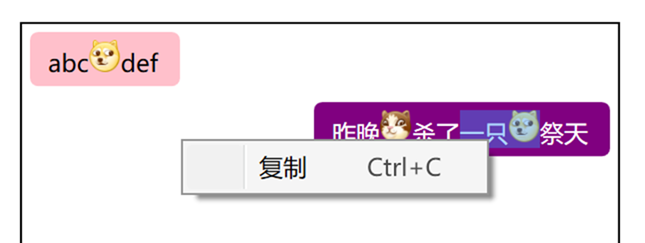
最后是我们的效果啦。
最后,因为现在 WPF 是开源(https://github.com/dotnet/wpf)的了,因此已经蛋疼不已的博主果断提了一个 issue(https://github.com/dotnet/wpf/issues/307),希望有遇到同样困难的小伙伴能在上面支持一下,让巨硬早日把 TextBlock 选择这功能加上。
【WPF】实现类似QQ聊天消息的界面的更多相关文章
- iOS开发学习-类似微信聊天消息中的电话号码点击保存到通讯录中的功能
类似微信聊天消息中的电话号码点击保存到通讯录中的功能,ABAddress的实现在iOS9中是不能正常使用的,点击完成后,手机会非常的卡,iOS9之后需要使用Contact新提供的方法来实现该功能.快捷 ...
- reactnative实现qq聊天消息气泡拖拽消失效果
前言(可跳过) 我在开发自己的APP时遇到了一个类似于qq聊天消息气泡拖拽消息的需求,因为在网上没有找到相关的组件,所以自己动手实现了一下 需求:对聊天消息气泡拖拽到一定长度松开时该气泡会消失(可自行 ...
- C#+ html 实现类似QQ聊天界面的气泡效果
/**定义两个人的头像*/ Myhead = "<img src=qrc:/chatdemo/Msg/Head.png width='30px'heigth='30px'>&qu ...
- 类似QQ在线离线好友界面
把头像设置成圆形的代码如下: package com.example.lesson6_11_id19; import android.content.Context; import android.c ...
- Android—简单的仿QQ聊天界面
最近仿照QQ聊天做了一个类似界面,先看下界面组成(画面不太美凑合凑合呗,,,,):
- WPF仿QQ聊天框表情文字混排实现
原文:WPF仿QQ聊天框表情文字混排实现 二话不说.先上图 图中分别有文件.文本+表情.纯文本的展示,对于同一个list不同的展示形式,很明显,应该用多个DataTemplate,那么也就需要Data ...
- 搭建QQ聊天通信的程序:(1)基于 networkcomms.net 创建一个WPF聊天客户端服务器应用程序 (1)
搭建QQ聊天通信的程序:(1)基于 networkcomms.net 创建一个WPF聊天客户端服务器应用程序 原文地址(英文):http://www.networkcomms.net/creating ...
- 即时通信系统中如何实现:聊天消息加密,让通信更安全? 【低调赠送:QQ高仿版GG 4.5 最新源码】
加密重要的通信消息,是一个常见的需求.在一些政府部门的即时通信软件中(如税务系统),对聊天消息进行加密是非常重要的一个功能,因为谈话中可能会涉及到机密的数据.我在最新的GG 4.5中,增加了对聊天消息 ...
- Objective-c——UI基础开发第八天(QQ聊天界面)
一.知识点: QQ聊天界面 双模型的使用(dataModel和frameModel) UITextField的使用 通知的使用 拉伸图片的两种方法(slicing/image对象的resizeable ...
随机推荐
- hive mysql元数据,报错 Specified key was too long; max key length is 767 bytes
Specified key was too long; max key length is 767 bytes 此错误为hive 元数据mysql 字符集编码问题 如 show create tabl ...
- 为什么SQL用UPDATE语句更新时更新行数会多3行有触发器有触发器有触发器有触发器有触发器有触发器
update明显更新就一行,但是结果显示更新多行. 原因是有触发器有触发器有触发器有触发器有触发器有触发器有触发器有触发器有触发器
- JRebel 代理激活
1.生成GUID https://www.guidgen.com/ 例:04cfff79-8f45-481c-a858-a5b9590422e7 2.License Server 例: http: ...
- 学习node.js 第2篇 介绍node.js 安装
Node.js - 环境安装配置 如果愿意安装设置Node.js环境,需要计算机上提供以下两个软件: 一.文本编辑器 二.Node.js二进制安装包 文本编辑器 这将用来编写程序代码. 一些编辑器包括 ...
- 2017-11-04 Sa Oct 消参
2017-11-04 Sa $ P(-3, 0) $ 在圆C $ (x-3)^2 + y^2 = 8^2 $ 内,动圆M与圆相切且过P点,求M点轨迹. 设切点 $ A(a, b) $,圆心 \(M(x ...
- (转)Detect it Easy(壳侦测工具)使用方法介绍
http://www.ucbug.com/jiaocheng/129805.html Detect it Easy是一个多功能的PE-DIY工具,主要用于壳侦测.功能正日益完善,是不可多得的破解利器! ...
- VS2010 Chart控件(一)Chart控件在ASP.NET网站中的应用示例详解(C#语言)
步骤如下: 1. Chart控件(一)Chart控件在ASP.NET网站中的应用示例详解(C#语言)" title="VS2010 Chart控件(一)Chart控件在ASP.NE ...
- JS 高级总结
一.查找HTML元素 通常,通过 JavaScript,您需要操作 HTML 元素. 1.通过 id 找到 HTML 元素 2.通过标签名找到 HTML 元素 3.通过类名找到 HTML 元素 提示: ...
- OpenJudge NOI 4976 硬币
http://noi.openjudge.cn/ch0207/4976/ 描述 宇航员Bob有一天来到火星上,他有收集硬币的习惯.于是他将火星上所有面值的硬币都收集起来了,一共有n种,每种只有一个:面 ...
- 大数据学习笔记1-大数据处理架构Hadoop
Hadoop:一个开源的.可运行于大规模集群上的分布式计算平台.实现了MapReduce计算模型和分布式文件系统HDFS等功能,方便用户轻松编写分布式并行程序. Hadoop生态系统: HDFS:Ha ...