
Java Web系列:Spring Boot 基础 (转)
@OneToOne or @ManyToOne
Caused by: org.hibernate.AnnotationException: @OneToOne or @ManyToOne on com.lpp.domain.User.roles references an unknown entity: java.util.List

    at org.hibernate.cfg.ToOneFkSecondPass.doSecondPass(ToOneFkSecondPass.java:97) ~[hibernate-core-5.0.11.Final.jar:5.0.11.Final]

    at org.hibernate.boot.internal.InFlightMetadataCollectorImpl.processEndOfQueue(InFlightMetadataCollectorImpl.java:1786) ~[hibernate-core-5.0.11.Final.jar:5.0.11.Final]

    at org.hibernate.boot.internal.InFlightMetadataCollectorImpl.processFkSecondPassesInOrder(InFlightMetadataCollectorImpl.java:1730) ~[hibernate-core-5.0.11.Final.jar:5.0.11.Final]

    at org.hibernate.boot.internal.InFlightMetadataCollectorImpl.processSecondPasses(InFlightMetadataCollectorImpl.java:1617) ~[hibernate-core-5.0.11.Final.jar:5.0.11.Final]

    at org.hibernate.boot.model.process.spi.MetadataBuildingProcess.complete(MetadataBuildingProcess.java:278) ~[hibernate-core-5.0.11.Final.jar:5.0.11.Final]

    at org.hibernate.jpa.boot.internal.EntityManagerFactoryBuilderImpl.metadata(EntityManagerFactoryBuilderImpl.java:847) ~[hibernate-entitymanager-5.0.11.Final.jar:5.0.11.Final]

    at org.hibernate.jpa.boot.internal.EntityManagerFactoryBuilderImpl.build(EntityManagerFactoryBuilderImpl.java:874) ~[hibernate-entitymanager-5.0.11.Final.jar:5.0.11.Final]

    at org.springframework.orm.jpa.vendor.SpringHibernateJpaPersistenceProvider.createContainerEntityManagerFactory(SpringHibernateJpaPersistenceProvider.java:60) ~[spring-orm-4.3.6.RELEASE.jar:4.3.6.RELEASE]

    at org.springframework.orm.jpa.LocalContainerEntityManagerFactoryBean.createNativeEntityManagerFactory(LocalContainerEntityManagerFactoryBean.java:353) ~[spring-orm-4.3.6.RELEASE.jar:4.3.6.RELEASE]

    at org.springframework.orm.jpa.AbstractEntityManagerFactoryBean.buildNativeEntityManagerFactory(AbstractEntityManagerFactoryBean.java:373) ~[spring-orm-4.3.6.RELEASE.jar:4.3.6.RELEASE]

    at org.springframework.orm.jpa.AbstractEntityManagerFactoryBean.afterPropertiesSet(AbstractEntityManagerFactoryBean.java:362) ~[spring-orm-4.3.6.RELEASE.jar:4.3.6.RELEASE]

    at org.springframework.beans.factory.support.AbstractAutowireCapableBeanFactory.invokeInitMethods(AbstractAutowireCapableBeanFactory.java:1687) ~[spring-beans-4.3.6.RELEASE.jar:4.3.6.RELEASE]

    at org.springframework.beans.factory.support.AbstractAutowireCapableBeanFactory.initializeBean(AbstractAutowireCapableBeanFactory.java:1624) ~[spring-beans-4.3.6.RELEASE.jar:4.3.6.RELEASE]

    ... 44 common frames omitted
解决办法:
将:
@Entity

public class User {

    @Id

    @GeneratedValue

    private Long id;

    private String name;

    @DateTimeFormat(pattern = "yyyy-MM-dd HH:mm:ss")//保证存取时有正确的格式

    private Date createDate;

    @ManyToOne

    @JoinColumn(name = "department_id")//user表中使用department_id字段来表示部门id

    @JsonBackReference//防止关系对象的递归访问

    private Department department;

    @ManyToOne(cascade = {}, fetch = FetchType.EAGER)

    @JoinTable(name = "user_role",

            joinColumns = {@JoinColumn(name = "user_id")},

            inverseJoinColumns = {@JoinColumn(name = "role_id")})

    //中间表user_role来存在各自的id,以表示它们的对应关系

    private List<Role> roles;
改为:
@Entity

public class User {

    @Id

    @GeneratedValue

    private Long id;

    private String name;

    @DateTimeFormat(pattern = "yyyy-MM-dd HH:mm:ss")//保证存取时有正确的格式

    private Date createDate;

    @ManyToOne

    @JoinColumn(name = "department_id")//user表中使用department_id字段来表示部门id

    @JsonBackReference//防止关系对象的递归访问

    private Department department;

    @ManyToMany(fetch = FetchType.EAGER)

    @JoinTable(name = "user_role",

            joinColumns = {@JoinColumn(name = "user_id", referencedColumnName = "ID")},

            inverseJoinColumns = {@JoinColumn(name = "role_id", referencedColumnName = "ID")})

    //中间表user_role来存在各自的id,以表示它们的对应关系

    private List<Role> roles;
Spring Boot 项目(参考1) 提供了一个类似ASP.NET MVC的默认模板一样的标准样板,直接集成了一系列的组件并使用了默认的配置。使用Spring Boot 不会降低学习成本,甚至增加了学习成本,但显著降低了使用成本并提高了开发效率。如果没有Spring基础不建议直接上手。
1.基础项目
这里只关注基于Maven的项目构建,使用Spring Boot CLI命令行工具和Gradle构建方式请参考官网。
(1)创建项目:
创建类型为quickstart的Maven项目,删除默认生成的.java文件保持默认的Maven目录即可。
(2)修改/pom.xml
<?xml version="1.0" encoding="UTF-8"?>

<project xmlns="http://maven.apache.org/POM/4.0.0" xmlns:xsi="http://www.w3.org/2001/XMLSchema-instance"

    xsi:schemaLocation="http://maven.apache.org/POM/4.0.0 http://maven.apache.org/xsd/maven-4.0.0.xsd">

    <modelVersion>4.0.0</modelVersion>

    <groupId>com.example</groupId>

    <artifactId>myproject</artifactId>

    <version>0.0.1-SNAPSHOT</version>

    <properties>

        <java.version>1.8</java.version>

    </properties>

    <parent>

        <groupId>org.springframework.boot</groupId>

        <artifactId>spring-boot-starter-parent</artifactId>

        <version>1.3.1.RELEASE</version>

    </parent>

    <dependencies>

        <dependency>

            <groupId>org.springframework.boot</groupId>

            <artifactId>spring-boot-starter-web</artifactId>

        </dependency>

    </dependencies>

</project>
(3)添加/src/main/sample/controller/HomeController.java文件:
package simple.controller;

import org.springframework.web.bind.annotation.*;

@RestController

public class HomeController {

    @RequestMapping("/")

    public String index() {

        return "Hello World!";

    }

}
(4)添加/src/main/sample/Application.java文件:
package simple;

import org.springframework.boot.*;

import org.springframework.boot.autoconfigure.*;

import simple.controller.*;

@EnableAutoConfiguration

public class Application {

    public static void main(String[] args) throws Exception {

        SpringApplication.run(new Object[] { Application.class, HomeController.class }, args);

    }

}
在浏览器中输入http://localhost:8080/,即可直接看到"Hello World"运行结果。
2. 添加数据访问支持
(1)修改pom,添加spring-boot-starter-data-jpa和h2依赖:
<?xml version="1.0" encoding="UTF-8"?>

<project xmlns="http://maven.apache.org/POM/4.0.0" xmlns:xsi="http://www.w3.org/2001/XMLSchema-instance"

    xsi:schemaLocation="http://maven.apache.org/POM/4.0.0 http://maven.apache.org/xsd/maven-4.0.0.xsd">

    <modelVersion>4.0.0</modelVersion>

    <groupId>com.example</groupId>

    <artifactId>myproject</artifactId>

    <version>0.0.1-SNAPSHOT</version>

    <properties>

        <java.version>1.8</java.version>

    </properties>

    <parent>

        <groupId>org.springframework.boot</groupId>

        <artifactId>spring-boot-starter-parent</artifactId>

        <version>1.3.1.RELEASE</version>

    </parent>

    <dependencies>

        <dependency>

            <groupId>org.springframework.boot</groupId>

            <artifactId>spring-boot-starter-web</artifactId>

        </dependency>

        <dependency>

            <groupId>org.springframework.boot</groupId>

            <artifactId>spring-boot-starter-data-jpa</artifactId>

        </dependency>

        <dependency>

            <groupId>com.h2database</groupId>

            <artifactId>h2</artifactId>

            <scope>runtime</scope>

        </dependency>

    </dependencies>

</project>
如果需要在控制台查看生成SQL语句,可以添加/src/main/resources/application.properties
1 spring.h2.console.enabled=true

2 logging.level.org.hibernate.SQL=debug
(2)添加实体
添加User、Role、Category和Post实体。
User:
package simple.domain;

import java.util.*;

import javax.persistence.*;

@Entity

public class User {

    @Id

    @GeneratedValue

    private Long id;

    private String userName;

    private String password;

    private String Email;

    @javax.persistence.Version

    private Long Version;

    @ManyToMany(cascade = CascadeType.ALL)

    private List<Role> roles = new ArrayList<Role>();

    public Long getId() {

        return id;

    }

    public void setId(Long id) {

        this.id = id;

    }

    public String getUserName() {

        return userName;

    }

    public void setUserName(String userName) {

        this.userName = userName;

    }

    public String getPassword() {

        return password;

    }

    public void setPassword(String password) {

        this.password = password;

    }

    public String getEmail() {

        return Email;

    }

    public void setEmail(String email) {

        Email = email;

    }

    public List<Role> getRoles() {

        return roles;

    }

    public void setRoles(List<Role> roles) {

        this.roles = roles;

    }

    public Long getVersion() {

        return Version;

    }

    public void setVersion(Long version) {

        Version = version;

    }

}
Role:
package simple.domain;

import java.util.*;

import javax.persistence.*;

@Entity

public class Role {

    @Id

    @GeneratedValue

    private Long id;

    private String roleName;

    @ManyToMany(cascade = CascadeType.ALL)

    private List<User> users = new ArrayList<User>();

    public Long getId() {

        return id;

    }

    public void setId(Long id) {

        this.id = id;

    }

    public String getRoleName() {

        return roleName;

    }

    public void setRoleName(String roleName) {

        this.roleName = roleName;

    }

    public List<User> getUsers() {

        return users;

    }

    public void setUsers(List<User> users) {

        this.users = users;

    }

}
Category:
package simple.domain;

import java.util.*;

import javax.persistence.*;

@Entity

public class Category {

    @Id

    @GeneratedValue

    private Long id;

    private String Name;

    @OneToMany

    private List<Post> posts = new ArrayList<Post>();

    public Long getId() {

        return id;

    }

    public void setId(Long id) {

        this.id = id;

    }

    public String getName() {

        return Name;

    }

    public void setName(String name) {

        Name = name;

    }

    public List<Post> getPosts() {

        return posts;

    }

    public void setPosts(List<Post> posts) {

        this.posts = posts;

    }

}
Post:
package simple.domain;

import java.util.*;

import javax.persistence.*;

@Entity

public class Post {

    @Id

    @GeneratedValue

    private Long id;

    private String Name;

    private String Html;

    private String Text;

    private Date CreateAt;

    @ManyToOne

    private Category category;

    public Long getId() {

        return id;

    }

    public void setId(Long id) {

        this.id = id;

    }

    public String getName() {

        return Name;

    }

    public void setName(String name) {

        Name = name;

    }

    public String getHtml() {

        return Html;

    }

    public void setHtml(String html) {

        Html = html;

    }

    public String getText() {

        return Text;

    }

    public void setText(String text) {

        Text = text;

    }

    public Date getCreateAt() {

        return CreateAt;

    }

    public void setCreateAt(Date createAt) {

        CreateAt = createAt;

    }

    public Category getCategory() {

        return category;

    }

    public void setCategory(Category category) {

        this.category = category;

    }

}
(3)添加资源库
添加UserRepository、RoleRepository、CategoryRepository和PostRepository接口,无需实现。
UserRepository:
package simple.repository;

import org.springframework.data.repository.*;

import simple.domain.*;

public interface UserRepository extends CrudRepository<User, Long> {

}
RoleRepository
package simple.repository;

import org.springframework.data.repository.*;

import simple.domain.*;

public interface RoleRepository extends CrudRepository<Role, Long> {

}
CategoryRepository
package simple.repository;

import org.springframework.data.repository.*;

import simple.domain.*;

public interface CategoryRepository extends CrudRepository<Category, Long> {

}
PostRepository
package simple.repository;

import org.springframework.data.repository.*;

import simple.domain.*;

public interface PostRepository extends CrudRepository<User, Long> {

}
(4)在控制器中注入资源库接口
package simple.controller;

import org.springframework.beans.factory.annotation.*;

import org.springframework.web.bind.annotation.*;

import simple.repository.*;

@RestController

public class HomeController {

    private UserRepository userRepository;

    private RoleRepository roleRepository;

    private CategoryRepository categoryRepository;

    private PostRepository postReppository;

    @Autowired

    public HomeController(UserRepository userRepository, RoleRepository roleRepository,

            CategoryRepository categoryRepository, PostRepository postReppository) {

        this.userRepository = userRepository;

        this.roleRepository = roleRepository;

        this.categoryRepository = categoryRepository;

        this.postReppository = postReppository;

    }

    @RequestMapping("/")

    public long index() {

        return userRepository.count();

    }

}
使用事务时在方法上应用注解@Transactional
3.添加验证和授权支持
(1)添加spring-boot-starter-security依赖
<?xml version="1.0" encoding="UTF-8"?>

<project xmlns="http://maven.apache.org/POM/4.0.0" xmlns:xsi="http://www.w3.org/2001/XMLSchema-instance"

    xsi:schemaLocation="http://maven.apache.org/POM/4.0.0 http://maven.apache.org/xsd/maven-4.0.0.xsd">

    <modelVersion>4.0.0</modelVersion>

    <groupId>com.example</groupId>

    <artifactId>myproject</artifactId>

    <version>0.0.1-SNAPSHOT</version>

    <properties>

        <java.version>1.8</java.version>

    </properties>

    <parent>

        <groupId>org.springframework.boot</groupId>

        <artifactId>spring-boot-starter-parent</artifactId>

        <version>1.3.1.RELEASE</version>

    </parent>

    <dependencies>

        <dependency>

            <groupId>org.springframework.boot</groupId>

            <artifactId>spring-boot-starter-web</artifactId>

        </dependency>

        <dependency>

            <groupId>org.springframework.boot</groupId>

            <artifactId>spring-boot-starter-data-jpa</artifactId>

        </dependency>

        <dependency>

            <groupId>com.h2database</groupId>

            <artifactId>h2</artifactId>

            <scope>runtime</scope>

        </dependency>

        <dependency>

            <groupId>org.springframework.boot</groupId>

            <artifactId>spring-boot-starter-security</artifactId>

        </dependency>

    </dependencies>

</project>
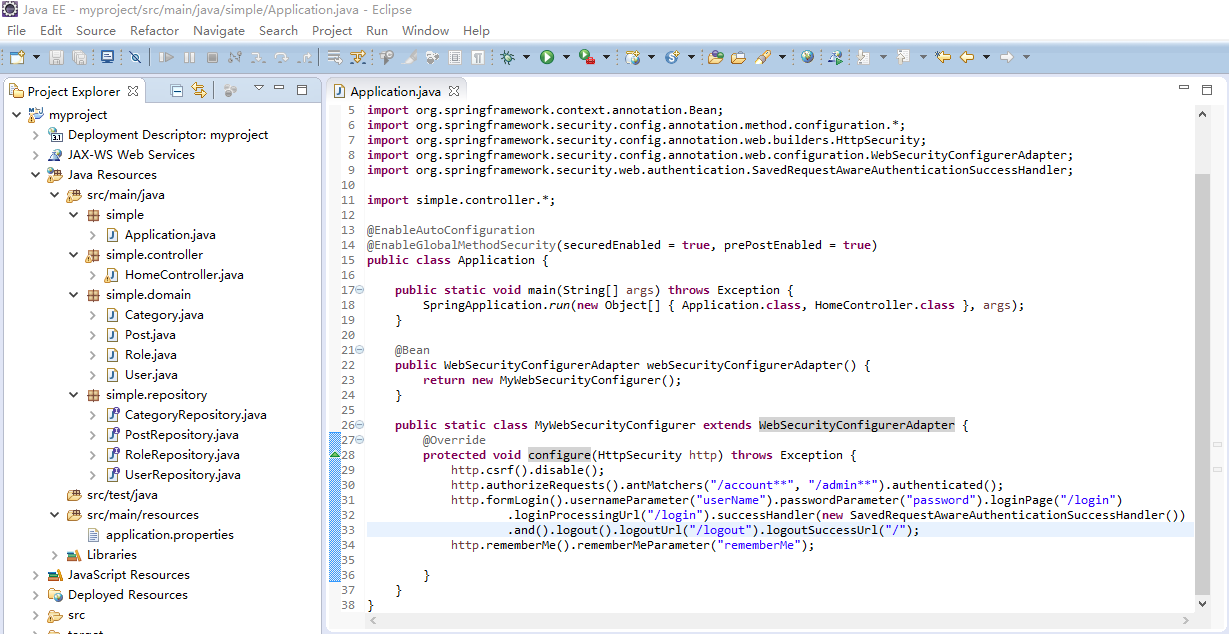
(2)修改Application.java
package simple;

import org.springframework.boot.*;

import org.springframework.boot.autoconfigure.*;

import org.springframework.context.annotation.Bean;

import org.springframework.security.config.annotation.method.configuration.*;

import org.springframework.security.config.annotation.web.builders.HttpSecurity;

import org.springframework.security.config.annotation.web.configuration.WebSecurityConfigurerAdapter;

import org.springframework.security.web.authentication.SavedRequestAwareAuthenticationSuccessHandler;

import simple.controller.*;

@EnableAutoConfiguration

@EnableGlobalMethodSecurity(securedEnabled = true, prePostEnabled = true)

public class Application {

    public static void main(String[] args) throws Exception {

        SpringApplication.run(new Object[] { Application.class, HomeController.class }, args);

    }

    @Bean

    public WebSecurityConfigurerAdapter webSecurityConfigurerAdapter() {

        return new MyWebSecurityConfigurer();

    }

    public static class MyWebSecurityConfigurer extends WebSecurityConfigurerAdapter {

        @Override

        protected void configure(HttpSecurity http) throws Exception {

            http.csrf().disable();

            http.authorizeRequests().antMatchers("/account**", "/admin**").authenticated();

            http.formLogin().usernameParameter("userName").passwordParameter("password").loginPage("/login")

                    .loginProcessingUrl("/login").successHandler(new SavedRequestAwareAuthenticationSuccessHandler())

                    .and().logout().logoutUrl("/logout").logoutSuccessUrl("/");

            http.rememberMe().rememberMeParameter("rememberMe");

        }

    }

}
访问http://localhost:8080/account会自动跳转到login登录页。Spring Security的具体使用前文已有所述。
参考:
(1)https://github.com/spring-projects/spring-boot
(2)http://projects.spring.io/spring-boot/
Java Web系列:Spring Boot 基础 (转)的更多相关文章
- 传统Java Web(非Spring Boot)、非Java语言项目接入Spring Cloud方案
技术架构在向spring Cloud转型时,一定会有一些年代较久远的项目,代码已变成天书,这时就希望能在不大规模重构的前提下将这些传统应用接入到Spring Cloud架构体系中作为一个服务以供其它项 ...
- 传统Java Web(非Spring Boot)、非Java语言项目接入Spring Cloud方案--temp
技术架构在向spring Cloud转型时,一定会有一些年代较久远的项目,代码已变成天书,这时就希望能在不大规模重构的前提下将这些传统应用接入到Spring Cloud架构体系中作为一个服务以供其它项 ...
- Java Web系列:JDBC 基础
ADO.NET在Java中的对应技术是JDBC,企业库DataAccessApplicationBlock模块在Java中的对应是spring-jdbc模块,EntityFramework在Java中 ...
- Java Web系列:Hibernate 基础
从以下5个方面学习hibernate ORM. (1)配置文件:hibernate.cfg.xml XML文件和hibernate.properties属性文件 (2)实体映射:1对多.多对多 (3) ...
- Java Web系列:Spring Security 基础
Spring Security虽然比JAAS进步很大,但还是先天不足,达不到ASP.NET中的认证和授权的方便快捷.这里演示登录.注销.记住我的常规功能,认证上自定义提供程序避免对数据库的依赖,授权上 ...
- Spring Boot 基础,理论,简介
Spring Boot 基础,理论,简介 1.SpringBoot自动装配 1.1 Spring装配方式 1.2 Spring @Enable 模块驱动 1.3 Spring 条件装配 2.自动装配正 ...
- Spring Boot 基础
Spring Boot 基础 Spring Boot 项目(参考1) 提供了一个类似ASP.NET MVC的默认模板一样的标准样板,直接集成了一系列的组件并使用了默认的配置.使用Spring Boot ...
- spring boot基础学习教程
Spring boot 标签(空格分隔): springboot HelloWorld 什么是spring boot Spring Boot是由Pivotal团队提供的全新框架,其设计目的是用来简化新 ...
- spring boot基础 入门
spring boot基础 spring boot 的简单搭建 spring boot 的基本用法 spring boot 基本用法 自动配置 技术集成 性能监控 源码解析 工程的构建 创建一个mav ...
- 第64节:Java中的Spring Boot 2.0简介笔记
Java中的Spring Boot 2.0简介笔记 spring boot简介 依赖java8的运行环境 多模块项目 打包和运行 spring boot是由spring framework构建的,sp ...
随机推荐
- Java整型数组的最大长度到底有多长?
Java整型数组的最大长度到底有多长? 今天上网查了一下,各种说法都有,这个问题似乎总困扰我们Java初学者,无奈,只好自己试了一下,以下是我的测试代码,如果有错误,还望不吝赐教! 使用eclipse ...
- Apache Phoenix JDBC 驱动和Spring JDBCTemplate的集成
介绍:Phoenix查询引擎会将SQL查询转换为一个或多个HBase scan,并编排运行以生成标准的JDBC结果集. 直接使用HBase API.协同处理器与自己定义过滤器.对于简单查询来说,其性能 ...
- linux sort,uniq,cut,wc命令详解 (转)
sort sort 命令对 File 参数指定的文件中的行排序,并将结果写到标准输出.如果 File 参数指定多个文件,那么 sort 命令将这些文件连接起来,并当作一个文件进行排序. sort语法 ...
- 深入理解计算机系统之旅(四)处理器(CPU)的体系结构
1.前言 处理器是很复杂的系统,它不是一蹴而就的,它是经过不断的升级.更新.设计之后的产物,而且如今还在保持着不断的更新. 处理器仅仅能运行一系列的指令,每条指令都仅仅是运行某个简单的操作,比方数字相 ...
- lua学习笔记11:lua中的小技巧
lua中的小技巧,即基础lua语言本身的特种,进行一个些简化的操作 一. 巧用or x = x or v 等价于: if not x then x = v end 假设x为nil或false,就给他赋 ...
- flex4 一些项目使用的技术
<?xml version="1.0" encoding="utf-8"?> <s:Application xmlns:fx="ht ...
- JSP中的include有哪些?有什么差别?
JSP中的include有哪些?有什么差别? 1.JSP中的include有哪些 (1)<%@include file="" %> (2)<jsp:include ...
- Duanxx的STM32学习: 启动模式,BOOT0和BOOT1具体解释
在画STM32的电路图的时候,关于STM32的启动方式纠结了一下,现有的參考设计都是在STM32的启动选择引脚BOOT0和BOOT1上使用了跳帽,用以人工选择STM32的启动方式,可是在实际应用中这样 ...
- 于Heroku平台部署maven webapp(java web)工程
眼下,需要Heroku上述部署java web工程,该项目必须使用maven管理 一:新maven webapp工程 编者pom.xml档,增加下面的配置为例, <project xmlns=& ...
- poj3928 Ping pong 树状数组
http://poj.org/problem?id=3928 Ping pong Time Limit: 1000MS Memory Limit: 65536K Total Submissions ...