
libgdx学习记录15——音乐Music播放
背景音乐是游戏中必备的元素,好的背景音乐能为游戏加分不少,使人更容易融入到游戏的氛围中去。
Music类中主要有以下函数:
play()播放
stop()停止
pause()暂停
setVolume()设置音量
setLooping()是否循环播放
代码示例:
 package com.fxb.newtest;

 import com.badlogic.gdx.ApplicationAdapter;

 import com.badlogic.gdx.Gdx;

 import com.badlogic.gdx.audio.Music;

 import com.badlogic.gdx.audio.Sound;

 import com.badlogic.gdx.graphics.Color;

 import com.badlogic.gdx.graphics.GL10;

 import com.badlogic.gdx.scenes.scene2d.Actor;

 import com.badlogic.gdx.scenes.scene2d.InputEvent;

 import com.badlogic.gdx.scenes.scene2d.InputListener;

 import com.badlogic.gdx.scenes.scene2d.Stage;

 import com.badlogic.gdx.scenes.scene2d.ui.Label;

 import com.badlogic.gdx.scenes.scene2d.ui.Skin;

 import com.badlogic.gdx.scenes.scene2d.ui.Slider;

 import com.badlogic.gdx.scenes.scene2d.ui.Table;

 import com.badlogic.gdx.scenes.scene2d.ui.TextButton;

 import com.badlogic.gdx.scenes.scene2d.utils.ChangeListener;

 public class Lib015_Music extends ApplicationAdapter{

     Music music;

     Sound sound;

     Skin skin;

     Stage stage;

     State state;

     enum State{ music_play, music_stop, music_pause };

     @Override

     public void create() {

         // TODO Auto-generated method stub

         super.create();

         music = Gdx.audio.newMusic( Gdx.files.internal( "audio/xjwq.mp3" ) );

         music.setLooping( true );

         music.setVolume( 0.5f );

         //music.play();

         stage = new Stage();

         skin = new Skin( Gdx.files.internal( "skin/uiskin.json" ) );

         final TextButton buttonStop = new TextButton( "Stop", skin );

         TextButton buttonPlay = new TextButton( "Play/Pause", skin );

         state = State.music_stop;

         buttonStop.setDisabled( true );

         buttonStop.addListener(new InputListener(){

             public boolean touchDown(InputEvent event, float x, float y,int pointer, int button) {

                 // TODO Auto-generated method stub

                 return true;

             }

             public void touchUp(InputEvent event, float x, float y,int pointer, int button) {

                 // TODO Auto-generated method stub

                 if( state != State.music_stop ){

                     music.stop();

                     state = State.music_stop;

                     buttonStop.setDisabled( true );

                     System.out.println( "stop" );

                 }

             }

         });

         buttonPlay.addListener(new InputListener(){

             public boolean touchDown(InputEvent event, float x, float y,int pointer, int button) {

                 // TODO Auto-generated method stub

                 return true;

             }

             public void touchUp(InputEvent event, float x, float y,int pointer, int button) {

                 // TODO Auto-generated method stub

                 if( state == State.music_play ){

                     music.pause();

                     state = State.music_pause;

                     System.out.println( "pause" );

                 }

                 else{

                     music.play();

                     state = State.music_play;

                     buttonStop.setDisabled( false );

                     System.out.println( "play" );

                 }

                 //(state==State.music_play)? music.pause(): music.play();

             }

         });

         final Slider slider = new Slider( 0, 100, 1, false, skin );

         slider.addListener(new ChangeListener(){

             public void changed(ChangeEvent event, Actor actor) {

                 // TODO Auto-generated method stub

                 music.setVolume( slider.getValue()/100 );

             }

         });

         slider.setValue( 50 );

         Table table = new Table();

         table.defaults().space(5);

         table.row();

         table.add( new Label( "Music Play", skin )  ).colspan(2).expandX();

         table.row();

         table.add( slider ).colspan(2).expandX();

         table.row();

         table.add( buttonPlay ).minWidth(100);

         table.add( buttonStop ).minWidth(100);

         table.pad( 10 );

         table.pack();

         table.setBackground( skin.newDrawable( "white", Color.PINK ) );

         stage.addActor( table );

         table.setPosition( stage.getWidth()/2-table.getWidth()/2, stage.getHeight()/2-table.getHeight()/2 );

         Gdx.input.setInputProcessor( stage );

     }

     @Override

     public void render() {

         // TODO Auto-generated method stub

         super.render();

         Gdx.gl.glClearColor( 1, 1, 1, 1 );

         Gdx.gl.glClear( GL10.GL_COLOR_BUFFER_BIT );

         stage.act();

         stage.draw();

     }

     @Override

     public void dispose() {

         // TODO Auto-generated method stub

         music.dispose();

         super.dispose();

     }

 }
运行效果:
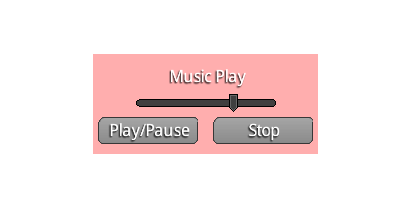
中间滑动条是调节音量的,左下是播放暂停键,右下是停止键。
另外Sound与Music类似。
libgdx学习记录15——音乐Music播放的更多相关文章
- libgdx学习记录18——Box2d物理引擎
libgdx封装了Box2D物理引擎,通过这个引擎能够模拟物理现实,使设计出的游戏更具有真实感. libgdx中,Box2d程序的大概过程: 1. 创建物理世界world,并设置重力加速度. 2. 创 ...
- libgdx学习记录2——文字显示BitmapFont
libgdx对中文支持不是太好,主要通过Hireo和ttf字库两种方式实现.本文简单介绍最基本的bitmapfont的用法. 代码如下: package com.fxb.newtest; import ...
- libgdx学习记录3——动画Animation
libgdx动画采用Animation实现,即通过帧动画实现. 代码如下: package com.fxb.newtest; import com.badlogic.gdx.ApplicationAd ...
- libgdx学习记录26——Polygon多边形碰撞检测
libgdx中Math封装了Polygon这个类,它是由多个定点进行描述实现的,在进行物体间的碰撞时,物体轮廓有时候是不规则的,这时候可以用一个多边形勾勒出其大概的轮廓,对其进行模拟. Polygon ...
- libgdx学习记录22——3d物体创建
libgdx是一个强大的游戏框架,不仅支持2d部分,同时还支持3d部分. libgdx的3d部分投影主要通过PerspectiveCamera实现. 物体的显示过程: 1. 创建远景相机,角度一般设为 ...
- libgdx学习记录20——多线程MultiThread资源处理
在libgdx中,一般的逻辑流程都在rende()函数中执行,这个函数是由opengl的渲染线程调用的,一般的图形显示和逻辑处理都在这个线程中. 一般情形下,在这个线程中处理就行了.但是当某些逻辑处理 ...
- libgdx学习记录19——图片动态打包PixmapPacker
libgdx中,opengl 1.x要求图片长宽必须为2的整次幂,一般有如下解决方法 1. 将opengl 1.x改为opengl 2.0.(libgdx 1.0版本后不支持1.x,当然不存在这个问题 ...
- libgdx学习记录17——照相机Camera
照相机在libgdx中的地位举足轻重,贯穿于整个游戏开发过程的始终.一般我们都通过Stage封装而间接使用Camera,同时我们也可以单独使用Camera以完成背景的移动.元素的放大.旋转等操作. C ...
- libgdx学习记录16——资源加载器AssetManager
AssetManager用于对游戏中的资源进行加载.当游戏中资源(图片.背景音乐等)较大时,加载时会需要较长时间,可能会阻塞渲染线程,使用AssetManager可以解决此类问题. 主要优点: 1. ...
随机推荐
- Fabric密码保存
参考:https://segmentfault.com/a/1190000000497630 多个IP分别使用不同的账号.密码 from fabric.api import * env.hosts = ...
- abp框架里使用Redis
首先引用 nuget Abp.RedisCache 在 appsettings.json加上Redis服务器配置 "RedisCache": { "ConnectionS ...
- Linux之因BASH造成的键盘错误和环境问题
对于Linux我们习惯使用/bin/bash.并且大多数人操作在Centos系统上,但是仍有不少人在ubuntu上使用,两个操作系统大同小异.都是使用了Linux内核.接下来就来讲讲我使用过程中两个系 ...
- from urllib.request import urlopen
from urllib.request impor urlopen (负责打开浏览url内的html 文本) re.compile(r'alex(?P<name>\d+)and' ...
- SDN2017 第三次实验作业
实验目的 在给定如上实验拓扑情况下,用vlan得到下列虚拟网段 h1--h4互通 h2--h5互通 h3--h6互通 其余主机间无法通信 实验步骤 1. 创建拓扑 #! /usr/bin/python ...
- mnist手写数字检测
# -*- coding: utf-8 -*- """ Created on Tue Apr 23 06:16:04 2019 @author: 92958 " ...
- 关于Javascript的des加密
参考文章:https://www.cnblogs.com/MSMXQ/p/4484348.html 需要先下载CryptoJS文件,然后引入其中的两个文件,可以在github中找到. 直接上代码 &l ...
- Linux命令一览
Linux系统中的命令参数有长短格式之分,长格式和长格式之间不能合并,长格式和短格式之间也不能合并,但短格式和短格式之间是可以合并的,合并后仅保留一个-(减号)即可. echo命令:用于在终端输出字符 ...
- lavarel模板引擎blade学习
blade 模板学习 特点 主要的两个优点是:模板继承和区块 继承页面布局 布局文件(layout.php) + 详情文件 (page.php) 的组合,即一般到具体的组合.在blade文件之中的体现 ...
- php大流量高并发解决方案
一.硬件 提升硬件,影响因素有: 带宽-硬盘读写速度-内存大小-cpu处理速度 二.软件 反向代理负载均衡 mysql : 1.优化你的sql和索引 2.加缓存,memcached,redis 3 ...