
【开发工具】Jenkins+Gitlab实现自动化部署
最全的Java后端知识体系 https://www.pdai.tech, 每天更新中...。

我在尝试在容器中安装Jenkins时,初衷是希望使用docker in docker 的模式来实现Jenkins slave容器按需创建。在实现的时候需要在Jenkins 中安装Kubernetes插件。
kubernetes的插件目前来看存在一个Bug,这个bug很小但是会导致我们无法设置和kubernetes mastert认证的机制。Bug是由于配置代理时候是用的IP地址,但是jenkins必须加入http协议,可惜的是加入http协议后更新的代理又不能使用了,进入这种死循环了。所以这种方案暂时搁置。
我在写这篇文章的时候,Jenkins X 还没有出来。。。目前Jenkins 是拥抱了K8S; 我认为CI CD环境容器化编排是大趋势。
一些实践
搭建过基于K8S的完整的平台,写了系列的文章总结。有些小的团队或者独立开发者,单独一个Jenkins和Gitlab就足够做编译自动化了。
So,这里我会写常用的实现自动化部署的方案之Jenkins+Gitlab这种模式,在小型的开发时候完全够用了,从来没有一致的最佳方案,只有适不适合咱们的团队方案。
Jenkins的安装 - 官网
RedHat Linux RPM packages for Jenkins - https://pkg.jenkins.io/redhat-stable/
To use this repository, run the following command:
sudo wget -O /etc/yum.repos.d/jenkins.repo https://pkg.jenkins.io/redhat-stable/jenkins.repo

sudo rpm --import https://pkg.jenkins.io/redhat-stable/jenkins.io.key
If you've previously imported the key from Jenkins, the "rpm --import" will fail because you already have a key. Please ignore that and move on.
You will need to explicitly install a Java runtime environment, because Oracle's Java RPMs are incorrect and fail to register as providing a java dependency. Thus, adding an explicit dependency requirement on Java would force installation of the OpenJDK JVM.
2.54 (2017-04) and newer: Java 8
1.612 (2015-05) and newer: Java 7
With that set up, the Jenkins package can be installed with:
yum install jenkins
See Wiki for more information, including how Jenkins is run and where the configuration is stored, etc.
Gitlab的安装
自己网上找吧,但是安装8.0+的版本,因为后面webhooks是有版本的要求的。
自动化部署配置
创建普通编译Job
Jenkins创建一个Job,并配置git信息
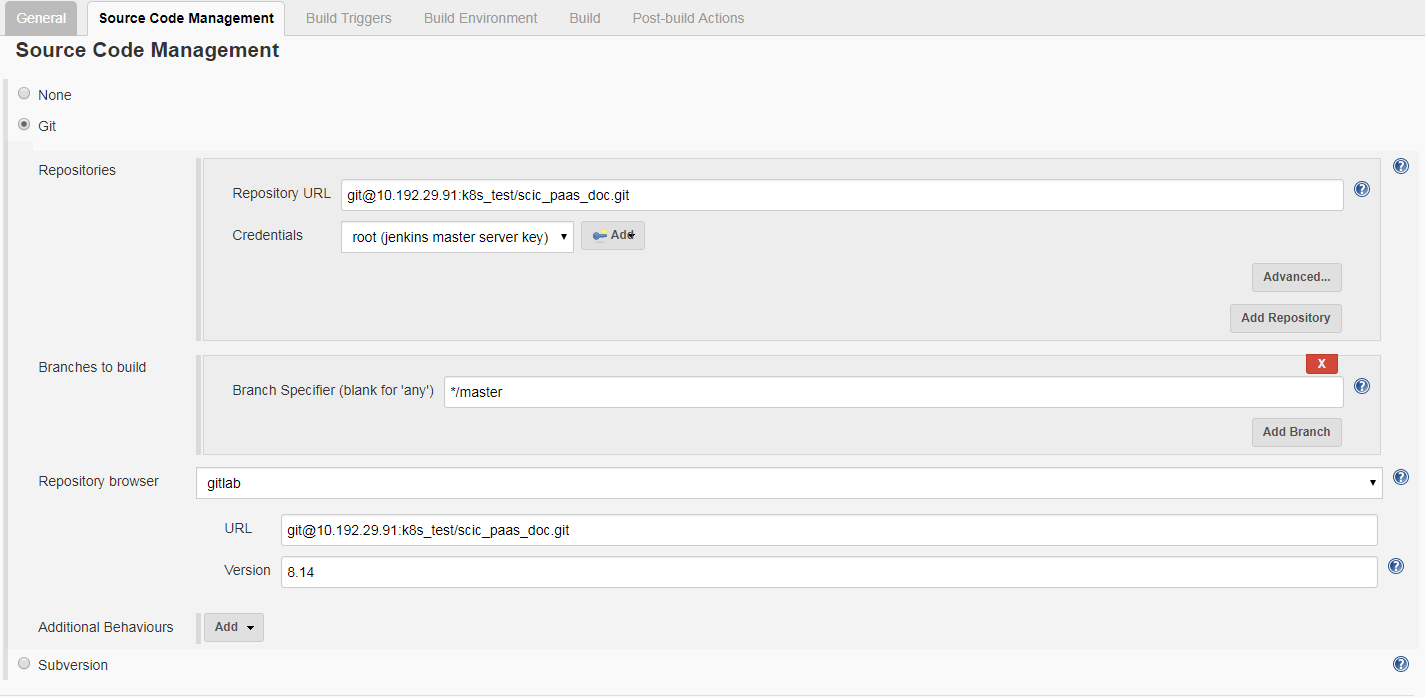
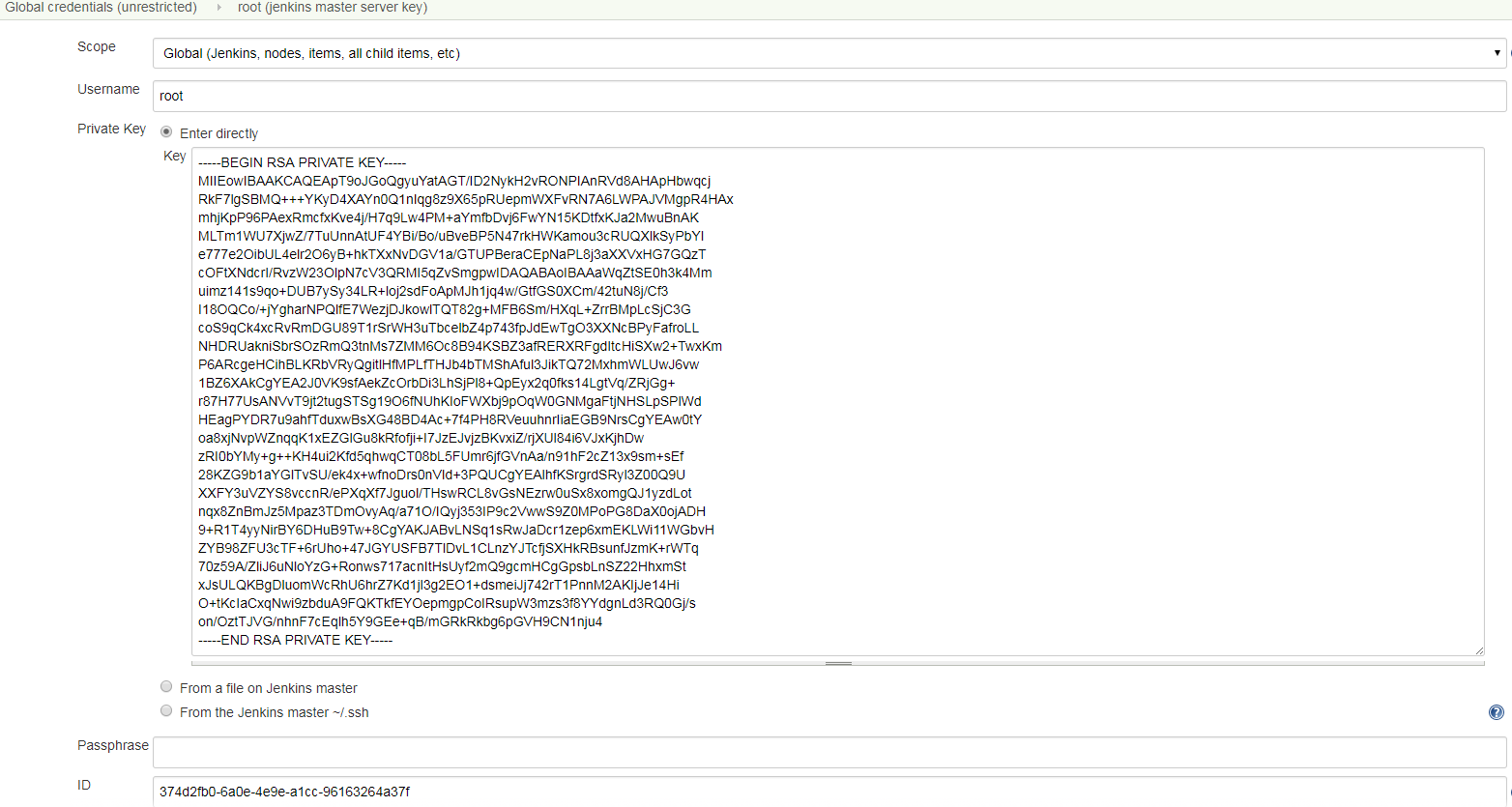
注意,这里连接Gitlab需要配置认证
同时,保证jenkins机器安装了Java, maven。
Maven 中需要配置成我们自己的仓库,配置settings.xm即可。
[root@jenkins ~]# find / -name settings.xml

/etc/maven/settings.xml

/var/lib/jenkins/.m2/settings.xml

/usr/share/maven/conf/settings.xml

[root@jenkins ~]# cat /usr/share/maven/conf/settings.xml
更改成公司artificatory配置
   <mirror>

      <id>mirrorId_2</id>

      <mirrorOf>*</mirrorOf>

      <name>Human Readable Name for this Mirror.</name>

      <url>http://maven.aliyun.com/nexus/content/groups/public/</url>

    </mirror>-->

   <mirror>

      <id>mirrorId_1</id>

      <mirrorOf>*</mirrorOf>

      <name>Human Readable Name for this Mirror.</name>

      <url>http://your_ip:your_port/artifactory/list/maven2/</url>

    </mirror>
加入CI Trigger功能
Jenkins Trigger配置
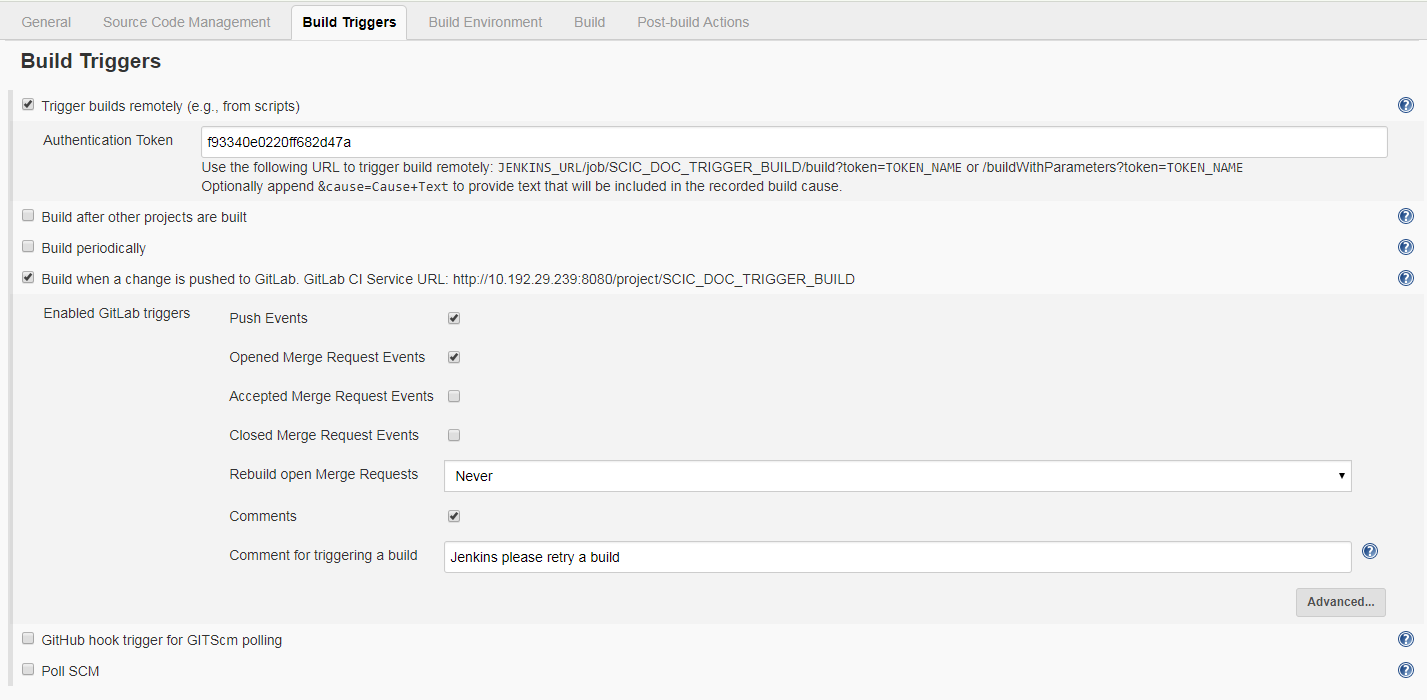
Gitlab配置webhook
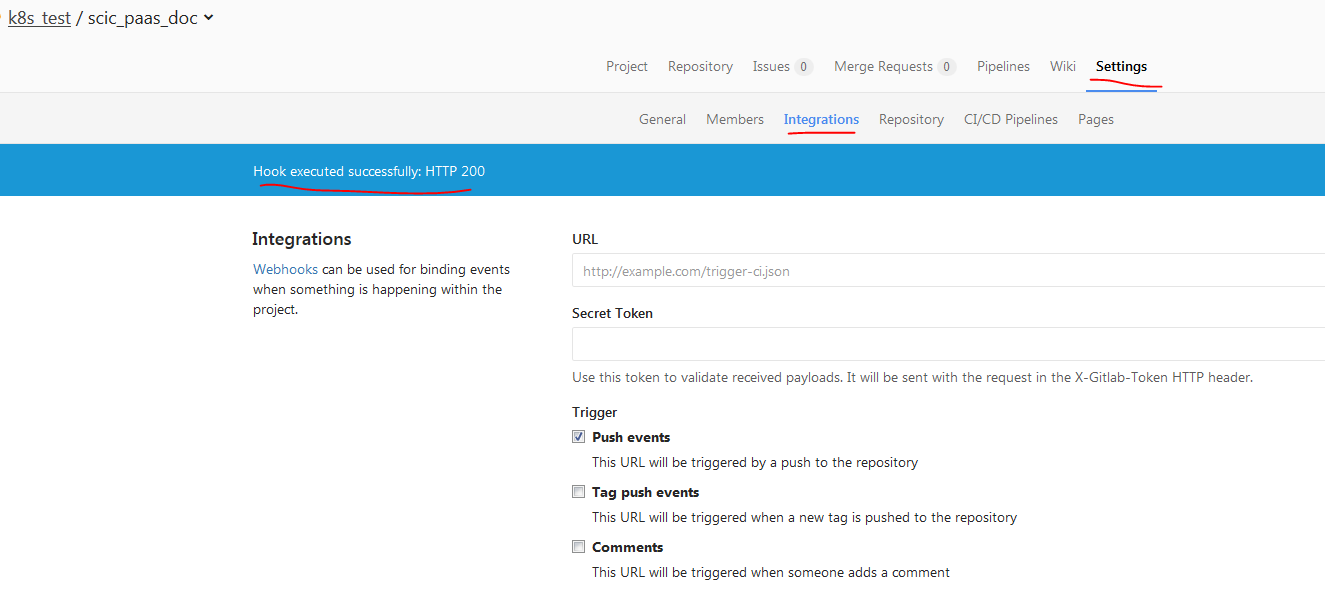
测试webhook:

加入CD功能
自动化运行脚本编写
[root@jenkins ~]# cat run.sh

#!/bin/bash

echo 'Checking scic document system status...'

SCIC_APP_PID=$(ps -ef | grep scic_paas_doc | grep -v grep | awk '{ print $2 }')

if [ -z "$SCIC_APP_PID" ]

  then

      echo Starting scic document...

      nohup java -jar scic_paas_doc-0.0.1-RELEASE.jar > doc.log 2>&1 &

      echo Started successfully.

else

    echo killing old service -  $SCIC_APP_PID ...

    kill $SCIC_APP_PID

    echo Restarting scic document...

    nohup java -jar scic_paas_doc-0.0.1-RELEASE.jar > doc.log 2>&1 &

    echo Restarted successfully.

fi
Global配置SSH Server
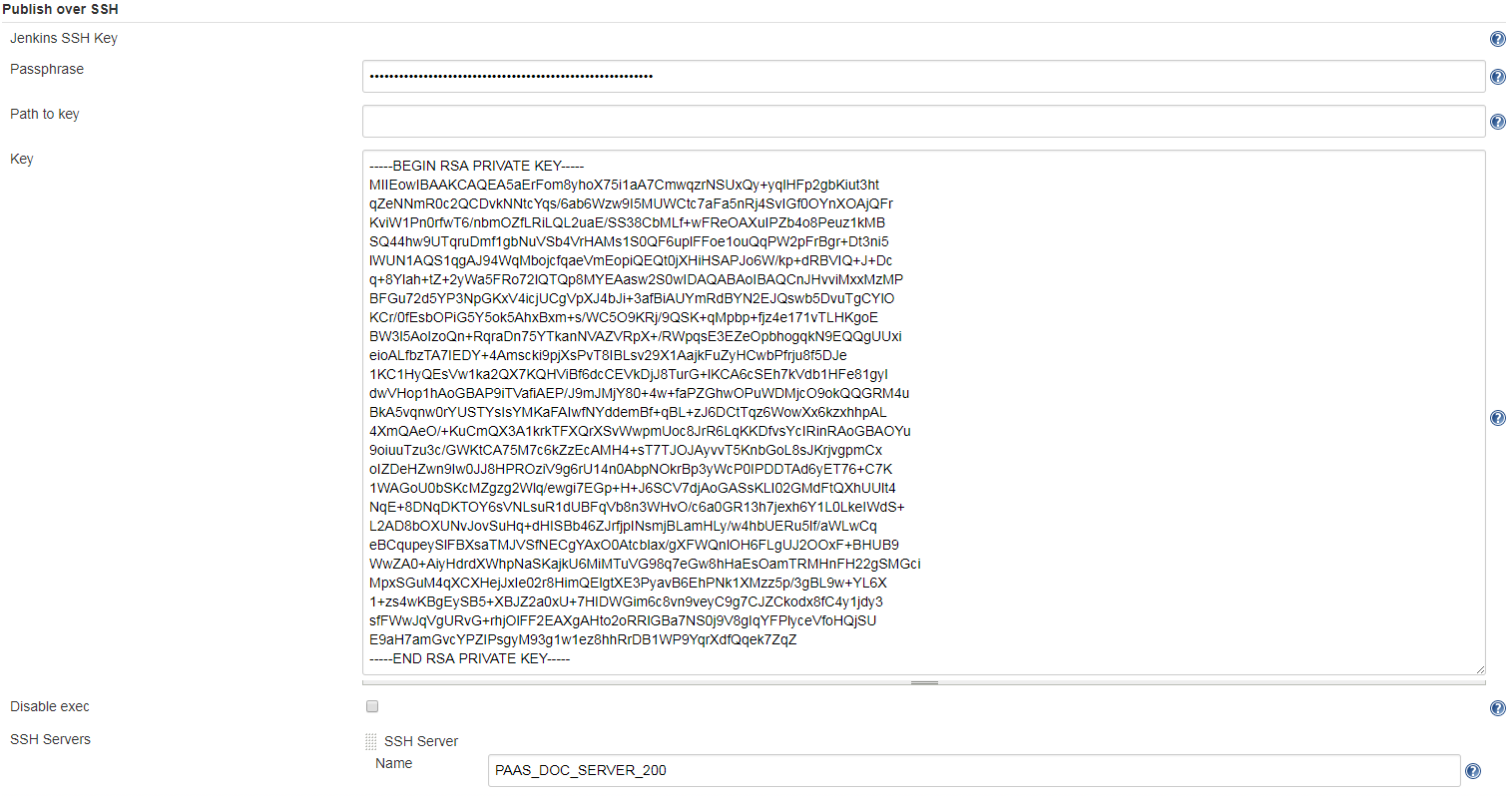
Build Job中配置PostBuild,Over SSH
通过SSH上传jar,并使用脚本运行
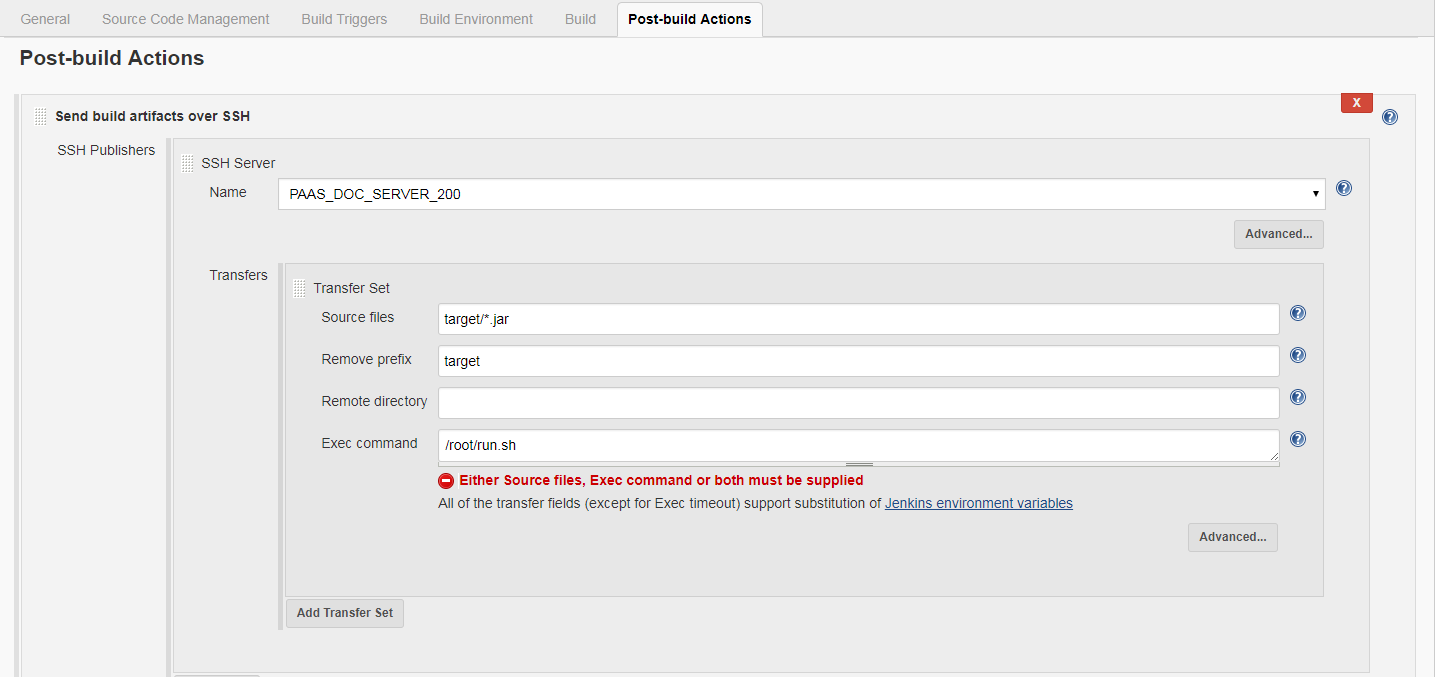
更新并提交代码
Z003MRZB@AAECNSHA02921L MINGW64 /d/git/k8s/scic_paas_doc (master)

$ git add .

warning: LF will be replaced by CRLF in src/main/resources/static/_sidebar.md.

The file will have its original line endings in your working directory.

Z003MRZB@AAECNSHA02921L MINGW64 /d/git/k8s/scic_paas_doc (master)

$ git commit

warning: LF will be replaced by CRLF in src/main/resources/static/_sidebar.md.

The file will have its original line endings in your working directory.

[master warning: LF will be replaced by CRLF in src/main/resources/static/_sidebar.md.

The file will have its original line endings in your working directory.

50c1cc4] test trigger

warning: LF will be replaced by CRLF in src/main/resources/static/_sidebar.md.

The file will have its original line endings in your working directory.

 1 file changed, 1 insertion(+), 1 deletion(-)

Z003MRZB@AAECNSHA02921L MINGW64 /d/git/k8s/scic_paas_doc (master)

$ git push

Counting objects: 7, done.

Delta compression using up to 4 threads.

Compressing objects: 100% (6/6), done.

Writing objects: 100% (7/7), 499 bytes | 0 bytes/s, done.

Total 7 (delta 5), reused 0 (delta 0)

To git@10.192.29.91:k8s_test/scic_paas_doc.git

   63b8ff4..50c1cc4  master -> master
触发编译和自动化部署
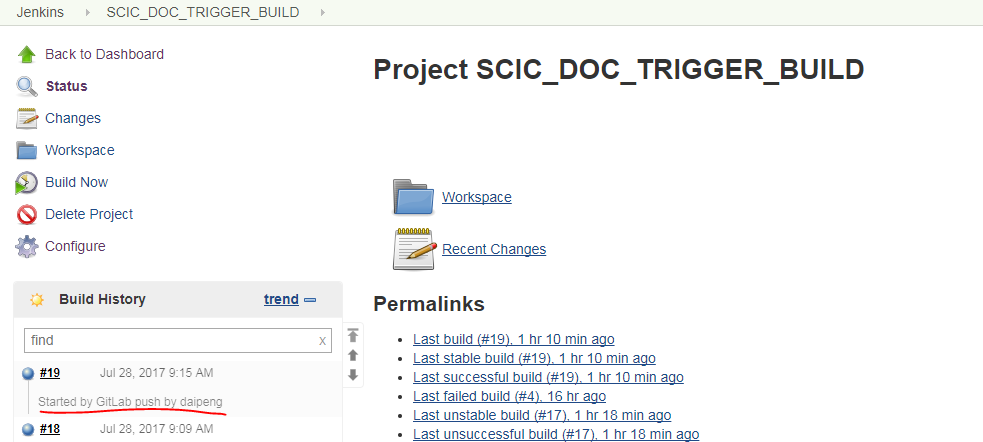
Tigger Build Logs
Started by GitLab push by daipeng

Building in workspace /var/lib/jenkins/workspace/SCIC_DOC_TRIGGER_BUILD

 > git rev-parse --is-inside-work-tree # timeout=10

Fetching changes from the remote Git repository

 > git config remote.origin.url git@10.192.29.91:k8s_test/scic_paas_doc.git # timeout=10

Fetching upstream changes from git@10.192.29.91:k8s_test/scic_paas_doc.git

 > git --version # timeout=10

using GIT_SSH to set credentials jenkins master server key

 > git fetch --tags --progress git@10.192.29.91:k8s_test/scic_paas_doc.git +refs/heads/*:refs/remotes/origin/*

 > git rev-parse remotes/origin/master^{commit} # timeout=10

 > git branch -a -v --no-abbrev --contains 50c1cc4499394d70919a470db5961cec00e65457 # timeout=10

Checking out Revision 50c1cc4499394d70919a470db5961cec00e65457 (origin/master)

Commit message: "test trigger"

 > git config core.sparsecheckout # timeout=10

 > git checkout -f 50c1cc4499394d70919a470db5961cec00e65457

 > git rev-list 99d919b08d5a2010fe750d4d920a10024401bc92 # timeout=10

[SCIC_DOC_TRIGGER_BUILD] $ /bin/sh -xe /tmp/jenkins3779972667920467885.sh

+ mvn package

[INFO] Scanning for projects...

[INFO]

[INFO] ------------------------------------------------------------------------

[INFO] Building pass_doc 0.0.1-RELEASE

[INFO] ------------------------------------------------------------------------

[INFO]

[INFO] --- maven-resources-plugin:2.6:resources (default-resources) @ scic_paas_doc ---

[INFO] Using 'UTF-8' encoding to copy filtered resources.

[INFO] Copying 1 resource

[INFO] Copying 71 resources

[INFO]

[INFO] --- maven-compiler-plugin:3.1:compile (default-compile) @ scic_paas_doc ---

[INFO] Nothing to compile - all classes are up to date

[INFO]

[INFO] --- maven-resources-plugin:2.6:testResources (default-testResources) @ scic_paas_doc ---

[INFO] Using 'UTF-8' encoding to copy filtered resources.

[INFO] skip non existing resourceDirectory /var/lib/jenkins/workspace/SCIC_DOC_TRIGGER_BUILD/src/test/resources

[INFO]

[INFO] --- maven-compiler-plugin:3.1:testCompile (default-testCompile) @ scic_paas_doc ---

[INFO] No sources to compile

[INFO]

[INFO] --- maven-surefire-plugin:2.18.1:test (default-test) @ scic_paas_doc ---

[INFO] No tests to run.

[INFO]

[INFO] --- maven-jar-plugin:2.6:jar (default-jar) @ scic_paas_doc ---

[INFO] Building jar: /var/lib/jenkins/workspace/SCIC_DOC_TRIGGER_BUILD/target/scic_paas_doc-0.0.1-RELEASE.jar

[INFO]

[INFO] --- spring-boot-maven-plugin:1.4.1.RELEASE:repackage (default) @ scic_paas_doc ---

[INFO] ------------------------------------------------------------------------

[INFO] BUILD SUCCESS

[INFO] ------------------------------------------------------------------------

[INFO] Total time: 3.695s

[INFO] Finished at: Fri Jul 28 09:15:43 CST 2017

[INFO] Final Memory: 16M/237M

[INFO] ------------------------------------------------------------------------

SSH: Connecting from host [jenkins]

SSH: Connecting with configuration [PAAS_DOC_SERVER_200] ...

SSH: EXEC: STDOUT/STDERR from command [/root/run.sh] ...

Checking scic document system status...

killing old service - 19970 ...

Restarting scic document...

Restarted successfully.

SSH: EXEC: completed after 200 ms

SSH: Disconnecting configuration [PAAS_DOC_SERVER_200] ...

SSH: Transferred 1 file(s)

Finished: SUCCESS
查看网站更新
发现确实已经更新 啦。
参考文档
https://jenkins.io/doc/pipeline/tour/hello-world/
https://jenkins.io/user-handbook.pdf
http://www.cnblogs.com/kevingrace/p/5651447.html
http://www.cnblogs.com/ceshi2016/p/6529557.html
http://linuxsogood.org/1539.html
http://www.mamicode.com/info-detail-1264849.html
http://blog.didispace.com/spring-boot-run-backend/
【开发工具】Jenkins+Gitlab实现自动化部署的更多相关文章
- Jenkins+Gitlab+Ansible自动化部署(二)
接Jenkins+Gitlab+Ansbile自动化部署(一):https://www.cnblogs.com/zd520pyx1314/p/10210727.html Ansible的配置与部署 工 ...
- Jenkins+Gitlab+Ansible自动化部署(三)
接Jenkins+Gitlab+Ansible自动化部署(一)https://www.cnblogs.com/zd520pyx1314/p/10210727.html 和(二)https://www. ...
- Jenkins+Gitlab+Ansible自动化部署(一)
首先准备实验环境 虚拟机 主机名 IP地址 服务 系统版本 内核版本 Vmware Workstation 14 gitlab.example.com 192.168.244.130 gitlab ...
- Jenkins+Gitlab+Ansible自动化部署(五)
Freestyle Job实现静态网站部署交付(接Jenkins+Gitlab+Ansible自动化部署(四)https://www.cnblogs.com/zd520pyx1314/p/102445 ...
- Jenkins+Gitlab+Ansible自动化部署(六)
Pipeline Job实现Nginix+MySQL+PHP+Wordpress实现自动化部署交付(Jenkins+Gitlab+Ansible自动化部署(五)https://www.cnblogs. ...
- Jenkins+Gitlab+Ansible自动化部署(四)
接Jenkins+Gitlab+Ansible自动化部署(三)https://www.cnblogs.com/zd520pyx1314/p/10235394.html Jenkins应用 Jenkin ...
- 基于Jenkins+Gitlab的自动化部署实战
故事背景 一个中小型企业,是典型的互联网公司,当初期的时候可能运维只能标配到2~3人,此时随着公司的发展,项目会逐渐增多.前期部署项目可能都是手动的, 俗称“人肉部署”,这简直是无比的痛苦,不能忍受的 ...
- jenkins +gitlab +docker 自动化部署tomcat 项目
实验环境 实验设备 三台服务器 centos 7.X 以上 内存 2-3G左右 192.168.1.195 (jenkins最新+ git 2.8+maven 3.5 +tomcat 8+java1. ...
- Linux-GitLab+Jenkins持续集成+自动化部署
GitLab+Jenkins持续集成+自动化部署 什么是持续集成? (1)Continuous integration (CI) 持续集成是一种软件开发实践,即团队开发成员经常集成他们的工作,通常每个 ...
随机推荐
- ssm框架实现图片上传显示并保存地址到数据库
本案例是通过springmvc+spring+mybatis框架以商品上传为例,实现的图片上传功能,并把图片的地址保存到数据库并在前台显示上传的图片. 本项目是使用maven搭建的项目,首先看下项目结 ...
- jquery插件的2种扩展开发(jQuery.extend和jQuery.fn.extend的区别)
1.类级别 jQuery.extend(object) 类级别你可以理解为拓展jquery类,最明显的例子是$.ajax(...),相当于静态方法. 开发扩展其方法时使用$.extend方法,即jQu ...
- BZOJ3141 Hnoi2013 游走 【概率DP】【高斯消元】*
BZOJ3141 Hnoi2013 Description 一个无向连通图,顶点从1编号到N,边从1编号到M. 小Z在该图上进行随机游走,初始时小Z在1号顶点,每一步小Z以相等的概率随机选 择当前顶点 ...
- POJ3696 The Windy's 【网络流】
#include<iostream> #include<vector> #include<cstring> #include<algorithm> #i ...
- Hive中日期处理
1.日期函数UNIX时间戳转日期函数:from_unixtime() 函数 格式 返回值 说明 from_unixtime from_unixtime(bigint unixtime[, string ...
- 文件上传 jqueryForm
关于formData方式ajax上传文件的方式在笔者随笔开发日记5-18中有描述,在此不做记录. 由于之前使用的是formData方式上传文件,但是在后期处理浏览器兼容问题的时候出现头痛的事情,for ...
- 记录一些WPF常用样式方便以后复用(二)(Button、CheckBox、输入账号密码框)(转)
Button (一) <Style x:Key="ButtonSaveStyle" TargetType="{x:Type Button}"> &l ...
- dockerize 容器工具集基本使用
基本功能: * 在启动的时候根据环境变量或者模版生成配置文锦啊 * 多日志文件重定向到标准输入输出 * 等待其他服务(tcp,http unix)起来之后在启动主进程 1. 安装 直 ...
- cocos2dx 云彩特效
cocos2dx 云彩特效,就是一张云彩Png 图片从屏幕左边移动到右边,再从左边移动到右边 yuncai = static_cast<ImageView*>(Helper::seekWi ...
- 用oradebug short_stack及strace -p分析oracle进程是否dead或出现故障
1,可以采用oradebug或者strace -p跟踪后台或前台进程是否dead或hang住2,如果进程出现故障,必会在对应的TRC文件写入最新信息,基于此可以获取非常重要的信息进一步分析与诊断 ...