
[转帖]PostgreSQL 压测工具pgbench
1.命令
-
pgbench --help
-
-
pgbench is a benchmarking tool for PostgreSQL.
-
-
Usage:
-
pgbench [OPTION]... [DBNAME]
-
-
Initialization options:
-
-i, --initialize invokes initialization mode 初始化模式
-
-F, --fillfactor=NUM set fill factor
-
-n, --no-vacuum do not run VACUUM after initialization
-
-q, --quiet quiet logging (one message each 5 seconds)
-
-s, --scale=NUM scaling factor
-
--foreign-keys create foreign key constraints between tables
-
--index-tablespace=TABLESPACE
-
create indexes in the specified tablespace
-
--tablespace=TABLESPACE create tables in the specified tablespace
-
--unlogged-tables create tables as unlogged tables
-
-
Options to select what to run:
-
-b, --builtin=NAME[@W] add builtin script NAME weighted at W (default: 1)
-
(use "-b list" to list available scripts)
-
-f, --file=FILENAME[@W] add script FILENAME weighted at W (default: 1) 测试脚本位置(可以自定义)
-
-N, --skip-some-updates skip updates of pgbench_tellers and pgbench_branches
-
(same as "-b simple-update")
-
-S, --select-only perform SELECT-only transactions
-
(same as "-b select-only")
-
-
Benchmarking options:
-
-c, --client=NUM number of concurrent database clients (default: 1) 模拟客户端个数,相当于并发量
-
-C, --connect establish new connection for each transaction 设定为每一个事务建一个新连接
-
-D, --define=VARNAME=VALUE
-
define variable for use by custom script
-
-j, --jobs=NUM number of threads (default: 1) 启动线程数
-
-l, --log write transaction times to log file
-
-L, --latency-limit=NUM count transactions lasting more than NUM ms as late
-
-M, --protocol=simple|extended|prepared
-
protocol for submitting queries (default: simple)
-
-n, --no-vacuum do not run VACUUM before tests
-
-P, --progress=NUM show thread progress report every NUM seconds 每隔数秒显示线程进度报告
-
-r, --report-latencies report average latency per command 报告每个命令的平均延迟
-
-R, --rate=NUM target rate in transactions per second
-
-s, --scale=NUM report this scale factor in output
-
-t, --transactions=NUM number of transactions each client runs (default: 10)
-
-T, --time=NUM duration of benchmark test in seconds 测试时间,单位:秒
-
-v, --vacuum-all vacuum all four standard tables before tests
-
--aggregate-interval=NUM aggregate data over NUM seconds
-
--progress-timestamp use Unix epoch timestamps for progress
-
--sampling-rate=NUM fraction of transactions to log (e.g., 0.01 for 1%)
-
-
Common options:
-
-d, --debug print debugging output
-
-h, --host=HOSTNAME database server host or socket directory
-
-p, --port=PORT database server port number
-
-U, --username=USERNAME connect as specified database user
-
-V, --version output version information, then exit
-
-?, --help show this help, then exit
2.初始化
-
su - postgres
-
-
# 使用postgres作为测试库
-
pgbench -i -d postgres
-
-
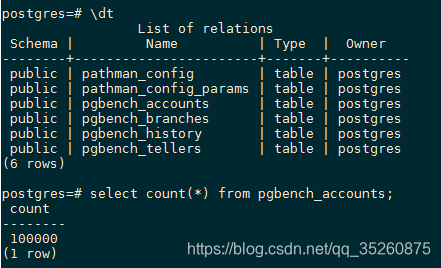
# 使用默认参数创造的测试表,各表的数据量:
-
pgbench_accounts:100000
-
pg_branches:1
-
pg_tellers:10
pgbench -i -F 100 -s 100 -d postgres
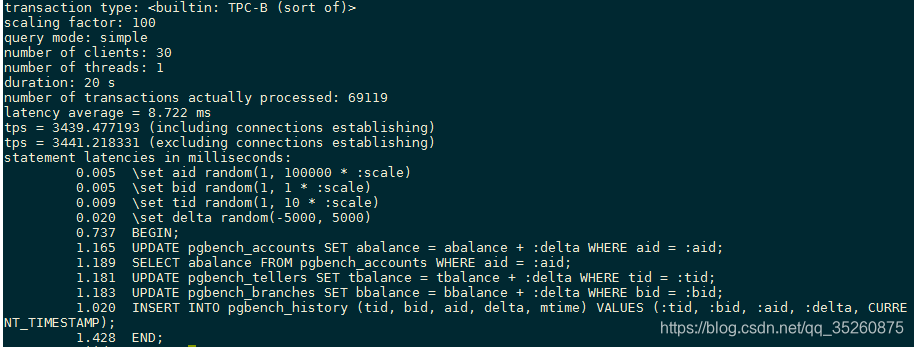
3.压力测试
(1)测试一个客户端session(用户)
pgbench -c 1 -T 20 -r -d postgres
(2)测试30个客户端session(用户)
pgbench -c 30 -T 20 -r -d postgres
4.自定义脚本压力测试
create table test(id int primary key, info text, crt_time timestamp);
-
vi test.sql
-
\set id random(1,100000000)
-
insert into test (id,info,crt_time) values (:id, md5(random()::text), now()) on conflict (id) do update set info=excluded.info, crt_time=excluded.crt_time;
pgbench -M prepared -r -f ./test.sql -c 32 -j 32 -T 20 -d postgres
[转帖]PostgreSQL 压测工具pgbench的更多相关文章
- super-smack压测工具
简介 super-smack是一款开源压测工具,支持MySQL.PostgreSQL.Oracle.本篇主要介绍一下使用super-smack压测MySQL体会. 1.SQL定义 2.数据字典定义 3 ...
- Http压测工具wrk使用指南
用过了很多压测工具,却一直没找到中意的那款.最近试了wrk感觉不错,写下这份使用指南给自己备忘用,如果能帮到你,那也很好. 安装 wrk支持大多数类UNIX系统,不支持windows.需要操作系统支持 ...
- web压测工具http_load原理分析
一.前言 http_load是一款测试web服务器性能的开源工具,从下面的网址可以下载到最新版本的http_load: http://www.acme.com/software/http_load/ ...
- [软件测试]网站压测工具Webbench源码分析
一.我与webbench二三事 Webbench是一个在linux下使用的非常简单的网站压测工具.它使用fork()模拟多个客户端同时访问我们设定的URL,测试网站在压力下工作的性能.Webbench ...
- Http压测工具wrk使用指南【转】
用过了很多压测工具,却一直没找到中意的那款.最近试了wrk感觉不错,写下这份使用指南给自己备忘用,如果能帮到你,那也很好. 安装 wrk支持大多数类UNIX系统,不支持windows.需要操作系统支持 ...
- python服务端多进程压测工具
本文描述一个python实现的多进程压测工具,这个压测工具的特点如下: 多进程 在大多数情况下,压测一般适用于IO密集型场景(如访问接口并等待返回),在这种场景下多线程多进程的区分并不明显(详情请参见 ...
- 内存压测工具Memtester
在做压力测试时,发现一个内存压测工具Memtester,可以随意设置内存占用大小,非常方便 下载地址:http://pyropus.ca/software/memtester/old-versions ...
- Http 压测工具 wrk 基本使用
Http 压测工具 wrk 基本使用 Intro wrk 是一款现代HTTP基准测试工具,能够在单个多核CPU上运行时产生显着负载.它将多线程设计与可扩展事件通知系统(如epoll和kqueue)结合 ...
- 压测工具使用(vegeta)
一.压测工具vegeta 1.介绍 Vegeta 是一个用 Go 语言编写的多功能的 HTTP 负载测试工具,它提供了命令行工具和一个开发库. 官方地址:https://github.com/tsen ...
- 003_ab http压测工具
一. ab -r -k -c 20000 -n 25000000 https://www.uuwatch.me/abtest #ab压测工具单机最大并发为20000,可以在多台机器上执行以增大并发 y ...
随机推荐
- ElasticSearch-2
原文链接:https://gaoyubo.cn/blogs/cbe60a4d.html 一.DSL查询文档 1.1DSL查询分类 Elasticsearch提供了基于JSON的DSL(Domain S ...
- 温故而知新——MYSQL基本操作
相关连接: mysql和sqlserver的区别:https://www.cnblogs.com/vic-tory/p/12760197.html sqlserver基本操作:https://www. ...
- 了解库开发,我们从STM32标准库开发学起
摘要:从STM32新建工程.编译下载程序出发,让新手由浅入深,尽享STM32标准库开发的乐趣. 自从CubeMX等图像配置软件的出现,同学们往往点几下鼠标就解决了单片机的配置问题.对于追求开发速度的业 ...
- 综合指南|如何为平台工程选择关键 KPI
平台工程是一种新兴的技术方法,可以加速应用程序的交付和产生商业价值的速度.通过提供具有自动化基础设施操作的自助服务能力,改善开发者的体验与生产力,同时降低操作的复杂性.在企业采用了平台工程之后,需要对 ...
- 火山引擎ByteHouse:4000字总结,Serverless在OLAP领域应用的五点思考
更多技术交流.求职机会,欢迎关注字节跳动数据平台微信公众号,回复[1]进入官方交流群 作为云计算的下一个迭代,Serverless可以使开发者更专注于构建产品中的应用,而无需考虑底层堆栈问题.伴随着近 ...
- No Feign Client for loadBalancing defined. Did you forget to include spring-cloud-starter-loadbalanc
No Feign Client for loadBalancing defined. Did you forget to include spring-cloud-starter-loadbalanc ...
- Mysql--表注释,字段注释
information_schema数据库是MySQL数据库自带的数据库,里面存放的MySQL数据库所有的信息,包括数据表.数据注释.数据表的索引.数据库的权限等等. 1.添加表.字段注释 creat ...
- 阿里云视频云「 vPaaS 」演绎了怎样的音视频应用开发「未来图景」?
vPaaS是阿里云视频云最新推出的低代码音视频应用开发产品,其中,vPaaS低代码音视频工厂,彻底打破了音视频应用的繁冗技术开发壁垒:vPaaS视频原生应用开发平台,全新定义了音视频应用的开发方式. ...
- JSP开发模式(四种模式)
原作者为 RioTian@cnblogs, 本作品采用 CC 4.0 BY 进行许可,转载请注明出处. 学习编程开发少不了学习开发模式, JSP在创立至今有 \(4\) 种流行的开发模式: 包括 JS ...
- 神秘又强大的@SpringBootApplication注解
一.前言 大部分的配置都可以用Java类+注解来代替,而在SpringBoot项目中见的最多的莫过于@SpringBootApplication注解了,它在每个SpringBoot的启动类上都有标注. ...