
maven-archetype-plugin 的正确打开方式
1. 准备好一个编辑好的模板工程
2. 在 pom.xml 中添加 maven-archetype-plugin 插件
<plugin>

    <groupId>org.apache.maven.plugins</groupId>

    <artifactId>maven-archetype-plugin</artifactId>

    <version>2.4</version>

</plugin>
3. 执行: mvn archetype:create-from-project,生成对应的 archetype 工程
(IDEA 可以直接在 Maven Projects 面板上点击)
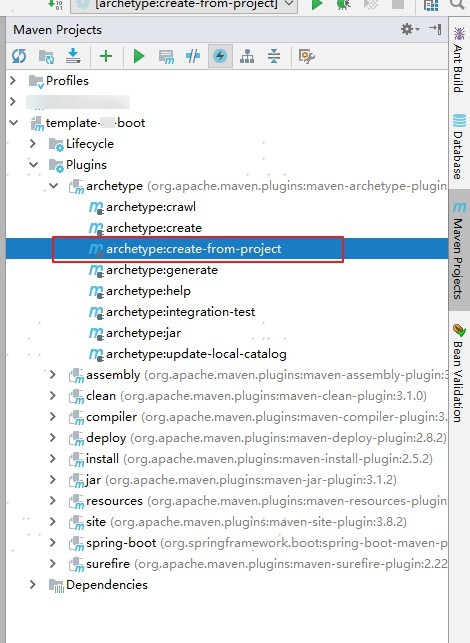
4. 导入刚刚生成的 archetype 工程
在 target\generated-sources\archetype 目录下有个 pom.xml,IDEA 可以直接拖放到 Maven Projects 面板上,就可以导入了
5. 编辑 target\generated-sources\archetype\src\main\resources\META-INF\maven\archetype-metadata.xml,设置模板工程需要使用到的文件,删除不必要配置(比如:pom 中 maven-archetype-plugin 的配置)。
我这里设置成如下:
(为了避免每次生成 archetype 工程都重新编辑 archetype-metadata.xml,可以将修改好的 archetype-metadata.xml 放在模板工程里面)
<?xml version="1.0" encoding="UTF-8"?>

<archetype-descriptor xsi:schemaLocation="http://maven.apache.org/plugins/maven-archetype-plugin/archetype-descriptor/1.0.0 http://maven.apache.org/xsd/archetype-descriptor-1.0.0.xsd" name="template-sf-boot"

                      xmlns="http://maven.apache.org/plugins/maven-archetype-plugin/archetype-descriptor/1.0.0"

                      xmlns:xsi="http://www.w3.org/2001/XMLSchema-instance">

    <fileSets>

        <fileSet filtered="true" packaged="true" encoding="UTF-8">

            <directory>src/main/java</directory>

            <includes>

                <include>**/**</include>

            </includes>

        </fileSet>

        <fileSet filtered="true" encoding="UTF-8">

            <directory>src/main/resources</directory>

            <includes>

                <include>**/**</include>

            </includes>

        </fileSet>

        <fileSet filtered="true" encoding="UTF-8">

            <directory>src/main/assembly</directory>

            <includes>

                <include>**/**</include>

            </includes>

        </fileSet>

    </fileSets>

</archetype-descriptor>
filtered="true" 表示这些文件需要替换里面的占位符: ${}
6. mvn install 这个 archetype(注意:是 archetype 工程)
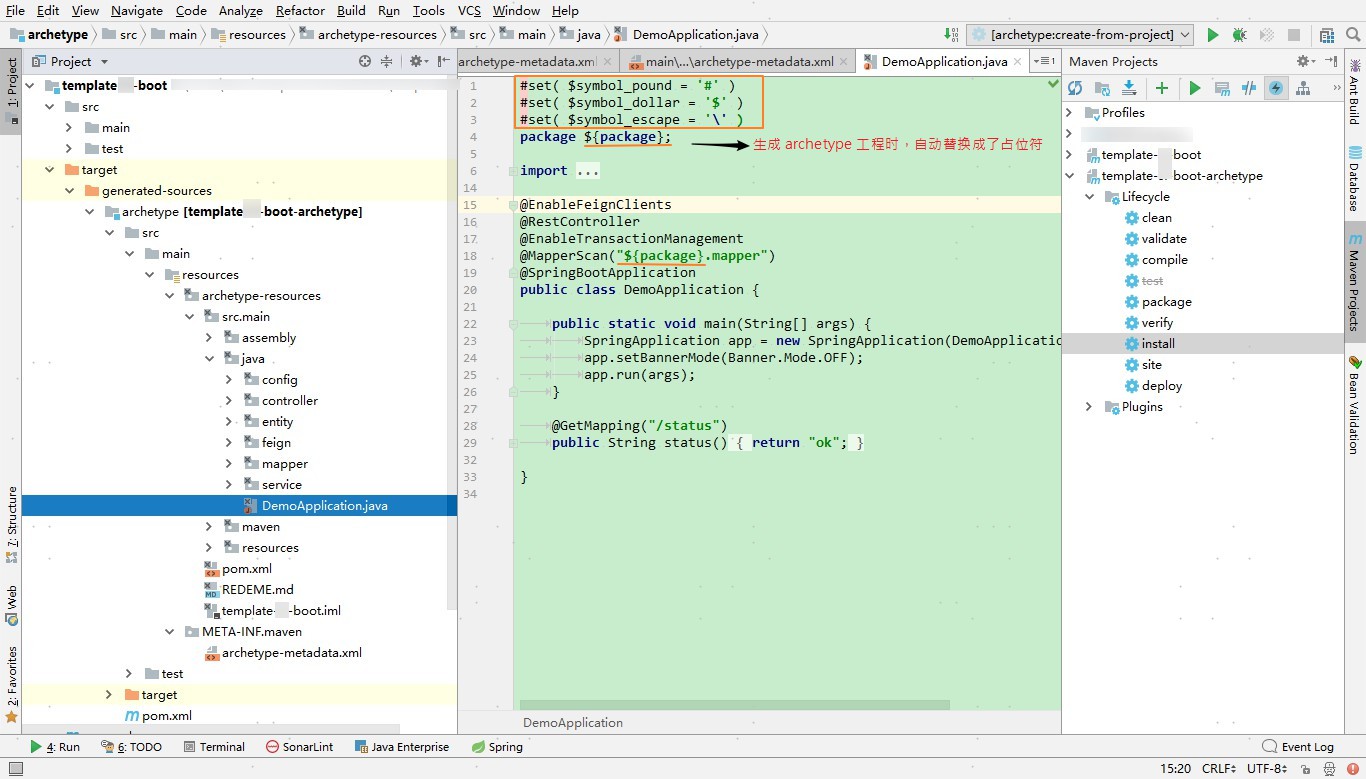
7. 通过 archetype 生成工程
有三种方式:
a. maven 命令
mvn archetype:generate -DarchetypeRepository=local -DarchetypeGroupId=com.xx.xx -DarchetypeArtifactId=template-xxx-archetype -DarchetypeVersion=1.0-SNAPSHOT -DgroupId=com.kvn.demo -DartifactId=demo-test
(关闭对话模式,添加参数:-DinteractiveMode=false )
b. IDEA 或者 eclipse
参考: https://www.cnblogs.com/fengpingfan/p/5179735.html
https://github.com/alonWang/maven-custom-archetype
maven-archetype-plugin 的正确打开方式的更多相关文章
- iOS开发小技巧--相机相册的正确打开方式
iOS相机相册的正确打开方式- UIImagePickerController 通过指定sourceType来实现打开相册还是相机 UIImagePickerControllerSourceTypeP ...
- Xcode 的正确打开方式——Debugging(转载)
Xcode 的正确打开方式——Debugging 程序员日常开发中有大量时间都会花费在 debug 上,从事 iOS 开发不可避免地需要使用 Xcode.这篇博客就主要介绍了 Xcode 中几种能 ...
- C#语法——泛型的多种应用 C#语法——await与async的正确打开方式 C#线程安全使用(五) C#语法——元组类型 好好耕耘 redis和memcached的区别
C#语法——泛型的多种应用 本篇文章主要介绍泛型的应用. 泛型是.NET Framework 2.0 版类库就已经提供的语法,主要用于提高代码的可重用性.类型安全性和效率. 泛型的定义 下面定义了 ...
- InnoDB缓冲池预加载在MySQL 5.7中的正确打开方式
InnoDB缓冲池预加载在MySQL 5.7中的正确打开方式 https://mp.weixin.qq.com/s/HGa_90XvC22anabiBF8AbQ 在这篇文章里,我将讨论在MySQL 5 ...
- Console控制台的正确打开方式
Console控制台的正确打开方式 console对象提供了访问浏览器调试模式的信息到控制台 -- Console对象 |-- assert() 如果第一个参数断言为false,则在控制台输出错误信息 ...
- 任务队列和异步接口的正确打开方式(.NET Core版本)
任务队列和异步接口的正确打开方式 什么是异步接口? Asynchronous Operations Certain types of operations might require processi ...
- (一)Redis for Windows正确打开方式
目录 (一)Redis for Windows正确打开方式 (二)Redis for 阿里云公网连接 (三)Redis for StackExchange.Redis 下载地址 官网.中文网1 及 中 ...
- List的remove()方法的三种正确打开方式
转: java编程:List的remove()方法的三种正确打开方式! 2018年08月12日 16:26:13 Aries9986 阅读数 2728更多 分类专栏: leetcode刷题 版权声 ...
- C++11随机数的正确打开方式
C++11随机数的正确打开方式 在C++11之前,现有的随机数函数都存在一个问题:在利用循环多次获取随机数时,如果程序运行过快或者使用了多线程等方法,srand((unsigned)time(null ...
- Pull Request的正确打开方式(如何在GitHub上贡献开源项目)
Pull Request的正确打开方式(如何在GitHub上贡献开源项目) GitHub的官方帮助如下: Fork A Repo: https://help.github.com/articles/f ...
随机推荐
- appium报错:An unknown server-side error occurred while processing the command. Original error: Could not proxy command to remote server. Original error: Error: read ECONNRESET
Appium Desktop版本:1.9.0 xcode版本:9.4.1 测试机:iPhone7 11.3系统 问题描述:在xcode上的produc的text运行是可以将WebDriverAgen ...
- HTML实现调用百度在线翻译API
HTML实现调用百度在线翻译API 本文章已收录于: <!doctype html> <html lang="en"> <head> < ...
- vue.js不仅是一种模式,也是一种工程组织方式
vue.js不仅是一种模式,也是一种工程组织方式
- OpenCV 学习笔记(11)【OpenCV】光流场方法标出前景(运动)和背景(静止)
用光流场方法,标出前景(运动)和背景(静止). 环境:VS2017 + OpenCV3.4.1 光流场介绍可以参见英文版学习OpenCV3的第17章Tracking 英文原版学习OpenCV3下载链接 ...
- go语言 函数return值的几种情况
分三种情况 (以下 “指定返回值”这句话, 仅指return后面直接跟着的返回值) 退出执行,不指定返回值 (1) 函数没有返回值 package main import ( "fmt&qu ...
- ent 基本使用十 数据库迁移
ent 提供了便捷的数据库迁移处理,我们可以直接使用生成的代码进行操作,同时代码也提供了比较全的运行选项 默认迁移处理 我们通过create 进行资源创建,默认是append-only 模式 ,以为着 ...
- 分享一个Centos8的国内yum源
使用的是清华大学开源镜像站,文件地址: https://github.com/hackyoMa/docker-centos/blob/8/CentOS-Base.repo 使用方法: cd /etc/ ...
- 洛谷 p1968 美元汇率 题解
传送门 美元由马克转化,马克由美元转化 求最大美元 每一天只有2种选择 ①:不转化另一货币 ②:转化另一货币 典型01背包 可以开一个二维数组f[100][3] F[i][1]表示前i天获得最大美元 ...
- 启动hadoop报does not contain a valid host:port authority:node2_1:9000
报错:启动hadoop报does not contain a valid host:port authority:node2_1:9000 原因:主机的hostname不合法,修改为不包含着‘.’ ' ...
- 回滚事件只是让原数据看起来不变,但是id还是会自增吗?
回滚事件只是让原数据看起来不变,但是id还是会自增对吗? 1 2 3 4 5 6 7 8 9 10 11 12 13 14 15 16 17 18 19 20 21 22 23 24 25 26 27 ...