
Nginx 核心配置-检测文件是否存在
Nginx核心配置-检测文件是否存在
作者:尹正杰
版权声明:原创作品,谢绝转载!否则将追究法律责任。
try_files会按顺序检查文件是否存在,返回第一个找到的文件或文件夹(结尾加斜线表示为文件夹),如果所有文件或文件夹都找不到,会进行一个内部重定向到最后一个参数。只有最后一个参数可以引起一个内部重定向,之前的参数只设置内部URI的指向。最后一个参数是回退URI且必须存在,否则会出现内部500错误。
一.try_files使用案例1
1>.编辑主配置文件
[root@node101.yinzhengjie.org.cn ~]# cat /yinzhengjie/softwares/nginx/conf/nginx.conf

worker_processes  4;

worker_cpu_affinity 00000001 00000010 00000100 00001000;

events {

    worker_connections  100000;

    use epoll;

    accept_mutex on;

    multi_accept on;

}

http {

    include       mime.types;

    default_type  application/octet-stream;

    sendfile        on;

    gzip  on;

    charset utf-8;

    keepalive_timeout  65 65;

    #导入其他路径的配置文件

    include /yinzhengjie/softwares/nginx/conf.d/*.conf;

}

[root@node101.yinzhengjie.org.cn ~]#

[root@node101.yinzhengjie.org.cn ~]# nginx -t

nginx: the configuration file /yinzhengjie/softwares/nginx/conf/nginx.conf syntax is ok

nginx: configuration file /yinzhengjie/softwares/nginx/conf/nginx.conf test is successful

[root@node101.yinzhengjie.org.cn ~]#
2>.编辑子配置文件
[root@node101.yinzhengjie.org.cn ~]# cat /yinzhengjie/softwares/nginx/conf.d/auth.conf

server {

    listen 80;

    server_name node101.yinzhengjie.org.cn;

    location / {

        root /yinzhengjie/data/web/nginx/static;

        index index.html;

    }

    location /login {

        root /yinzhengjie/data/web/nginx;

        index index.html;

        try_files $uri /default.html;          #如果访问当前localtion出现了错误页面,都会被跳转到"/default.html"

    }

}

[root@node101.yinzhengjie.org.cn ~]#

[root@node101.yinzhengjie.org.cn ~]# nginx -t

nginx: the configuration file /yinzhengjie/softwares/nginx/conf/nginx.conf syntax is ok

nginx: configuration file /yinzhengjie/softwares/nginx/conf/nginx.conf test is successful

[root@node101.yinzhengjie.org.cn ~]#
3>.创建测试数据
[root@node101.yinzhengjie.org.cn ~]# echo "<h1 style='color:rgb(255,0,255)'>Defalut</h1>" > /yinzhengjie/data/web/nginx/static/default.html

[root@node101.yinzhengjie.org.cn ~]#

[root@node101.yinzhengjie.org.cn ~]# ll /yinzhengjie/data/web/nginx/ -R

/yinzhengjie/data/web/nginx/:

total 0

drwxr-xr-x 2 root root 24 Dec 17 12:49 login

drwxr-xr-x 2 root root 44 Dec 17 12:54 static

/yinzhengjie/data/web/nginx/login:

total 4

-rw-r--r-- 1 root root 171 Dec 17 09:41 index.html

/yinzhengjie/data/web/nginx/static:

total 8

-rw-r--r-- 1 root root 46 Dec 17 12:53 default.html

-rw-r--r-- 1 root root 73 Dec 17 12:54 index.html

[root@node101.yinzhengjie.org.cn ~]#

[root@node101.yinzhengjie.org.cn ~]# cat /yinzhengjie/data/web/nginx/static/default.html

<h1 style='color:rgb(255,0,255)'>Defalut</h1>

[root@node101.yinzhengjie.org.cn ~]#
4>.重新加载配置文件
[root@node101.yinzhengjie.org.cn ~]# ps -ef | grep nginx | grep -v grep

root      2840     1  0 09:37 ?        00:00:00 nginx: master process nginx

nginx     4011  2840  0 12:38 ?        00:00:00 nginx: worker process

nginx     4012  2840  0 12:38 ?        00:00:00 nginx: worker process

nginx     4013  2840  0 12:38 ?        00:00:00 nginx: worker process

nginx     4014  2840  0 12:38 ?        00:00:00 nginx: worker process

[root@node101.yinzhengjie.org.cn ~]#

[root@node101.yinzhengjie.org.cn ~]#

[root@node101.yinzhengjie.org.cn ~]# nginx -s reload

[root@node101.yinzhengjie.org.cn ~]#

[root@node101.yinzhengjie.org.cn ~]# ps -ef | grep nginx | grep -v grep

root      2840     1  0 09:37 ?        00:00:00 nginx: master process nginx

nginx     4066  2840  2 12:42 ?        00:00:00 nginx: worker process

nginx     4067  2840  3 12:42 ?        00:00:00 nginx: worker process

nginx     4068  2840  3 12:42 ?        00:00:00 nginx: worker process

nginx     4069  2840  3 12:42 ?        00:00:00 nginx: worker process

[root@node101.yinzhengjie.org.cn ~]#

[root@node101.yinzhengjie.org.cn ~]#
5>.浏览器访问一个不存在的页面,默认匹配到的是"http://node101.yinzhengjie.org.cn/default.html"。

二.try_files使用案例2
1>.编辑子配置文件
[root@node101.yinzhengjie.org.cn ~]# cat /yinzhengjie/softwares/nginx/conf.d/auth.conf

server {

    listen 80;

    server_name node101.yinzhengjie.org.cn;

    location / {

        root /yinzhengjie/data/web/nginx/static;

        index index.html;

    }

    location /login {

        root /yinzhengjie/data/web/nginx;

        index index.html;

        #try_files $uri /default.html;

        try_files $uri $uri.html $uri/index.html /default.html;        #根据给定的参数依次匹配,首先获取到用户输入的uri,然后用用户的uri的值添加".html"后缀进行配置,若不成功就继续访问uri目录下的index.html,若前面两个都匹配失败,则最后匹配"/defalut.html"。

    }

}

[root@node101.yinzhengjie.org.cn ~]#

[root@node101.yinzhengjie.org.cn ~]# nginx -t

nginx: the configuration file /yinzhengjie/softwares/nginx/conf/nginx.conf syntax is ok

nginx: configuration file /yinzhengjie/softwares/nginx/conf/nginx.conf test is successful

[root@node101.yinzhengjie.org.cn ~]#
2>.编写测试数据
[root@node101.yinzhengjie.org.cn ~]# ll /yinzhengjie/data/web/nginx/login/

total 4

-rw-r--r-- 1 root root 171 Dec 17 09:41 index.html

[root@node101.yinzhengjie.org.cn ~]#

[root@node101.yinzhengjie.org.cn ~]# echo "<h1 style='color:rgb(0,0,255)'>Golang</h1>" > /yinzhengjie/data/web/nginx/login/go.html

[root@node101.yinzhengjie.org.cn ~]#

[root@node101.yinzhengjie.org.cn ~]# mkdir /yinzhengjie/data/web/nginx/login/test

[root@node101.yinzhengjie.org.cn ~]#

[root@node101.yinzhengjie.org.cn ~]# echo "<h1 style='color:rgb(255,0,255)'>TEST Page</h1>"  > /yinzhengjie/data/web/nginx/login/test/index.html

[root@node101.yinzhengjie.org.cn ~]#

[root@node101.yinzhengjie.org.cn ~]# ll /yinzhengjie/data/web/nginx/ -R

/yinzhengjie/data/web/nginx/:

total 4

-rw-r--r-- 1 root root 43 Dec 17 13:04 index.html

drwxr-xr-x 3 root root 51 Dec 17 13:08 login

drwxr-xr-x 2 root root 44 Dec 17 12:54 static

/yinzhengjie/data/web/nginx/login:

total 8

-rw-r--r-- 1 root root  43 Dec 17 13:08 go.html

-rw-r--r-- 1 root root 171 Dec 17 09:41 index.html

drwxr-xr-x 2 root root  24 Dec 17 13:09 test

/yinzhengjie/data/web/nginx/login/test:

total 4

-rw-r--r-- 1 root root 48 Dec 17 13:09 index.html

/yinzhengjie/data/web/nginx/static:

total 8

-rw-r--r-- 1 root root 46 Dec 17 12:53 default.html

-rw-r--r-- 1 root root 73 Dec 17 12:54 index.html

[root@node101.yinzhengjie.org.cn ~]#
3>.重新加载配置文件
[root@node101.yinzhengjie.org.cn ~]# ps -ef | grep nginx |grep -v grep

root      2840     1  0 09:37 ?        00:00:00 nginx: master process nginx

nginx     4434  2840  0 13:06 ?        00:00:00 nginx: worker process

nginx     4435  2840  0 13:06 ?        00:00:00 nginx: worker process

nginx     4436  2840  0 13:06 ?        00:00:00 nginx: worker process

nginx     4437  2840  0 13:06 ?        00:00:00 nginx: worker process

[root@node101.yinzhengjie.org.cn ~]#

[root@node101.yinzhengjie.org.cn ~]# nginx -s reload

[root@node101.yinzhengjie.org.cn ~]#

[root@node101.yinzhengjie.org.cn ~]# ps -ef | grep nginx |grep -v grep

root      2840     1  0 09:37 ?        00:00:00 nginx: master process nginx

nginx     4497  2840  2 13:14 ?        00:00:00 nginx: worker process

nginx     4498  2840  2 13:14 ?        00:00:00 nginx: worker process

nginx     4499  2840  2 13:14 ?        00:00:00 nginx: worker process

nginx     4500  2840  3 13:14 ?        00:00:00 nginx: worker process

[root@node101.yinzhengjie.org.cn ~]#
4>.客户端验证
浏览器输入:"http://node101.yinzhengjie.org.cn/login/test",匹配到了"http://node101.yinzhengjie.org.cn/login/test/index.html"的内容,如下图所示。

浏览器输入:"http://node101.yinzhengjie.org.cn/login/go",匹配到的是:"http://node101.yinzhengjie.org.cn/login/go.html",如下图所示

浏览器输入一个不存在的路径,默认匹配到的是"http://node101.yinzhengjie.org.cn/default.html",如下图所示。

三.try_files使用案例3
1>.编写子配置文件
[root@node101.yinzhengjie.org.cn ~]# cat /yinzhengjie/softwares/nginx/conf.d/auth.conf

server {

    listen 80;

    server_name node101.yinzhengjie.org.cn;

    location / {

        root /yinzhengjie/data/web/nginx/static;

        index index.html;

    }

    location /login {

        root /yinzhengjie/data/web/nginx;

        index index.html;

        #try_files $uri /default.html;

        #try_files $uri $uri.html $uri/index.html /default.html;

        try_files $uri $uri.html $uri/index.html /default.html =888;

    }

}

[root@node101.yinzhengjie.org.cn ~]#

[root@node101.yinzhengjie.org.cn ~]# nginx -t

nginx: the configuration file /yinzhengjie/softwares/nginx/conf/nginx.conf syntax is ok

nginx: configuration file /yinzhengjie/softwares/nginx/conf/nginx.conf test is successful

[root@node101.yinzhengjie.org.cn ~]#
2>.重新加载配置文件
[root@node101.yinzhengjie.org.cn ~]# ps -ef | grep nginx | grep -v grep

root      2840     1  0 09:37 ?        00:00:00 nginx: master process nginx

nginx     4497  2840  0 13:14 ?        00:00:00 nginx: worker process

nginx     4498  2840  0 13:14 ?        00:00:00 nginx: worker process

nginx     4499  2840  0 13:14 ?        00:00:00 nginx: worker process

nginx     4500  2840  0 13:14 ?        00:00:00 nginx: worker process

[root@node101.yinzhengjie.org.cn ~]#

[root@node101.yinzhengjie.org.cn ~]# nginx -s reload

[root@node101.yinzhengjie.org.cn ~]#

[root@node101.yinzhengjie.org.cn ~]# ps -ef | grep nginx | grep -v grep

root      2840     1  0 09:37 ?        00:00:00 nginx: master process nginx

nginx     4604  2840  1 13:23 ?        00:00:00 nginx: worker process

nginx     4605  2840  2 13:23 ?        00:00:00 nginx: worker process

nginx     4606  2840  2 13:23 ?        00:00:00 nginx: worker process

nginx     4607  2840  2 13:23 ?        00:00:00 nginx: worker process

[root@node101.yinzhengjie.org.cn ~]#

[root@node101.yinzhengjie.org.cn ~]#
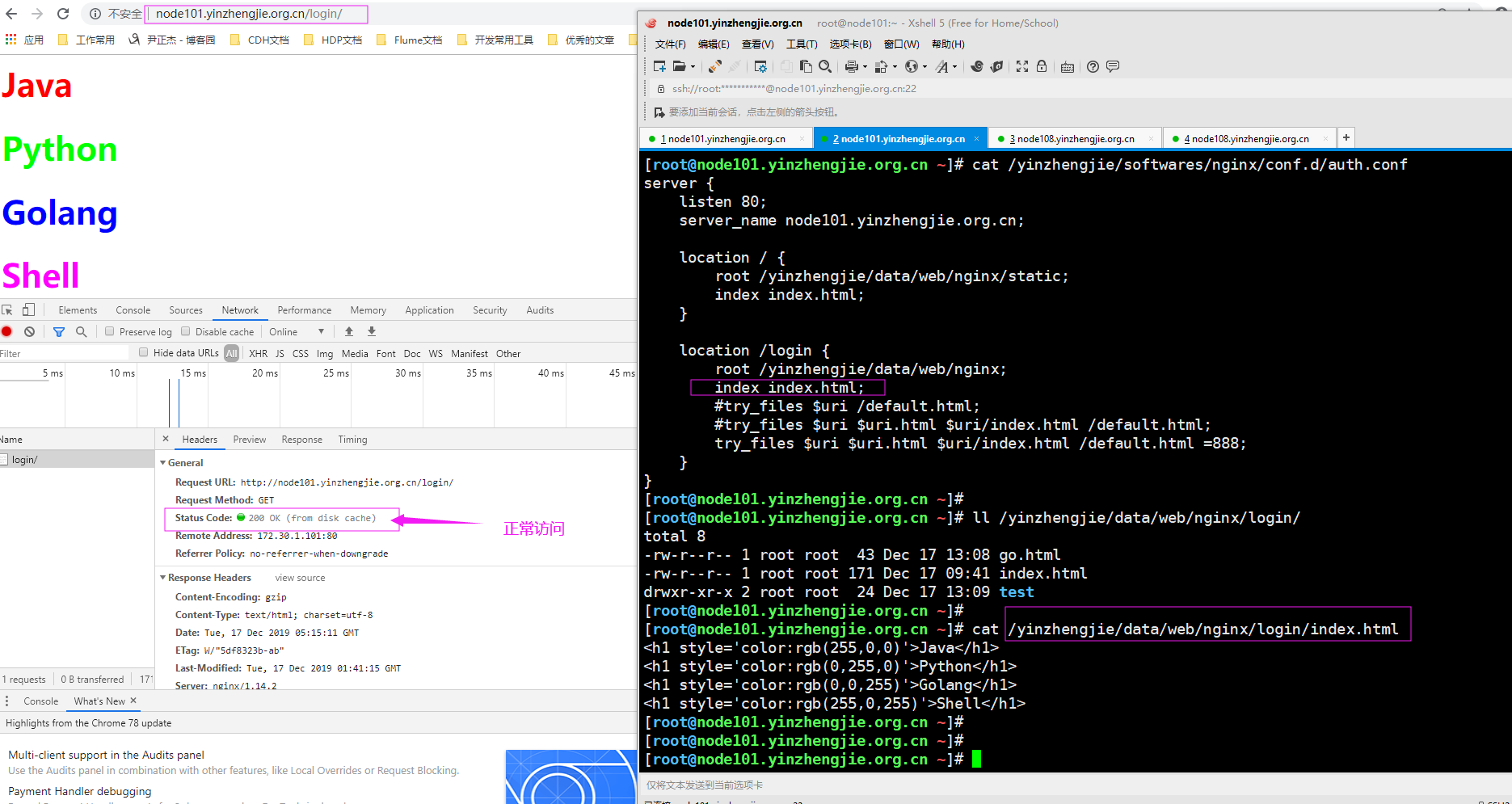
3>.浏览器访问"http://node101.yinzhengjie.org.cn/login/",如下图所示
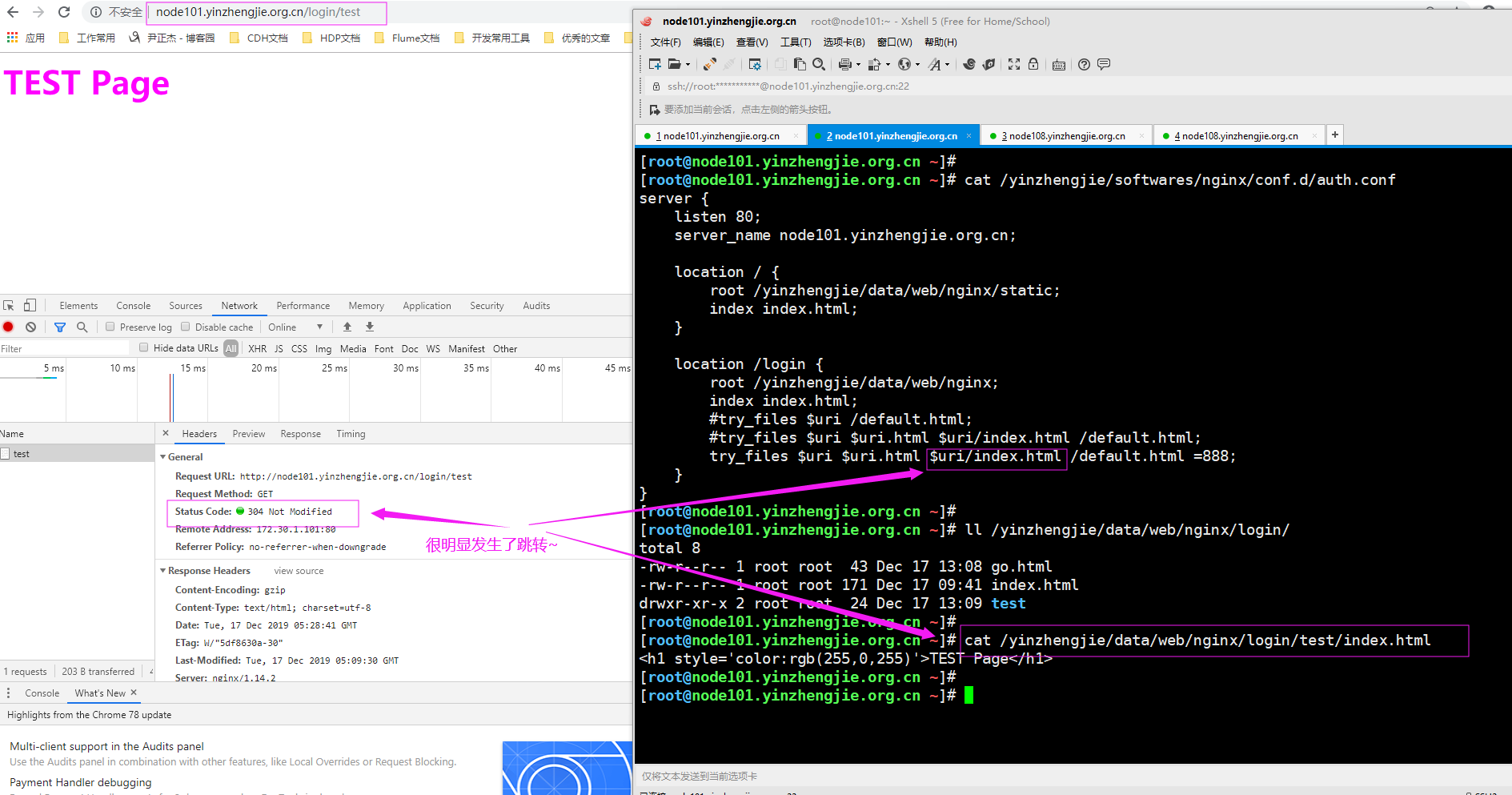
4>.浏览器访问"http://node101.yinzhengjie.org.cn/login/test",如下图所示
5>.浏览器访问一个不存在的资源, "http://node101.yinzhengjie.org.cn/login/",如下图所示

Nginx 核心配置-检测文件是否存在的更多相关文章
- Nginx 核心配置详解
目录 Nginx 核心配置详解 Nginx 四层访问控制: Nginx账户认证功能: 自定义错误页面: 自定义访问日志: 检测文件是否存在: 长连接配置: 作为下载服务器配置: 作为上传服务器: 其他 ...
- Nginx 核心配置-可优化配置参数
Nginx 核心配置-可优化配置参数 作者:尹正杰 版权声明:原创作品,谢绝转载!否则将追究法律责任. 一.nginx的官网查看指令帮助信息方法 1>.打开nginx的官网(https://ng ...
- Nginx 核心配置-作为上传服务器配置
Nginx 核心配置-作为上传服务器配置 作者:尹正杰 版权声明:原创作品,谢绝转载!否则将追究法律责任. 一.关键参数说明 client_max_body_size 1m: 设置允许客户端上传单 ...
- Nginx 核心配置-作为下载服务器配置
Nginx 核心配置-作为下载服务器配置 作者:尹正杰 版权声明:原创作品,谢绝转载!否则将追究法律责任. 一.无限速版本的下载服务器 1>.查看主配置文件 [root@node101.yinz ...
- Nginx 核心配置-自定义日志路径及清空日志注意事项
Nginx 核心配置-自定义日志路径及清空日志注意事项 作者:尹正杰 版权声明:原创作品,谢绝转载!否则将追究法律责任. 一.关于日志清空注意事项 1>.nginx服务写访问日志是基于acces ...
- Nginx 核心配置-自定义错误页面
Nginx 核心配置-自定义错误页面 作者:尹正杰 版权声明:原创作品,谢绝转载!否则将追究法律责任. 生产环境中错误页面一般都是UI或开发工程师提供的,他们已经在软件中定义好了,我们这里就简单写个h ...
- Nginx 核心配置-location的登录账户认证实战篇
Nginx 核心配置-location的登录账户认证实战篇 作者:尹正杰 版权声明:原创作品,谢绝转载!否则将追究法律责任. 一.使用ab命令模拟网站攻击 1>.安装httpd-tools工具 ...
- Nginx 核心配置-location的匹配案例实战篇
Nginx 核心配置-location的匹配案例实战篇 作者:尹正杰 版权声明:原创作品,谢绝转载!否则将追究法律责任. 一.location语法规则介绍 在没有使用正则表达式的时候,nginx会先在 ...
- Nginx 核心配置-新建一个web站点
Nginx 核心配置-新建一个web站点 作者:尹正杰 版权声明:原创作品,谢绝转载!否则将追究法律责任. 一.Nginx基础配置常用参数说明 [root@node101.yinzhengjie.or ...
随机推荐
- 在centos8搭建dhcp服务
1.用这两个命令就可以安装成功 yum - y install dhcp yum -y install dhcp-server.x86_64 2.配置文件在 /etc/dhcp/dhcpd.conf ...
- SQL Server 迁移数据库 (一)导入和导出
今天正好换服务器,记录一下迁移数据库的过程. 以前经常用备份还原法,今天试试‘SQL Server 2016 导入和导出数据’这个看怎么玩. 1. 建数据库结构 1.1 在需要迁移的数据库名字上右击, ...
- 记一次排错经历,requests和fake_useragent
在部署tornado项目上线时, 首次重启服务后第一次请求必然会报错, 后续的就能正常访问, 长报错urllib.error.URLError,如图排查多次依然发现不了问题 报的最多的依然是上图中的错 ...
- uniApp配置文件几个注意点
虽然有文档,但是偶尔还是会又找不到的,写下来遇到过的问题,随时补充.好记性不如烂笔头. 1.打包完安装之后,app 有时候会弹出一个提示框.如下: 修改配置项,设置 ignoreVersion 为 t ...
- STM32Cube生成的HID项目,找不到hUsbDeviceFS
症状 在main中尝试发消息给上位机: 解决方法 在STM32生成的HID项目里,默认是没有把hUsbDeviceFS导出的,需要修改usb_device.h文件,在USER CODE BEGIN V ...
- C#自定义特性的使用
特性类的使用过程: 第一步:定义一个特性类,定义一些成员来包含验证时需要的数据:第二步:创建特性类实例:创建一个特性类的实例,里面包含着验证某一个属性或者字段需要的数据.将该实例关联到某个属性上面.第 ...
- Shell~echo -e 颜色输出
echo -e 可以控制字体颜色和背景颜色输出 从一个例子开始: # echo -e "\e[1;33;41m test content \e[0m" 输出效果: . \e 转义起 ...
- UVA 10789 题解
Prime Frequency Given a string containing only alpha-numerals (0-9,A-Z and a-z) you have to count th ...
- VS一个奇怪的发布问题
同事的环境,发布项目时一直提示找不到某dll,在引用及bin里未发现黄色感叹号,后来发现问题是因为项目文件不小心包含了一个外部bin目录,并且该bin目录中的dll删除导致的.
- C# Thread was being aborted
先重现问题 1.新建一个aspx页面项目,插入两个页面WebForm1.aspx,WebForm2.aspx, WebForm1代码修改如下 protected void Page_Load(obje ...