
音视频入门-05-RGB-TO-BMP使用开源库
RGB-TO-BMP 回顾
将 RGB 数据转成 BMP 图片:
- 了解 BMP 文件格式
- 准备 BMP 文件头信息
- 准备 BMP 信息头
- BMP 存储 RGB 的顺序是 B-G-R
- BitmapInfoHeader 中的 biHeight 字段,biHeight 为正,位图自底向顶扫描,biHeight 为负,位图自顶向底扫描。
- BMP 图像四字节对齐
实际开发过程,通常会使用第三方开源库来简化开发,屏蔽一些底层的复杂度,节省大量编写代码的时间。
使用开源库的方式
libbmp (C 库)
#include <stdio.h>

#include "libbmp/libbmp.h"

// 彩虹的七种颜色

u_int32_t rainbowColors[] = {

        0XFF0000, // 红

        0XFFA500, // 橙

        0XFFFF00, // 黄

        0X00FF00, // 绿

        0X007FFF, // 青

        0X0000FF, // 蓝

        0X8B00FF  // 紫

};

int main() {

    int width = 711, height = 711;

    bmp_img img;

    bmp_img_init_df (&img, width, height);

    for (int i = 0; i < width; ++i) {

        // 当前颜色

        u_int32_t currentColor = rainbowColors[0];

        if(i < 100) {

            currentColor = rainbowColors[0];

        } else if(i < 200) {

            currentColor = rainbowColors[1];

        } else if(i < 300) {

            currentColor = rainbowColors[2];

        } else if(i < 400) {

            currentColor = rainbowColors[3];

        } else if(i < 500) {

            currentColor = rainbowColors[4];

        } else if(i < 600) {

            currentColor = rainbowColors[5];

        } else if(i < 700) {

            currentColor = rainbowColors[6];

        }

        // 当前颜色 R 分量

        u_int8_t R = (currentColor & 0xFF0000) >> 16;

        // 当前颜色 G 分量

        u_int8_t G = (currentColor & 0x00FF00) >> 8;

        // 当前颜色 B 分量

        u_int8_t B = currentColor & 0x0000FF;

        for (int j = 0; j < height; ++j) {

            bmp_pixel_init (&img.img_pixels[i][j], R, G, B);

        }

    }

    bmp_img_write (&img, "/Users/staff/Desktop/test-libbmp.bmp");

    bmp_img_free (&img);

    return 0;

}
google libbmp(C 库)
#include <stdio.h>

#include "google/libbmp/src/bmpfile.h"

// 彩虹的七种颜色

u_int32_t rainbowColors[] = {

        0XFF0000, // 红

        0XFFA500, // 橙

        0XFFFF00, // 黄

        0X00FF00, // 绿

        0X007FFF, // 青

        0X0000FF, // 蓝

        0X8B00FF  // 紫

};

int main(int argc, char **argv) {

    int width = 711, height = 711;

    bmpfile_t *bmp;

    if ((bmp = bmp_create(width, height, 24)) == NULL) {

        return -1;

    }

    for (int i = 0; i < width; ++i) {

        // 当前颜色

        u_int32_t currentColor = rainbowColors[0];

        if(i < 100) {

            currentColor = rainbowColors[0];

        } else if(i < 200) {

            currentColor = rainbowColors[1];

        } else if(i < 300) {

            currentColor = rainbowColors[2];

        } else if(i < 400) {

            currentColor = rainbowColors[3];

        } else if(i < 500) {

            currentColor = rainbowColors[4];

        } else if(i < 600) {

            currentColor = rainbowColors[5];

        } else if(i < 700) {

            currentColor = rainbowColors[6];

        }

        // 当前颜色 R 分量

        u_int8_t R = (currentColor & 0xFF0000) >> 16;

        // 当前颜色 G 分量

        u_int8_t G = (currentColor & 0x00FF00) >> 8;

        // 当前颜色 B 分量

        u_int8_t B = currentColor & 0x0000FF;

        rgb_pixel_t pixel = {B, G, R, 0};

        for (int j = 0; j < height; ++j) {

            bmp_set_pixel(bmp, j, i, pixel);

        }

    }

    bmp_save(bmp, "/Users/staff/Desktop/test-google-libbmp.bmp");

    bmp_destroy(bmp);

    return 0;

}
bmp(C 库)
#include <stdio.h>

#include "bmp/bmp.h"

// 彩虹的七种颜色

u_int32_t rainbowColors[] = {

        0XFF0000, // 红

        0XFFA500, // 橙

        0XFFFF00, // 黄

        0X00FF00, // 绿

        0X007FFF, // 青

        0X0000FF, // 蓝

        0X8B00FF  // 紫

};

int main() {

    int width = 711, height = 711;

    char bmp[BMP_SIZE(width, height)];

    bmp_init(bmp, width, height);

    for (int i = 0; i < width; ++i) {

        // 当前颜色

        u_int32_t currentColor = rainbowColors[0];

        if(i < 100) {

            currentColor = rainbowColors[0];

        } else if(i < 200) {

            currentColor = rainbowColors[1];

        } else if(i < 300) {

            currentColor = rainbowColors[2];

        } else if(i < 400) {

            currentColor = rainbowColors[3];

        } else if(i < 500) {

            currentColor = rainbowColors[4];

        } else if(i < 600) {

            currentColor = rainbowColors[5];

        } else if(i < 700) {

            currentColor = rainbowColors[6];

        }

        for (int j = 0; j < height; ++j) {

            bmp_set(bmp, j, i, currentColor);

        }

    }

    FILE *f = fopen("/Users/hubin/Desktop/test-bmp.bmp", "wb");

    fwrite(bmp, sizeof(bmp), 1, f);

    fclose(f);

    return 0;

}
qdbmp(C 库)
#include <stdio.h>

#include "qdbmp/qdbmp.h"

// 彩虹的七种颜色

u_int32_t rainbowColors[] = {

        0XFF0000, // 红

        0XFFA500, // 橙

        0XFFFF00, // 黄

        0X00FF00, // 绿

        0X007FFF, // 青

        0X0000FF, // 蓝

        0X8B00FF  // 紫

};

int main() {

    int width = 711, height = 711;

    BMP* bmp = BMP_Create(width, height, 24);

    for (int i = 0; i < width; ++i) {

        // 当前颜色

        u_int32_t currentColor = rainbowColors[0];

        if(i < 100) {

            currentColor = rainbowColors[0];

        } else if(i < 200) {

            currentColor = rainbowColors[1];

        } else if(i < 300) {

            currentColor = rainbowColors[2];

        } else if(i < 400) {

            currentColor = rainbowColors[3];

        } else if(i < 500) {

            currentColor = rainbowColors[4];

        } else if(i < 600) {

            currentColor = rainbowColors[5];

        } else if(i < 700) {

            currentColor = rainbowColors[6];

        }

        // 当前颜色 R 分量

        u_int8_t R = (currentColor & 0xFF0000) >> 16;

        // 当前颜色 G 分量

        u_int8_t G = (currentColor & 0x00FF00) >> 8;

        // 当前颜色 B 分量

        u_int8_t B = currentColor & 0x0000FF;

        for (int j = 0; j < height; ++j) {

            BMP_SetPixelRGB(bmp, j, i, R, G, B);

        }

    }

    /* Save result */

    BMP_WriteFile( bmp, "/Users/hubin/Desktop/test-qdbmp.bmp");

    BMP_CHECK_ERROR( stderr, -2 );

    /* Free all memory allocated for the image */

    BMP_Free( bmp );

    return 0;

}
easybmp(C++ 库)
#include "EasyBMP/EasyBMP.h"

using namespace std;

// 彩虹的七种颜色

u_int32_t rainbowColors[] = {

        0XFF0000, // 红

        0XFFA500, // 橙

        0XFFFF00, // 黄

        0X00FF00, // 绿

        0X007FFF, // 青

        0X0000FF, // 蓝

        0X8B00FF  // 紫

};

int main( int argc, char* argv[]) {

    int width = 711, height = 711;

    int bitDepth = 24;

    BMP bmp;

    bmp.SetSize(width, height);

    bmp.SetBitDepth(bitDepth);

    for (int i = 0; i < width; ++i) {

        // 当前颜色

        u_int32_t currentColor = rainbowColors[0];

        if(i < 100) {

            currentColor = rainbowColors[0];

        } else if(i < 200) {

            currentColor = rainbowColors[1];

        } else if(i < 300) {

            currentColor = rainbowColors[2];

        } else if(i < 400) {

            currentColor = rainbowColors[3];

        } else if(i < 500) {

            currentColor = rainbowColors[4];

        } else if(i < 600) {

            currentColor = rainbowColors[5];

        } else if(i < 700) {

            currentColor = rainbowColors[6];

        }

        // 当前颜色 R 分量

        u_int8_t R = (currentColor & 0xFF0000) >> 16;

        // 当前颜色 G 分量

        u_int8_t G = (currentColor & 0x00FF00) >> 8;

        // 当前颜色 B 分量

        u_int8_t B = currentColor & 0x0000FF;

        RGBApixel pixel;

        pixel.Red = R;

        pixel.Green = G;

        pixel.Blue = B;

        pixel.Alpha = 0;

        for (int j = 0; j < height; ++j) {

            bmp.SetPixel(j, i, pixel);

        }

    }

    bmp.WriteToFile("/Users/hubin/Desktop/test-easybmp.bmp");

    return 0;

}
bitmap(C++ 库)
#include "bitmap/bitmap_image.hpp"

using namespace std;

// 彩虹的七种颜色

u_int32_t rainbowColors[] = {

        0XFF0000, // 红

        0XFFA500, // 橙

        0XFFFF00, // 黄

        0X00FF00, // 绿

        0X007FFF, // 青

        0X0000FF, // 蓝

        0X8B00FF  // 紫

};

int main() {

    int width = 711, height = 711;

    bitmap_image image(width, height);

    image.clear();

    for (int i = 0; i < width; ++i) {

        // 当前颜色

        u_int32_t currentColor = rainbowColors[0];

        if(i < 100) {

            currentColor = rainbowColors[0];

        } else if(i < 200) {

            currentColor = rainbowColors[1];

        } else if(i < 300) {

            currentColor = rainbowColors[2];

        } else if(i < 400) {

            currentColor = rainbowColors[3];

        } else if(i < 500) {

            currentColor = rainbowColors[4];

        } else if(i < 600) {

            currentColor = rainbowColors[5];

        } else if(i < 700) {

            currentColor = rainbowColors[6];

        }

        // 当前颜色 R 分量

        u_int8_t R = (currentColor & 0xFF0000) >> 16;

        // 当前颜色 G 分量

        u_int8_t G = (currentColor & 0x00FF00) >> 8;

        // 当前颜色 B 分量

        u_int8_t B = currentColor & 0x0000FF;

        for (int j = 0; j < height; ++j) {

            image.set_pixel(j, i, R, G, B);

        }

    }

    image.save_image("/Users/hubin/Desktop/test-bitmap.bmp");

    return 0;

}
查看开源库的效果
六个开源库都可以大大减少我们的工作量!
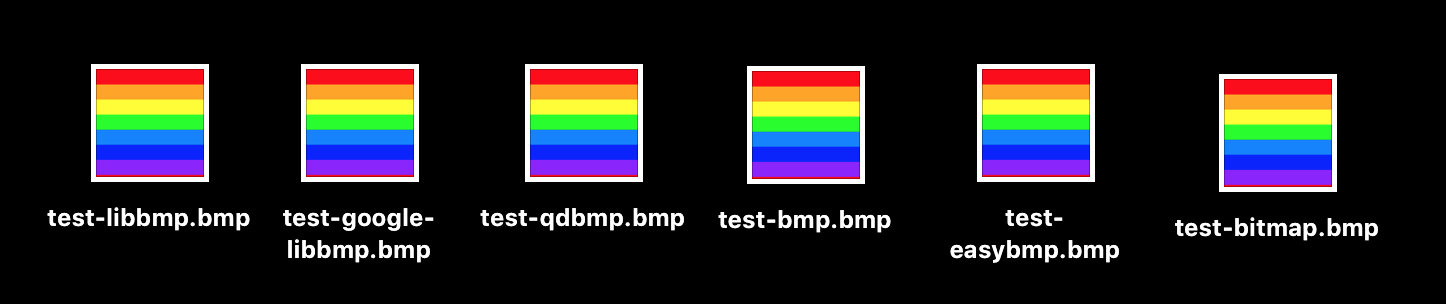
代码:
参考资料:
内容有误?联系作者:

音视频入门-05-RGB-TO-BMP使用开源库的更多相关文章
- 音视频入门-09-RGB&YUV互转-使用开源库
* 音视频入门文章目录 * 介绍开源库 使用第三方开源库来简化开发,屏蔽一些底层的复杂度,节省大量编写代码的时间. libyuv: Google 开源的实现各种 YUV 与 RGB 之间相互转换.旋转 ...
- 音视频入门-03-RGB转成BMP图片
* 音视频入门文章目录 * BMP 文件格式解析 BMP 文件由文件头.位图信息头.颜色信息和图形数据四部分组成. 位图文件头(14个字节) 位图信息头(40个字节) 颜色信息 图形数据 文件头与信息 ...
- 音视频入门-01-认识RGB
* 音视频入门文章目录 * RGB 简介 RGB 色彩模式是工业界的一种颜色标准,是通过对红(R).绿(G).蓝(B)三个颜色通道的变化以及它们相互之间的叠加来得到各式各样的颜色的,RGB 即是代表红 ...
- 音视频入门-11-PNG文件格式详解
* 音视频入门文章目录 * PNG 文件格式解析 PNG 图像格式文件由一个 8 字节的 PNG 文件署名域和 3 个以上的后续数据块(IHDR.IDAT.IEND)组成. PNG 文件包括 8 字节 ...
- 音视频入门-10-使用libyuv对YUV数据进行缩放、旋转、镜像、裁剪、混合
* 音视频入门文章目录 * libyuv libyuv 是 Google 开源的实现各种 YUV 与 RGB 之间相互转换.旋转.缩放等的库.它是跨平台的,可在 Windows.Linux.Mac.A ...
- 音视频入门-08-RGB&YUV
* 音视频入门文章目录 * YUV & RGB 相互转换公式 YCbCr 的 Y 与 YUV 中的 Y 含义一致,Cb 和 Cr 与 UV 同样都指色彩,Cb 指蓝色色度,Cr 指红色色度,在 ...
- 音视频入门-04-BMP图像四字节对齐的问题
* 音视频入门文章目录 * BMP 图像四字节对齐 表示 BMP 位图中像素的位元是以行为单位对齐存储的,每一行的大小都向上取整为4字节(32 位 DWORD)的倍数.如果图像的高度大于 1,多个经过 ...
- 音视频入门-20-BMP、PNG、JPG、GIF静态图生成GIF动态图
* 音视频入门文章目录 * 静态图 -> 动态图 前面 [18-手动生成一张GIF图片] 和 [19-使用giflib处理GIF图片] 生成的 GIF 每一帧都是一个颜色,平时用到的 GIF 每 ...
- 音视频入门-12-手动生成一张PNG图片
* 音视频入门文章目录 * 预热 上一篇 [PNG文件格式详解]详细介绍了 PNG 文件的格式. PNG 图像格式文件由一个 8 字节的 PNG 文件署名域和 3 个以上的后续数据块(IHDR.IDA ...
随机推荐
- 宝塔 ssl https无法访问使用
https 使用的是443端口 请确保 云上的与宝塔上的443端口开放即可
- Hive的配置详解和日常维护
Hive的配置详解和日常维护 一.Hive的参数配置详解 1>.mapred.reduce.tasks 默认为-1.指定Hive作业的reduce task个数,如果保留默认值,则Hive 自 ...
- flutter -------- 页面跳转和传值
在安卓原生开发中,页面跳转可以用Intent类来具体实现: Intent intent =new Intent(MainActivity.this,second.class); startActivi ...
- Java8中的日期时间类
测试类: import java.time.*; import java.time.format.DateTimeFormatter; public class App { public static ...
- Kotlin数据类型 Unit、Nothing与Nothing?、Any与Any?
Kotlin数据类型 Unit.Nothing与Nothing?.Any与Any? 本文链接:https://blog.csdn.net/ldxlz224/article/details/9440 ...
- [转]WebMercator与经纬度互转
//经纬度转Web墨卡托 Vector3 lonLat2WebMercator(Vector3 lonLat) { Vector3 mercator; ; + lonLat.y)*)) / (); y ...
- Ajax serialize()提交form表单不能上传file类型
前台form表单的提交方式有很多种,例如: 1. form表单submit直接提交的方法 2. Ajax提交的方法 3. jquery提交的方法 4. 原生js提交的方法 每一种方法都有它的优势和不足 ...
- Spring cloud微服务安全实战-3-10API安全机制之授权
说一下最后一个模块,授权.用来做访问控制,控制哪个用户能干什么.哪个用户不能干什么? 遵循最小的授权原则,一个用户只给他必须要的那些权限. 1.你的请求是不是需要权限认证, 有一些请求是根本不需要权限 ...
- 【PHP】 解决array_filter会过滤0 false的问题
定义和用法 array_filter() 函数用回调函数过滤数组中的元素. 该函数把输入数组中的每个键值传给回调函数.如果回调函数返回 true,则把输入数组中的当前键值返回给结果数组.数组键名保持不 ...
- Glide升级到4.x版本遇到的问题
Failed to find GeneratedAppGlideModule. You should include an annotationProcessor compile dependency ...