
git之fatal: Could not read from remote repository
问题背景:
在git bash中使用hexo g -d命令进行文章发布
详细错误信息:
fatal: Could not read from remote repository.

Please make sure you have the correct access rights

and the repository exists.

FATAL Something's wrong. Maybe you can find the solution here: http://hexo.io/docs/troubleshooting.html

Error: Connection reset by 13.250.177.223 port 22

fatal: Could not read from remote repository.

Please make sure you have the correct access rights

and the repository exists.

    at ChildProcess.<anonymous> (E:\Hexo\node_modules\hexo-util\lib\spawn.js:37:17)

    at emitTwo (events.js:126:13)

    at ChildProcess.emit (events.js:214:7)

    at ChildProcess.cp.emit (E:\Hexo\node_modules\cross-spawn\lib\enoent.js:40:29)

    at maybeClose (internal/child_process.js:915:16)

    at Socket.stream.socket.on (internal/child_process.js:336:11)

    at emitOne (events.js:116:13)

    at Socket.emit (events.js:211:7)

    at Pipe._handle.close [as _onclose] (net.js:561:12)
错误原因是因为ssh key有问题,连接不上服务器。
于是我参考如下链接,一步一步操作,最终解决了这个问题:
git遇到的问题之“Please make sure you have the correct access rights and the repository exists.”
虽然已经有了问题的解决答案,但是我觉得还是需要列举一下相关步骤,梳理一下:
1.重新在git设置一下身份的名字和邮箱
git config --global user.name "yourname"

git config --global user.email "your@email.com"
这里的yourname必须与github的用户名一致
这里your@email.com必须与github登录邮箱一致
2.删除.ssh文件夹下的known_hosts文件(该文件主要作用是域名解析)
3.ssh-keygen -t rsa -C “your@email.com(填写github对应的邮箱)”
一路回车即可,无需输入
4.进入github设置界面
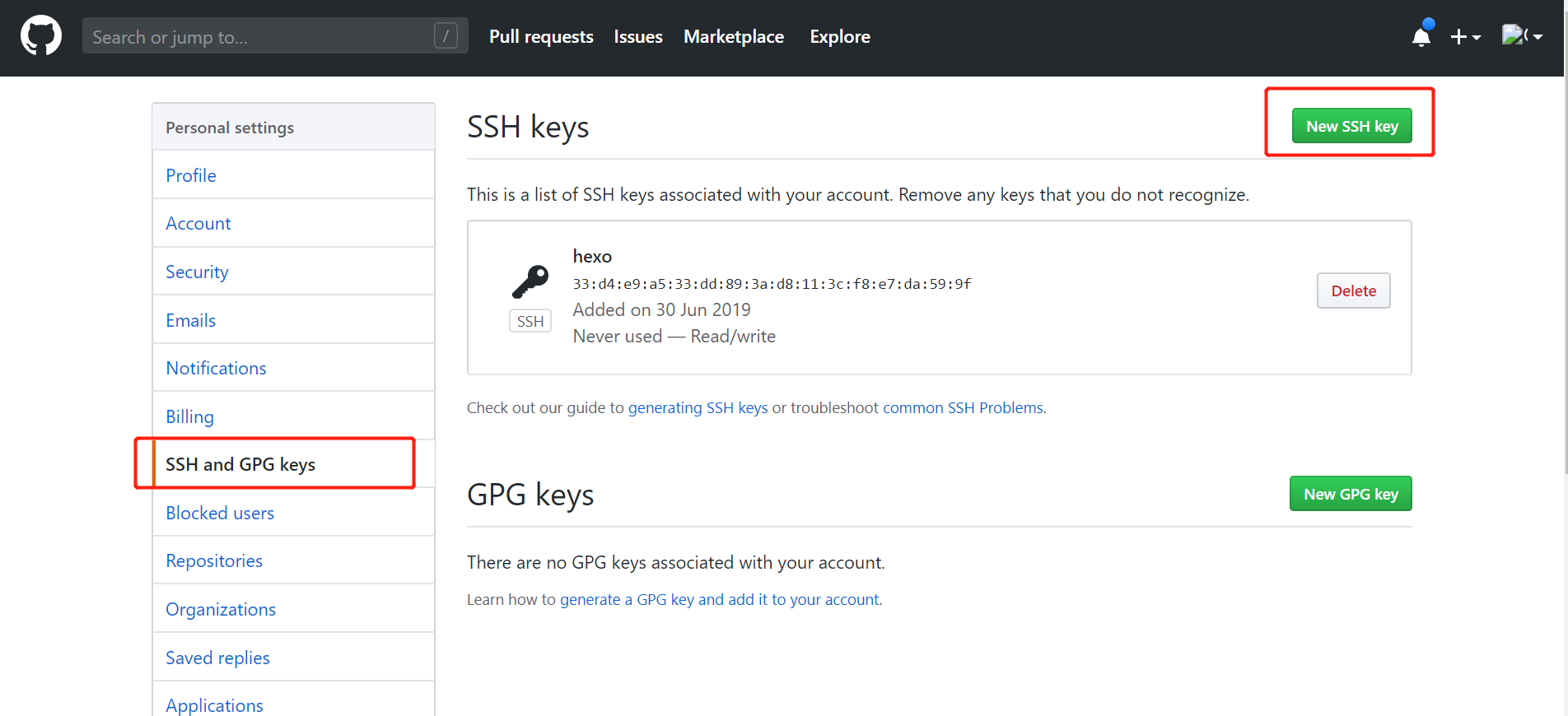
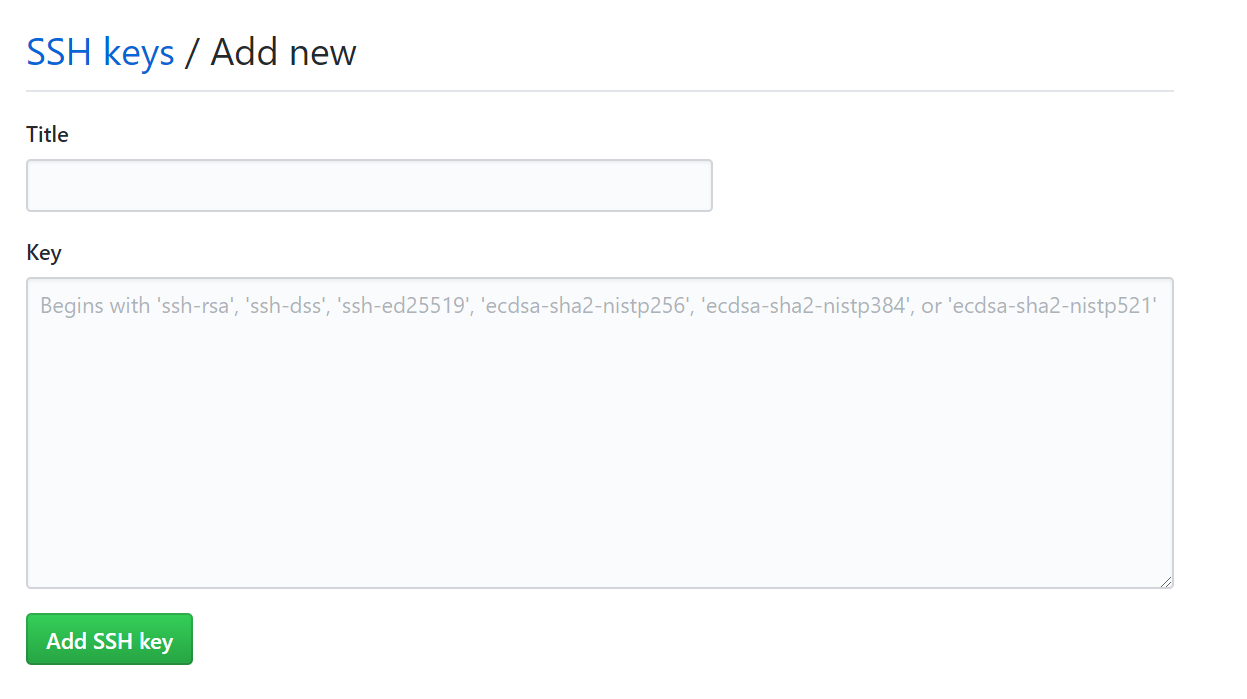
新增SSH key将id_rsa.pub内容添加到如图中的Key上(title可任意命名):
5.最后完美解决这个问题
git之fatal: Could not read from remote repository的更多相关文章
- git pull 出错 fatal: Could not read from remote repository.Please make sure you have the correct access rights.and the repository exists.
Warning: Permanently added the RSA host key for IP address '192.30.252.131' to the list of known hos ...
- git提示错误关于错误:ssh: Could not resolve hostname github.com: Name or service not known.fatal: Could not read from remote repository.
关于 Git 使用中出现的错误 饥人谷_楠柒 关注 2016.11.02 15:33* 字数 746 阅读 3607评论 5喜欢 10赞赏 1 关于错误:ssh: Could not resolve ...
- 用ssh进行git clone出现 fatal: Could not read from remote repository.
问题:在通过MobaXterm进行ssh连接的服务器上用ssh进行git clone出现 fatal: Could not read from remote repository. 解决方法:prox ...
- gitlab 安装遇到 fatal:does not appear to be a git repository fatal: Could not read from remote repository. 问题
Cloning into 'door_lock_bsp'... git@192.168.1.5's password: fatal: 'door_lock/door_lock_bsp.git' do ...
- fatal:'origin' does not appear to be a git repository fatal:Could not read from remote repository
天gitlab中遇到的问题: 当 git push origin branch_name时遇到报错如下: fatal:'origin' does not appear to be a git repo ...
- 【git基础】Permission denied (publickey). fatal: Could not read from remote repository
运行以下git命令的时候出现错误 git push -u origin master error The authenticity of host 'github.com (13.250.177.22 ...
- git clone ssh 时出现 fatal: Could not read from remote repository
一.问题及解决办法参考: 在 ubuntu 中,要把 GitHub 上的储存库克隆到计算机上时,执行如下命令: git clone git@github.com:USER-NAME/REPOSITOR ...
- github Permission denied (publickey). fatal: Could not read from remote repository.
github Permission denied (publickey).fatal: Could not read from remote repository. ----------------- ...
- Permission denied (publickey). fatal: Could not read from remote repository.
博主在github上下载tiny face的的源代码的时候,遇到git clone命令为:git clone --recursive git@github.com:peiyunh/tiny.git 而 ...
随机推荐
- intellij IDEA github clone 指定分支代码
1.问题描述 在实际开发中,我们通常会使用idea克隆一个新项目(clone),通常情况下,我们默认克隆的是master分支,但是如果master分支只是一个空文件夹而已,真正的代码在develop分 ...
- 设置Linux 程序lib搜索目录
设置Linux 程序lib搜索目录:export LD_LIBRARY_PATH=$LD_LIBRARY_PATH:lib路径,例如: export LD_LIBRARY_PATH=$LD_LIBRA ...
- angular官网实例(综合)
第一部分: (应用的“外壳”) 1.新建项目: ng new mytest 2.进入项目目录,并启动这个应用. cd mytest ng serve --open 3.添加一个标题 打开 app.co ...
- 查看Linux 系统的配置,内核版本和增减用户/增减组/增减权限
今天购买了一款腾讯云服务器,一年120RMB 配置也很一般 1核的CPU 2GB内存 1Mbps 带宽 普通云硬盘 50G 操作系统: CentOS 7.2.64 现在来验收一下 17 2019-0 ...
- 流Stream的关闭
文章;MemoryStream.Close() or MemoryStream.Dispose() Close() and Dispose(), when called on a MemoryStre ...
- Unity进阶之:MVC编程思想
版权声明: 本文原创发布于博客园"优梦创客"的博客空间(网址:http://www.cnblogs.com/raymondking123/)以及微信公众号"优梦创客&qu ...
- django项目中使用手机号登录
本文使用聚合数据的短信接口,需要先获取到申请接口的appkey和模板id 项目目录下创建ubtils文件夹,定义返回随机验证码和调取短信接口的函数 function.py文件 import rando ...
- asp.net 访问局域网共享文件
最近有个项目ASP.NET的项目,要读写一个局域网里的共享文件夹上的文件,记录如下: 1.访问共享文件 在这里我定义了一个方法,SaveFileExist(filesrc,filename),这个方法 ...
- [ML] Tensorflow.js + Image segmentPerson
<!DOCTYPE html> <html> <head> <title>Parcel Sandbox</title> <meta c ...
- jmeter使用教程
jmeter是基于JVM(最新版本基于jdk8+)的压测工具包.提供了丰富的工具来设置压测计划,执行压测任务和生成压测报告. 我这边使用的是windows10平台. 整个流程如下: 1.下载jmete ...