
sass登陆页面实例
sass登陆页面实例
一、总结
一句话总结:
sass使用非常方便:使用就是将sass转化为css引入,并且动态监听让sass转化为css,可以很方便的所见即所得
1、sass安装?
npm就可以按照了:npm install -g sass
2、sass文件如何使用?
Sass使用.scss作为文件后缀名,不能直接在<link>标签中使用,需要编译为.css文件。
将sass文件转化为css文件:sass input.scss output.css
3、sass的作用是什么?
Sass可以让我们使用一些CSS中没有实现的功能,例如变量、嵌套、组合、继承等等;
4、实时监控并且将sass文件转化为css文件?
sass--watch input.scss:output.css
sass --watch scss:dist/css 将sass文件夹中的sass文件转化为dist/css文件夹中的css文件
5、弹性布局居中?
display: flex;
justify-content: center;
align-items: center;
6、弹性布局左右分布实例?
display: flex;
justify-content: space-between;
7、after做body的颜色块?
after里面可以定义内容,样式等,很方便
  &::after {

    content: "";

    position: absolute;

    top:;

    left:;

    width: 100%;

    height: 100%;

    z-index: -1;

    background: $main-color;

    opacity: 0.8;

  }
8、css动画实例?
有hover属性后,可以加个transition: all 0.4s;
&:last-child {

  color: #fff;

  background: $second-color;

  transition: all 0.4s;

  &:hover {

    background: $main-color;

  }

}
9、vh使用实例?
min-height: 100vh;
body {

  position: relative;

  min-height: 100vh;

  background: url(../img/bg.jpg) no-repeat center center/cover;

  display: flex;

  justify-content: center;

  align-items: center;

}
二、sass登陆页面实例
1、效果图
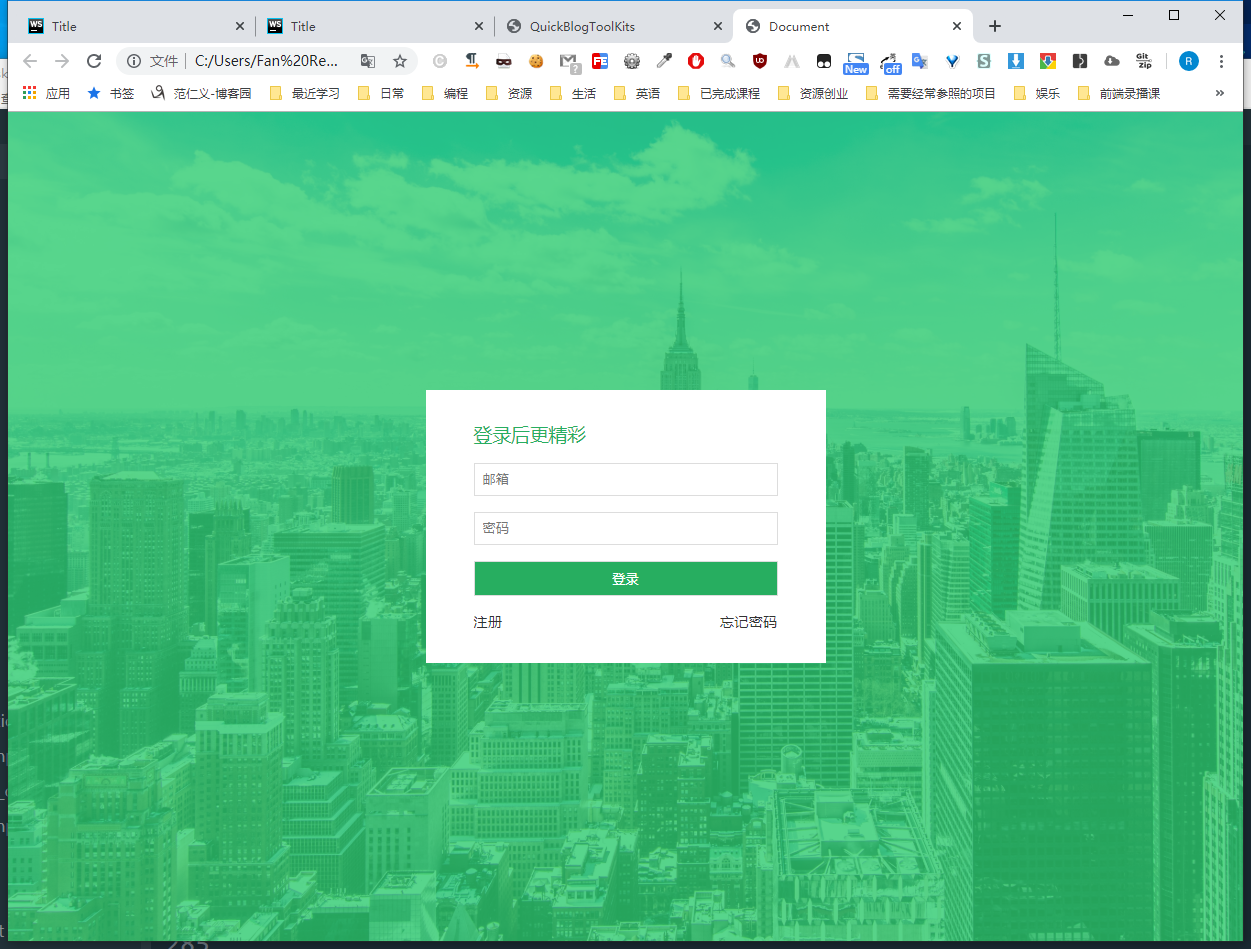
2、代码
1)html代码:index.html
 <!DOCTYPE html>

 <html lang="en">

   <head>

     <meta charset="UTF-8" />

     <meta name="viewport" content="width=device-width, initial-scale=1.0" />

     <meta http-equiv="X-UA-Compatible" content="ie=edge" />

     <link rel="stylesheet" href="css/main.css" />

     <title>Document</title>

   </head>

   <body>

     <div class="card">

       <h3>登录后更精彩</h3>

       <form>

         <input type="email" id="email" name="email" placeholder="邮箱" />

         <input type="password" id="password" name="password" placeholder="密码" />

         <input type="submit" value="登录" />

       </form>

       <ul>

         <li><a href="#">注册</a></li>

         <li><a href="#">忘记密码</a></li>

       </ul>

     </div>

   </body>

 </html>
2)sass代码:main.scss
 $main-color: #2ecc71;

 $second-color: #27ae60;

 * {

   margin:;

   padding:;

   box-sizing: border-box;

 }

 body {

   position: relative;

   min-height: 100vh;

   background: url(../img/bg.jpg) no-repeat center center/cover;

   display: flex;

   justify-content: center;

   align-items: center;

   &::after {

     content: "";

     position: absolute;

     top:;

     left:;

     width: 100%;

     height: 100%;

     z-index: -1;

     background: $main-color;

     opacity: 0.8;

   }

   .card {

     width: 400px;

     padding: 2rem 3rem;

     background: #fff;

     h3 {

       font-weight:;

       color: $second-color;

       margin-bottom: 1rem;

     }

     form input {

       display: block;

       width: 100%;

       border: 1px solid #ddd;

       padding: 0.5rem;

       margin-bottom: 1rem;

       &:last-child {

         color: #fff;

         background: $second-color;

         transition: all 0.4s;

         &:hover {

           background: $main-color;

         }

       }

       &:focus {

         outline: 1px solid $main-color;

       }

     }

     ul {

       list-style: none;

       display: flex;

       justify-content: space-between;

       font-size: 0.9rem;

       li a {

         color: #333;

         text-decoration: none;

         border-bottom: 1px solid transparent;

         transition: all 0.4s;

         &:hover {

           color: $main-color;

           border-bottom: 1px solid $main-color;

         }

       }

     }

   }

 }
3)css代码:main.css
 * {

   margin:;

   padding:;

   box-sizing: border-box;

 }

 body {

   position: relative;

   min-height: 100vh;

   background: url(../img/bg.jpg) no-repeat center center/cover;

   display: flex;

   justify-content: center;

   align-items: center;

 }

 body::after {

   content: "";

   position: absolute;

   top:;

   left:;

   width: 100%;

   height: 100%;

   z-index: -1;

   background: #2ecc71;

   opacity: 0.8;

 }

 body .card {

   width: 400px;

   padding: 2rem 3rem;

   background: #fff;

 }

 body .card h3 {

   font-weight:;

   color: #27ae60;

   margin-bottom: 1rem;

 }

 body .card form input {

   display: block;

   width: 100%;

   border: 1px solid #ddd;

   padding: 0.5rem;

   margin-bottom: 1rem;

 }

 body .card form input:last-child {

   color: #fff;

   background: #27ae60;

   transition: all 0.4s;

 }

 body .card form input:last-child:hover {

   background: #2ecc71;

 }

 body .card form input:focus {

   outline: 1px solid #2ecc71;

 }

 body .card ul {

   list-style: none;

   display: flex;

   justify-content: space-between;

   font-size: 0.9rem;

 }

 body .card ul li a {

   color: #333;

   text-decoration: none;

   border-bottom: 1px solid transparent;

   transition: all 0.4s;

 }

 body .card ul li a:hover {

   color: #2ecc71;

   border-bottom: 1px solid #2ecc71;

 }

 /*# sourceMappingURL=main.css.map */
sass登陆页面实例的更多相关文章
- web系统登陆页面增加验证码
传统登陆页面中包含两个输入项: • 用户名 • 密码有时为了防止机器人进行自动登陆操作,或者防止恶意用户进行用户信息扫描,需增加动态验证码功能.此时,登陆页面中包含了三个输入项: • 用户名 • 密码 ...
- Shrio登陆验证实例详细解读(转)
摘要:本文采用了Spring+SpringMVC+Mybatis+Shiro+Msql来写了一个登陆验证的实例,下面来看看过程吧!整个工程基于Mavevn来创建,运行环境为JDK1.6+WIN7+to ...
- 用java编写一个微博登陆页面
上次也写了一个微博登陆页面,不过功能还不够完善.今天重新完善了一些功能,分享出来给大家. 基本功能如下: (1)具有类似新浪微博的用户注册图形界面. (2)使用用户名或手机号注册,注册时需要提供新密码 ...
- [ExtJS5学习笔记]第二十五节 利用window.open()函数实现ExtJS5的登陆页面跳转
本文地址:http://blog.csdn.net/sushengmiyan/article/details/40427543 mvvm方式实现登陆的博客:http://blog.csdn.net/s ...
- Shiro学习总结(4)——Shrio登陆验证实例详细解读
最终效果如下: 工程整体的目录如下: Java代码如下: 配置文件如下: 页面资源如下: 好了,下面来简单说下过程吧! 准备工作: 先建表: [sql] view plain copy drop ta ...
- 编写大型项目web页面 从写web登陆页面开始
web页面搭建需要准备什么工具 首先我们会和设计师沟通 我们需要一些检验设计的工具 ps 自动裁图 自动测量工具 (我这里安利一下一个工具 我用的cutterman) sketch 可以使用阿里的工具 ...
- Springsecurity3.1.3配置多个登陆页面
需求:网站的前台和后台不同的url需要不同的登陆页面,不同的异常捕获方式. spring-security3.1以后的版本支持多个<http>标签,因此本文所采用的方式就是使用两个,实际上 ...
- MUI APP防止登陆页面出现白屏
最近在用MUI开发APP,总体效果,在IOS上,是完美的,但是在低端的Android手机上,就会出现性能问题,我个人觉得最严重的是,就是首页,就是APP打开的第一个页面,在iOS上,由于性能高,所以, ...
- Ajax 提交session实效跳转到完整的登陆页面
在spring security 中 Ajax提交时,session超时,局部加载登陆页面,为解决这个问题,重写ajax提交,返回的是modeview或者没有制定datatype时; 如果检测到加载到 ...
随机推荐
- WPF如何设置启动窗口
在做系统时,我们想在启动时显示自己想显示的界面,和Winform不同的是它有两种方法 1.在App.xaml中 <Application x:Class="WpfApp1.App&qu ...
- Linux命令cut
原文 cut 文件内容查看 显示行中的指定部分,删除文件中指定字段 显示文件的内容,类似于下的type命令. 说明 该命令有两项功能,其一是用来显示文件的内容,它依次读取由参数file所指明的文件,将 ...
- Nginx配置文件示例
Nginx的配置文件示例:(仅供参考) 强烈建议先将默认的配置文件备份再进行操作! 请根据自己项目的实际路径来配置相关路径! uwsgi配置文件请参考:uwsgi配置文件示例 # For more i ...
- centos7安装后,一些小优化
1.设置静态ip vim /etc/sysconfig/network-scripts/ifcfg-ens33 将BOOTPROTO=dhcp修改为BOOTPROTO=static ONBOOT=no ...
- PHP添加php-java-brideg模块(ubuntu环境)
1.下载php-java-bridge 下载地址:https://sourceforge.net/projects/php-java-bridge/files/Binary%20package/php ...
- 大量javascript代码的项目如何改善可维护性
项目中有点javascript文件,javascript代码行数达到7000多行,维护很费力,主要体现在以下几个方面: 1,方法没有注释,没有注释方法的作用,从上到下罗列,很难知道这个方法应该啥时候调 ...
- springboot 运行jar 跳转jsp页面
pom.xml 添加 <!-- tomcat支持 --> <dependency> <groupId>org.springframework.boot</gr ...
- Spring -13 -Spring 中常用注解总结
1.@Component 创建类对象,相当于配置<bean/> 2.@Service 与@Component 功能相同. 2.1都写在ServiceImpl 类上. 3.@Reposito ...
- #《你们都是魔鬼吗》第八次团队作业:第五天Alpha冲刺
<你们都是魔鬼吗>第八次团队作业:Alpha冲刺 项目 内容 这个作业属于哪个课程 任课教师博客主页链接 这个作业的要求在哪里 作业链接地址 团队名称 你们都是魔鬼吗 作业学习目标 完成最 ...
- 《BUG创造队》作业8:软件测试与Alpha冲刺(第五天)
项目 内容 这个作业属于哪个课程 2016级软件工程 这个作业的要求在哪里 实验十二 团队作业8:软件测试与ALPHA冲刺 团队名称 BUG创造队 作业学习目标 (1)掌握软件测试基础技术.(2)学习 ...