
[Songqw.Net 基础]WPF实现简单的插件化开发
原文:[Songqw.Net 基础]WPF实现简单的插件化开发
接着上一篇博客, 那里实现了简单的控制台加载插件,在这里通过WPF实现,做个备份.
WPF控件空间经常会与WinFrom混淆,要记得WPF控件是引用 using System.Windows.Controls;
1.构建控件:
WpfPart1.xaml
<UserControl x:Class="Songqw.Net.Plugins.Test.WPFPlugins.WpfPart1"

             xmlns="http://schemas.microsoft.com/winfx/2006/xaml/presentation"

             xmlns:x="http://schemas.microsoft.com/winfx/2006/xaml"

             xmlns:mc="http://schemas.openxmlformats.org/markup-compatibility/2006"

             xmlns:d="http://schemas.microsoft.com/expression/blend/2008"

             mc:Ignorable="d"

             d:DesignHeight="300" d:DesignWidth="300">

    <Grid>

        <Grid.Background>

            <LinearGradientBrush EndPoint="0.5,1" StartPoint="0.5,0">

                <GradientStop Color="#FF7C44F5" Offset="0"/>

                <GradientStop Color="White" Offset="1"/>

            </LinearGradientBrush>

        </Grid.Background>

    </Grid>

</UserControl>
WpfPart1.xaml.cs
using System;

using System.Windows.Controls;

using Songqw.Net.Plugins.Interface;

namespace Songqw.Net.Plugins.Test.WPFPlugins

{

    /// <summary>

    /// WpfPart1.xaml 的交互逻辑

    /// </summary>

    public partial class WpfPart1 : UserControl, IPluginMember

    {

        public WpfPart1()

        {

            InitializeComponent();

        }

        public string PluginName()

        {

            return "WpfPart1";

        }

        public int PluginId()

        {

            return GetHashCode();

        }

        public object InitPlugin()

        {

            return this;

        }

        public object InitPlugin(object[] paras)

        {

            return this;

        }

        public bool DisposePlugin()

        {

            throw new NotImplementedException();

        }

    }

}
WpfPart2 同上, 修改下名称即可.
测试WPF程序:
MainWindow.xaml
<Window x:Class="Songqw.Net.Plugins.Test.WpfApplication.MainWindow"

        xmlns="http://schemas.microsoft.com/winfx/2006/xaml/presentation"

        xmlns:x="http://schemas.microsoft.com/winfx/2006/xaml"

        Title="WPF插件测试程序" Height="350" Width="525">

    <Grid>

        <Grid.RowDefinitions>

            <RowDefinition Height="20"/>

            <RowDefinition Height="100*"/>

            <RowDefinition Height="30"/>

        </Grid.RowDefinitions>

        <Grid.ColumnDefinitions>

            <ColumnDefinition Width="120"/>

            <ColumnDefinition Width="100*"/>

        </Grid.ColumnDefinitions>

        <StackPanel x:Name="PartPanel" Margin="0,4,0,2" Grid.Row="1"/>

        <Grid x:Name="PartGrid"

              HorizontalAlignment="Left" Height="320" VerticalAlignment="Top" Width="397"

              Grid.Column="1"

              Grid.Row="0"

              Grid.RowSpan="3" Background="#FF686868"/>

        <Label  Content="加载插件数量 : 0 "

                Name="NumLabel"

                Grid.Row="0"

                Grid.Column="0"

                VerticalAlignment="Top" Height="20" Padding="5,0" Margin="5,0"/>

        <Button Content="选择目录"

                Grid.Row="2"

                Grid.Column="0"

                HorizontalAlignment="Left"   VerticalAlignment="Top"

                Margin="21,3,0,0"   Width="75" Click="Button_Click"

               />

    </Grid>

</Window>
MainWindow.xaml.cs:
using System;

using System.Windows;

using System.Windows.Forms;

using Songqw.Net.Plugins.Interface;

using Songqw.Net.Plugins.Tool;

using Application = System.Windows.Forms.Application;

using Button = System.Windows.Controls.Button;

namespace Songqw.Net.Plugins.Test.WpfApplication

{

    /// <summary>

    /// MainWindow.xaml 的交互逻辑

    /// </summary>

    public partial class MainWindow : Window

    {

        public MainWindow()

        {

            InitializeComponent();

        }

        private void Button_Click(object sender, RoutedEventArgs e)

        {

            var folderBrowserDialog = new FolderBrowserDialog();

            folderBrowserDialog.SelectedPath = Application.StartupPath;

            folderBrowserDialog.ShowDialog();

            if (!string.IsNullOrEmpty(folderBrowserDialog.SelectedPath))

            {

                PartGrid.Children.Clear();

                PartPanel.Children.Clear();

                var plugins = LoadLibrary.LoadDocument(Application.StartupPath);

                if (plugins != null && plugins.Length > 0)

                {

                    foreach (Type t in plugins)

                    {

                        var instance = LoadLibrary.InitClassByType(t) as IPluginMember;

                        if (instance == null)

                            continue;

                        var btn = new System.Windows.Controls.Button

                        {

                            Tag = instance,

                            Content = instance.PluginName(),

                            Height = 25

                        };

                        btn.Click += btn_Click;

                        PartPanel.Children.Add(btn);

                    }

                    NumLabel.Content = string.Format("加载插件数量 : {0}", plugins.Length);

                }

            }

        }

        void btn_Click(object sender, RoutedEventArgs e)

        {

            PartGrid.Children.Clear();

            var btn = sender as Button;

            var instance = btn.Tag as IPluginMember;

            var ui = instance.InitPlugin();

            var uiElement = ui as UIElement;

            PartGrid.Children.Add(uiElement);

        }

    }

}
测试效果:
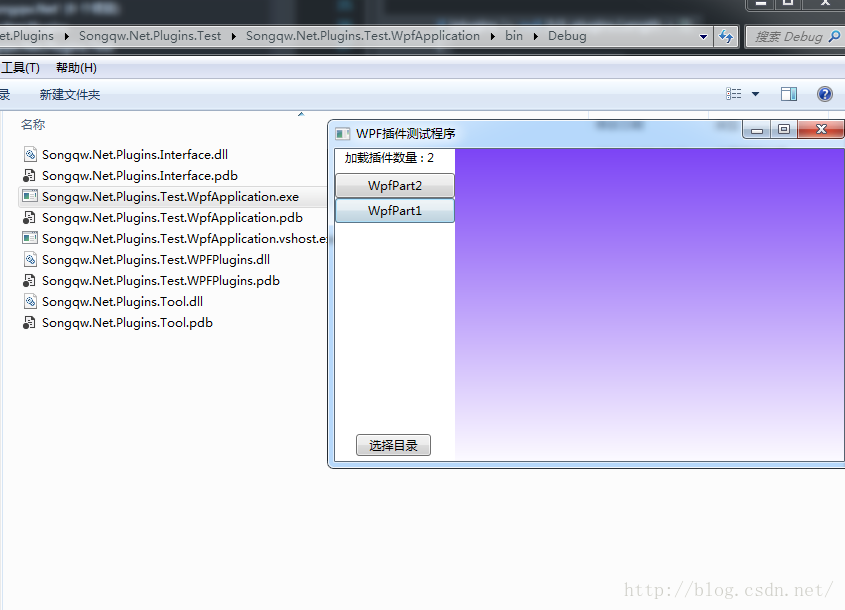
实际使用时, 可以通过InitPlugin 方法传递参数, 进行赋值等操作. 资源释放方面需要额外注意....
[Songqw.Net 基础]WPF实现简单的插件化开发的更多相关文章
- [Songqw.Net 基础]WPF插件化中同步Style
原文:[Songqw.Net 基础]WPF插件化中同步Style 版权声明:本文为博主原创文章,未经博主允许可以随意转载 https://blog.csdn.net/songqingwei1988/a ...
- 零基础ASP.NET Core MVC插件式开发
零基础ASP.NET Core MVC插件式开发 一个项目随着业务模块的不断增加,系统会越来越庞大.如果参与开发的人员越多,管理起来也难度也很大.面对这样的情况,首先想到的是模块化插件式开发,根据业务 ...
- NET 平台下的插件化开发内核
.NET 平台下的插件化开发内核(Rabbit Kernel) 每个程序猿都有一个框架梦,曾经在2013年8月15日写过一篇“Koala Framework是什么?我为什么要写这个框架?”的文章, ...
- 《Android插件化开发指南》面世
本书在京东购买地址:https://item.jd.com/31178047689.html 本书Q群:389329264 (一)这是一本什么书 如果只把本书当作纯粹介绍Android插件化技术的书籍 ...
- Android 插件化开发(一):Java 反射技术介绍
写在前面:学习插件化开发推荐书籍<Android 插件化开发指南>,本系列博客所整理知识部分内容出自此书. 在之前的项目架构的博文中,我们提到了项目插件化架构,提到插件化架构不得不提的到J ...
- apisix docker镜像构建及插件化开发
高能劝退:lua开发,适合小白看!!! 前段时间有个项目,用的java程序做网关,压测tps只有1k多点,惨不忍睹. 后来公司有个大佬改用apisix做网关,tps飙升到1w多. 于是对神奇的apis ...
- Android组件化和插件化开发
http://www.cnblogs.com/android-blogs/p/5703355.html 什么是组件化和插件化? 组件化开发就是将一个app分成多个模块,每个模块都是一个组件(Modul ...
- Android插件化开发
客户端开发给人的印象往往是小巧,快速奔跑.但随着产品的发展,目前产生了大量的门户型客户端.功能模块持续集成,开发人员迅速增长.不同的开发小组开发不同的功能模块,甚至还有其他客户端集成进入.能做到功能模 ...
- JavaScript插件化开发
大熊君JavaScript插件化开发 一,开篇分析 Hi,大家好!大熊君又和大家见面了,还记得昨天的那篇文章吗------这个系列的开篇(第一季).主要讲述了以“jQuery的方式如何开发插件”, 那 ...
随机推荐
- stm32的电源
有人说rtc会不工作
- php 发送QQ邮箱邮件
这是我的源码比较简陋 https://www.lanzous.com/i2l7h8f 感谢 https://www.cnblogs.com/woider/p/6980456.html 下载phpmai ...
- 【例题3-3 UVA - 401】Palindromes
[链接] 我是链接,点我呀:) [题意] 在这里输入题意 [题解] 如果一个字符没有对应的镜像,那么它对应的是一个空格. 然后注意 aba这种情况. 这种情况下b也要查一下它的镜像是不是和b一样. [ ...
- 【39.66%】【codeforces 740C】Alyona and mex
time limit per test2 seconds memory limit per test256 megabytes inputstandard input outputstandard o ...
- diff_mysql_table_exec.py
#!/usr/bin/env python #-*- encoding: utf8 -*- import mysql.connector import sys import re import dat ...
- bitnami WAMP stack使用方法(转)
想学习PHP,在网上找了些资料看了一下.介绍一个简单快速的服务器搭建方法,基于WAMP(WINDOWS+APATCH_MYSQL/MARIADB+PERL/PHP/PYTHON)架构.对应的也有LAM ...
- eclipse去掉js验证
第一步:去除eclipse的js验证:window->preference->Java Script->Validator->Errors/Warnings->Enabl ...
- 【9207&&b701】统计数字(NOIP2007)
问题描述 某次科研调查时得到了n个自然数,每个数均不超过1500000000 (1.5*109).已知不相同的数不超过10000个,现在需要统计这些自然数各自出现的次数,并按照自然数从小到大的顺序输出 ...
- 二:新浪微博:第三方框架管理工具CocoaPods的安装和使用
一:CocoaPods的安装 我们可以用淘宝的Ruby镜像来访问cocoapods.按照下面的顺序在终端中敲入依次敲入 $ gem sources --remove https://rubygems. ...
- [Redux] Avoid action type naming conflicts
In redux, the action type is just a normal string type, it is easy to get naming conflicts in large ...