
【Azure Redis 缓存】使用Python代码获取Azure Redis的监控指标值 (含Powershell脚本方式)
问题描述
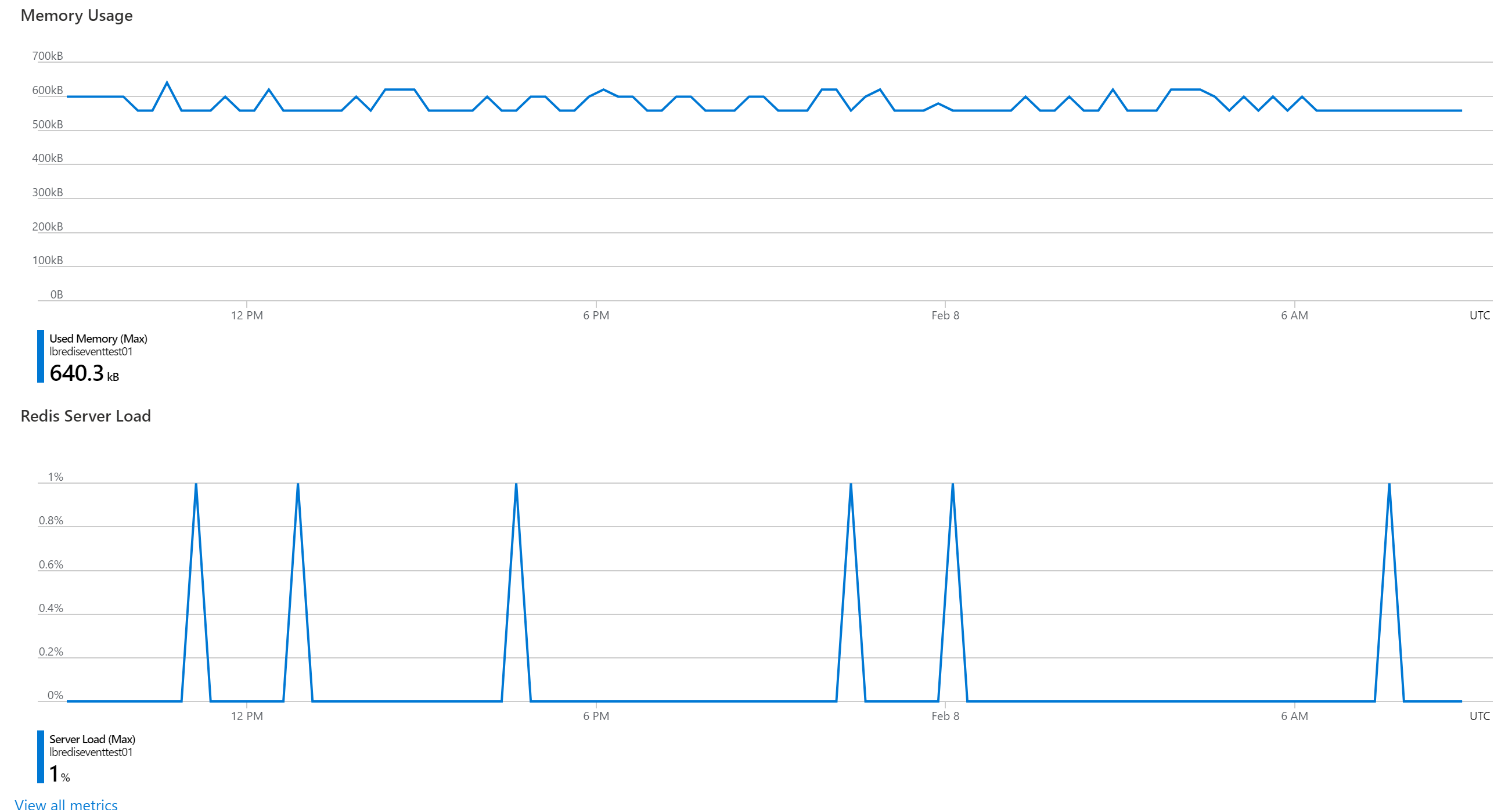
通过Metrics监控页面,我们能得知当前资源(如Redis)的运行情况与各种指标。如果我们需要把指标下载到本地或者生成JSON数据导入到第三方的监控平台呢?Azure是否可以通过Python代码或者时Powershell脚本导出各种指标数据呢?
解决办法
可以! PowerShell命令可以使用Get-AzMetric 或者是 az monitor metrics list命令来获取资源的Metrics值。
- Get-AzMetric:Gets the metric values of a resource. https://docs.microsoft.com/en-us/powershell/module/az.monitor/get-azmetric?view=azps-5.4.0&viewFallbackFrom=azps-5.2.0
- az monitor metrics list: List the metric values for a resource. https://docs.microsoft.com/en-us/cli/azure/monitor/metrics?view=azure-cli-latest#az_monitor_metrics_list
而使用Python代码,可以使用Metrics的REST API来实现
Metrics - List:Lists the metric values for a resource. https://docs.microsoft.com/en-us/rest/api/monitor/metrics/list
- 在AAD中注册应用获取在Python代码中访问Redis Metrics的Access Token: (将应用程序注册到 Microsoft 标识平台: https://docs.azure.cn/zh-cn/active-directory/develop/quickstart-register-app)
注:使用Powershell必须先登录到Azure。使用命令 Connect-AzAccount -Environment AzureChinaCloud 或 az cloud set --name AzureChinaCloud 和 az login。
使用Python代码则需要先获取到访问Redis Metrics的Token。获取Token可以在Azure AD中注册一个应用,然后给该应用在Redis的访问控制中赋予reader的权限即可读取Metris数据。
执行步骤
Python
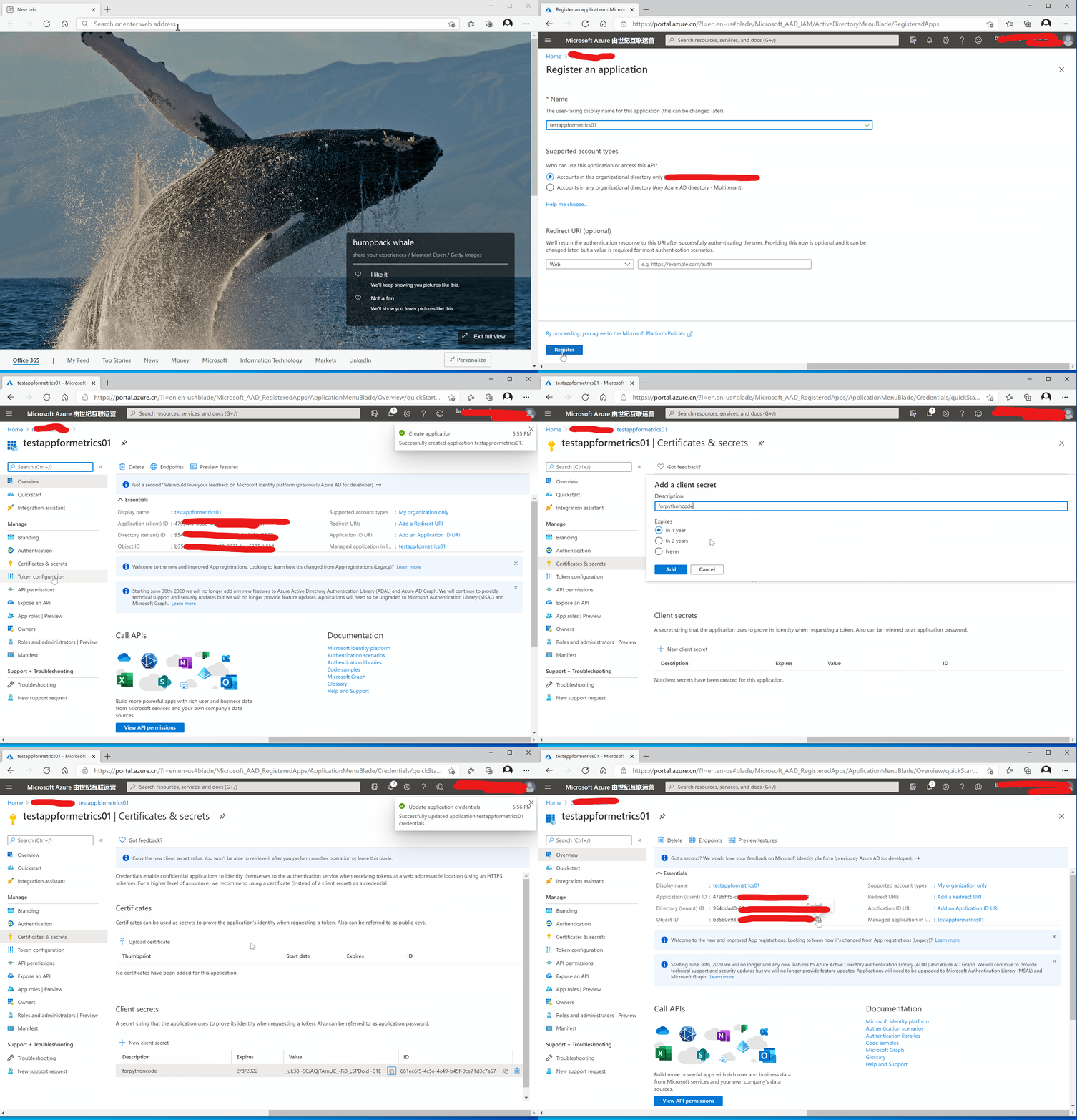
步骤一:注册AAD应用,复制应用ID,客户端访问密码
- 登录Azure平台,进入AAD页面,点击App registrations: https://portal.azure.cn/?l=en.en-us#blade/Microsoft_AAD_IAM/ActiveDirectoryMenuBlade/RegisteredApps
- 点击“New Registration” 按钮,输入应用名称,其他值保留默认,点击保存
- 创建成功后,进入应用页面,导入到“Certificates & secrets”页面,创建需要使用的Client Secret并复制出来,第三步需要使用
- 在应用页面复制出Tenant ID, Applicaiton ID需要在第三步代码中使用
具体操作过程见如下动图:
步骤二:赋予获取Metrics的权限
在Redis的Access control (IAM)页面中,通过步骤一的应用名搜索并赋予Monitoring Reader权限
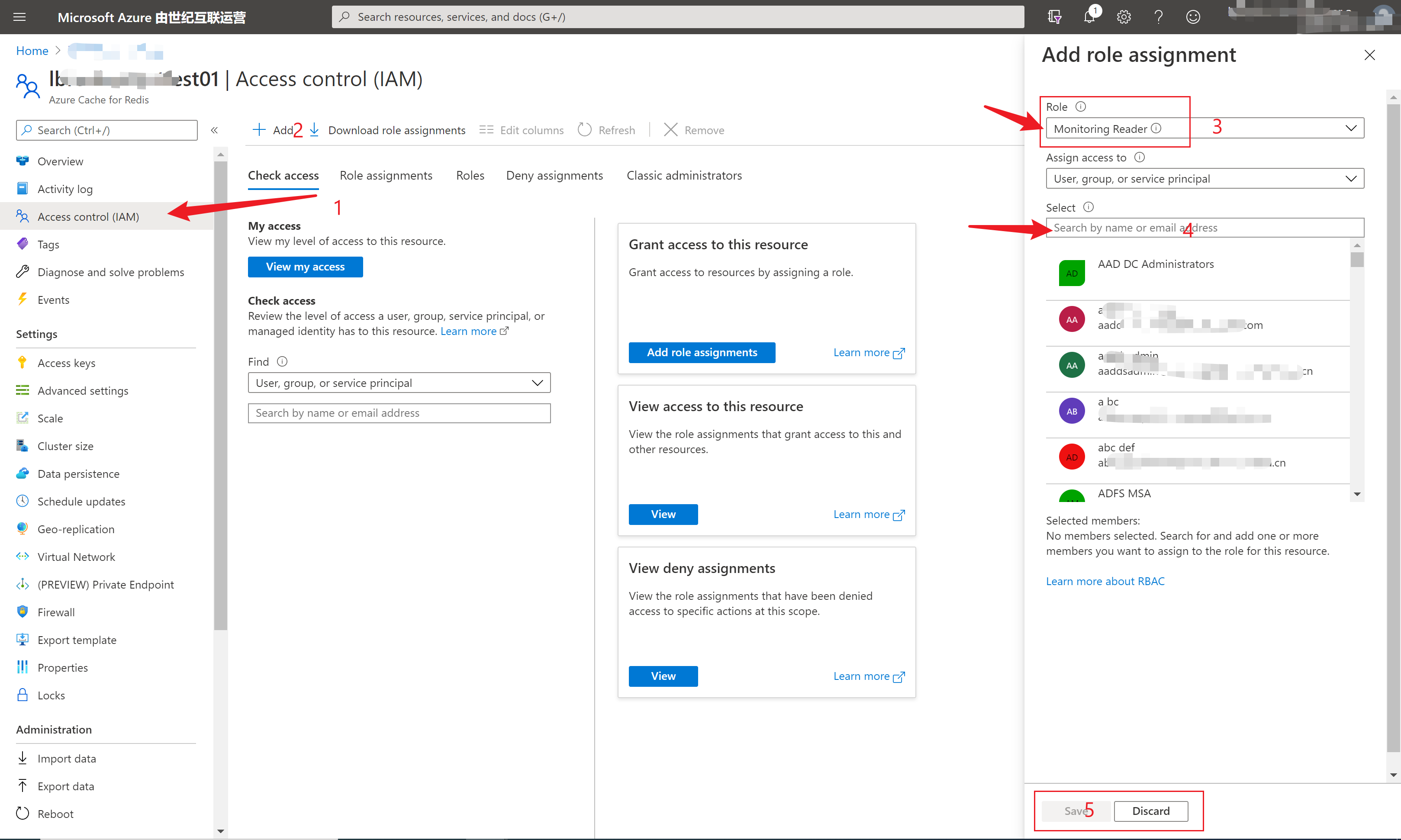
注:如没有赋予权限,则代码中会报出类似错误:
|
Status Code: <Response [403]> |
步骤三:编写Python代码,使用requests来发送psot,get请求
- 代码中主要有两部分内容:一是获取Access Token,二是获取Metrics Data
- 高亮中的内容都是需要替换成相应的资源信息和第一步中准备的信息
- 在获取Access Token的Body内容中,grant_type是固定值,为client_credentials。resource的值为中国区azure的管理终结点:https://management.chinacloudapi.cn
import requests

import json

##Part 1: Get Access Token

aadurl="https://login.chinacloudapi.cn/<your aad tenant id>/oauth2/token"

aadbody={

    'grant_type':'client_credentials',

    'client_id':'your aad client id',

    'client_secret':'your aad client secret',

    'resource':'https://management.chinacloudapi.cn'

}

rtoken= requests.post(aadurl, data=aadbody)

##print(rtoken)

objtoken = json.loads(rtoken.text)

##print(obj['access_token'])

##Part 2: Get the Metrics Value by Token

headers = {'content-type': "application/json",

           'Authorization': 'Bearer '+objtoken['access_token']

        }

url= "https://management.chinacloudapi.cn/subscriptions/<subscriptions>/resourceGroups/<resourceGroups>/providers/Microsoft.Cache/Redis/<your redis name>/providers/microsoft.insights/metrics?api-version=2018-01-01&metricnames=expiredkeys,usedmemory"

r = requests.get(url, headers=headers)

print('Status Code: ' + str(r))

print('Response Content: ' + str(r.content))
运行效果如:

Powershell
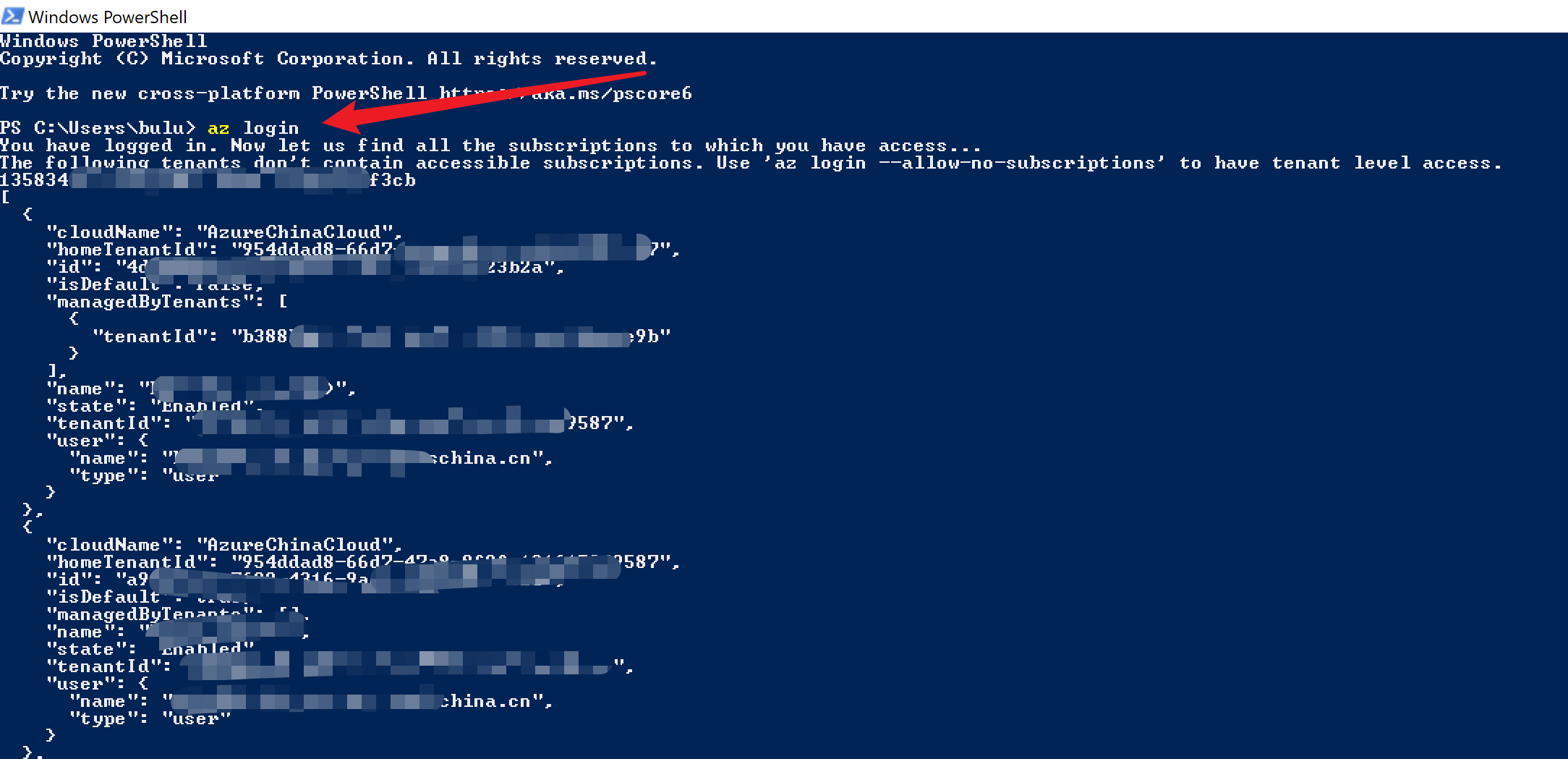
- 登录azure
- 准备az monitor metrics list命令
az cloud set --name AzureChinaCloud

az login

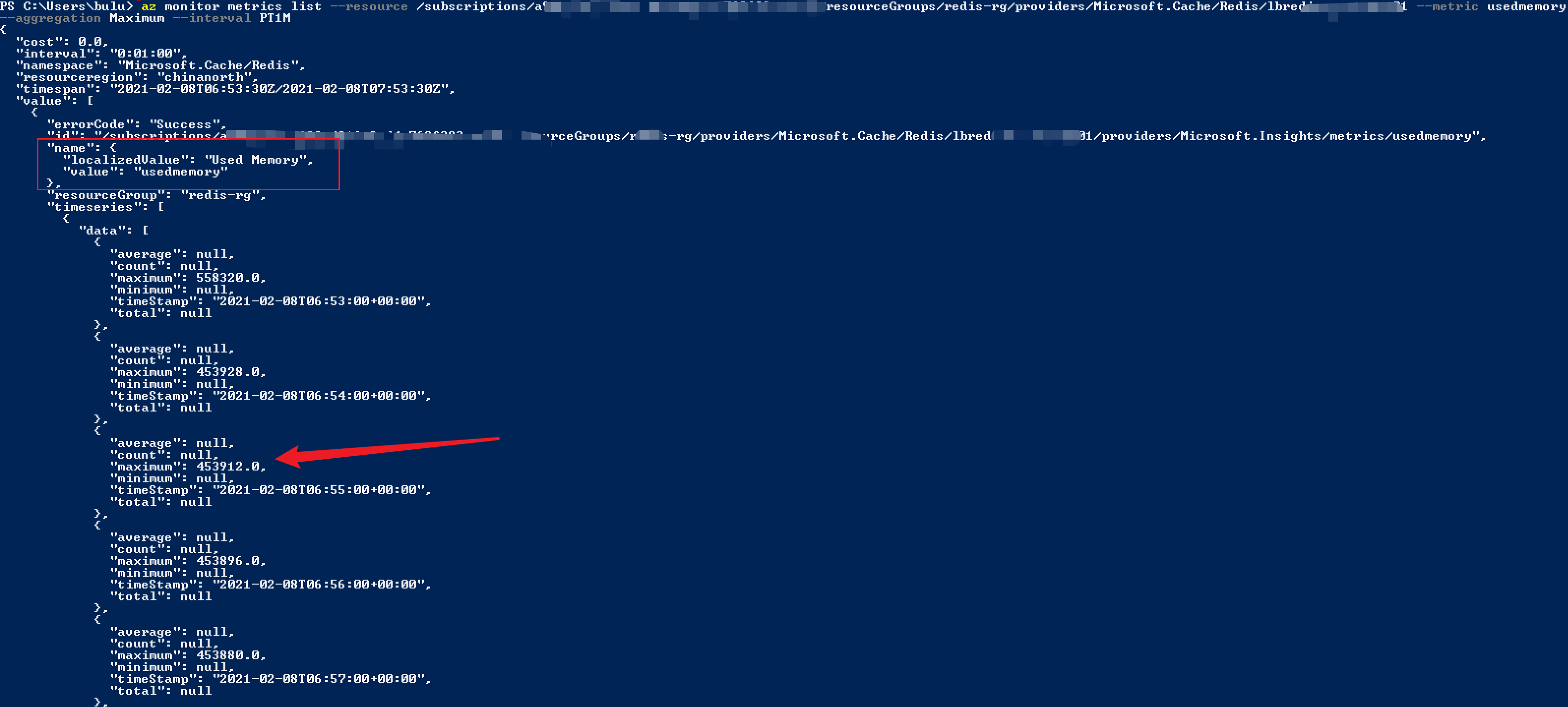
az monitor metrics list --resource /subscriptions/<your subscriptions>/resourceGroups/<resourceGroups>/providers/Microsoft.Cache/Redis/<your redis name> --metric usedmemory --aggregation Maximum --interval PT1M
执行效果如下:
参考资料
将应用程序注册到 Microsoft 标识平台:https://docs.azure.cn/zh-cn/active-directory/develop/quickstart-register-app
REST API Metrics - List: https://docs.microsoft.com/en-us/rest/api/monitor/metrics/list
Get-AzMetric: https://docs.microsoft.com/en-us/powershell/module/az.monitor/get-azmetric?view=azps-5.4.0&viewFallbackFrom=azps-5.2.0
az monitor metrics list: https://docs.microsoft.com/en-us/cli/azure/monitor/metrics?view=azure-cli-latest#az_monitor_metrics_list
【Azure Redis 缓存】使用Python代码获取Azure Redis的监控指标值 (含Powershell脚本方式)的更多相关文章
- 【Azure 环境】【Azure Developer】使用Python代码获取Azure 中的资源的Metrics定义及数据
问题描述 使用Python SDK来获取Azure上的各种资源的Metrics的名称以及Metrics Data的示例 问题解答 通过 azure-monitor-query ,可以创建一个 metr ...
- Windows下Redis缓存服务器的使用 .NET StackExchange.Redis Redis Desktop Manager 转发非原创
Windows下Redis缓存服务器的使用 .NET StackExchange.Redis Redis Desktop Manager Redis缓存服务器是一款key/value数据库,读11 ...
- 【Azure Redis 缓存】 Python连接Azure Redis, 使用redis.ConnectionPool 出现 "ConnectionResetError: [Errno 104] Connection reset by peer"
问题描述 Python连接Azure Redis, 使用redis.ConnectionPool 出现 "ConnectionResetError: [Errno 104] Connecti ...
- 【Azure Developer】【Python 】使用 azure.identity 和 azure.common.credentials 获取Azure AD的Access Token的两种方式
问题描述 使用Python代码,展示如何从Azure AD 中获取目标资源的 Access Token. 如要了解如何从AAD中获取 client id,client secret,tenant id ...
- 【Azure Developer】使用 Python SDK连接Azure Storage Account, 计算Blob大小代码示例
问题描述 在微软云环境中,使用python SDK连接存储账号(Storage Account)需要计算Blob大小?虽然Azure提供了一个专用工具Azure Storage Explorer可以统 ...
- 【Azure Developer】使用Java代码启动Azure VM(虚拟机)
问题描述 在使用Java的启动Azure VM的过程中,遇见了com.azure.core.management.exception.ManagementException: Status code ...
- C# Redis 缓存应用 主要代码及版本选择
/// <summary> /// RedisManager类主要是创建链接池管理对象的 /// </summary> public class RedisManager { ...
- Windows下Redis缓存服务器的使用 .NET StackExchange.Redis Redis Desktop Manager
Redis缓存服务器是一款key/value数据库,读110000次/s,写81000次/s,因为是内存操作所以速度飞快,常见用法是存用户token.短信验证码等 官网显示Redis本身并没有Wind ...
- [转]Windows下Redis缓存服务器的使用 .NET StackExchange.Redis Redis Desktop Manager
转自:http://www.cnblogs.com/oppoic/p/6165581.html Redis缓存服务器是一款key/value数据库,读110000次/s,写81000次/s,因为是内存 ...
随机推荐
- kubernets之secret资源
一 对于一些保密度比较高的文件,k8s又是如何存储的呢? 针对那些保密度比较高的配置文件,例如证书以及一些认证配置不能直接存储在configmap中,而是需要存储在另外一种资源中,需要对存储在里面的 ...
- File Inclusion - Pikachu
概述: 文件包含,是一个功能.在各种开发语言中都提供了内置的文件包含函数,其可以使开发人员在一个代码文件中直接包含(引入)另外一个代码文件. 比如 在PHP中,提供了: include(),inclu ...
- oracle绑定变量测试及性能对比
1.创建测试数据 2.查看cursor_sharing的值 SQL> show parameter cursor_sharing; NAME TYPE VALUE --------------- ...
- 1V转3.3V稳压供电的芯片电路图
1V转3.3V供电是简单的,仅需要一个芯片和三个外围元件即可组成这样的一个1V转3.3V的电路图和升压电路了.可以持续稳定地供电3.3V给模块或者MCU灯电路.让后端工作稳定,同时也能控制电路的功耗. ...
- 1.2V升3.3V芯片,大电流,应用MCU供电,3.3V稳压源
MCU供电一般是2.5V-5V之间等等都有,1.2V需要升到3.3V的升压芯片来稳压输出3.3V给MCU供电. 同时1.2V的输入电压低,说明供电端的能量也是属于低能量的,对于芯片自身供货是也要求高. ...
- ATtiny3217 x WS2812B梦幻联动
TinyAVR 1-series是Microchip于2018年推出的AVR单片机系列,定位是新一代的8位单片机,ATtiny3217是其中最高端的一款.相比于ATmega328P那个时代的AVR,A ...
- (13)-Python3之--获取当前时间
1.导入datetime模块 import datetime 2.获取当前日期和时间 import datetime now_time = datetime.datetime.now() print( ...
- CSSmargin击穿问题(子元素margin-top会影响父元素)
最近写一个H5页面的时候发现了这个被忽视的问题,一时没想到什么原因,搜了半天,记录一下,方便他人踩坑.唉,有些东西不用就忘. 一.问题描述 <div class="container& ...
- 干货 | 携程Redis治理演进之路(二)
https://mp.weixin.qq.com/s/QTqcBZlAhp5cLRJGJVZRNw 干货 | 携程Redis治理演进之路(二) 原创 技术中心 携程技术 2020-12-24 ...
- 【C++小知识】#define、enum、const的含义与用法
一.#define 含义 define是宏定义,编译器不对其进行错误检查,在预编译阶段处理,没有作用域限制属于全局常量,在程序中编译器会对定义的常量名以数值进行替换,且每次替换都分配内存,此方法对于大 ...