
Object Modeling
https://developer.apple.com/library/content/documentation/General/Conceptual/CocoaEncyclopedia/ObjectModeling/ObjectModeling.html#//apple_ref/doc/uid/TP40010810-CH15-SW1
This section defines terms and presents examples of object modeling and key-value coding that are specific to Cocoa bindings and the Core Data framework. Understanding terms such as key paths is fundamental to using these technologies effectively. This section is recommended reading if you are new to object-oriented design or key-value coding.
When using the Core Data framework, you need a way to describe your model objects that does not depend on views and controllers. In a good reusable design, views and controllers need a way to access model properties without imposing dependencies between them. The Core Data framework solves this problem by borrowing concepts and terms from database technology—specifically, the entity-relationship model.
Entity-relationship modeling is a way of representing objects typically used to describe a data source’s data structures in a way that allows those data structures to be mapped to objects in an object-oriented system. Note that entity-relationship modeling isn’t unique to Cocoa; it’s a popular discipline with a set of rules and terms that are documented in database literature. It is a representation that facilitates storage and retrieval of objects in a data source. A data source can be a database, a file, a web service, or any other persistent store. Because it is not dependent on any type of data source it can also be used to represent any kind of object and its relationship to other objects.
In the entity-relationship model, the objects that hold data are called entities, the components of an entity are called attributes, and the references to other data-bearing objects are called relationships. Together, attributes and relationships are known as properties. With these three simple components (entities, attributes, and relationships), you can model systems of any complexity.
Cocoa uses a modified version of the traditional rules of entity-relationship modeling referred to in this document as object modeling. Object modeling is particularly useful in representing model objects in the Model-View-Controller (MVC) design pattern. This is not surprising because even in a simple Cocoa application, models are typically persistent—that is, they are stored in a data container such as a file.
Entities
Entities are model objects. In the MVC design pattern, model objects are the objects in your application that encapsulate specified data and provide methods that operate on that data. They are usually persistent but more importantly, model objects are not dependent on how the data is displayed to the user.
For example, a structured collection of model objects (an object model) can be used to represent a company’s customer base, a library of books, or a network of computers. A library book has attributes—such as the book title, ISBN number, and copyright date—and relationships to other objects—such as the author and library member. In theory, if the parts of a system can be identified, the system can be expressed as an object model.
Figure 8-1 shows an example object model used in an employee management application. In this model, Department models a department and Employee models an employee.
Figure 8-1 Employee management application object diagram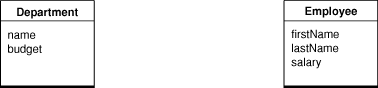
Attributes
Attributes represent structures that contain data. An attribute of an object may be a simple value, such as a scalar (for example, an integer, float, or double value), but can also be a C structure (for example an array of char values or an NSPoint structure) or an instance of a primitive class (such as, NSNumber, NSData, or NSColor in Cocoa). Immutable objects such as NSColor are usually considered attributes too. (Note that Core Data natively supports only a specific set of attribute types, as described in NSAttributeDescription Class Reference. You can, however, use additional attribute types, as described in Non-Standard Persistent Attributes in Core Data Programming Guide.)
In Cocoa, an attribute typically corresponds to a model’s instance variable or accessor method. For example, Employee has firstName, lastName, and salary instance variables. In an employee management application, you might implement a table view to display a collection of Employee objects and some of their attributes, as shown in Figure 8-2. Each row in the table corresponds to an instance of Employee, and each column corresponds to an attribute of Employee.
Figure 8-2 Employees table view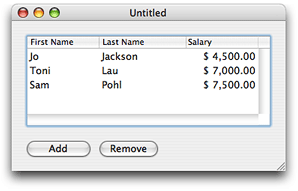
Relationships
Not all properties of a model are attributes—some properties are relationships to other objects. Your application is typically modeled by multiple classes. At runtime, your object model is a collection of related objects that make up an object graph. These are typically the persistent objects that your users create and save to some data container or file before terminating the application (as in a document-based application). The relationships between these model objects can be traversed at runtime to access the properties of the related objects.
For example, in the employee management application, there are relationships between an employee and the department in which the employee works, and between an employee and the employee’s manager. Because a manager is also an employee, the employee–manager relationship is an example of a reflexive relationship—a relationship from an entity to itself.
Relationships are inherently bidirectional, so conceptually at least there are also relationships between a department and the employees that work in the department, and an employee and the employee’s direct reports. Figure 8-3 illustrates the relationships between a Department and an Employee entity, and the Employee reflexive relationship. In this example, the Department entity’s “employees” relationship is the inverse of the Employee entity’s “department” relationship. It is possible, however, for relationships to be navigable in only one direction—for there to be no inverse relationship. If, for example, you are never interested in finding out from a department object what employees are associated with it, then you do not have to model that relationship. (Note that although this is true in the general case, Core Data may impose additional constraints over general Cocoa object modeling—not modeling the inverse should be considered an extremely advanced option.)
Figure 8-3 Relationships in the employee management application
Relationship Cardinality and Ownership
Every relationship has a cardinality; the cardinality tells you how many destination objects can (potentially) resolve the relationship. If the destination object is a single object, then the relationship is called a to-one relationship. If there may be more than one object in the destination, then the relationship is called a to-many relationship.
Relationships can be mandatory or optional. A mandatory relationship is one where the destination is required—for example, every employee must be associated with a department. An optional relationship is, as the name suggests, optional—for example, not every employee has direct reports. So the directReports relationship depicted in Figure 8-4 is optional.
It is also possible to specify a range for the cardinality. An optional to-one relationship has a range 0-1. An employee may have any number of direct reports, or a range that specifies a minimum and a maximum, for example, 0-15, which also illustrates an optional to-many relationship.
Figure 8-4 illustrates the cardinalities in the employee management application. The relationship between an Employee object and a Department object is a mandatory to-one relationship—an employee must belong to one, and only one, department. The relationship between a Department and its Employee objects is an optional to-many relationship (represented by a “*”). The relationship between an employee and a manager is an optional to-one relationship (denoted by the range 0-1)—top-ranking employees do not have managers.
Figure 8-4 Relationship cardinality
Note also that destination objects of relationships are sometimes owned and sometimes shared.
Accessing Properties
In order for models, views, and controllers to be independent of each other, you need to be able to access properties in a way that is independent of a model’s implementation. This is accomplished by using key-value pairs.
Keys
You specify properties of a model using a simple key, often a string. The corresponding view or controller uses the key to look up the corresponding attribute value. This design enforces the notion that the attribute itself doesn’t necessarily contain the data—the value can be indirectly obtained or derived.
Key-value coding is used to perform this lookup; it is a mechanism for accessing an object’s properties indirectly and, in certain contexts, automatically. Key-value coding works by using the names of the object’s properties—typically its instance variables or accessor methods—as keys to access the values of those properties.
For example, you might obtain the name of a Department object using a name key. If the Department object either has an instance variable or a method called name then a value for the key can be returned (if it doesn’t have either, an error is returned). Similarly, you might obtain Employee attributes using the firstName, lastName, and salary keys.
Values
All values for a particular attribute of a given entity are of the same data type. The data type of an attribute is specified in the declaration of its corresponding instance variable or in the return value of its accessor method. For example, the data type of the Department object name attribute may be an NSStringobject in Objective-C.
Note that key-value coding returns only object values. If the return type or the data type for the specific accessor method or instance variable used to supply the value for a specified key is not an object, then an NSNumber or NSValue object is created for that value and returned in its place. If the name attribute of Department is of type NSString, then, using key-value coding, the value returned for the name key of a Department object is an NSString object. If the budget attribute of Department is of type float, then, using key-value coding, the value returned for the budget key of a Department object is an NSNumberobject.
Similarly, when you set a value using key-value coding, if the data type required by the appropriate accessor or instance variable for the specified key is not an object, then the value is extracted from the passed object using the appropriate -typeValue method.
The value of a to-one relationship is simply the destination object of that relationship. For example, the value of the department property of an Employee object is a Department object. The value of a to-many relationship is the collection object. The collection can be a set or an array. If you use Core Data it is a set; otherwise, it is typically an array) that contains the destination objects of that relationship. For example, the value of the employees property of an Department object is a collection containing Employee objects. Figure 8-5 shows an example object graph for the employee management application.
Figure 8-5 Object graph for the employee management application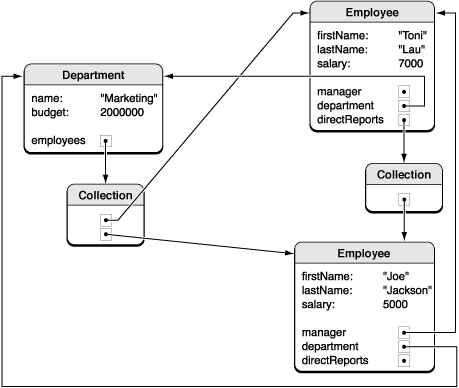
Key Paths
A key path is a string of dot-separated keys that specify a sequence of object properties to traverse. The property of the first key is determined by, and each subsequent key is evaluated relative to, the previous property. Key paths allow you to specify the properties of related objects in a way that is independent of the model implementation. Using key paths you can specify the path through an object graph, of whatever depth, to a specific attribute of a related object.
The key-value coding mechanism implements the lookup of a value given a key path similar to key-value pairs. For example, in the employee-management application you might access the name of a Department via an Employee object using the department.name key path where department is a relationship of Employee and name is an attribute of Department. Key paths are useful if you want to display an attribute of a destination entity. For example, the employee table view in Figure 8-6 is configured to display the name of the employee’s department object, not the department object itself. Using Cocoa bindings, the value of the Department column is bound to department.name of the Employee objects in the displayed array.
Figure 8-6 Employees table view showing department name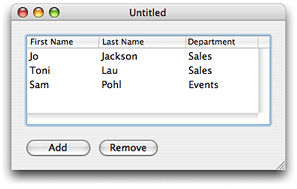
Not every relationship in a key path necessarily has a value. For example, the manager relationship can be nil if the employee is the CEO. In this case, the key-value coding mechanism does not break—it simply stops traversing the path and returns an appropriate value, such as nil.
Object Modeling的更多相关文章
- IT English Collection(20) of Object modeling
1 前言 本节简单的介绍了对象建模,以及需要注意的事项. 2 详述 2.1 原文 Objectmodeling is the process of designing the objects or c ...
- IOS深入学习(20)之Object modeling
1 前言 本节简单的介绍了对象建模,以及需要注意的事项. 2 详述 对象建模是对设计通过一个面向对象应用检测和操作服务的对象或者类的加工.许多模型技术是可能的:Cocoa开发环境不推荐歧义性. 典型地 ...
- 彩色建模(四色原型) Object Modeling in Color学习心得
定义4种类的原型,在UML中用不同颜色表示不同原型的对象 1. Party, Place, Thing Party: 事件的参与方,例如某人人.某组织等 Place: 事件的发生地,例如仓库. ...
- (转) [it-ebooks]电子书列表
[it-ebooks]电子书列表 [2014]: Learning Objective-C by Developing iPhone Games || Leverage Xcode and Obj ...
- 转:深入浅出UML类图(具体到代码层次)
深入浅出UML类图 作者:刘伟 ,发布于:2012-11-23,来源:CSDN 在UML 2.0的13种图形中,类图是使用频率最高的UML图之一.Martin Fowler在其著作<UML ...
- C++的学习资源
本文总结了几个好的C++网站,以及C++方面的经典书籍.所列书籍或标准可以到这里找找电子版. wikipedia关于C++有关条目,注意看后面“参考文献”和“外部链接”: C++ programmin ...
- 深入浅出UML类图(一)
在UML 2.0的13种图形中,类图是使用频率最高的UML图之一.Martin Fowler在其著作<UML Distilled: A Brief Guide to the Standard O ...
- iOS-数据持久化-CoreData
CoreData详解 介绍: 在Cocoa环境下,如果你想使用数据库(如sqlite),你可以使用sql语句的方式通过相关的工具类进行数据库的直接操作.当然你也可以通过别人封装之后的一些简单框架,使得 ...
- 深入浅出UML类图
原作者:http://www.uml.org.cn/oobject/201211231.asp 在UML 2.0的13种图形中,类图是使用频率最高的UML图之一.Martin Fowler在其著作&l ...
随机推荐
- UVa 10801 Lift Hopping (Dijkstra)
题意:有一栋100层的大楼(标号为0~99),里面有n个电梯(不超过5个),以及要到达的层数(aid),然后是每个电梯走一层所需的时间, 再n行就是对应每个电梯可以到达的层数,数量不定.然后每装换一次 ...
- Gym - 101889E Enigma(数位填数+记忆化)
https://cn.vjudge.net/problem/Gym-101889E 1??????????????????????????????? 2 10000000000000000000000 ...
- jQuery 操作select 下拉列表
jQuery这个框架方便了我们对于HTML元素的操作,本来以为自己对于Select操作也算是熟悉了,但上午在测试的时候才发现自己了解的还真不多. 看了一下jQuery的一些方法后,理出了一些常用的方法 ...
- 使用ASP.NET Core实现Docker的HealthCheck指令
写在前面 HealthCheck 不仅是对应用程序内运行情况.数据流通情况进行检查, 还包括应用程序对外部服务或依赖资源的健康检查. 健康检查通常是以暴露应用程序的HTTP端点的形式 实施,可用于配 ...
- tf.pad()
说一下我理解的tf.pad(),先来看一下定义: def pad(tensor, paddings, mode="CONSTANT", name=None, constant_ ...
- 30个php操作redis常用方法代码例子【转】
背景:redis这个新产品在sns时很火,而memcache早就存在, 但redis提供出来的功能,好多网站均把它当memcache使用,这是大才小用,这儿有30个方法来使用redis,值得了解. 这 ...
- hdu2795(线段树单点更新&区间最值)
题目链接:http://acm.hdu.edu.cn/showproblem.php?pid=2795 题意:有一个 h * w 的板子,要在上面贴 n 条 1 * x 的广告,在贴第 i 条广告时要 ...
- 基于react+如何搭建一个完整的前端框架(1)
1.使用 create-react-app 快速构建 React 开发环境 create-react-app 是来自于 Facebook,通过该命令我们无需配置就能快速构建 React 开发环境. ...
- Android实现点击两次返回退出APP
Android实现点击两次退出APP 这两天在做一个项目碰到这么个问题,需要主界面点击两次直接退出整个APP而不是返回上一个界面,查找了网上的资料,整合和修改了一下写了这篇博客. 这里我主要以我的项目 ...
- appium服务——封装生成可用端口
一.判断端口是否可用 1.在windows中判断端口是否可用,使用dos命令"netstat -ano| findstr 8080".运行结果有如下两种 如果没有被占用,就是结果为 ...