
Android图片缓存之Bitmap详解(一)
前言:
最近准备研究一下图片缓存框架,基于这个想法觉得还是先了解有关图片缓存的基础知识,今天重点学习一下Bitmap、BitmapFactory这两个类。
Bitmap:
Bitmap是Android系统中的图像处理的最重要类之一。用它可以获取图像文件信息,进行图像剪切、旋转、缩放等操作,并可以指定格式保存图像文件。
重要函数
public void recycle() // 回收位图占用的内存空间,把位图标记为Dead
public final boolean isRecycled() //判断位图内存是否已释放
public final int getWidth()//获取位图的宽度
public final int getHeight()//获取位图的高度
public final boolean isMutable()//图片是否可修改
public int getScaledWidth(Canvas canvas)//获取指定密度转换后的图像的宽度
public int getScaledHeight(Canvas canvas)//获取指定密度转换后的图像的高度
public boolean compress(CompressFormat format, int quality, OutputStream stream)//按指定的图片格式以及画质,将图片转换为输出流。
format:Bitmap.CompressFormat.PNG或Bitmap.CompressFormat.JPEG
quality:画质,0-100.0表示最低画质压缩,100以最高画质压缩。对于PNG等无损格式的图片,会忽略此项设置。
public static Bitmap createBitmap(Bitmap src) //以src为原图生成不可变得新图像
public static Bitmap createScaledBitmap(Bitmap src, int dstWidth, int dstHeight, boolean filter)//以src为原图,创建新的图像,指定新图像的高宽以及是否可变。
public static Bitmap createBitmap(int width, int height, Config config)——创建指定格式、大小的位图
public static Bitmap createBitmap(Bitmap source, int x, int y, int width, int height)以source为原图,创建新的图片,指定起始坐标以及新图像的高宽。
BitmapFactory工厂类:
Option 参数类:
public boolean inJustDecodeBounds//如果设置为true,不获取图片,不分配内存,但会返回图片的高度宽度信息。
public int inSampleSize//图片缩放的倍数
public int outWidth//获取图片的宽度值
public int outHeight//获取图片的高度值
public int inDensity//用于位图的像素压缩比
public int inTargetDensity//用于目标位图的像素压缩比(要生成的位图)
public byte[] inTempStorage //创建临时文件,将图片存储
public boolean inScaled//设置为true时进行图片压缩,从inDensity到inTargetDensity
public boolean inDither //如果为true,解码器尝试抖动解码
public Bitmap.Config inPreferredConfig //设置解码器
public String outMimeType //设置解码图像
public boolean inPurgeable//当存储Pixel的内存空间在系统内存不足时是否可以被回收
public boolean inInputShareable //inPurgeable为true情况下才生效,是否可以共享一个InputStream
public boolean inPreferQualityOverSpeed //为true则优先保证Bitmap质量其次是解码速度
public boolean inMutable //配置Bitmap是否可以更改,比如:在Bitmap上隔几个像素加一条线段
public int inScreenDensity //当前屏幕的像素密度
工厂方法:
public static Bitmap decodeFile(String pathName, Options opts) //从文件读取图片
public static Bitmap decodeFile(String pathName)
public static Bitmap decodeStream(InputStream is) //从输入流读取图片
public static Bitmap decodeStream(InputStream is, Rect outPadding, Options opts)
public static Bitmap decodeResource(Resources res, int id) //从资源文件读取图片
public static Bitmap decodeResource(Resources res, int id, Options opts)
public static Bitmap decodeByteArray(byte[] data, int offset, int length) //从数组读取图片
public static Bitmap decodeByteArray(byte[] data, int offset, int length, Options opts)
public static Bitmap decodeFileDescriptor(FileDescriptor fd)//从文件读取文件 与decodeFile不同的是这个直接调用JNI函数进行读取 效率比较高
public static Bitmap decodeFileDescriptor(FileDescriptor fd, Rect outPadding, Options opts)
Bitmap.Config inPreferredConfig :
枚举变量 (位图位数越高代表其可以存储的颜色信息越多,图像越逼真,占用内存越大)
- public static final Bitmap.Config ALPHA_8 //代表8位Alpha位图 每个像素占用1byte内存
- public static final Bitmap.Config ARGB_4444 //代表16位ARGB位图 每个像素占用2byte内存
- public static final Bitmap.Config ARGB_8888 //代表32位ARGB位图 每个像素占用4byte内存
- public static final Bitmap.Config RGB_565 //代表8位RGB位图 每个像素占用2byte内存
图片读取实例:
1.)从文件读取方式一
   /**

     * 获取缩放后的本地图片

     *

     * @param filePath 文件路径

     * @param width    宽

     * @param height   高

     * @return

     */

    public static Bitmap readBitmapFromFile(String filePath, int width, int height) {

        BitmapFactory.Options options = new BitmapFactory.Options();

        options.inJustDecodeBounds = true;

        BitmapFactory.decodeFile(filePath, options);

        float srcWidth = options.outWidth;

        float srcHeight = options.outHeight;

        int inSampleSize = 1;

        if (srcHeight > height || srcWidth > width) {

            if (srcWidth > srcHeight) {

                inSampleSize = Math.round(srcHeight / height);

            } else {

                inSampleSize = Math.round(srcWidth / width);

            }

        }

        options.inJustDecodeBounds = false;

        options.inSampleSize = inSampleSize;

        return BitmapFactory.decodeFile(filePath, options);

    }
2.)从文件读取方式二 效率高于方式一
/**

     * 获取缩放后的本地图片

     *

     * @param filePath 文件路径

     * @param width    宽

     * @param height   高

     * @return

     */

    public static Bitmap readBitmapFromFileDescriptor(String filePath, int width, int height) {

        try {

            FileInputStream fis = new FileInputStream(filePath);

            BitmapFactory.Options options = new BitmapFactory.Options();

            options.inJustDecodeBounds = true;

            BitmapFactory.decodeFileDescriptor(fis.getFD(), null, options);

            float srcWidth = options.outWidth;

            float srcHeight = options.outHeight;

            int inSampleSize = 1;

            if (srcHeight > height || srcWidth > width) {

                if (srcWidth > srcHeight) {

                    inSampleSize = Math.round(srcHeight / height);

                } else {

                    inSampleSize = Math.round(srcWidth / width);

                }

            }

            options.inJustDecodeBounds = false;

            options.inSampleSize = inSampleSize;

            return BitmapFactory.decodeFileDescriptor(fis.getFD(), null, options);

        } catch (Exception ex) {

        }

        return null;

    }
测试同样生成10张图片两种方式耗时比较 cpu使用以及内存占用两者相差无几 第二种方式效率高一点 所以建议优先采用第二种方式
      start = System.currentTimeMillis();

        for (int i = 0; i < testMaxCount; i++) {

            BitmapUtils.readBitmapFromFile(filePath, 400, 400);

        }

        end = System.currentTimeMillis();

        Log.e(TAG, "BitmapFactory decodeFile--time-->" + (end - start));

        start = System.currentTimeMillis();

        for (int i = 0; i < testMaxCount; i++) {

           BitmapUtils.readBitmapFromFileDescriptor(filePath, 400, 400);

        }

        end = System.currentTimeMillis();

        Log.e(TAG, "BitmapFactory decodeFileDescriptor--time-->" + (end - start));

3.)从输入流中读取文件
  /**

     * 获取缩放后的本地图片

     *

     * @param ins    输入流

     * @param width  宽

     * @param height 高

     * @return

     */

    public static Bitmap readBitmapFromInputStream(InputStream ins, int width, int height) {

        BitmapFactory.Options options = new BitmapFactory.Options();

        options.inJustDecodeBounds = true;

        BitmapFactory.decodeStream(ins, null, options);

        float srcWidth = options.outWidth;

        float srcHeight = options.outHeight;

        int inSampleSize = 1;

        if (srcHeight > height || srcWidth > width) {

            if (srcWidth > srcHeight) {

                inSampleSize = Math.round(srcHeight / height);

            } else {

                inSampleSize = Math.round(srcWidth / width);

            }

        }

        options.inJustDecodeBounds = false;

        options.inSampleSize = inSampleSize;

        return BitmapFactory.decodeStream(ins, null, options);

    }
4.)从资源文件中读取文件
    public static Bitmap readBitmapFromResource(Resources resources, int resourcesId, int width, int height) {

        BitmapFactory.Options options = new BitmapFactory.Options();

        options.inJustDecodeBounds = true;

        BitmapFactory.decodeResource(resources, resourcesId, options);

        float srcWidth = options.outWidth;

        float srcHeight = options.outHeight;

        int inSampleSize = 1;

        if (srcHeight > height || srcWidth > width) {

            if (srcWidth > srcHeight) {

                inSampleSize = Math.round(srcHeight / height);

            } else {

                inSampleSize = Math.round(srcWidth / width);

            }

        }

        options.inJustDecodeBounds = false;

        options.inSampleSize = inSampleSize;

        return BitmapFactory.decodeResource(resources, resourcesId, options);

    }
此种方式相当的耗费内存 建议采用decodeStream代替decodeResource 可以如下形式
    public static Bitmap readBitmapFromResource(Resources resources, int resourcesId, int width, int height) {

        InputStream ins = resources.openRawResource(resourcesId);

        BitmapFactory.Options options = new BitmapFactory.Options();

        options.inJustDecodeBounds = true;

        BitmapFactory.decodeStream(ins, null, options);

        float srcWidth = options.outWidth;

        float srcHeight = options.outHeight;

        int inSampleSize = 1;

        if (srcHeight > height || srcWidth > width) {

            if (srcWidth > srcHeight) {

                inSampleSize = Math.round(srcHeight / height);

            } else {

                inSampleSize = Math.round(srcWidth / width);

            }

        }

        options.inJustDecodeBounds = false;

        options.inSampleSize = inSampleSize;

        return BitmapFactory.decodeStream(ins, null, options);

    }
decodeStream、decodeResource占用内存对比:
 start = System.currentTimeMillis();

        for (int i = 0; i < testMaxCount; i++) {

            BitmapUtils.readBitmapFromResource(getResources(), R.mipmap.ic_app_center_banner, 400, 400);

            Log.e(TAG, "BitmapFactory decodeResource--num-->" + i);

        }

        end = System.currentTimeMillis();

        Log.e(TAG, "BitmapFactory decodeResource--time-->" + (end - start));

        start = System.currentTimeMillis();

        for (int i = 0; i < testMaxCount; i++) {

            BitmapUtils.readBitmapFromResource1(getResources(), R.mipmap.ic_app_center_banner, 400, 400);

            Log.e(TAG, "BitmapFactory decodeStream--num-->" + i);

        }

        end = System.currentTimeMillis();

        Log.e(TAG, "BitmapFactory decodeStream--time-->" + (end - start));
BitmapFactory.decodeResource 加载的图片可能会经过缩放,该缩放目前是放在 java 层做的,效率比较低,而且需要消耗 java 层的内存。因此,如果大量使用该接口加载图片,容易导致OOM错误
BitmapFactory.decodeStream 不会对所加载的图片进行缩放,相比之下占用内存少,效率更高。
这两个接口各有用处,如果对性能要求较高,则应该使用 decodeStream;如果对性能要求不高,且需要 Android 自带的图片自适应缩放功能,则可以使用 decodeResource。
5. )从二进制数据读取图片
public static Bitmap readBitmapFromByteArray(byte[] data, int width, int height) {

        BitmapFactory.Options options = new BitmapFactory.Options();

        options.inJustDecodeBounds = true;

        BitmapFactory.decodeByteArray(data, 0, data.length, options);

        float srcWidth = options.outWidth;

        float srcHeight = options.outHeight;

        int inSampleSize = 1;

        if (srcHeight > height || srcWidth > width) {

            if (srcWidth > srcHeight) {

                inSampleSize = Math.round(srcHeight / height);

            } else {

                inSampleSize = Math.round(srcWidth / width);

            }

        }

        options.inJustDecodeBounds = false;

        options.inSampleSize = inSampleSize;

        return BitmapFactory.decodeByteArray(data, 0, data.length, options);

    }
6.)从assets文件读取图片
  /**

     * 获取缩放后的本地图片

     *

     * @param filePath 文件路径

     * @return

     */

    public static Bitmap readBitmapFromAssetsFile(Context context, String filePath) {

        Bitmap image = null;

        AssetManager am = context.getResources().getAssets();

        try {

            InputStream is = am.open(filePath);

            image = BitmapFactory.decodeStream(is);

            is.close();

        } catch (IOException e) {

            e.printStackTrace();

        }

        return image;

    }
图片保存文件:
    public static void writeBitmapToFile(String filePath, Bitmap b, int quality) {

        try {

            File desFile = new File(filePath);

            FileOutputStream fos = new FileOutputStream(desFile);

            BufferedOutputStream bos = new BufferedOutputStream(fos);

            b.compress(Bitmap.CompressFormat.JPEG, quality, bos);

            bos.flush();

            bos.close();

        } catch (IOException e) {

            e.printStackTrace();

        }

    }
图片压缩:
    private static Bitmap compressImage(Bitmap image) {

        if (image == null) {

            return null;

        }

        ByteArrayOutputStream baos = null;

        try {

            baos = new ByteArrayOutputStream();

            image.compress(Bitmap.CompressFormat.JPEG, 100, baos);

            byte[] bytes = baos.toByteArray();

            ByteArrayInputStream isBm = new ByteArrayInputStream(bytes);

            Bitmap bitmap = BitmapFactory.decodeStream(isBm);

            return bitmap;

        } catch (OutOfMemoryError e) {

        } finally {

            try {

                if (baos != null) {

                    baos.close();

                }

            } catch (IOException e) {

            }

        }

        return null;

    }
图片缩放:
    /**

     * 根据scale生成一张图片

     *

     * @param bitmap

     * @param scale  等比缩放值

     * @return

     */

    public static Bitmap bitmapScale(Bitmap bitmap, float scale) {

        Matrix matrix = new Matrix();

        matrix.postScale(scale, scale); // 长和宽放大缩小的比例

        Bitmap resizeBmp = Bitmap.createBitmap(bitmap, 0, 0, bitmap.getWidth(), bitmap.getHeight(), matrix, true);

        return resizeBmp;

    }
获取图片旋转角度:
 /**

     * 读取照片exif信息中的旋转角度

     *

     * @param path 照片路径

     * @return角度

     */

    private static int readPictureDegree(String path) {

        if (TextUtils.isEmpty(path)) {

            return 0;

        }

        int degree = 0;

        try {

            ExifInterface exifInterface = new ExifInterface(path);

            int orientation = exifInterface.getAttributeInt(ExifInterface.TAG_ORIENTATION, ExifInterface.ORIENTATION_NORMAL);

            switch (orientation) {

                case ExifInterface.ORIENTATION_ROTATE_90:

                    degree = 90;

                    break;

                case ExifInterface.ORIENTATION_ROTATE_180:

                    degree = 180;

                    break;

                case ExifInterface.ORIENTATION_ROTATE_270:

                    degree = 270;

                    break;

            }

        } catch (Exception e) {

        }

        return degree;

    }
图片旋转角度:
    private static Bitmap rotateBitmap(Bitmap b, float rotateDegree) {

        if (b == null) {

            return null;

        }

        Matrix matrix = new Matrix();

        matrix.postRotate(rotateDegree);

        Bitmap rotaBitmap = Bitmap.createBitmap(b, 0, 0, b.getWidth(), b.getHeight(), matrix, true);

        return rotaBitmap;

    }
图片转二进制:
    public byte[] bitmap2Bytes(Bitmap bm) {

        ByteArrayOutputStream baos = new ByteArrayOutputStream();

        bm.compress(Bitmap.CompressFormat.PNG, 100, baos);

        return baos.toByteArray();

    }
Bitmap转Drawable
  public static Drawable bitmapToDrawable(Resources resources, Bitmap bm) {

        Drawable drawable = new BitmapDrawable(resources, bm);

        return drawable;

    }
Drawable转Bitmap
    public static Bitmap drawableToBitmap(Drawable drawable) {

        Bitmap bitmap = Bitmap.createBitmap(drawable.getIntrinsicWidth(), drawable.getIntrinsicHeight(), drawable.getOpacity() != PixelFormat.OPAQUE ? Bitmap.Config.ARGB_8888 : Bitmap.Config.RGB_565);

        Canvas canvas = new Canvas(bitmap);

        drawable.setBounds(0, 0, drawable.getIntrinsicWidth(), drawable.getIntrinsicHeight());

        drawable.draw(canvas);

        return bitmap;

    }
Drawable、Bitmap占用内存探讨
之前一直使用过Afinal 和Xutils 熟悉这两框架的都知道,两者出自同一人,Xutils是Afina的升级版,AFinal中的图片内存缓存使用的是Bitmap 而后来为何Xutils将内存缓存的对象改成了Drawable了呢?我们一探究竟
写个测试程序:
        List<Bitmap> bitmaps = new ArrayList<>();

        start = System.currentTimeMillis();

        for (int i = 0; i < testMaxCount; i++) {

            Bitmap bitmap = BitmapUtils.readBitMap(this, R.mipmap.ic_app_center_banner);

            bitmaps.add(bitmap);

            Log.e(TAG, "BitmapFactory Bitmap--num-->" + i);

        }

        end = System.currentTimeMillis();

        Log.e(TAG, "BitmapFactory Bitmap--time-->" + (end - start));

        List<Drawable> drawables = new ArrayList<>();

        start = System.currentTimeMillis();

        for (int i = 0; i < testMaxCount; i++) {

            Drawable drawable = getResources().getDrawable(R.mipmap.ic_app_center_banner);

            drawables.add(drawable);

            Log.e(TAG, "BitmapFactory Drawable--num-->" + i);

        }

        end = System.currentTimeMillis();

        Log.e(TAG, "BitmapFactory Drawable--time-->" + (end - start));
测试数据1000 同一张图片
Bitmap 直接70条数据的时候挂掉

Drawable 轻松1000条数据通过
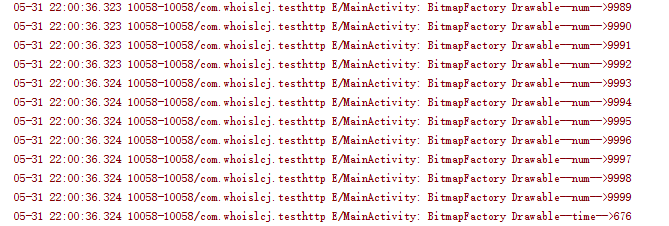
从测试说明Drawable 相对Bitmap有很大的内存占用优势。这也是为啥现在主流的图片缓存框架内存缓存那一层采用Drawable作为缓存对象的原因。
小结:
图片处理就暂时学习到这里,以后再做补充。
Android图片缓存之Bitmap详解(一)的更多相关文章
- Android图片缓存之Bitmap详解
前言: 最近准备研究一下图片缓存框架,基于这个想法觉得还是先了解有关图片缓存的基础知识,今天重点学习一下Bitmap.BitmapFactory这两个类. 图片缓存相关博客地址: Android图片缓 ...
- Android图片缓存之Lru算法
前言: 上篇我们总结了Bitmap的处理,同时对比了各种处理的效率以及对内存占用大小.我们得知一个应用如果使用大量图片就会导致OOM(out of memory),那该如何处理才能近可能的降低oom发 ...
- Android图片缓存之Glide进阶
前言: 前面学习了Glide的简单使用(Android图片缓存之初识Glide),今天来学习一下Glide稍微复杂一点的使用. 图片缓存相关博客地址: Android图片缓存之Bitmap详解 And ...
- Android图片缓存之初识Glide
前言: 前面总结学习了图片的使用以及Lru算法,今天来学习一下比较优秀的图片缓存开源框架.技术本身就要不断的更迭,从最初的自己使用SoftReference实现自己的图片缓存,到后来做电商项目自己的实 ...
- 安卓高级 Android图片缓存之初识Glide
前言: 前面总结学习了图片的使用以及Lru算法,今天来学习一下比较优秀的图片缓存开源框架.技术本身就要不断的更迭,从最初的自己使用SoftReference实现自己的图片缓存,到后来做电商项目自己的实 ...
- 《Android群英传》读书笔记 (5) 第十一章 搭建云端服务器 + 第十二章 Android 5.X新特性详解 + 第十三章 Android实例提高
第十一章 搭建云端服务器 该章主要介绍了移动后端服务的概念以及Bmob的使用,比较简单,所以略过不总结. 第十三章 Android实例提高 该章主要介绍了拼图游戏和2048的小项目实例,主要是代码,所 ...
- Android中Canvas绘图基础详解(附源码下载) (转)
Android中Canvas绘图基础详解(附源码下载) 原文链接 http://blog.csdn.net/iispring/article/details/49770651 AndroidCa ...
- Android高效率编码-第三方SDK详解系列(二)——Bmob后端云开发,实现登录注册,更改资料,修改密码,邮箱验证,上传,下载,推送消息,缩略图加载等功能
Android高效率编码-第三方SDK详解系列(二)--Bmob后端云开发,实现登录注册,更改资料,修改密码,邮箱验证,上传,下载,推送消息,缩略图加载等功能 我的本意是第二篇写Mob的shareSD ...
- Android高效率编码-第三方SDK详解系列(一)——百度地图,绘制,覆盖物,导航,定位,细腻分解!
Android高效率编码-第三方SDK详解系列(一)--百度地图,绘制,覆盖物,导航,定位,细腻分解! 这是一个系列,但是我也不确定具体会更新多少期,最近很忙,主要还是效率的问题,所以一些有效的东西还 ...
随机推荐
- Linux学习-服务器硬件数据的收集
以系统内建 dmidecode 解析硬件配备 系统有个名为 dmidecode 的软件,它可以解析 CPU 型号.主板型号与内存相 关的型号等等~ [root@study ~]# dmidecode ...
- BZOJ 2687: 交与并
答案存在于 1.两个互相包含的区间 2.两个互不包含的区间 决策单调性显然 但是这代码很精妙啊,并不知道这个为什么能这样写 #include<cstdio> #include<alg ...
- 更改activity切换方式
overridePendingTransition(enterAnim, exitAnim); Intent intent =new Intent(this,item2.class); startAc ...
- 光学字符识别OCR-6 光学识别
经过前面的文字定位和文本切割,我们已经能够找出图像中单个文字的区域,接下来可以建立相应的模型对单字进行识别. 模型选择 在模型方面,我们选择了深度学习中的卷积神经网络模型,通过多层卷积 ...
- day05 模块以及内置常用模块用法
内置常用模块详解: 1 time 2 datetime 3 random 4 os 5 sys 6 shutil 7 shelve 8 xml 9 configparser 10 hashlib ...
- luogu3376 【模板】网络最大流 dinic
当前弧优化 #include <iostream> #include <cstring> #include <cstdio> #include <queue& ...
- Hadoop全分布式模式安装
一.准备 1.准备至少三台linux服务器,并安装JDK 关闭防火墙如下 systemctl stop firewalld.service systemctl disable firewalld.se ...
- 连通图 poj2186 最受欢迎的牛(求最受欢迎的牛的数量)
Popular Cows Time Limit: 2000MS Memory Limit: 65536K Total Submissions: 27531 Accepted: 11077 De ...
- 【Go】Panic函数
panic(运行时恐慌)是一种只会在程序运行时才回抛出来的异常.在panic被抛出之后,如果没有在程序里添加任何保护措施的话,程序就会在打印出panic的详情,终止运行. 如果一个panic是无意间引 ...
- 九度oj 题目1370:数组中出现次数超过一半的数字
题目描述: 数组中有一个数字出现的次数超过数组长度的一半,请找出这个数字.例如输入一个长度为9的数组{1,2,3,2,2,2,5,4,2}.由于数字2在数组中出现了5次,超过数组长度的一半,因此输出2 ...