
封装,策略,Asp换脸
封装、策略
using System;

using System.Collections.Generic;

using System.Linq;

using System.Text;

namespace 算

{

    public interface Isuan

    {

         int calculate(int a, int b);

    }

    public  class add : Isuan

    {

        public int calculate(int a,int b)

        {

            return a + b;

        }

    }

    public class sub : Isuan

    {

        public int calculate(int a, int b)

        {

            return a - b;

        }

    }

    public class mal : Isuan

    {

        public int calculate(int a, int b)

        {

            return a * b;

        }

    }

    public class div : Isuan

    {

        public int calculate(int a, int b)

        {

            return a / b;

        }

    }

}
using System;

using System.Collections.Generic;

using System.Linq;

using System.Text;

using System.IO;

namespace 算

{

    class fuhao

    {

        private Isuan fh;

        public fuhao(string a)

        {

            switch(a)

            {

                case"+":

                    fh = new add();

                    break;

                case "-":

                    fh = new sub();

                    break;

                case "*":

                    fh = new mal();

                    break;

                case "/":

                    fh = new div();

                    break;

            }

        }

        public int jisuan(int a, int b)

        {

            return fh.calculate(a, b);

        }

    }

}
using System;

using System.Collections.Generic;

using System.ComponentModel;

using System.Data;

using System.Drawing;

using System.Linq;

using System.Text;

using System.Windows.Forms;

using System.IO;

namespace 算

{

    public partial class Form1 : Form

    {

        public Form1()

        {

            InitializeComponent();

        }

        private int An;

        private void button2_Click(object sender, EventArgs e)

        {

            this.Close();

        }

        private void button1_Click(object sender, EventArgs e)

        {
            fuhao clacuter = new fuhao(comboBox1.Text);
            An = clacuter.jisuan(int.Parse(textBox1.Text), int.Parse(textBox2.Text));

            if (textBox3.Text == An.ToString())

            {

                MessageBox.Show("回答正确!");

            }

            else

            {

                MessageBox.Show("回答错误!");

            }

            textBox1.Clear();

            textBox2.Clear();

            comboBox1.Text = "";

            textBox3.Clear();

        }

        private void textBox3_KeyDown(object sender, KeyEventArgs e)

        {

            if (e.KeyCode == Keys.Enter)

            {

                fuhao clacuter = new fuhao(comboBox1.Text);

                An = clacuter.jisuan(int.Parse(textBox1.Text), int.Parse(textBox2.Text));

                if (textBox3.Text == An.ToString())

                {

                    MessageBox.Show("回答正确!");

                }

                else

                {

                    MessageBox.Show("回答错误!");

                }

                textBox1.Clear();

                textBox2.Clear();

                comboBox1.Text = "";

                textBox3.Clear();

            }

        }

    }

}

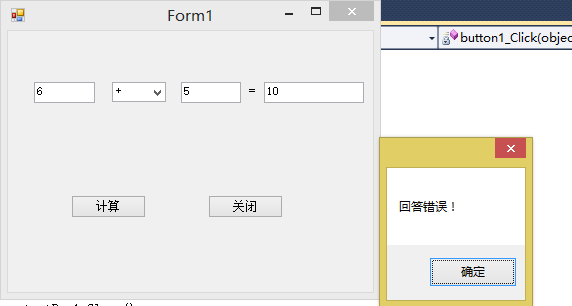
asp换脸
using System;

using System.Collections.Generic;

using System.Linq;

using System.Web;

/// <summary>

///fuhao 的摘要说明

/// </summary>

public class fuhao

{

    private Isuan s;

    public fuhao(string a)

    {

        switch (a)

        {

            case"+":

                s = new add();

                break;

            case "-":

                s = new sub();

                break;

            case "*":

                s = new cml();

                break;

            case "/":

                s = new div();

                break;

        }

    }

    public int suan(int a, int b)

    {

        return s.cla(a,b);

    }

}
using System;

using System.Collections.Generic;

using System.Linq;

using System.Web;

/// <summary>

///suan 的摘要说明

/// </summary>

     public interface Isuan

    {

         int cla(int a, int b);

    }

    public class add:Isuan

    {

        public int cla(int a, int b)

        {

            return a + b;

        }

    }

    public class sub:Isuan

    {

        public int cla(int a, int b)

        {

            return a - b;

        }

    }

    public class cml:Isuan

    {

        public int cla(int a, int b)

        {

            return a * b;

        }

    }

    public class div:Isuan

    {

        public int cla(int a, int b)

        {

            return a / b;

        }

    }
using System;

using System.Collections.Generic;

using System.Linq;

using System.Web;

using System.Web.UI;

using System.Web.UI.WebControls;

public partial class _Default : System.Web.UI.Page

{

    private int An;

    protected void Page_Load(object sender, EventArgs e)

    {

    }

    protected void Button1_Click(object sender, EventArgs e)

    {

        fuhao b = new fuhao(TextBox2.Text);

        An=b.suan(int.Parse(TextBox1.Text),int.Parse(TextBox3.Text));

        if (TextBox4.Text == An.ToString())

        {

            Response.Write("回答正确!");

        }

        else

        {

            Response.Write("回答错误!");

        }

    }

}

封装,策略,Asp换脸的更多相关文章
- 封装,策略模式,Asp换脸
1.简单封装 1>计算类 using System; using System.Collections.Generic; using System.Linq; using System.Text ...
- Angular2-三种样式封装策略的区别
Angular2有三种样式封装方式,分别是None.Native.Emulated. 可用元数据“encapsulation”配置,配置方式如下: encapsulation: ViewEncapsu ...
- Wpf+数据库代码封装+策略模式封装
运行界面: 数据库保存的题: 数据库封装代码: using System; using System.Collections.Generic; using System.Linq; using Sys ...
- 计算器简单封装和ASP.net
封装: using System; using System.Collections.Generic; using System.Linq; using System.Text; namespace ...
- 自己封装的ASP.NET的MYSQL的数据库操作类
/** * 作者:牛腩 * 创建时间:2010年3月7日17时35分 * 类说明:对MYSQL数据库的操作类 */ using System; using System.Data; using MyS ...
- 使用NetBox实现ASP网页封装为EXE教程
简单的形容就是把ASP文件打包 成一个EXE文件,并且不需要在调试的机器上安装IIS即可正常调试.如果按照说明书来操作的话,观看比较繁琐,本人为方便大家使用,现制作一个简单的使用教程. 封装过程 1. ...
- 在 ASP.NET Core Web API中使用 Polly 构建弹性容错的微服务
在 ASP.NET Core Web API中使用 Polly 构建弹性容错的微服务 https://procodeguide.com/programming/polly-in-aspnet-core ...
- javascript设计模式:策略模式
前言 策略模式有效利用组合.委托.多态等技术和思想,可以有效避免多重条件选择语句. 策略模式对开放-封闭原则提供了很好的支持,将算法封装在strategy中,使得他们易于切换.理解.扩展. 策略模式中 ...
- IOS之Objective-C学习 策略模式
对于策略模式,我个人理解策略模式就是对各种规则的一种封装的方法,而不仅仅是对算法的封装与调用而已.与工厂模式中简单工厂有点类似,但是比简单工厂更有耦合度,因为策略模式以相同的方法调用所有的规则,减少了 ...
随机推荐
- 远程连接服务器端Jupyter Notebook
1. 安装 输入命令: sudo apt-get install sshfs 2. 服务器端开启Jupyter Notebook Ubuntu服务器端安装过程参考:www.cnblogs.com/la ...
- PHP操作xml学习笔记之增删改查(2)—删、改、查
xml文件 <?xml version="1.0" encoding="utf-8"?><班级> <学生> ...
- day 86 Vue学习之五DIY脚手架、webpack使用、vue-cli的使用、element-ui
本节目录 一 vue获取原生DOM的方式 二 DIY脚手架 三 vue-cli脚手架的使用 四 webpack创建项目的玩法 五 element-ui的使用 六 xxx 七 xxx 八 xxx 一 ...
- 在centos6.5下用nginx无法连接zabbix与mysql的解决办法
一般情况下默认的webserver是apache.zabbix也不例外,官方文档全都是推荐用apache. 如果执意用nginx来做webserver的话,php引导需要再安装一个php-fpm.而且 ...
- 异步fifo with 读控制
之前做LDPC编码器时,学习了一下异步FIFO的相关知识,主要参考了http://www.cnblogs.com/aslmer/p/6114216.html,并在此基础上根据项目需求,添加了一个读控制 ...
- 大数据入门第九天——MapReduce详解(六)MR其他补充
一.自定义in/outputFormat 1.需求 现有一些原始日志需要做增强解析处理,流程: 1. 从原始日志文件中读取数据 2. 根据日志中的一个URL字段到外部知识库中获取信息增强到原始日志 3 ...
- Hibernate第三天——表间关系与级联操作
第三天,我们来使用Hibernate进行表之间一对多 多对多关系的操作: 这里我们先利用两个例子进行表关系的回顾: 一对多(重点): 例如分类和商品的关系,一个分类多个商品,一个商品属于一个分类 CR ...
- 2017-2018-1 20155207&20155308《信息安全技术》实验四-木马及远程控制技术
2017-2018-1 20155207&20155308<信息安全技术>实验四-木马及远程控制技术 实验目的 剖析网页木马的工作原理 理解木马的植入过程 学会编写简单的网页木马脚 ...
- 洛咕 P4199 万径人踪灭
给了两条限制,但是第二条想想是没用的,直接manacher就可以减掉多余的部分了,所以要求满足第一条的方案 也不难,可以想到枚举每个中心点,计算两边有多少对距离中心相等的位置值也相等,假设有\(t\) ...
- pycharm如何回到过去某个时间
在编写代码是,我们可能会写错代码,或者是误删某个文件,那么问题来了,如何回到过去的某个时间段,来弥补我们犯下的错呢? 1.如果是恢复删除的文件则右击之前文件所在的文件夹 2.右击文件夹的显示效果如图 ...