
【NLP】Python NLTK获取文本语料和词汇资源
Python NLTK 获取文本语料和词汇资源
作者:白宁超
2016年11月7日13:15:24
摘要:NLTK是由宾夕法尼亚大学计算机和信息科学使用python语言实现的一种自然语言工具包,其收集的大量公开数据集、模型上提供了全面、易用的接口,涵盖了分词、词性标注(Part-Of-Speech tag, POS-tag)、命名实体识别(Named Entity Recognition, NER)、句法分析(Syntactic Parse)等各项 NLP 领域的功能。本文主要介绍NLTK(Natural language Toolkit)的几种语料库,以及内置模块下函数的基本操作,诸如双连词、停用词、词频统计、构造自己的语料库等等,这些都是非常实用的。主要还是基础知识,关于python方面知识,可以参看本人的【Python五篇慢慢弹】系列文章(本文原创编著,转载注明出处:Python NLTK获取文本语料和词汇资源)
目录
【Python NLP】干货!详述Python NLTK下如何使用stanford NLP工具包(1)
【Python NLP】Python 自然语言处理工具小结(2)
【Python NLP】Python NLTK 走进大秦帝国(3)
【Python NLP】Python NLTK获取文本语料和词汇资源(4)
【Python NLP】Python NLTK处理原始文本(5)
1 古腾堡语料库
直接获取语料库的所有文本:nltk.corpus.gutenberg.fileids()
>>> import nltk

>>> nltk.corpus.gutenberg.fileids()
运行结果:
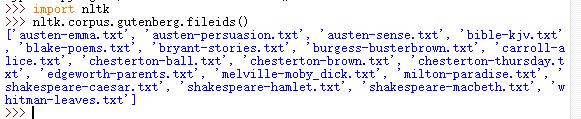
导入包获取语料库的所有文本
>>> from  nltk.corpus import gutenberg

>>> gutenberg.fileids()

['austen-emma.txt', 'austen-persuasion.txt', 'austen-sense.txt', 'bible-kjv.txt', 'blake-poems.txt', 'bryant-stories.txt', 'burgess-busterbrown.txt', 'carroll-alice.txt', 'chesterton-ball.txt', 'chesterton-brown.txt', 'chesterton-thursday.txt', 'edgeworth-parents.txt', 'melville-moby_dick.txt', 'milton-paradise.txt', 'shakespeare-caesar.txt', 'shakespeare-hamlet.txt', 'shakespeare-macbeth.txt', 'whitman-leaves.txt']
查找某个文本
>>> persuasion=nltk.corpus.gutenberg.words("austen-persuasion.txt")

>>> len(persuasion)

98171

>>> persuasion[:200]

['[', 'Persuasion', 'by', 'Jane', 'Austen', '1818', ...]
查找文件标识符
	num_char = len(gutenberg.raw(fileid))  # 原始文本的长度,包括空格、符号等

	num_words = len(gutenberg.words(fileid)) #词的数量

	num_sents = len(gutenberg.sents(fileid)) #句子的数量

	num_vocab = len(set([w.lower() for w in gutenberg.words(fileid)])) #文本的尺寸

        # 打印出平均词长(包括一个空白符号,如下词长是3)、平均句子长度、和文本中每个词出现的平均次数

	print(int(num_char/num_words),int(num_words/num_sents),int(num_words/num_vocab),fileid)
运行结果:

2 网络和聊天文本
获取网络聊天文本
>>> from nltk.corpus import webtext

>>> for fileid in webtext.fileids():

	print(fileid,webtext.raw(fileid))
运行结果
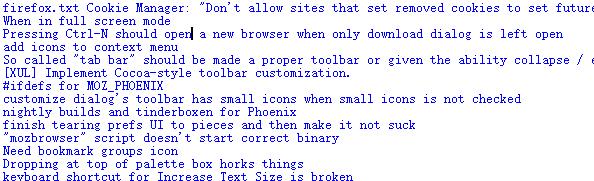
查看网络聊天文本信息
>>> for fileid in webtext.fileids():

	print(fileid,len(webtext.words(fileid)),len(webtext.raw(fileid)),len(webtext.sents(fileid)),webtext.encoding(fileid))

firefox.txt 102457 564601 1142 ISO-8859-2

grail.txt 16967 65003 1881 ISO-8859-2

overheard.txt 218413 830118 17936 ISO-8859-2

pirates.txt 22679 95368 1469 ISO-8859-2

singles.txt 4867 21302 316 ISO-8859-2

wine.txt 31350 149772 2984 ISO-8859-2
即时消息聊天会话语料库:
>>> from nltk.corpus import nps_chat

>>> chatroom = nps_chat.posts('10-19-20s_706posts.xml')

>>> chatroom[123]

['i', 'do', "n't", 'want', 'hot', 'pics', 'of', 'a', 'female', ',', 'I', 'can', 'look', 'in', 'a', 'mirror', '.']
3 布朗语料库
查看语料信息:
>>> from nltk.corpus import brown

>>> brown.categories()

['adventure', 'belles_lettres', 'editorial', 'fiction', 'government', 'hobbies', 'humor', 'learned', 'lore', 'mystery', 'news', 'religion', 'reviews', 'romance', 'science_fiction']
比较文体中情态动词的用法:
>>> import nltk

>>> from nltk.corpus import brown

>>> new_texts=brown.words(categories='news')

>>> fdist=nltk.FreqDist([w.lower() for w in new_texts])

>>> modals=['can','could','may','might','must','will']

>>> for m in modals:

	print(m + ':',fdist[m])

can: 94

could: 87

may: 93

might: 38

must: 53

will: 389
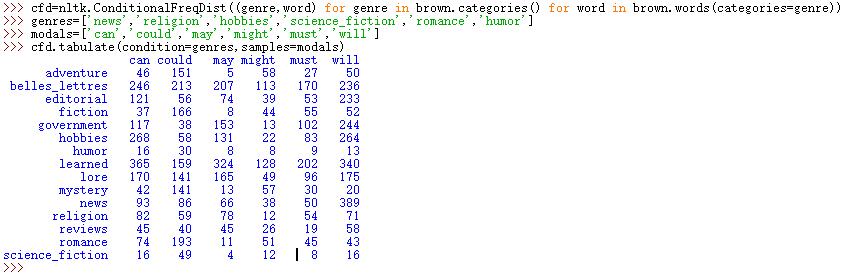
NLTK条件概率分布函数:
>>> cfd=nltk.ConditionalFreqDist((genre,word) for genre in brown.categories() for word in brown.words(categories=genre))

>>> genres=['news','religion','hobbies','science_fiction','romance','humor']

>>> modals=['can','could','may','might','must','will']

>>> cfd.tabulate(condition=genres,samples=modals)
运行结果:
4 路透社语料库
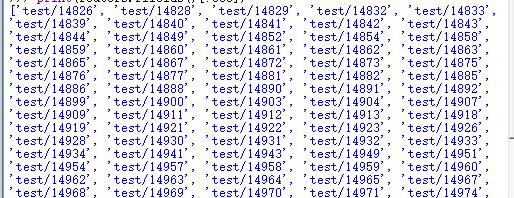
包括10788个新闻文档,共计130万字,这些文档分90个主题,安装训练集和测试分组,编号‘test/14826’文档属于测试
>>> from nltk.corpus import  reuters

>>> print(reuters.fileids()[:500])
运行结果:
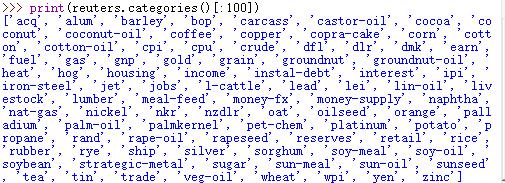
查看语料包括的前100个类别:>>> print(reuters.categories()[:100])
查看语料尺寸:
>>> len(reuters.fileids())

10788
查看语料类别尺寸:
>>> len(reuters.categories())

90
查看某个编号的语料下类别尺寸:
>>> reuters.categories('training/9865')

['barley', 'corn', 'grain', 'wheat']
查看某几个联合编号下语料的类别尺寸:
>>> reuters.categories(['training/9865','training/9880'])

['barley', 'corn', 'grain', 'money-fx', 'wheat']
查看哪些编号的文件属于指定的类别:
>>> reuters.fileids('barley')

['test/15618', 'test/15649', 'test/15676', 'test/15728', 'test/15871', 'test/15875', 'test/15952', 'test/17767', 'test/17769', 'test/18024', 'test/18263', 'test/18908', 'test/19275', 'test/19668', 'training/10175', 'training/1067', 'training/11208', 'training/11316', 'training/11885', 'training/12428', 'training/13099', 'training/13744', 'training/13795', 'training/13852', 'training/13856', 'training/1652', 'training/1970', 'training/2044', 'training/2171', 'training/2172', 'training/2191', 'training/2217', 'training/2232', 'training/3132', 'training/3324', 'training/395', 'training/4280', 'training/4296', 'training/5', 'training/501', 'training/5467', 'training/5610', 'training/5640', 'training/6626', 'training/7205', 'training/7579', 'training/8213', 'training/8257', 'training/8759', 'training/9865', 'training/9958']
5 就职演说语料库
查看语料信息:
>>> from nltk.corpus import inaugural

>>> len(inaugural.fileids())

56

>>> inaugural.fileids()

['1789-Washington.txt', '1793-Washington.txt', '1797-Adams.txt', '1801-Jefferson.txt', '1805-Jefferson.txt', '1809-Madison.txt', '1813-Madison.txt', '1817-Monroe.txt', '1821-Monroe.txt', '1825-Adams.txt', '1829-Jackson.txt', '1833-Jackson.txt', '1837-VanBuren.txt', '1841-Harrison.txt', '1845-Polk.txt', '1849-Taylor.txt', '1853-Pierce.txt', '1857-Buchanan.txt', '1861-Lincoln.txt', '1865-Lincoln.txt', '1869-Grant.txt', '1873-Grant.txt', '1877-Hayes.txt', '1881-Garfield.txt', '1885-Cleveland.txt', '1889-Harrison.txt', '1893-Cleveland.txt', '1897-McKinley.txt', '1901-McKinley.txt', '1905-Roosevelt.txt', '1909-Taft.txt', '1913-Wilson.txt', '1917-Wilson.txt', '1921-Harding.txt', '1925-Coolidge.txt', '1929-Hoover.txt', '1933-Roosevelt.txt', '1937-Roosevelt.txt', '1941-Roosevelt.txt', '1945-Roosevelt.txt', '1949-Truman.txt', '1953-Eisenhower.txt', '1957-Eisenhower.txt', '1961-Kennedy.txt', '1965-Johnson.txt', '1969-Nixon.txt', '1973-Nixon.txt', '1977-Carter.txt', '1981-Reagan.txt', '1985-Reagan.txt', '1989-Bush.txt', '1993-Clinton.txt', '1997-Clinton.txt', '2001-Bush.txt', '2005-Bush.txt', '2009-Obama.txt']
查看演说语料的年份:
>>> [fileid[:4] for fileid in inaugural.fileids()]

['1789', '1793', '1797', '1801', '1805', '1809', '1813', '1817', '1821', '1825', '1829', '1833', '1837', '1841', '1845', '1849', '1853', '1857', '1861', '1865', '1869', '1873', '1877', '1881', '1885', '1889', '1893', '1897', '1901', '1905', '1909', '1913', '1917', '1921', '1925', '1929', '1933', '1937', '1941', '1945', '1949', '1953', '1957', '1961', '1965', '1969', '1973', '1977', '1981', '1985', '1989', '1993', '1997', '2001', '2005', '2009']
条件概率分布
>>> import nltk

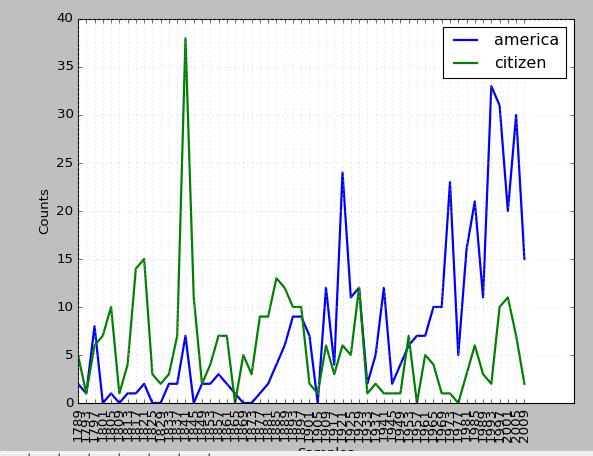
>>> cfd=nltk.ConditionalFreqDist((target,fileid[:4]) for fileid in inaugural.fileids() for w in inaugural.words(fileid) for target in ['america','citizen'] if w.lower().startswith(target))

>>> cfd.plot()
运行结果:
标注文本语料库 :许多语料库都包括语言学标注、词性标注、命名实体、句法结构、语义角色等
其他语言语料库 :某些情况下使用语料库之前学习如何在python中处理字符编码
>>> nltk.corpus.cess_esp.words() ['El', 'grupo', 'estatal', 'Electricité_de_France', ...]
文本语料库常见的几种结构:
- 孤立的没有结构的文本集;
- 按文体分类成结构(布朗语料库)
- 分类会重叠的(路透社语料库)
- 语料库可以随时间变化的(就职演说语料库)
查找NLTK语料库函数help(nltk.corpus.reader)
6 载入自己的语料库
构建自己语料库
>>> from nltk.corpus import PlaintextCorpusReader

>>> corpus_root=r'E:\dict'

>>> wordlists=PlaintextCorpusReader(corpus_root,'.*')

>>> wordlists.fileids()

['dqdg.txt', 'q0.txt', 'q1.txt', 'q10.txt', 'q2.txt', 'q3.txt', 'q5.txt', 'text.txt']

>>> len(wordlists.words('text.txt')) #如果输入错误或者格式不正确,notepad++转换下编码格式即可

152389
语料库信息:
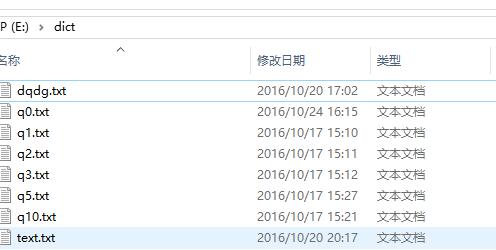
构建完成自己语料库之后,利用python NLTK内置函数都可以完成对应操作,换言之,其他语料库的方法,在自己语料库中通用,唯一的问题是,部分方法NLTK是针对英文语料的,中文语料不通用(典型的就是分词),解决方法很多,诸如你通过插件等在NLTK工具包内完成对中文的支持。另外也可以在NLTK中利用StandfordNLP工具包完成对自己语料的操作,这部分知识上节讲解过。
7 条件概率分布
条件频率分布是频率分布的集合,每一个频率分布有一个不同的条件,这个条件通常是文本的类别。
条件和事件:
频率分布计算观察到的事件,如文本中出现的词汇。条件频率分布需要给每个事件关联一个条件,所以不是处理一个词序列,而是处理一系列配对序列。
词序列:text=['The','Fulton','County']
配对序列:pairs=[('news','The'),('news','Fulton')]
每队形式:(条件,事件),如果我们按照文体处理整个布朗语料库,将有15个条件(一个文体一个条件)和1161192个事件(一个词一个事件)
按文体计算词汇:
>>> from nltk.corpus import brown

>>> cfd=nltk.ConditionalFreqDist((genre,word) for genre in brown.categories() for word in brown.words(categories=genre))
拆开来看,只看两个文体:新闻和言情。对于每个文体,便利文件中的每个词以产生文体与词配对
>>> genre_word=[(genre,word) for genre in ['news','romance'] for word in brown.words(categories=genre)]

>>> len(genre_word)

170576
文体_词匹配
>>> genre_word[:4]

[('news', 'The'), ('news', 'Fulton'), ('news', 'County'), ('news', 'Grand')]

>>> genre_word[-4:]

[('romance', 'afraid'), ('romance', 'not'), ('romance', "''"), ('romance', '.')]
条件频率:
>>> cfd=nltk.ConditionalFreqDist(genre_word)

>>> cfd

<ConditionalFreqDist with 2 conditions>

>>> cfd.conditions()

['romance', 'news']

>>> len(cfd['news'])

14394

>>> len(cfd['romance'])

8452
访问条件下的词汇表
>>> from nltk.corpus import brown

>>> import nltk

>>> cfd=nltk.ConditionalFreqDist((genre,word) for genre in brown.categories() for word in brown.words(categories=genre))

>>> len(list(cfd['romance']))

8452

>>> len(set(cfd['romance']))

8452

>>> cfd['news']['The']

806
绘制分布图和分布表
>>> cfd=nltk.ConditionalFreqDist((target,fileid[:4]) for fileid in inaugural.fileids() for word in inaugural.words(fileid) for target in ['america','citizen'] if word.lower().startswith(target))

>>> cfd.plot(cumulative=True)
运行结果:

生成表格形式展示:
cfd.tabulate(conditions=['English','The'],samples=range(10),cumulative=True)
运行结果:

conditions=['English','The'],限定条件
samples=range(10),指定样本数
8 更多关于python:代码重用
使用双连词生成随机文本: bigrams()函数能接受一个词汇链表,并建立一个连词的词对链表
>>> sent=['Emma', 'Woodhouse', ',', 'handsome', ',', 'clever', ',', 'and', 'rich', ',', 'with', 'a', 'comfortable', 'home', 'and', 'happy', 'disposition', ',', 'seemed', 'to', 'unite', 'some', 'of', 'the', 'best', 'blessings', 'of', ]

>>> nltk.bigrams(sent)

<generator object bigrams at 0x0103C180>
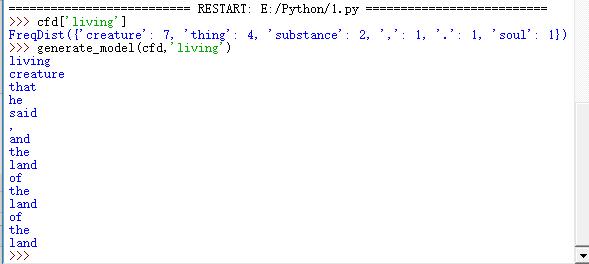
产生随机文本:定义一个程序获取《创世纪》文本中所有的双连词,然后构造一个条件频率分布来记录哪些词汇最有可能跟在后面,例如living后面可以是creature。定义一个这样的函数如下:Crtl+N,编辑函数脚本
import nltk

def generate_model(cfdist,word,num=15):

    for i in range(num):

        print(word)

        word=cfdist[word].max()

text = nltk.corpus.genesis.words('english-kjv.txt')

bigrams = nltk.bigrams(text)

cfd=nltk.ConditionalFreqDist(bigrams)
F5调用执行函数:
========================== RESTART: E:/Python/1.py ==========================

>>> cfd['living']

FreqDist({'creature': 7, 'thing': 4, 'substance': 2, ',': 1, '.': 1, 'soul': 1})

>>> generate_model(cfd,'living')
运行结果:
Crtl+N打开IDE编辑器,输入以下模块
class MyHello:

    def hello():

        print("Hello Python")

    def bnc():

        print("Hello BNC")

    def add(num1,num2):

        print("The sum is \t",str(num1+num2))
Crtl+S保存到本地命名hello.py,并F5运行
============== RESTART: E:/sourceCode/NLPPython/day_03/hello.py ==============

>>> from  hello import *

>>> MyHello.add(1,2)

The sum is   3

>>> MyHello.hello()

Hello Python
词典资源: 词典或者词典资源是一个词和短语及其相关信息的集合。 词汇列表语料库:
过滤文本:此程序计算文本词汇表,然后删除所有出现在现有词汇列表中出现的元素,只留下罕见的或者拼写错误的词汇 Crtl+N打开IDE编辑器,输入以下模块
class WordsPro:

    def unusual_words(text):

        text_vocab=set(w.lower() for w in text if w.isalpha())

        english_vocab=set(w.lower() for w in nltk.corpus.words.words())

        unusual=text_vocab.difference(english_vocab)

        return sorted(unusual)
Crtl+S保存到本地命名WordsPro.py,并F5运行
========================== RESTART: E:/Python/1.py ==========================

>>> import nltk

>>> from nltk.corpus import gutenberg

>>> len(WordsPro.unusual_words(nltk.corpus.gutenberg.words('austen-sense.txt')))

1601

>>>
停用词语料库:包括高频词如,the、to和and等。
>>> from nltk.corpus import stopwprds

>>> stopwords.words('english')
定义一个函数来计算文本中不包含停用词列表的词所占的比例,Crtl+N打开IDE编辑器,输入以下模块
def    content_faction(text):

            stopwords=nltk.corpus.stopwords.words('english')

            content = [w for w in text if w.lower() not in stopwords]

            return len(content)/len(text)
Crtl+S保存到本地命名WordsPro.py,并F5运行
>>> import nltk

>>> from nltk.corpus import reuters

>>> WordsPro.content_faction(nltk.corpus.reuters.words())

0.735240435097661
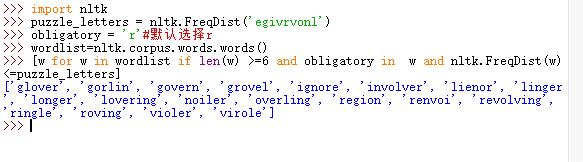
词迷游戏:3*3的方格出现不同的9个字母,随机选择一个字母并利用这个字母组词,要求如下:
1)词长大于或等于4,且每个字母只能使用一次
2)至少有一个9字母的词
3)能组成21个词为好,32个词很好,42个词非常好
python 程序:
>>> import nltk

>>> puzzle_letters = nltk.FreqDist('egivrvonl')

>>> obligatory = 'r'#默认选择r

>>> wordlist=nltk.corpus.words.words()

>>> [w for w in wordlist if len(w) >=6 and obligatory in  w and nltk.FreqDist(w)<=puzzle_letters]
运行结果
词汇工具:Toolbox和Shoebox
Toolbox下载http://www-01.sil.org/computing/toolbox/
9 python 实战:数据文本分词并去除停用词操作:停用词包下载
1 对数据文本进行分词
2 构建自己停用词语料库
3 去除停用词
>>> from nltk.tokenize.stanford_segmenter import StanfordSegmenter

>>> segmenter = StanfordSegmenter(

	path_to_jar=r"E:\tools\stanfordNLTK\jar\stanford-segmenter.jar",

        path_to_slf4j=r"E:\tools\stanfordNLTK\jar\slf4j-api.jar",

        path_to_sihan_corpora_dict=r"E:\tools\stanfordNLTK\jar\data",

        path_to_model=r"E:\tools\stanfordNLTK\jar\data\pku.gz",

        path_to_dict=r"E:\tools\stanfordNLTK\jar\data\dict-chris6.ser.gz"

	)

>>> with open(r"C:\Users\cuitbnc\Desktop\dqdg.txt","r+") as f:

	str=f.read()

>>> result = segmenter.segment(str)

>>> with open(r"C:\Users\cuitbnc\Desktop\text1.txt","w") as wf:

            wf.write(result)

1122469

>>> from nltk.corpus import PlaintextCorpusReader

>>> corpus_root=r'E:\dict\StopWord'

>>> wordlists=PlaintextCorpusReader(corpus_root,'.*')

>>> wordlists.fileids()

['baidu.txt', 'chuangda.txt', 'hagongda.txt', 'zhongwen.txt', '中文停用词库.txt', '四川大学机器智能实验室停用词库.txt']

>>> len(wordlists.words('hagongda.txt'))

977

>>> wordlists.words('hagongda.txt')[:100]

['———', '》),', ')÷(', '1', '-', '”,', ')、', '=(', ':', ...]

>>> stopwords=wordlists.words('hagongda.txt')

>>> content = [w for w in result if w not in stopwords]
【推荐】古滕堡语料库
【NLP】Python NLTK获取文本语料和词汇资源的更多相关文章
- python+NLTK 自然语言学习处理四:获取文本语料和词汇资源
在前面我们通过from nltk.book import *的方式获取了一些预定义的文本.本章将讨论各种文本语料库 1 古腾堡语料库 古腾堡是一个大型的电子图书在线网站,网址是http://www.g ...
- python 自然语言处理(二)____获得文本语料和词汇资源
一, 获取文本语料库 一个文本语料库是一大段文本.它通常包含多个单独的文本,但为了处理方便,我们把他们头尾连接起来当做一个文本对待. 1. 古腾堡语料库 nltk包含古腾堡项目(Project Gut ...
- nltk 获取 gutenberg 语料,gensim 生成词库和 onehot 编码
nltk 获取 gutenberg 语料 gensim 生成词库和 onehot 编码 正在尝试基于 Tensorflow LSTM 模型开发另外一个项目,需要自然语言处理的工具和语料. import ...
- 【NLP】干货!Python NLTK结合stanford NLP工具包进行文本处理
干货!详述Python NLTK下如何使用stanford NLP工具包 作者:白宁超 2016年11月6日19:28:43 摘要:NLTK是由宾夕法尼亚大学计算机和信息科学使用python语言实现的 ...
- 【NLP】Python NLTK处理原始文本
Python NLTK 处理原始文本 作者:白宁超 2016年11月8日22:45:44 摘要:NLTK是由宾夕法尼亚大学计算机和信息科学使用python语言实现的一种自然语言工具包,其收集的大量公开 ...
- [转]【NLP】干货!Python NLTK结合stanford NLP工具包进行文本处理 阅读目录
[NLP]干货!Python NLTK结合stanford NLP工具包进行文本处理 原贴: https://www.cnblogs.com/baiboy/p/nltk1.html 阅读目录 目 ...
- 【NLP】Python NLTK 走进大秦帝国
Python NLTK 走进大秦帝国 作者:白宁超 2016年10月17日18:54:10 摘要:NLTK是由宾夕法尼亚大学计算机和信息科学使用python语言实现的一种自然语言工具包,其收集的大量公 ...
- Python NLTK 自然语言处理入门与例程(转)
转 https://blog.csdn.net/hzp666/article/details/79373720 Python NLTK 自然语言处理入门与例程 在这篇文章中,我们将基于 Pyt ...
- 机器学习之路: python nltk 文本特征提取
git: https://github.com/linyi0604/MachineLearning 分别使用词袋法和nltk自然预言处理包提供的文本特征提取 from sklearn.feature_ ...
随机推荐
- ExtJS 4.2 评分组件
上一文章是扩展ExtJS自带的Date组件.在这里将创建一个评分组件. 目录 1. 介绍 2. 示例 3. 资源下载 1. 介绍 代码参考的是 Sencha Touch 2上的一个RatingStar ...
- 从0开始搭建SQL Server AlwaysOn 第三篇(配置AlwaysOn)
从0开始搭建SQL Server AlwaysOn 第三篇(配置AlwaysOn) 第一篇http://www.cnblogs.com/lyhabc/p/4678330.html第二篇http://w ...
- UWP中新加的数据绑定方式x:Bind分析总结
UWP中新加的数据绑定方式x:Bind分析总结 0x00 UWP中的x:Bind 由之前有过WPF开发经验,所以在学习UWP的时候直接省略了XAML.数据绑定等几个看着十分眼熟的主题.学习过程中倒是也 ...
- Concepts:Request 和 Task
当SQL Server Engine 接收到Session发出的Request时,SQL Server OS将Request和Task绑定,并为Task分配一个Workder.在TSQL Query执 ...
- 0.Win8.1,Win10,Windows Server 2012 安装 Net Framework 3.5
后期会在博客首发更新:http://dnt.dkill.net 网站部署之~Windows Server | 本地部署:http://www.cnblogs.com/dunitian/p/482280 ...
- Python(九) Python 操作 MySQL 之 pysql 与 SQLAchemy
本文针对 Python 操作 MySQL 主要使用的两种方式讲解: 原生模块 pymsql ORM框架 SQLAchemy 本章内容: pymsql 执行 sql 增\删\改\查 语句 pymsql ...
- 深入理解 JavaScript,以及 Linux 下的开发调试工具
前言 JavaScript 是我接触到的第二门编程语言,第一门是 C 语言.然后才是 C++.Java 还有其它一些什么.所以我对 JavaScript 是非常有感情的,毕竟使用它有十多年了.早就想写 ...
- C#制作简易屏保
前言:前段时间,有个网友问我C#制作屏保的问题,我瞬间懵逼了(C#还可以制作屏保!).于是我去查阅相关资料,下面把C#如何制作屏保的过程及我学习过程的心得也记录下来,希望对需要的人能有帮助. 基本思路 ...
- 云计算下PAAS的解析一
云计算下PAAS的解析一 PaaS是Platform-as-a-Service的缩写,意思是平台即服务. 把服务器平台作为一种服务提供的商业模式.通过网络进行程序提供的服务称之为SaaS( ...
- 【iOS10 SpeechRecognition】语音识别 现说现译的最佳实践
首先想强调一下“语音识别”四个字字面意义上的需求:用户说话然后马上把用户说的话转成文字显示!,这才是开发者真正需要的功能. 做需求之前其实是先谷歌百度一下看有没有造好的轮子直接用,结果真的很呵呵,都是 ...