
elasticsearch kibana 安装 配置
二.Elasticsearch 配置信息
2.1 因为 Elasticsearch 可以执行脚本文件,为了安全性,默认不允许通过 root 用户启动服务。
我们需要新创建用户名和用户组启动服务
2.2 默认情况下,Elasticsearch 只允许本机访问,如果需要远程访问,需要修改其配置文件
vim config/elasticsearch.yml

# 去掉 network.host 前边的注释,将它的值改成0.0.0.0

network.host: 0.0.0.0
2.3 常用命令
curl -i XGET "http://192.168.141.3:9200/_count?" #统计当前的信息
2.4 为了方便实用 安装Elasticsearch head 模块
elasticsearch-head 安装
安装插件
访问 http://x.x.x.x:9200 查看内容显示效果不友好,因此,我们需要安装一个名为 elasticsearch-head 的插件,让内容显示效果比较舒适。
登陆 GitHub 网站,搜索 mobz/elasticsearch-head ,将其下载到本地
wget https://github.com/mobz/elasticsearch-head/archive/master.zip

unzip master.zip

cd elasticsearch-head-master

npm install

npm run start
提示没有npm 命令 ,安装 npm
获取nodejs 资源

# 4.x

curl --silent --location https://rpm.nodesource.com/setup_4.x | bash -

# 5.x

curl --silent --location https://rpm.nodesource.com/setup_5.x | bash -

# 0.10

curl --silent --location https://rpm.nodesource.com/setup | bash -

我这里安装的是 v4.x

安装

yum install -y nodejs

测试是否安装成功

node -v

 # v4.4.0

npm -v

# 2.14.20
npm install 时报错报错:
npm ERR! phantomjs-prebuilt@2.1.16 install: `node install.js`
npm ERR! Exit status 1
解决:
安装 phantomjs
1、获取安装包

wget https://bitbucket.org/ariya/phantomjs/downloads/phantomjs-2.1.1-linux-x86_64.tar.bz2
或者
wget https://bbuseruploads.s3.amazonaws.com/fd96ed93-2b32-46a7-9d2b-ecbc0988516a/downloads/396e7977-71fd-4592-8723-495ca4cfa7cc/phantomjs-2.1.1-linux-x86_64.tar.bz2?Signature=yWIrMK09KI8r24QSHFdkuSIlR3A%3D&Expires=1523867378&AWSAccessKeyId=AKIAIQWXW6WLXMB5QZAQ&versionId=null&response-content-disposition=attachment%3B%20filename%3D%22phantomjs-2.1.1-linux-x86_64.tar.bz2%22

2、将bz2格式装换成tar格式

bzip2 -d phantomjs-2.1.1-linux-x86_64.tar.bz2

3、解压缩到/usr/local目录下

tar xvf phantomjs-2.1.1-linux-x86_64.tar -C /usr/local/

4、安装依赖

yum -y install wget fontconfig

5、重命名

mv /usr/local/phantomjs-2.1.1-linux-x86_64/ /usr/local/phantomjs

6、进入目录中,为PhantomJS添加可执行权限

cd /usr/local/phantomjs/bin

chmod 777 phantomjs

7、建立软链接

ln -s /usr/local/phantomjs/bin/phantomjs /bin/phantomjs
8、测试是否可执行 [root@iz2zea6jqvyc0mokqu9jyaz bin]# phantomjs
phantomjs>
2.5
注意:在请求URL中要用127.0.0.1 或者 绑定的具体IP地址,用localhost不起作用(以下问题原因在此)
- 绿色表示主分片和副本分片都可用;
- 黄色表示只有主分片可用,没有副本分片;
- 红色表示主分片中的部分索引不可用,但是不耽误某些索引的访问。
- 灰色代表连接失败

图中我们发现 elasticsearch-head 插件和 Elasticsearch 服务并没有建立连接,所以我们还需要修改 Elasticsearch 的配置文件:
cd /etc/elasticsearch-5.6.1

vi elasticsearch.yml

# 在文件末尾添加 2 段配置

http.cors.enabled: true

http.cors.allow-origin: "*"
2.6修改服务器监听地址(并不一定需要)
还是显示未连接,修改服务器监听地址

[root@linux-node1 elasticsearch-head]# pwd
/usr/local/elasticsearch-head/
[root@linux-node1 elasticsearch-head]# vim Gruntfile.js #添加上下面的内容
connect: {
server: {
options: {
port: 9100,
hostname: '*',
base: '.',
keepalive: true
}
}
}
增加hostname属性,设置为*
2.7 以上两个方法都试了,还是连接不上
考虑下可能是 ip地址的问题,因为 elasticsearch-head 和elasticsearch 在一台机器上,
只不过elasticsearch 运行在容器内,elasticsearch-head在系统上运行
将localhost 换位内网ip地址
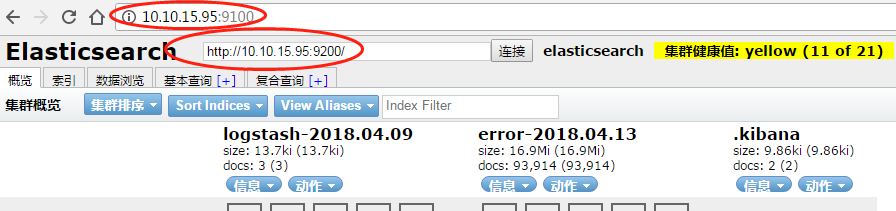
3.Kibana 配置信息
/opt/kibana/config/kibana.yml

server.port: 5601  (默认)

server.host: "localhost"

server.host: "0.0.0.0"

elasticsearch.url: "http://elk1:9200"
elasticsearch kibana 安装 配置的更多相关文章
- elasticsearch -- kibana安装配置
Kibana 是为Elasticsearch设计的开源分析和可视化平台,你可以使用 Kibana 来搜索,查看存储在 Elasticsearch 索引中的数据并与之交互.你可以很容易实现高级的数据分析 ...
- ElasticSearch搜索引擎安装配置拼音插件pinyin
近几篇ElasticSearch系列: 1.阿里云服务器Linux系统安装配置ElasticSearch搜索引擎 2.Linux系统中ElasticSearch搜索引擎安装配置Head插件 3.Ela ...
- ElasticSearch搜索引擎安装配置中文分词器IK插件
近几篇ElasticSearch系列: 1.阿里云服务器Linux系统安装配置ElasticSearch搜索引擎 2.Linux系统中ElasticSearch搜索引擎安装配置Head插件 3.Ela ...
- Linux系统中ElasticSearch搜索引擎安装配置Head插件
近几篇ElasticSearch系列: 1.阿里云服务器Linux系统安装配置ElasticSearch搜索引擎 2.Linux系统中ElasticSearch搜索引擎安装配置Head插件 3.Ela ...
- ELK 架构之 Elasticsearch 和 Kibana 安装配置
阅读目录: 1. ELK Stack 简介 2. 环境准备 3. 安装 Elasticsearch 4. 安装 Kibana 5. Kibana 使用 6. Elasticsearch 命令 最近在开 ...
- Kibana安装配置
Kibana 是一个开源的分析和可视化平台,是ELK的重要部分.Kibana提供搜索.查看和与存储在 Elasticsearch 索引中的数据进行交互的功能.开发者或运维人员可以轻松地执行高级数据分析 ...
- ELK学习笔记之Kibana安装配置
Kibana 是一个开源的分析和可视化平台,是ELK的重要部分.Kibana提供搜索.查看和与存储在 Elasticsearch 索引中的数据进行交互的功能.开发者或运维人员可以轻松地执行高级数据分析 ...
- ElasticSearch&kibana安装
目录 ElasticSearch ElasticSearch 简介 ElasticSearch 概念 ElasticSearch quick start docker安装ElasticSearch K ...
- ElasticSearch+Kibana安装部署
在安装ElasticSearch时遇到了很多坑,所以在这里做个笔记记录一下. 首先我考虑的是使用docker进行部署,结果发现虚拟机直接内存溢出,我也是无解了,也就是说使用docker部署还得注意容器 ...
随机推荐
- cogs 1829. [Tyvj 1728]普通平衡树 权值线段树
1829. [Tyvj 1728]普通平衡树 ★★★ 输入文件:phs.in 输出文件:phs.out 简单对比时间限制:1 s 内存限制:1000 MB [题目描述] 您需要写一种数 ...
- android:整理drawable(shapdrawable)(二)
前言 bitmapdrawable 与nithpathdrawable 完结,接下来是shapedrawable. shapedrawable是使用频率最高的drawable 可见其重要性. shap ...
- python中各种文件打开模式
在python中,总的来说有三种大的模式打开文件,分别是:a, w, r 当以a模式打开时,只能写文件,而且是在文件末尾添加内容. 当以a+模式打开时,可以写文件,也可读文件,可是在读文件的时候,会发 ...
- 沈阳网络赛 F - 上下界网络流
"Oh, There is a bipartite graph.""Make it Fantastic." X wants to check whether a ...
- Nginx在Centos 7中配置开机启动
1.创建脚本 # vi /etc/init.d/nginx #!/bin/bash # nginx Startup script for the Nginx HTTP Server # it is v ...
- 毒瘤养成记1: 如何卡hash
各位毒瘤大家好, 最近模拟赛考了一道trie+主席树好题, 但大家都用hash水过了这道题(包括我), 为了测试一下新搭建的HEAT OJ的hack功能, 我将继续扮演毒瘤的角色, 用毒瘤的艺术形象努 ...
- Egret学习-TiledMap使用
环境说明: 引擎版本:5.2.4 Egret Wing 4.1.6 1.下载依赖,下载地址https://github.com/egret-labs/egret-game-library/tree/m ...
- 【java面试】数据库篇
1.SQL语句分为哪几种? SQL语句主要可以划分为以下几类: DDL(Data Definition Language):数据定义语言,定义对数据库对象(库.表.列.索引)的操作. 包括:CREAT ...
- ubuntu文件操作mkdir cp mv rm ln
pwd:显示当前目录 date:显示当前日期 cal:显示日历 ls:列出目录内容 cd:改变当前工作目录 ‘.’:代表工作目录 ‘..’:代表工作目录父目录 进入当前目录的父目录:cd /home ...
- django cms 5月第一弹
官方文档: ##http://django-cms.readthedocs.io/en/latest/index.html #截图 #生存的项目结构